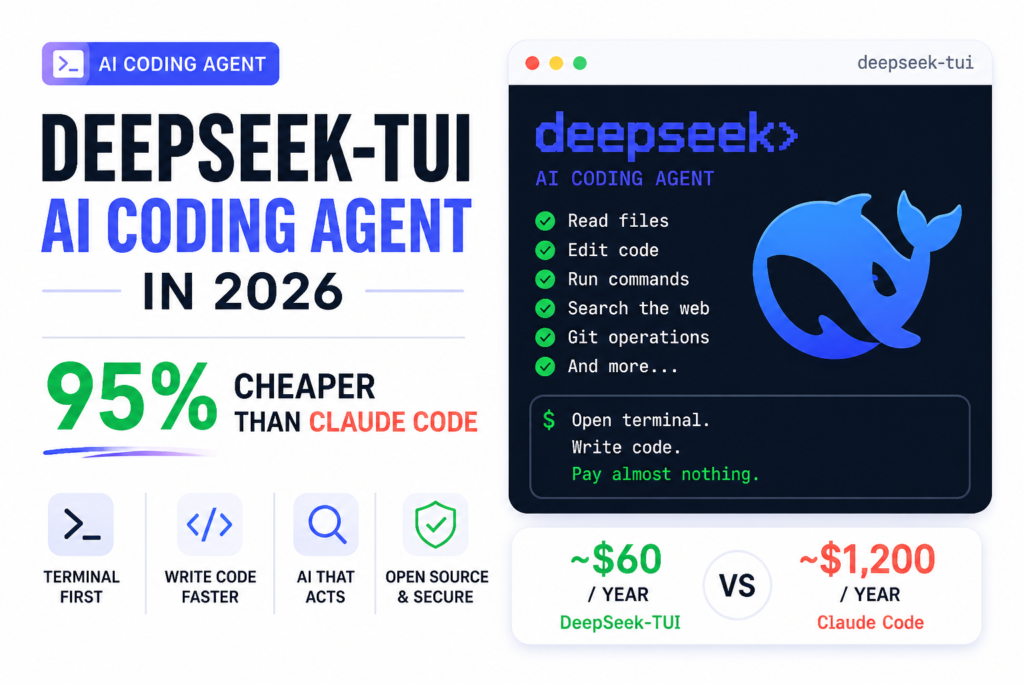
One developer ran 412 AI tool calls in a single day of heavy coding work. His total bill at the end: under seven dollars. The person sitting next to him, doing the same kind of work using Claude Max, paid over a hundred dollars that month,every month, automatically, whether he coded a lot or barely at all.
That seven-dollar developer was using DeepSeek-TUI, a free, open-source terminal coding agent. And the gap between those two numbers is the real story here.
What “Terminal Coding Agent” Actually Means (Plain English First)
Before anything else, let’s kill the jargon.
A terminal is the black text-window on your computer where you type commands. Programmers use it constantly. When people say “runs in your terminal,” they mean it’s a keyboard-driven app that lives there, no browser needed.
An AI coding agent is different from a regular AI chatbot. A chatbot answers your questions. An agent acts. It reads your files, edits your code, runs commands in your computer, searches the web, manages your git history (the system that tracks code changes), and keeps doing all of that in a chain without you having to paste things back and forth. It works more like a junior developer you can give a task to, rather than a search engine you interrogate.
DeepSeek-TUI is exactly that: a terminal coding agent that connects to DeepSeek’s AI models, gives them full access to your coding workspace, and lets you drive the whole thing from your keyboard without ever leaving the terminal. It’s written in Rust (a fast, modern programming language), available on npm (Node.js package manager, the same place you install JavaScript tools), and completely open-source under the MIT license. The repo on GitHub has crossed 1,400 stars with 83 forks and 97 commits , earned without any viral marketing push, just word-of-mouth from developers who tried it and noticed their cloud bill.
Why DeepSeek’s Price Is Actually Shocking
Here is the number that stops people cold.
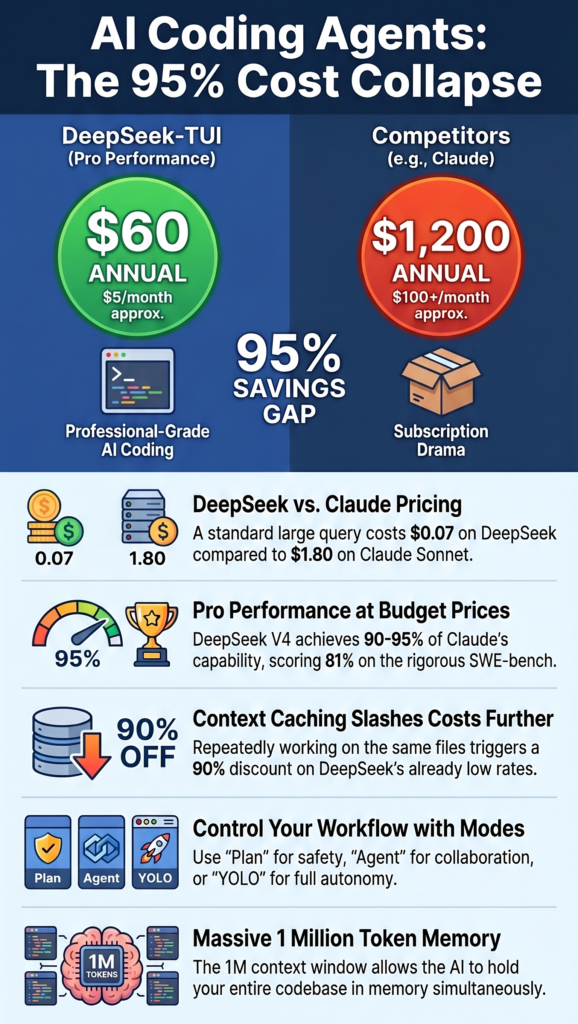
Claude Max 5x costs $100 per month ,roughly $1,200 a year. Claude Max 20x for the heaviest users is $200 per month, or $2,400 a year. These are subscription tiers for Claude Code, Anthropic’s own coding agent tool.
Now compare that to the raw API cost of running DeepSeek behind a similar interface. Most builders using DeepSeek V4 for coding work are spending between $2 and $10 a month. One developer ran 412 tool calls in a single heavy day and spent under $7 total.
Let’s translate that into a full year: about $60. Against $1,200.
That’s a 95% cost reduction.
Where does the gap come from? It starts with the pricing structure itself. DeepSeek V3.2 costs $0.28 per million input tokens and $0.42 per million output tokens for cache misses. Claude Sonnet 4.6 costs $3 per million input tokens and $15 per million output tokens. A token is roughly three-quarters of a word , the unit AI companies use to measure how much text you’re sending and receiving. The math on those per-token numbers means for a standard large query of 100,000 input tokens and 100,000 output tokens, Claude Sonnet 4.6 costs $1.80 while DeepSeek costs roughly seven cents.
The advantage gets even more dramatic when you use DeepSeek’s automatic context caching. Context caching means: if you’re working on the same project file repeatedly, the AI doesn’t re-read and re-charge for the same lines of code each time . it remembers the expensive part and only charges for new content. Cache hits on DeepSeek cost just $0.028 per million tokens versus $0.28 for cache misses, a 90% savings on repeated-context workloads.
So a developer building on a stable codebase , which is almost every developer, almost all the time , pays a fraction of even DeepSeek’s already-cheap price.
What DeepSeek V4 Actually Is (The Engine Under the Hood)
DeepSeek-TUI targets DeepSeek V4 models by default. Understanding what V4 is helps you understand why this tool is worth your attention.
DeepSeek is a Chinese AI research lab. Most of its models are freely available as open weights under the MIT License, which is part of why the January 2025 release of DeepSeek-R1 was such a big deal: it matched the reasoning quality of leading proprietary models at a fraction of the training cost. Open weights means anyone can download the actual model and run it themselves , no permission, no fees, no API key required if you have the hardware.
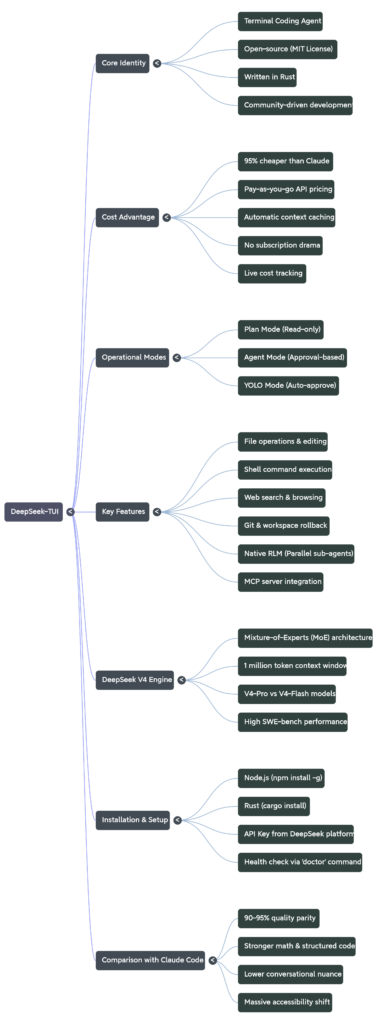
DeepSeek uses a Mixture-of-Experts (MoE) architecture, activating only 37 billion out of 671 billion parameters per query. Here’s the simple translation: imagine a hospital with 671 specialist doctors. Most AI models make all 671 doctors show up for every patient. DeepSeek only calls the ~37 doctors who are actually relevant to your specific problem. The other 634 stay in their offices. You get specialist-quality answers at general-practitioner prices.
DeepSeek V4 ships in two flavors that the TUI lets you switch between: V4-Pro for harder, deeper tasks, and V4-Flash for fast, cheap, lightweight work. V4 supports a 1 million token context window and scores 81% on SWE-bench Verified versus V3’s 69%. SWE-bench is a benchmark where AI agents have to fix real GitHub issues from real software projects , it’s a tough, practitioner-respected test of actual coding ability, not just textbook trivia.
The 1 million token context window is massive. For reference, the entire text of a medium-length novel fits in roughly 100,000 tokens. A 1M context means DeepSeek-TUI can hold your entire codebase in memory while working, rather than constantly losing track of earlier files.
The Three Modes: Plan, Agent, YOLO — And When to Use Each
DeepSeek-TUI is not a simple chat window. It runs in three distinct modes, which you switch using Tab on your keyboard. Understanding them is the difference between using this tool well and using it dangerously.
Plan mode is read-only. The AI explores your codebase, understands what’s there, and writes out a detailed plan , what it would do, in what order, and why – before touching a single file. You review the plan. Nothing changes on disk. Think of it as the AI asking permission before it does anything. This is where you should always start on an unfamiliar project.
Agent mode is the default. The AI takes multi-step actions – editing files, running shell commands, calling tools , but stops and asks for your approval on key decisions. It still creates a visible checklist of what it’s doing so you can follow along. You’re in control but not micromanaging.
YOLO mode auto-approves everything. The AI does whatever it decides without asking. This is meant for experienced developers in a trusted workspace who are comfortable letting the agent run unsupervised. Run this on a code repository you haven’t backed up and you’ll learn a hard lesson about git. Run it on a properly version-controlled project and it’s the fastest possible way to get a complex task done.
The repo’s README describes it plainly: YOLO mode still creates a visible checklist_write and update_plan log, so even when you’re not approving each step, you can see exactly what the agent did and in what order after the fact.
What DeepSeek-TUI Can Actually Do (The Feature List, Explained)
The README lists the full tool suite, and it’s worth walking through it because each one represents something the agent can do on your machine, not just respond to in text:
File operations means the agent reads your actual files, rewrites them, creates new ones, and deletes things. Not “here’s the code, you paste it” — it does the paste itself.
Shell execution means it runs terminal commands. npm install. python manage.py migrate. docker build. Anything you’d type yourself, it types for you, reads the output, and adjusts accordingly.
Web search and browse — the agent can look things up mid-task. If it hits an error it hasn’t seen, it searches for the fix, reads the Stack Overflow thread, and applies the solution. You don’t have to go be the search engine.
Git operations mean it can commit code, check what changed, compare branches, and stage files. The workspace rollback feature goes further: it takes pre- and post-turn snapshots using a side-git system that doesn’t touch your actual repository’s history. If the agent does something wrong, you type /restore and go back. Clean.
Native RLM (which stands for Runtime Language Model fanout) is the genuinely unusual feature. It fans out 1 to 16 parallel sub-agents running cheap V4-Flash models simultaneously against your problem. Think of it like spawning a small team of cheap interns to analyze different parts of a codebase in parallel, then collating results. The README calls these “children.” The cost stays low because Flash is the cheapest tier.
MCP server integration: MCP stands for Model Context Protocol — a standard way for AI models to connect to external tools (databases, APIs, services). DeepSeek-TUI supports it, meaning you can extend the agent’s capabilities by plugging in additional tools the same way you’d install plugins.
Live cost tracking shows you per-turn and session-level token usage and estimated dollar cost right in the interface. You never get surprised by a bill. You watch it tick up in real time, which makes you naturally more efficient with your prompts.
How to Install and Run It in 5 Minutes
You need Node.js installed on your machine. If you don’t have it, go to nodejs.org, download the installer, run it, and come back.
Once Node.js is ready, open your terminal and run:
npm install -g deepseek-tuiThis installs the tool globally — meaning you can run it from any folder on your computer, not just one specific project directory. The -g flag means global.
Then start it:
deepseek-tuiOn first launch, it asks for your DeepSeek API key. You get that key from platform.deepseek.com — make an account (free), go to API Keys, create one, paste it when asked. New users receive 5 million free tokens upon registration with no credit card required. That’s enough to run several thousand API calls before you spend a single dollar.
If you want to run it from within a project folder (which is where it’s most useful), navigate there first:
cd /your/project/folder
deepseek-tuiThe agent now has access to every file in that folder. Use deepseek-tui doctor to check whether your setup is working correctly. Use deepseek-tui models to see which DeepSeek models are currently available. Press F1 inside the TUI for the full keyboard shortcut reference.
For Rust developers who prefer compiling from source: the repo requires Rust 1.85 or newer. cargo install deepseek-tui --locked gets you the TUI binary; cargo install deepseek-tui-cli --locked gets you the deepseek command-line dispatcher.
Is DeepSeek-TUI Actually as Good as Claude Code? (Honest Answer)
The quality is roughly 90 to 95% of Claude on coding tasks. Not identical. Close. That assessment comes from developers who’ve used both in production, not from a benchmark lab. For designers, semi-technical builders, and students learning development, that gap doesn’t matter. The savings do.
Where DeepSeek is genuinely strong: mathematical reasoning, structured code generation, following explicit step-by-step instructions, and tasks that benefit from the chain-of-thought thinking mode. DeepSeek achieves a 91% score on HumanEval coding tasks. HumanEval is a benchmark where models write Python functions from scratch based on docstrings , a direct measure of code generation ability.
Where Claude is stronger: conversational nuance, multimodal tasks (analyzing images alongside code), handling ambiguous instructions where intent-reading matters, and long-term reasoning coherence on complex open-ended projects. Claude handles conversational drift well and usually infers intent without much hand-holding. DeepSeek tends to need more precise prompt engineering in open-ended scenarios.
The honest verdict: if you’re building data pipelines, writing utility scripts, debugging structured code, or doing anything where the task is specific and the output is verifiable — DeepSeek-TUI is competitive with anything on the market and costs almost nothing by comparison. If you’re building a complex multi-system architecture where requirements shift mid-conversation and you need the model to read between the lines repeatedly, Claude’s language quality earns its premium.
You can also run both. Claude Code accepts custom API backends. Claude Code is more flexible than most people realize. With the right setup, it can run a cheaper engine in the background , same interface, same workflow, way lower cost. DeepSeek-TUI itself supports NVIDIA NIM, Fireworks AI, and self-hosted SGLang endpoints, meaning you’re not locked into one provider.
Why This Matters Beyond the Price Tag
The cost collapse in AI inference is not just a budget optimization story. It’s a structural shift in who gets to build with these tools.
Two years ago, running a flagship LLM cost $10 per million input tokens. Today you can get a better model for a quarter of that price — and a perfectly adequate one for a hundredth. DeepSeek specifically blew up the pricing floor that incumbents had held stable.
For a developer in India, or a student anywhere, or a solo builder with a side project but no venture funding — the difference between $100/month and $5/month is the difference between using the tool and not using it. DeepSeek-TUI is a real answer to that problem, not a stripped-down compromise version of one.
The 1.4k GitHub stars and 83 forks the repo has accumulated tell you something real: these aren’t people who favorited a marketing tweet. These are developers who installed it, ran it against their actual codebases, and came back to bookmark it. The fact that it hit those numbers without being affiliated with DeepSeek Inc. (the repo explicitly notes it’s not affiliated) means the tool earned its reputation on its own merits.
Where to Go From Here
If you installed this today and spent thirty minutes with it in Plan mode on a project you already understand well, you’d know within the hour whether it fits your workflow. That’s the actual test. Not a benchmark. Not a pricing table. Your codebase, your problem, your keyboard.
The deepseek-tui doctor command is your first step after install. It checks API connectivity, configuration validity, and tells you exactly what’s broken if anything is. From there, Plan mode on a familiar project, then Agent mode once you’re confident in how it thinks, and YOLO mode only when you’ve seen it behave on the kind of task you’re running.
The free 5 million token credit means you can run serious tests before you spend anything. Use that window aggressively. Try the chain-of-thought streaming mode on a hard debugging problem — watching the model reason through your code step by step in real time is genuinely different from getting a text response that tells you what to do. You’ll know whether DeepSeek’s reasoning style matches how you think about code. And if it does, you just went from a $1,200 annual subscription to a $60 one.
That’s not a discount. That’s a different category of access.
Open terminal. Write code. Pay almost nothing. No subscription drama.