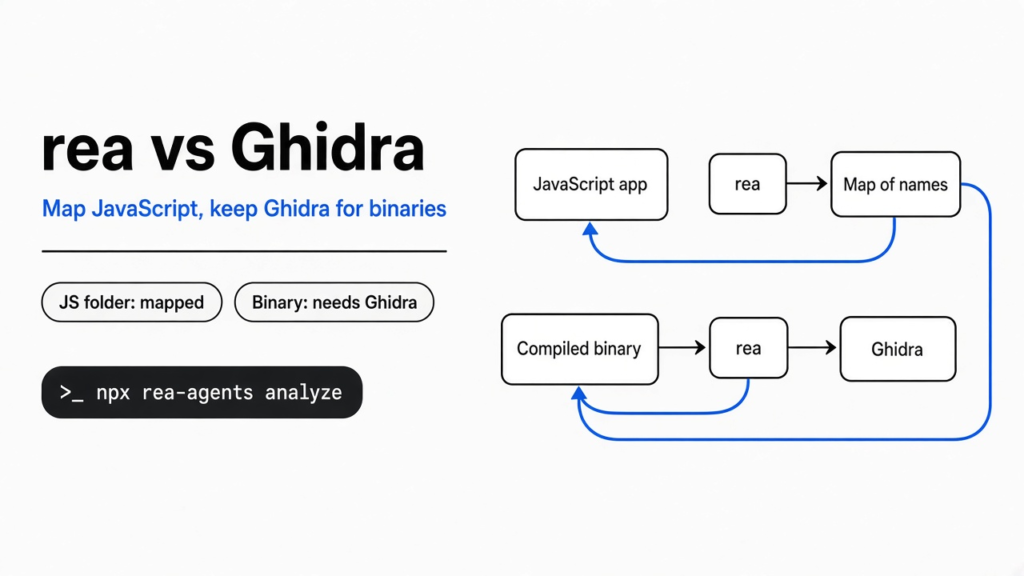
I had a tiny notes script split across two files, and I did not want to scroll it just to see how search worked. main.js loads search.js and calls one function, searchNotes. That question gets harder when the program was compiled and the original source is gone. A binary (the compiled file the computer runs) is what is left. Ghidra is the free desktop app people open to turn those bytes back into rough code. That step is decompiling (reading machine steps as something closer to a program). rea is a terminal command that tries to answer the same question from the shell, or from a coding tool. Use rea alone on JavaScript. Keep Ghidra when the file is a binary. I ran both on one Linux machine. Only the script folder finished.
rea does not replace Ghidra. It can map a JavaScript app by itself, and it stops on a compiled file until Ghidra, Hopper, or IDA is actually installed.
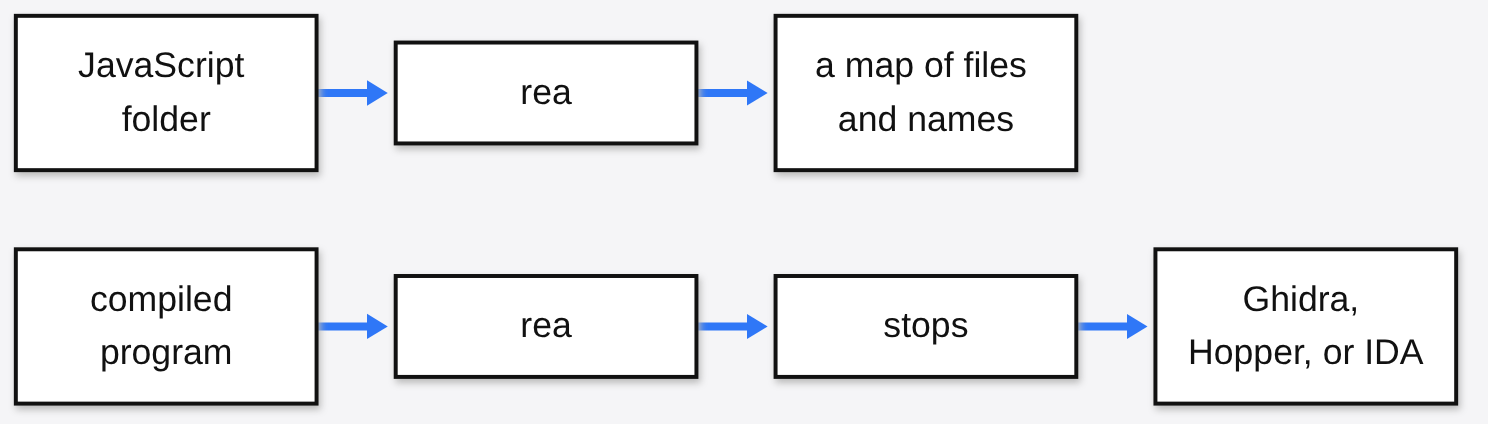
The picture is the choice. A script still has names in it. A compiled program has mostly thrown those names away, so you need a second tool to guess them back.
What is rea
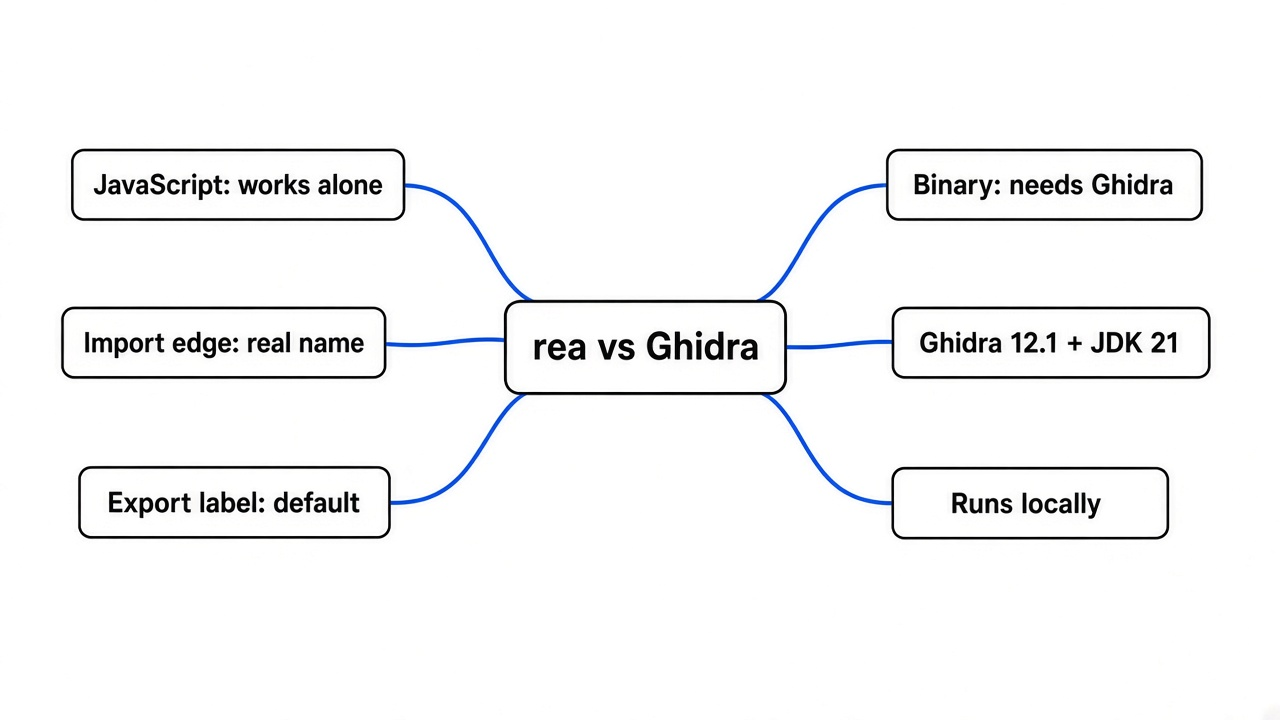
rea is one command that lets you, or a coding tool, inspect an app and come back with a record of what it saw. It does not itself turn a binary into rough code. It can read JavaScript, Electron apps, .NET assemblies, and web pages on its own, and it can hand a compiled file to Ghidra, Hopper, or IDA.
I ran npx -y rea-agents@5.0.0 --help. The first line was rea@5.0.0. The command for a script folder is analyze-javascript-application. The command for a compiled file is analyze. The second one refused to start. That refusal is the whole comparison.
A coding tool can call the same commands if you register rea as MCP (a local helper that coding tool is allowed to run). I did not need that registration. The terminal was enough. If that coding tool then rebuilds the feature with files you did not ask for, the brake is the short rules file in how to stop Claude Code from overengineering. rea only tells you how the feature is shaped. It does not decide how you rebuild it.
The project is morluto/rea. The desktop tool it can call later is Ghidra.
How do I reverse engineer a JavaScript app with rea?
Point analyze-javascript-application at a folder you are allowed to read. It reads the files as text. It does not run them.
I wrote the folder myself. package.json was 93 bytes. src/search.js was 294 bytes and held searchNotes, which lowercases a query and keeps notes whose title or body contains it. src/main.js was 340 bytes. It loads that function with require("./search") and prints the hits. I did not tell rea the function name.
npx -y rea-agents@5.0.0 analyze-javascript-application /absolute/path/to/the/folder --format jsonThe result was a real analysis, not an error. It was also enormous: 410,515 bytes of JSON for those three small files. I expected a short map. What I got was a file I had to search.
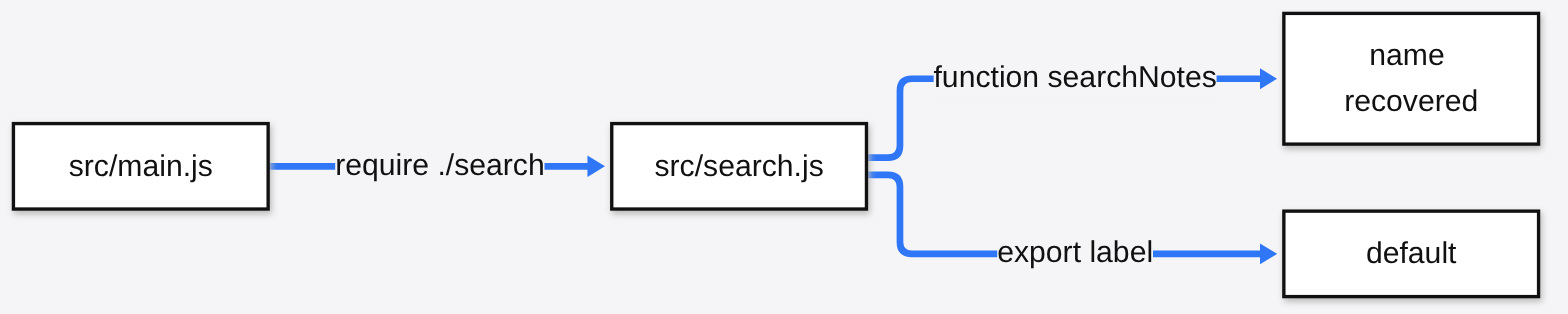
The useful lines were small. It resolved ./search to src/search.js. The import name was searchNotes. It marked a definition of that name on line 1 of search.js, which is where function searchNotes starts. Then the export record called the handoff default, not searchNotes. CommonJS (Node’s older way for one file to hand functions to another, with require and module.exports) was recovered as one export named default. If you only skim the export list, you will think the function is called default. The import edge is the line that still says searchNotes.
It also wrote its own limit, in plainer words than the field names: the files were parsed as inert text, and the code was never executed. So rea can tell you the name exists, which file it lives in, and that main.js loads it. It cannot tell you that a search for milk returns the groceries note. I already knew that, because I ran the script. The tool did not.
Static means it read the shape. Runtime means it watched the program run. On this folder, rea did only the first. If you need to watch a page run, that is a different job, the one in can Moli replace headless Chrome.
rea vs Ghidra on a compiled file
Ghidra still does the deep read. rea will not invent a decompiler when Ghidra, Hopper, and IDA are all missing.

That window is what people mean by Ghidra. The left side is the raw steps. The right side is a guess at the function, often with names like param_1 because the original names are gone. rea does not draw this window. It asks one of three engines to do that work, then it wants the notes back.
I ran this on ls, a program that is already on the machine:
npx -y rea-agents@5.0.0 analyze /bin/ls --format jsonIt failed. The code was provider_unavailable. The candidates were ghidra, hopper, and ida. Ghidra was not_configured, and the message said to set GHIDRA_INSTALL_DIR to an extracted Ghidra 12.1.x directory. Hopper looked for /opt/hopper/bin/Hopper and that file was not there. IDA was also not_configured, and it asked for REA_IDA_MCP_CONFIG. Three doors, all shut.
rea doctor on the same machine was unhealthy. Node was fine, at 22.23.3. The host called itself Debian 12 and was marked unsupported. The hosts it names are macOS 12 or newer, Ubuntu 24.04 or newer, Fedora 41 or newer, 64-bit Arch, and an experimental Windows path. Java on the machine was 17.0.20.1, and the Java check failed. This build wants a 64-bit JDK 21 or newer. The native decompiler check passed with the note that it is not required on this platform.
This is in contrast to the script run. Doctor had already called the machine the wrong kind of computer, and analyze-javascript-application still finished. The host check blocks the compiled path in practice, because that path needs an engine doctor can see. It does not block the JavaScript path.
How do I connect rea to Ghidra?
Install Ghidra yourself. rea will not download it, and it will not install Java for you.
The check I hit wants Ghidra 12.1.x and a 64-bit JDK 21 or newer. Java 17 was not enough, even though Java itself was present. Then:
export GHIDRA_INSTALL_DIR=/absolute/path/to/ghidra_12.1_PUBLIC
export JAVA_HOME=/absolute/path/to/jdk-21
npx -y rea-agents@5.0.0 doctor --format json
npx -y rea-agents@5.0.0 setup
npx -y rea-agents@5.0.0 providers --format jsonsetup is supposed to show its changes before it writes them, and it can record the Ghidra path into the coding tools it detects. I skipped setup. There was no Ghidra directory to point at, and I did not want it writing tool config on a machine doctor had already rejected.
One caveat: listing a provider name is not the same as opening a binary. analyze /bin/ls had already proved the difference. If you live in Ghidra’s window, renaming variables and fixing types by hand, stay in that window. rea is the wrong tool for the part where you edit an analysis you want to keep.
When should I stay in Ghidra?
Stay in Ghidra when the file is a binary and you need to change the analysis, not only read a one-shot report. Stay there when doctor says your host is outside the list above. Stay there when you already have a project open and you want the names you typed last week.
Stay with rea, and skip Ghidra, when the target is a JavaScript folder you are allowed to read. That is the path I actually finished. One command, a resolved import, the name searchNotes, an export label of default, and a written limit that the code never ran.
| Job | rea alone | rea with Ghidra | Ghidra by itself |
|---|---|---|---|
| Read a JavaScript folder | Yes. I did this. | Not needed | Wrong tool |
| Open a compiled program | Stops with provider_unavailable | Needs Ghidra 12.1.x and JDK 21, on a host doctor accepts | Yes, in its own window |
| See the function name in a CommonJS app | On the import edge, not always on the export label | Not needed for scripts | Wrong tool |
| My Debian 12 machine | JavaScript path worked | Doctor marked the host unsupported, and Java 17 was rejected | Not installed |
Hopper and IDA are the other deep readers. Hopper is a separate app with its own license. IDA is too. I had neither. If you have none of the three, analyze on a binary stops the way mine stopped.
Is rea worth it?
Yes, if you want a terminal, or a coding tool, to map a JavaScript app and show its work. No, if you hoped it was a free Ghidra that installs itself.
The check takes a few minutes. Put a folder of your own scripts on disk, ideally two files where one loads the other. Run analyze-javascript-application on that folder. Search the JSON for the function name, and also look at the export label. If the name is only on the import, you now know where to look. Then run analyze on one compiled program you are allowed to inspect. If the error is provider_unavailable, you still need Ghidra 12.1.x, Hopper, or IDA, on a host the doctor accepts, with JDK 21 or newer for the Ghidra path.
I would not point it at a program you are not allowed to inspect. The tool runs as you. It is not a locked room around the target.
Common questions about rea vs Ghidra
Can I use rea instead of Ghidra?
Only for the jobs rea does without a deep provider. JavaScript worked with no Ghidra on my machine, including on a host doctor called unsupported. A native binary did not. Electron, web observation, Android packages, and firmware commands are in the same help text. Those paths were outside this test, so there are no timings for them here.
Why does rea fail if Ghidra is not installed?
Because analyze on a binary picks Ghidra, Hopper, or IDA and will not invent a decompiler. My /bin/ls run failed with provider_unavailable. The Ghidra line was GHIDRA_INSTALL_DIR is not set. Java 17 was also the wrong generation for this build, which wants JDK 21 or newer. Installing a newer Java alone would not have opened ls. There was still no Ghidra directory, and the host check had already failed.
Does rea upload my app?
No. The JavaScript run read a local folder and wrote the evidence on that machine. The help text never asked for an account. The binary run failed before it could read the program, for the same local reason: no engine was configured.
I will keep rea on script folders, and I will search the import edge for the real name when the export label says default. I will keep Ghidra for compiled files, because rea stopped at the door and named the three missing engines.