
One small app for Postgres, MySQL and Redis. I installed it, broke nothing on purpose, and measured what the “25 MB” really means.
Short answer: yes. dbx is a free, open source database client that opens Postgres, MySQL, Redis and many more in one window. Its Windows download is 28 MB against DBeaver’s 117 MB. On Linux the gap almost disappears (116 MB vs 127 MB), and the Docker version is 562 MB. It is still the lighter, safer pick for most people.
You open DBeaver to check one row in one table. Your laptop fans spin up, and you wait for a Java app to wake. That wait is the reason people go looking for something lighter.
dbx is the tool that keeps showing up in that search. Its pitch is “25 MB to manage 100+ databases.” So the one question this post answers is simple: is the small size real, and is the app good enough to switch?
I ran it for real. I spun up a Postgres database with 200,000 orders and a Redis cache, connected dbx to both, ran queries, and then tried to delete data on purpose to see what stops me.
What is a database client, and why do you need one?
A database client is the window between you and your data. Pick a bad one and every small check feels slow.
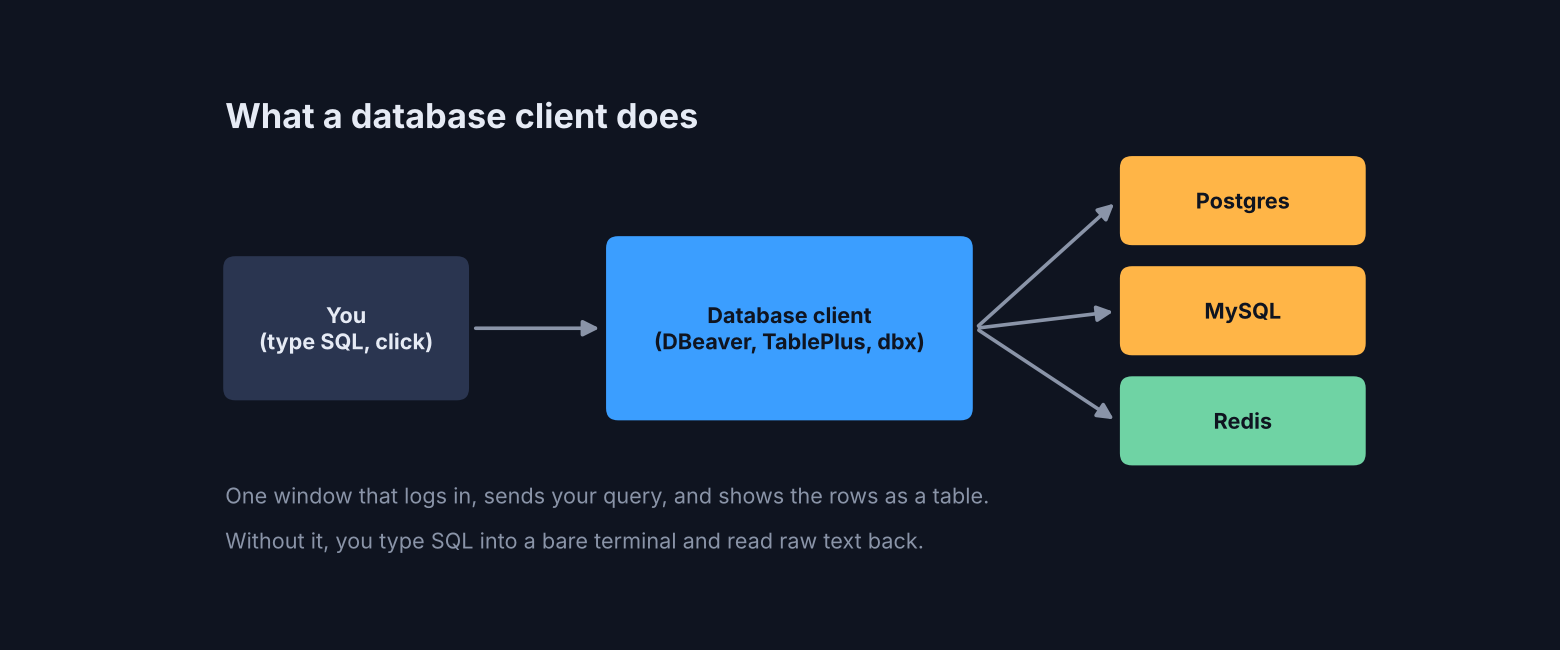
A database stores your app’s data in tables, like a big spreadsheet that lives on a server. To read it, you send it SQL (the short text commands databases understand, like select * from orders).
You can type SQL into a bare terminal. But then you read raw text back, scroll sideways, and retype passwords. A database client fixes that. It saves your logins, gives you an editor with autocomplete, and shows results as a sortable table.
So the client is a tool you open many times a day. That is why its size and start-up speed matter more than they seem. A two-second wait, twenty times a day, adds up.
Why are DBeaver and TablePlus not enough for some people?
DBeaver is free but heavy. TablePlus is light but paid. dbx tries to be free and light at once.
DBeaver Community is free and open source, and it covers almost every database. The catch is weight. It runs on Java, so it carries its own Java runtime (the engine Java programs need to run) inside the download. On Linux I unpacked it: 204 MB on disk, and 104 MB of that is the Java runtime alone. Its settings file also lets Java grow to 1 GB of memory.
TablePlus is the opposite. It is fast and native, but it costs \$99 for a one-time license. The free trial limits you to 2 open tabs and 2 windows at a time.
That leaves a gap: a client that is free, open source and light. dbx is built for that gap. It is free under the Apache 2.0 license (a permissive license that lets you use it at work, change it and ship it).
Is dbx really 25 MB?
Only on Windows. On Mac it is 38 to 42 MB, on Linux 116 MB, and the Docker image is 562 MB.
I checked the real file sizes of every official download.
| Download | dbx | DBeaver Community |
|---|---|---|
| Windows installer | 28 MB | 117 MB |
| Mac (Apple Silicon) | 38 MB | 123 MB |
| Mac (Intel) | 42 MB | not compared |
| Linux | 116 MB (AppImage) | 127 MB (tar.gz) |
| Docker image | 562 MB | not compared |
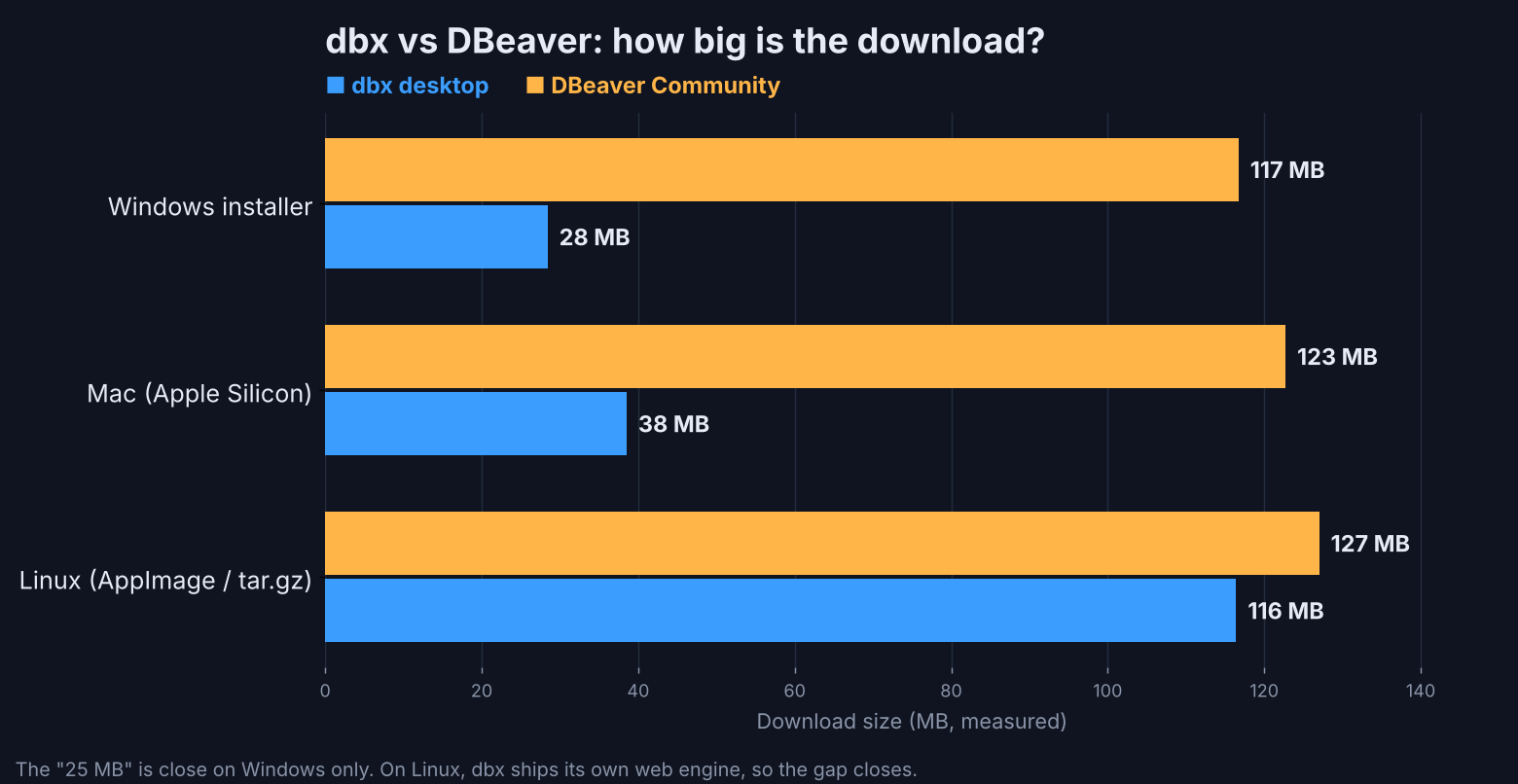
So the headline is true where most people use it, on Windows and Mac. On Linux it is barely smaller than DBeaver. The reason is not sloppy packaging. It is how the app is built.
Why is the same app 28 MB on Windows and 116 MB on Linux?
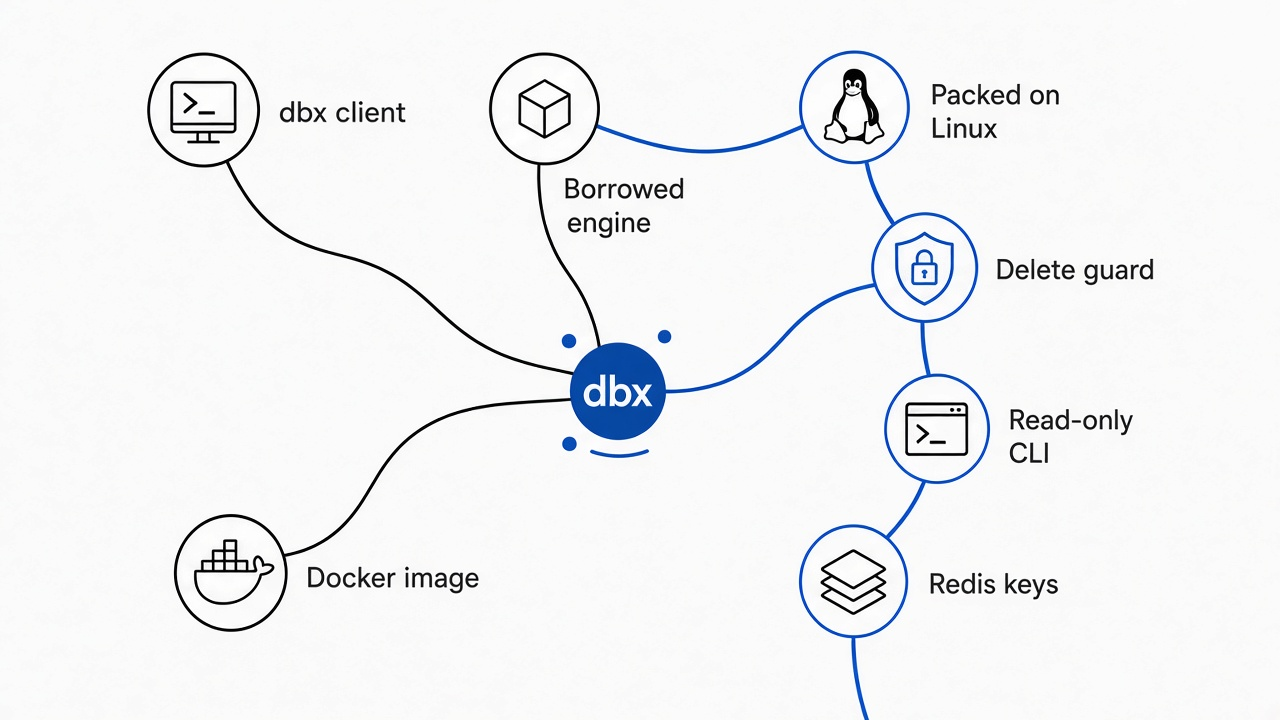
dbx borrows the web engine your computer already has. Windows and Mac have one built in. Linux does not, so dbx has to pack its own.
Start from the base. Many modern desktop apps draw their screens with web technology, the same HTML and CSS a website uses. To show that, the app needs a web engine (the part of a browser that turns HTML into pixels).
There are two ways to get one. Apps built with Electron (a popular framework behind Slack and VS Code) ship a full copy of the Chrome engine inside every download. dbx uses Tauri (a framework that borrows the operating system’s own web engine instead of shipping one).
Now the size difference makes sense. Windows already has Edge WebView2 (Microsoft’s built-in web engine), so dbx ships only its own code: 28 MB. Mac has its own engine too. Linux has no single shared engine, so the dbx AppImage (a one-file Linux app you download and run) carries WebKitGTK inside it. I unpacked the file: the engine alone is about 120 MB of it.
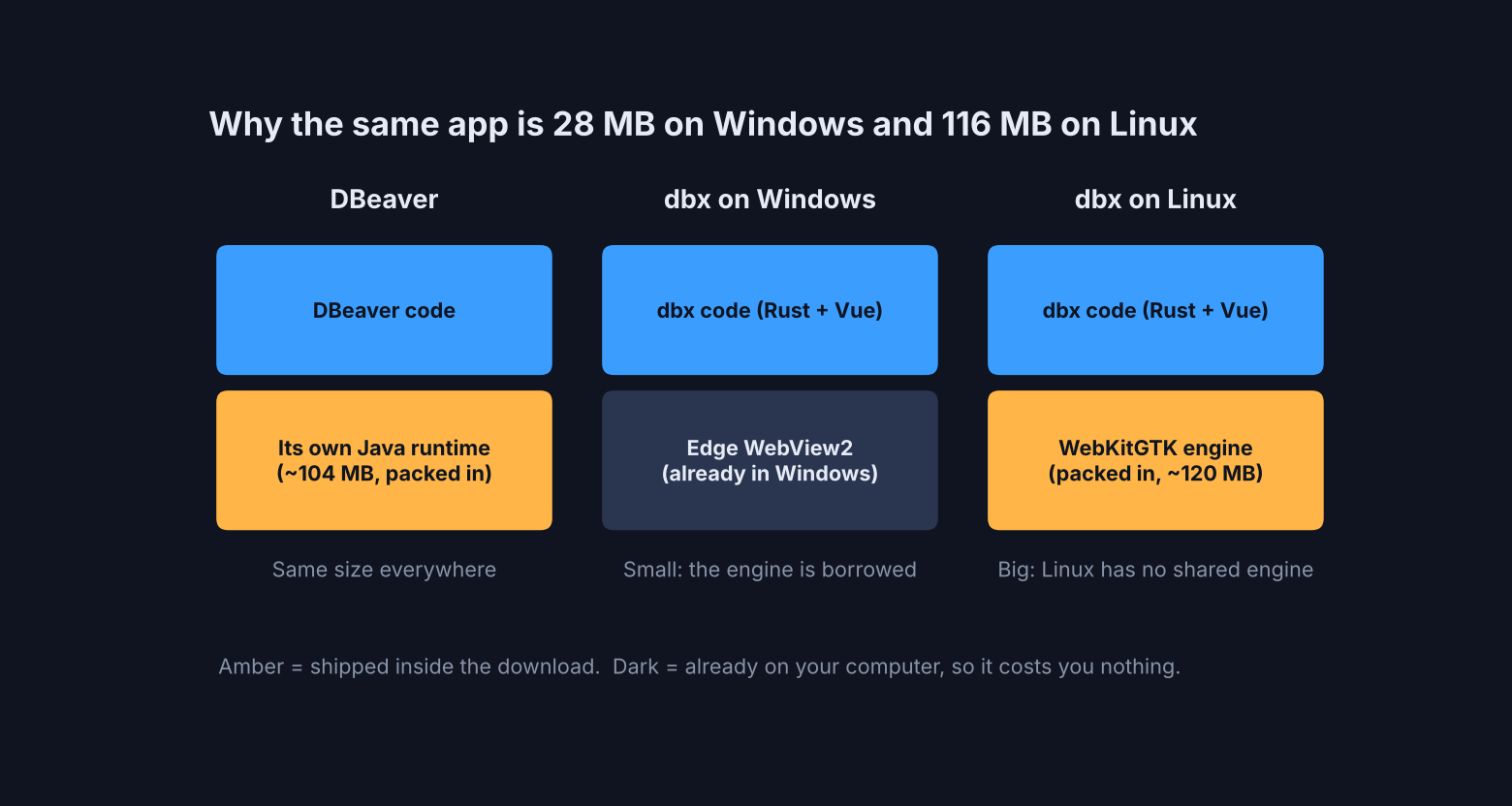
Think of it like moving into a furnished flat versus an empty one. Same you, same suitcase. The empty flat makes you bring the furniture.
What is inside the 562 MB Docker image?
Mostly Java. The Docker version ships a full Java 17 runtime so it can talk to databases that only have Java drivers.
Docker (a tool that runs an app in a sealed box with everything it needs) is how you run dbx on a server. Your team then opens it in a browser. I pulled the image and measured it layer by layer (each step that built the box).
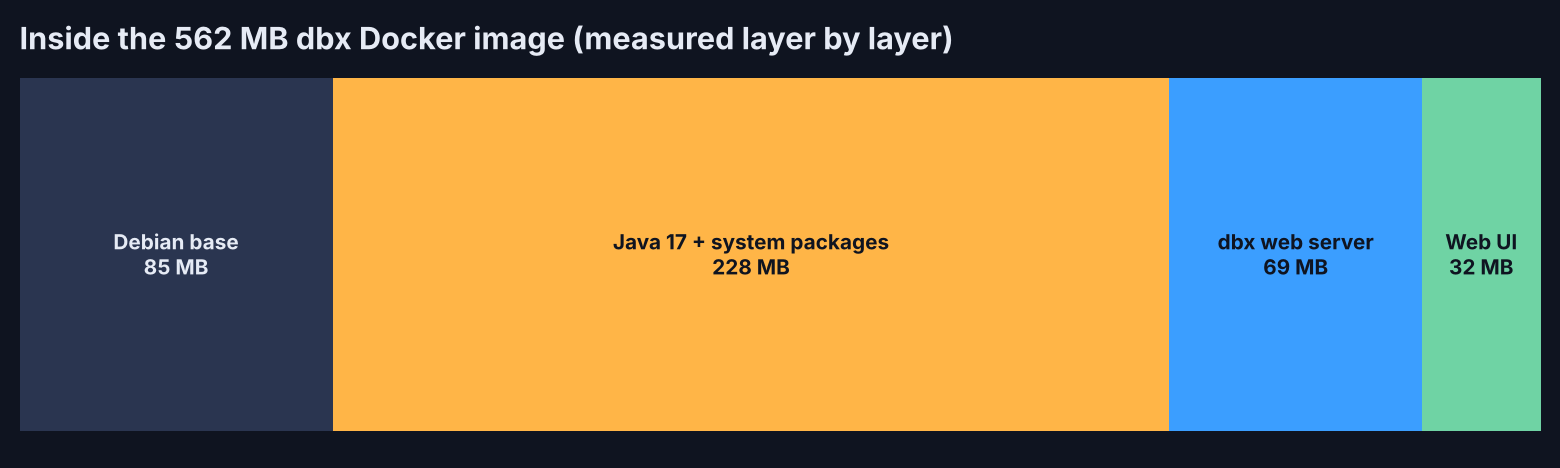
The big layer holds Java 17 plus system packages. The Java runtime folder inside it is 184 MB. dbx needs it for JDBC drivers (Java plug-ins that connect to databases like Snowflake, DB2 or Hive). The dbx server itself is a 69 MB file.
This matters only if you care about disk space on a server. Memory is a different story, and there dbx is tiny.
How do you install dbx and connect to a database?
One Docker command gets you a password-protected web version. On a desktop, use the normal installer.
For your own computer, download it from the official site, or use a package manager:
# Mac
brew install --cask dbx
# Windows
winget install t8y2.dbx
For a shared web version on a server, this is the one command I ran:
docker run -d --name dbx -p 4224:4224 -v dbx-data:/app/data t8y2/dbx:latest
Then open http://localhost:4224. Here is what happened in my test:
- The download took the longest part, because the image is 562 MB.
- The server started in under one second.
- The first screen asked me to set a password before anything else.
- I clicked New Connection, picked PostgreSQL, typed the host, user and password, and hit Test. It said “Connection successful.”
- Save & Connect, then New Query.
The whole thing took a few minutes, most of it waiting for the download. One warning: the web version listens on port 4224 for anyone who can reach it. Keep it on your own machine or behind a VPN, not open to the internet.
Is dbx fast enough for real work?
Yes for daily work. An aggregate over 200,000 rows came back in 122 ms, and the server used about 18 MB of memory.
I ran a real report query: total orders and revenue per city, joining the orders table to the customers table.
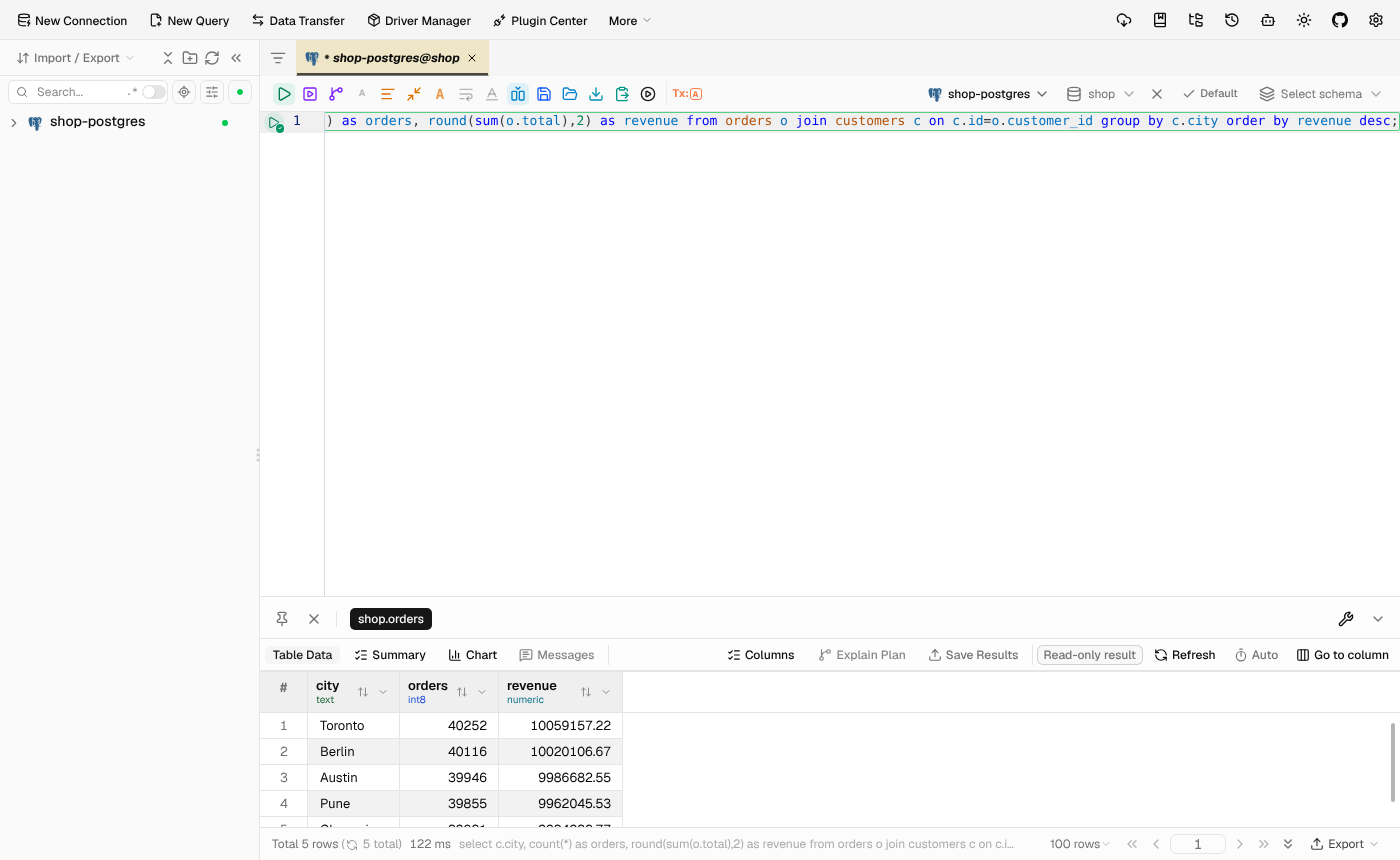
Here is the walk-through of the numbers:
- The query joined 200,000 orders to 5,000 customers and returned 5 rows in 122 ms.
- The dbx web server used 8.6 MB of memory idle and 18 MB after the queries.
- The command-line version answered a smaller query in 0.07 seconds, start to finish.
One catch on that memory number. It is the server only. The browser tab that shows the screen uses its own memory, like any web page. Still, 18 MB for the part that holds your connections is very small.
One more thing I noticed. dbx quietly added LIMIT 100 to my query, so a careless select * on a huge table does not flood your screen. That is a good default, but remember it when you export.
Can one tool handle Postgres and Redis together?
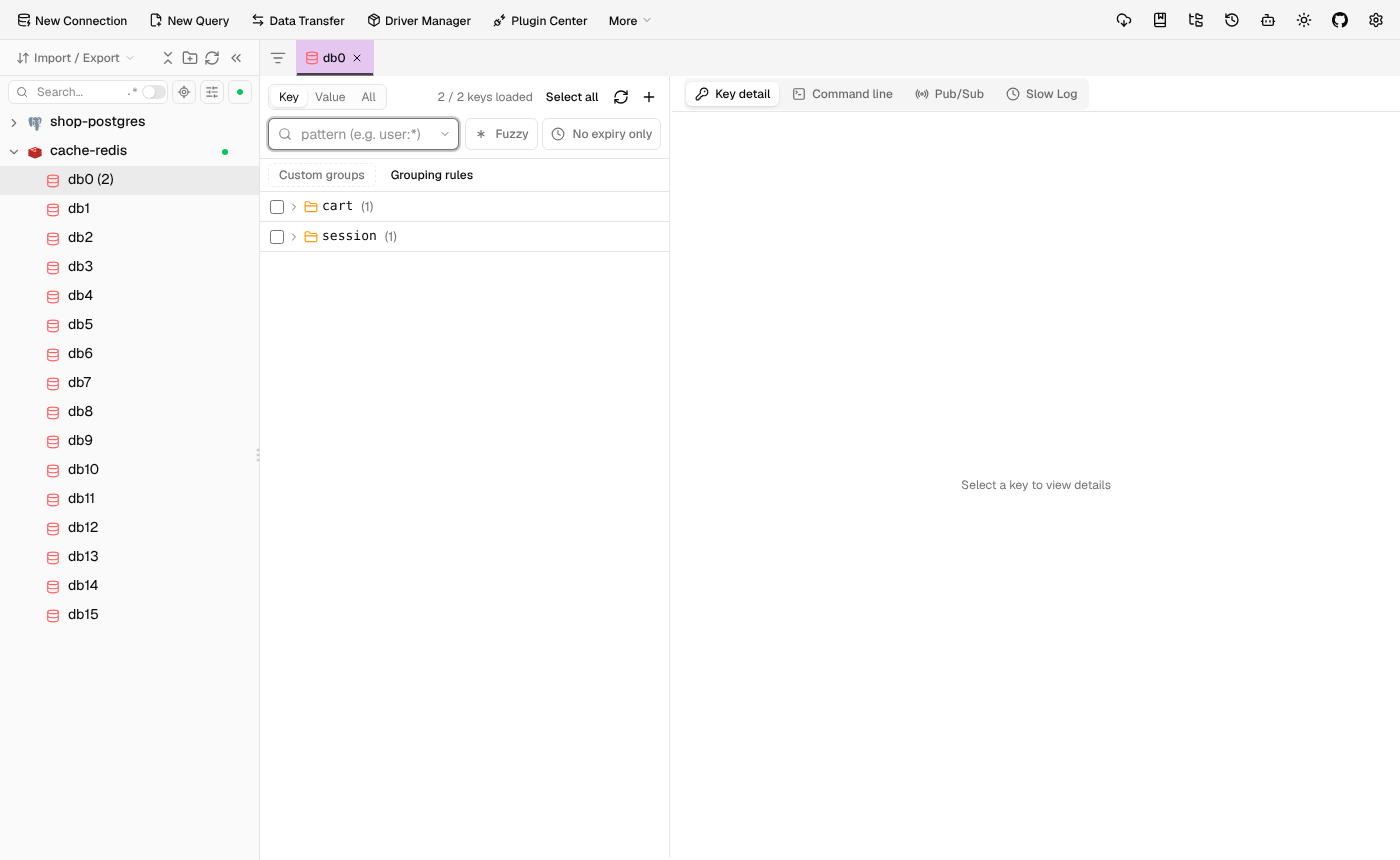
Yes. I added a Redis cache next to Postgres in the same window, and dbx grouped the keys by name.
Redis (a fast in-memory store, often used for sessions and caches) does not use tables. Most SQL clients ignore it, so people keep a second app just for Redis.
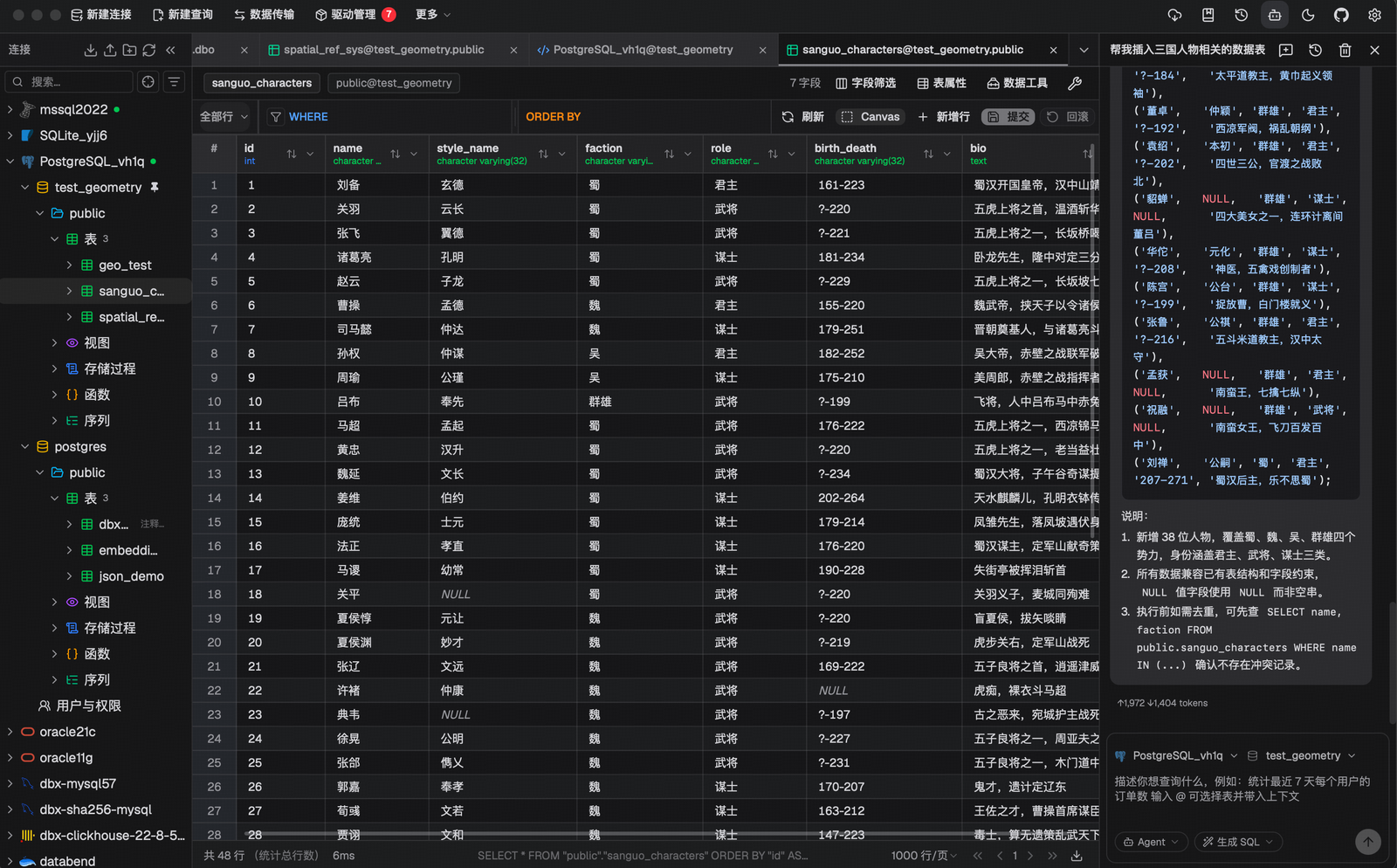
dbx gives it a proper browser. My test keys session:42 and cart:42 showed up grouped into session and cart folders, with search, a command line, and a slow-log view.
That is the real reason to switch for many people. One app replaces two or three.
What stops you from deleting data by mistake?
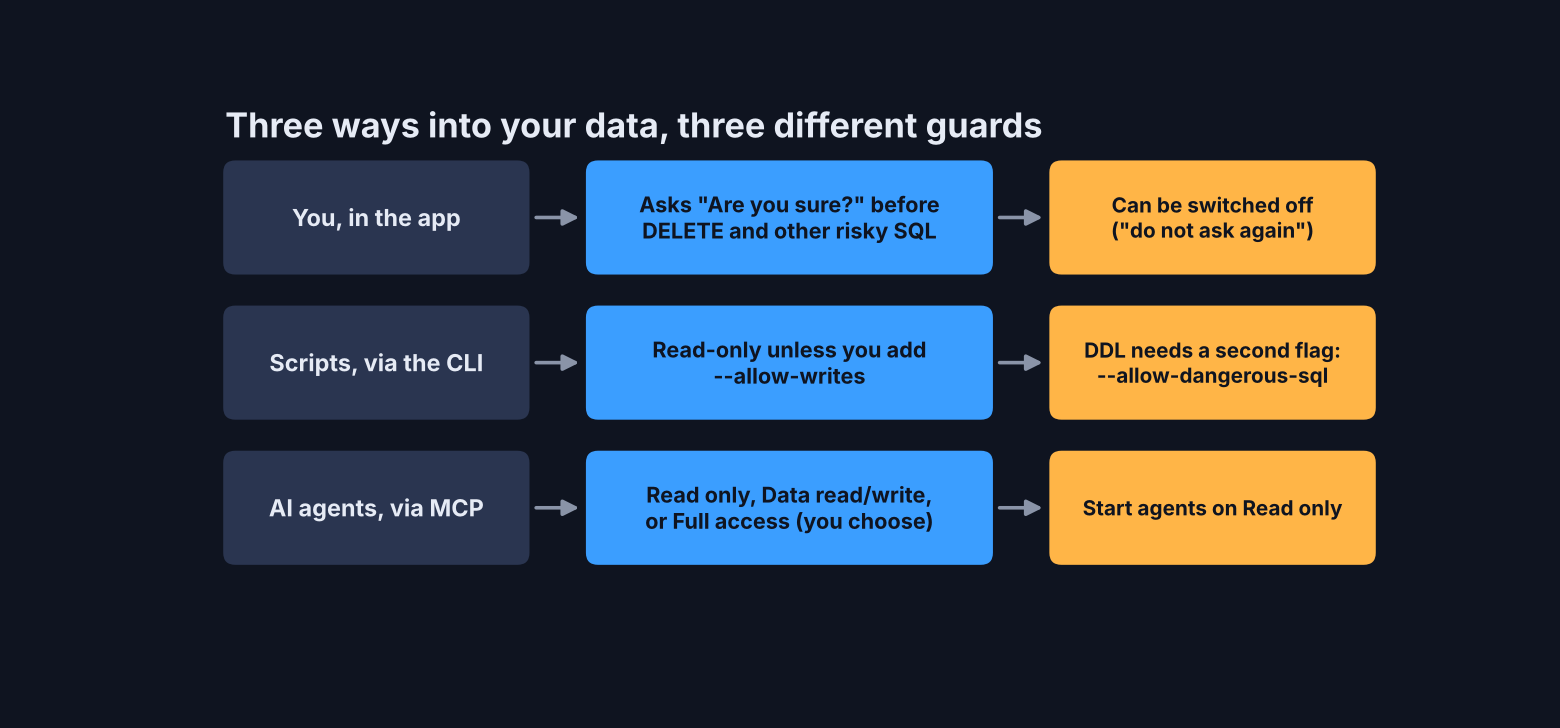
Three different guards, one for each way in. I tried to break each one.
This is the part I care about most, because a database client is also the fastest way to destroy data. I tested every door.
In the app. I typed delete from orders; with no filter and pressed run. dbx stopped and showed a “Dangerous Operation” warning with Cancel and Execute buttons. I cancelled. All 200,000 rows were still there.
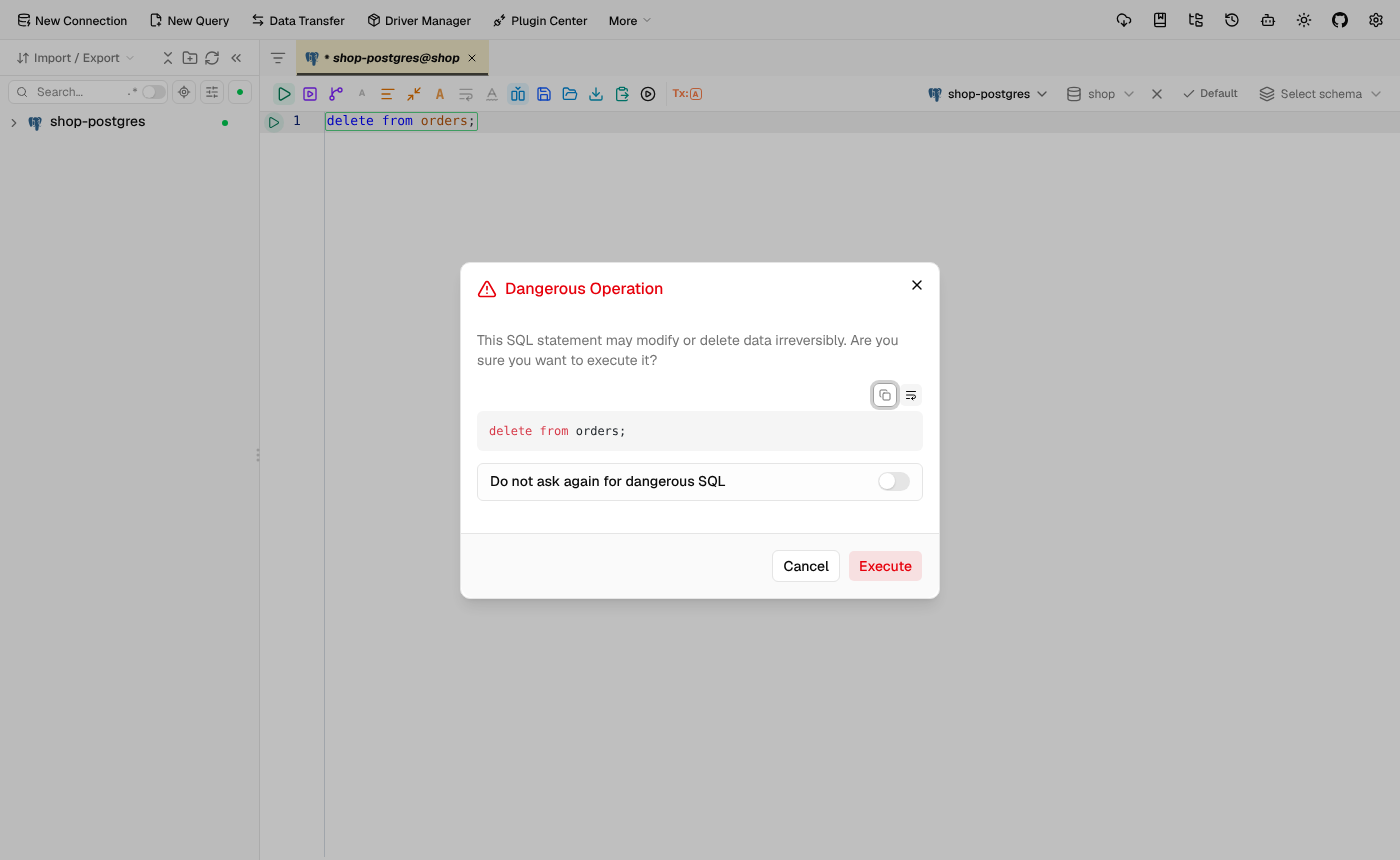
The catch: that warning has a “Do not ask again” switch. Leave it off.
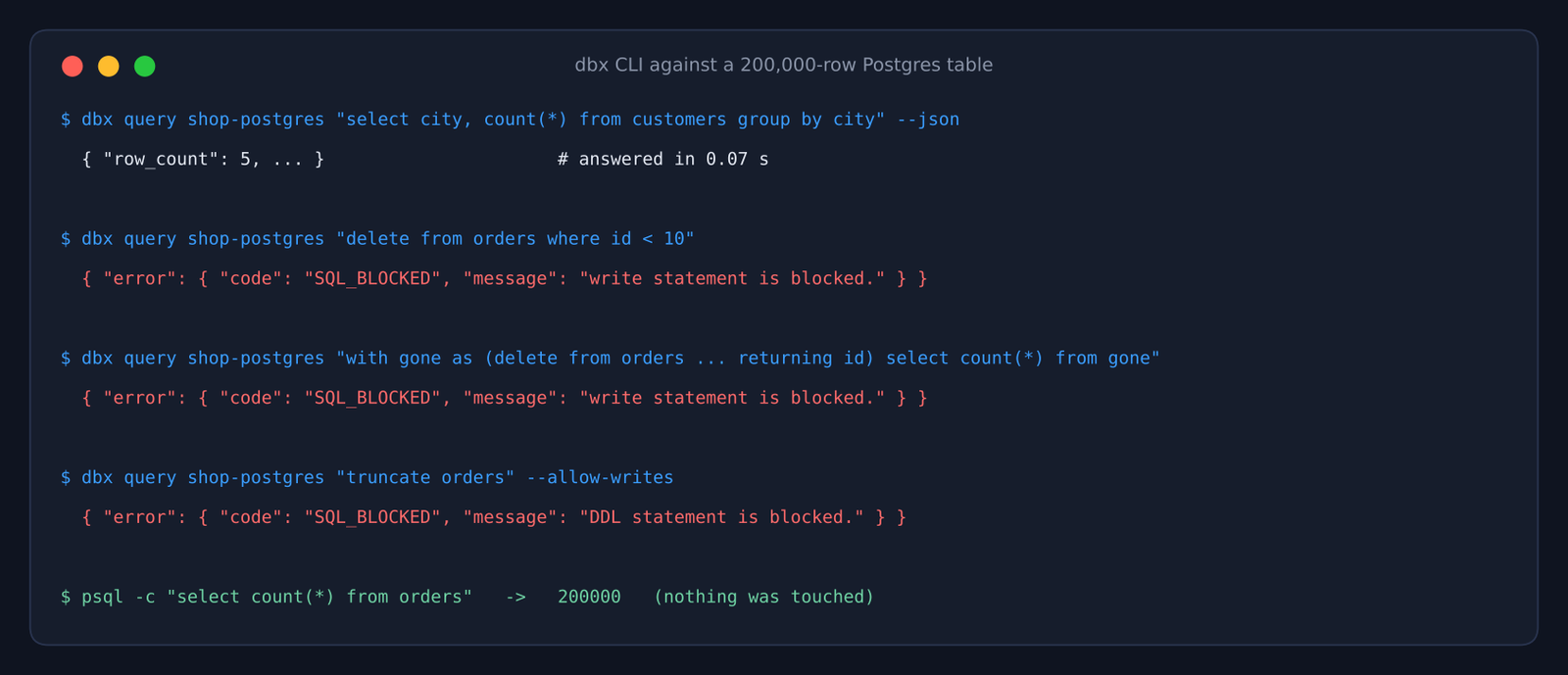
In the command line. The dbx CLI (command-line tool) is read-only by default. Plain deletes were blocked. So was a sneaky one: a CTE (a “with … as” sub-query) that hides a delete inside a select. Even truncate with the --allow-writes flag was blocked, because wiping or changing tables needs a second flag, --allow-dangerous-sql.
For AI agents. dbx can expose your databases to Claude Code, Cursor and similar tools through MCP (a standard plug that lets an AI app use outside tools). You choose one of three modes in the settings: Read only, Data read/write, or Full access. Start every agent on Read only.
That default matters. Agents do delete things nobody asked them to, as Claude Code deleting 48,000 files through a folder shortcut showed.
Each MCP server also adds to your token bill, so check which MCP server is wasting tokens before you add one more.
What can’t dbx do yet?
It is young, the AI side needs the desktop app for many databases, and the Docker image is big.
The honest edges, all from my test:
- The CLI can query only about ten database types directly, Postgres and MySQL among them. Redis, MongoDB and most others need the desktop app running in the background.
- On Linux, the download is almost as big as DBeaver.
- The web version must be kept off the open internet.
- DBeaver has had many more years to mature. If you rely on a niche DBeaver feature, test it in dbx before you switch.
There are good reasons to stay with DBeaver. If it already runs fine on your machine and you use its deeper tools every day, switching buys you little. For everyone else, especially on Windows and Mac, the lighter app with better guards is the better daily driver.
Should you switch from DBeaver to dbx?
Switch if you are on Windows or Mac and mostly run queries. Stay if you are on Linux and happy.
| You are… | Pick |
|---|---|
| On Windows or Mac, tired of a slow start | dbx |
| Using Postgres plus Redis and want one app | dbx |
| Letting an AI agent touch your database | dbx, on Read only |
| On Linux with DBeaver working fine | stay on DBeaver |
| Happy to pay for polish | TablePlus |
The small size is only half the story. The safety is the other half: a client that asks before you delete everything is worth more than one that saves 90 MB.
Get it from the dbx repo. Install it on one machine. Point it at a copy of your data, and try the delete.
FAQ
Is dbx free?
Yes. dbx is free and open source under the Apache 2.0 license, including for work use.
Is dbx a good DBeaver alternative?
For daily queries on Windows and Mac, yes. It is much smaller there, starts fast and asks before risky deletes. On Linux the size gain is small.
Does dbx work with Redis and MongoDB?
Yes. Redis has its own key browser in the app, and MongoDB has a document view.
Can Claude Code use dbx?
Yes, through the dbx MCP server or the dbx CLI. Keep the agent on Read only mode.
2 comments