Short answer: Moli is a free, open-source headless browser built for AI agents. For reading web pages it matches headless Chrome on the same test and uses about 3 to 7.5 times less memory. For click-through automation with Playwright or Puppeteer, it still fails about a third of tasks that Chrome passes. Swap it in for reading, keep Chrome for clicking.
Why does your agent need a browser at all?
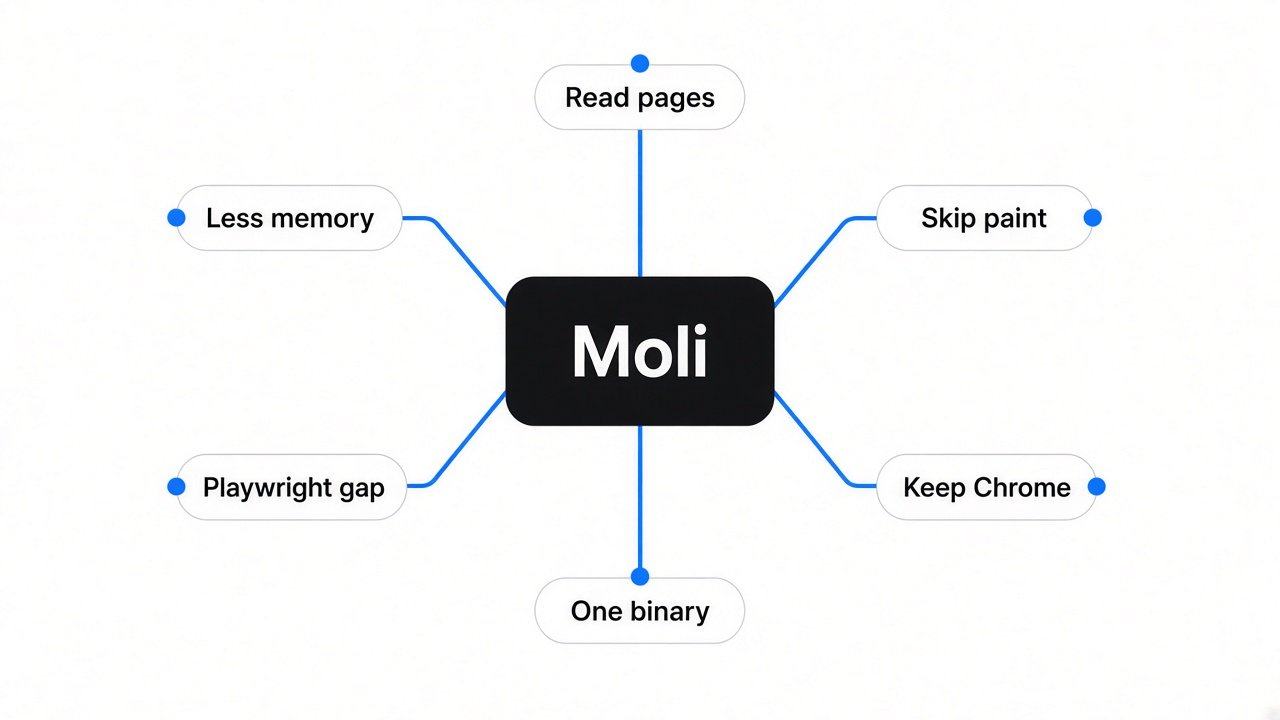
Most of the web only shows its content after JavaScript runs, so an agent that just downloads the page gets an empty shell.
Your agent asks for a page and gets back almost nothing. That happens because many sites send a near-blank HTML file, then fill it in with JavaScript (the code that runs inside the page) after it loads.
So the agent needs something that runs that JavaScript first. That something is a headless browser (a real web browser with no window on screen, controlled by code). It loads the page exactly like Chrome would, then hands your agent the finished text.
The default choice is headless Chrome. It works on almost every site. The catch is memory, and memory is what this post is about.
What does a headless browser actually do with a page?
It runs five steps, and an agent that only reads text needs just the first three.
Think of a page like a flat-pack wardrobe. You get the box, you read the instructions, you know every part. Building it and painting it is extra work you only do if you need to look at it.
A browser works the same way:
- Download the HTML.
- Run JavaScript with V8 (the engine inside Chrome that runs JavaScript).
- Build the DOM (the page as a tree of parts: headings, links, buttons).
- Layout (work out where every box sits on screen).
- Paint (turn those boxes into pixels).
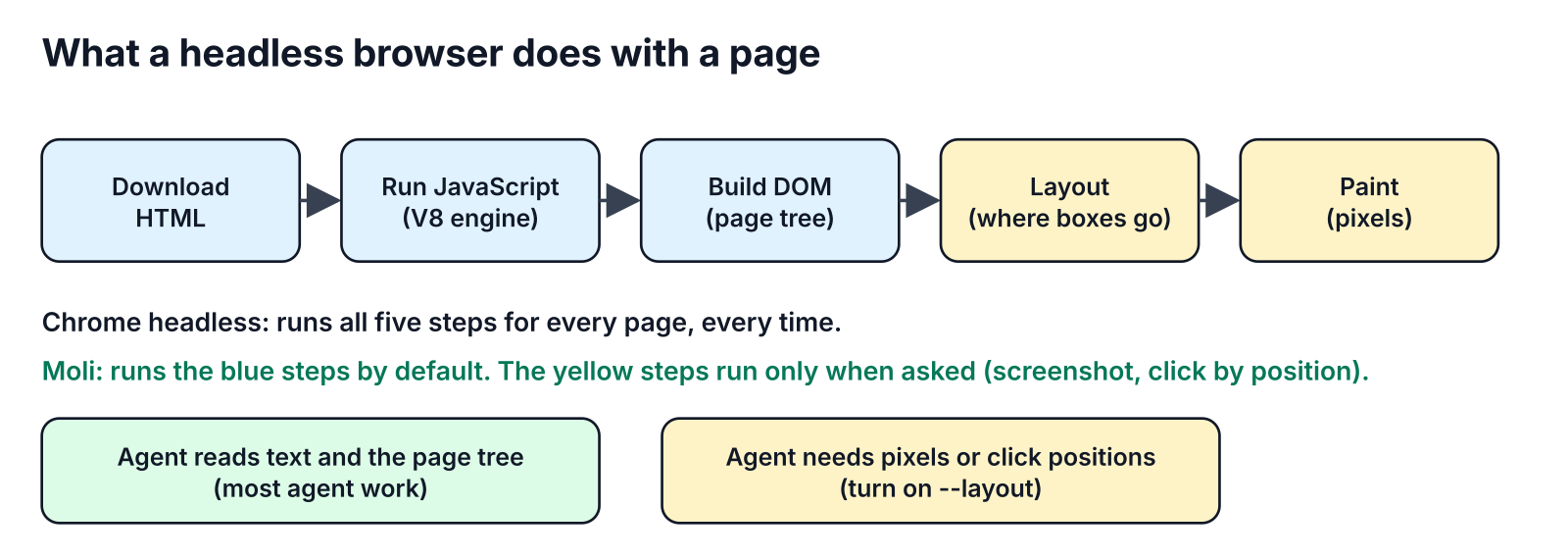
Chrome runs all five, for every page, every time. But an agent reading an article only needs the text and the tree. Steps 4 and 5 are building and painting a wardrobe nobody will look at.
What is Moli?
Moli is a headless browser written in Rust that skips layout and paint unless you ask for them.
That one design choice is the whole idea. Moli runs real JavaScript on V8 and builds a real DOM, like Chrome. Then it stops. Layout and pixels are made only when a request needs them, such as a screenshot or a click at a screen position, and thrown away after.
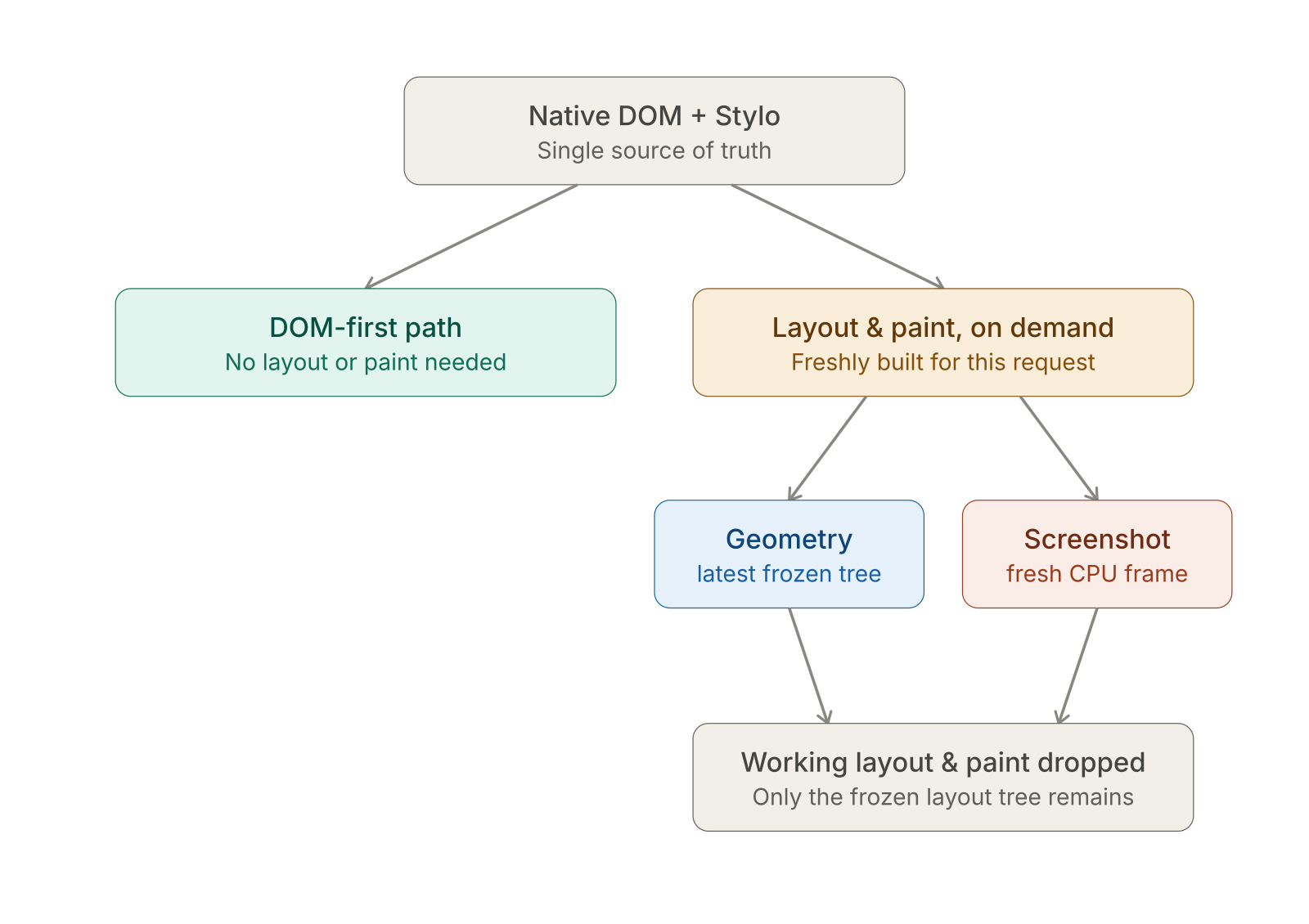
It gives your agent three ways in:
- A command line tool that fetches a page as Markdown, HTML, JSON or a compact page tree.
- CDP (Chrome DevTools Protocol, the remote-control language Chrome speaks), so tools built for Chrome can connect.
- WebDriver Classic and WebDriver BiDi (the remote-control standards Selenium uses).
It runs on Linux, macOS and Windows, and is free under MIT or Apache 2.0, your choice. It is one program: no separate Chrome download, no ChromeDriver.
Does Moli really use less memory than headless Chrome?
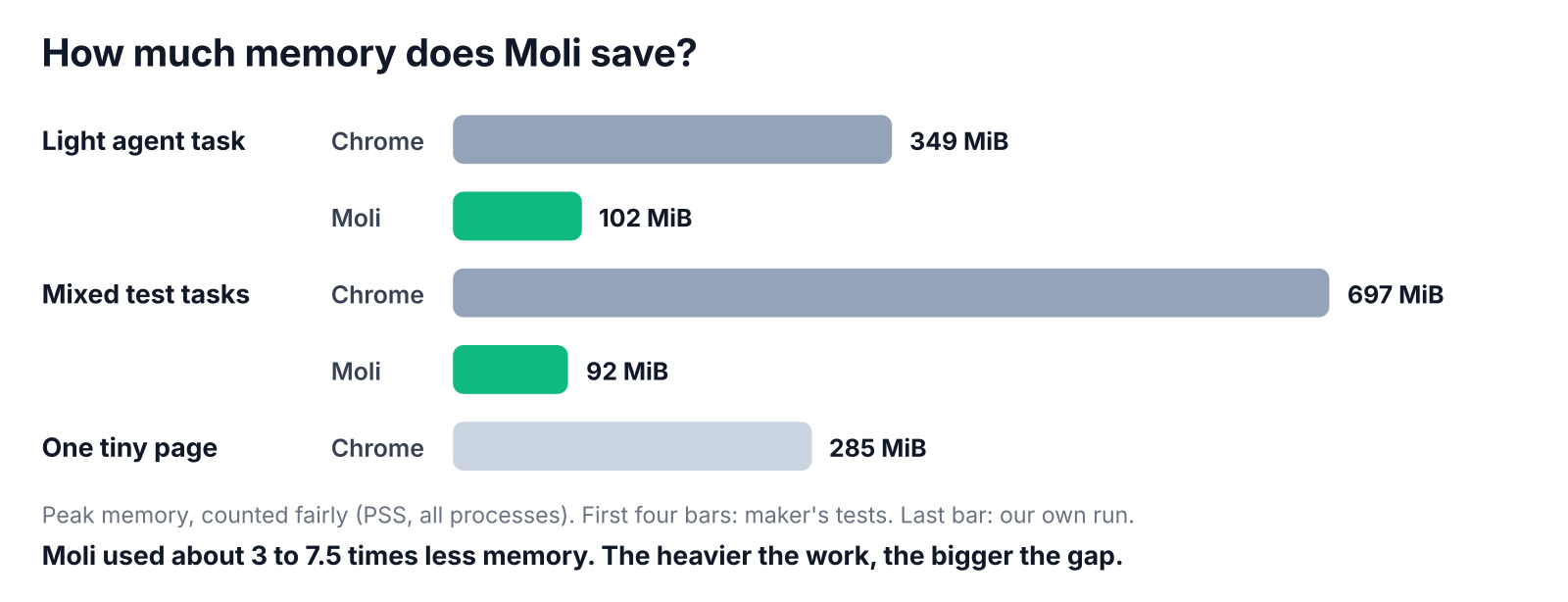
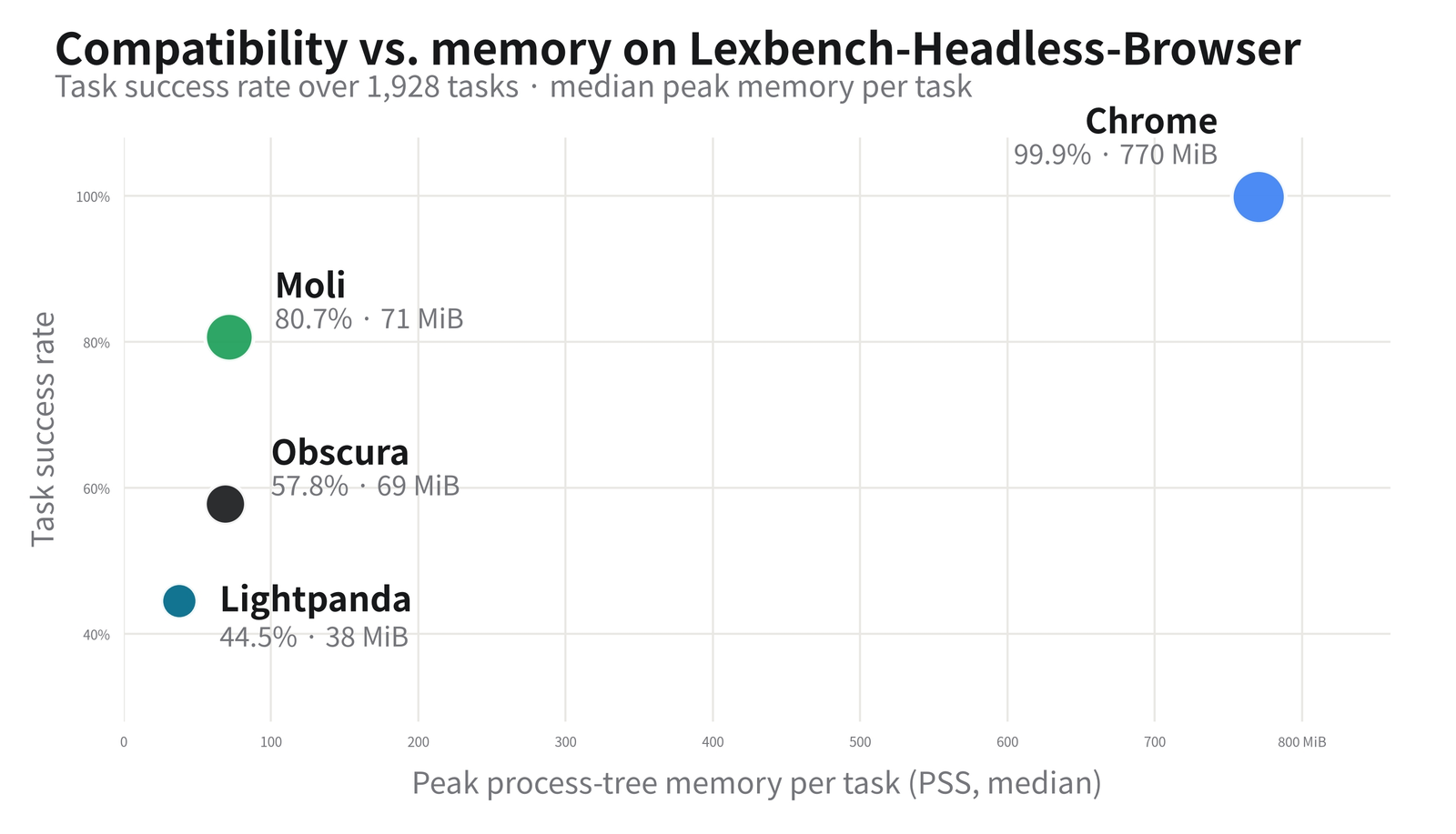
Yes. Counted fairly, it uses about 3 to 7.5 times less. Not the flat 10 times you may have seen.
That "10x less memory" headline is real, but it is the best case. The honest range depends on how heavy the work is, and on how you count memory in the first place.
Here is what the numbers say when memory is counted the fair way:
| Workload | Chrome headless | Moli | Moli saves |
|---|---|---|---|
| Sample agent task | 349 MiB | 102 MiB | about 3.4x |
| Hundreds of mixed test tasks (median) | 697 MiB | 92 MiB | about 7.5x |
| One tiny page (our own run, Chrome only) | 285 MiB | not tested | baseline |
The first two rows are the maker’s own tests. The third is ours: we ran Chromium headless on a one-line page on a small Linux box and measured it. Even doing almost nothing, Chrome sat near 285 MiB across 10 processes.
So for a light job, expect roughly a third of Chrome’s memory. On heavier, mixed work the gap grows.
Why does that matter to you? Memory decides how many browsers fit on one machine. If each Chrome takes 300 to 700 MiB, 4 GB of free memory fits about 5 to 13 of them. At around 100 MiB, the same 4 GB fits about 40.
Why do memory numbers for Chrome disagree so much?
Because Chrome is many processes sharing memory, and one common way of adding it up counts the shared part again and again.
Start with the base fact. Chrome does not run as one program. Even headless, our run had 10 processes (separate running programs that work together).
Those processes share a lot, like the same code libraries loaded once. Now there are two ways to measure:
- RSS (resident set size): each process reports all memory it touches, including the shared part. Add them up and the shared part is counted once per process.
- PSS (proportional set size): the shared part is split fairly between the processes that use it. Add them up and it is counted once.
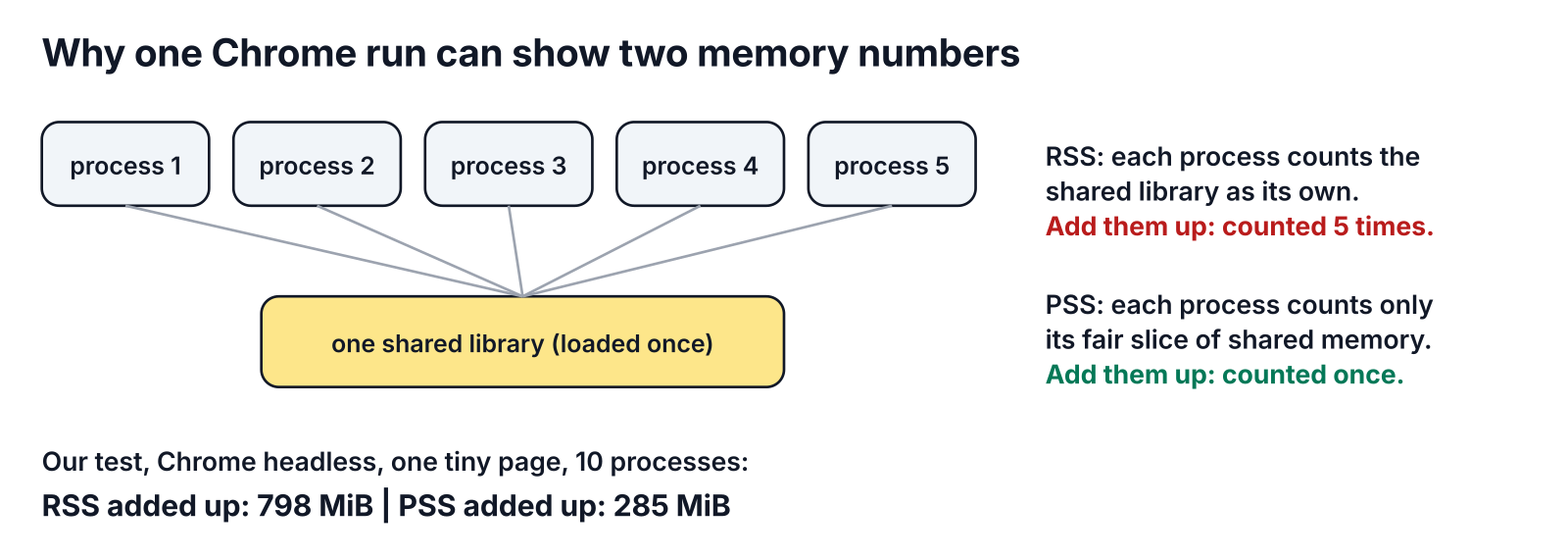
On our tiny-page run, the same Chrome showed 798 MiB with RSS added up, and 285 MiB with PSS. Same browser, same moment, almost three times apart.
Moli runs as one process, so its two numbers stay close. That is why a table that compares Chrome’s RSS against Moli’s can look far more dramatic than the real saving. If you test this yourself, compare PSS to PSS.
Can Moli replace Chrome for Playwright and Puppeteer?
Not yet for everything. It passes about two thirds of Playwright and Puppeteer tasks that Chrome passes almost all of.
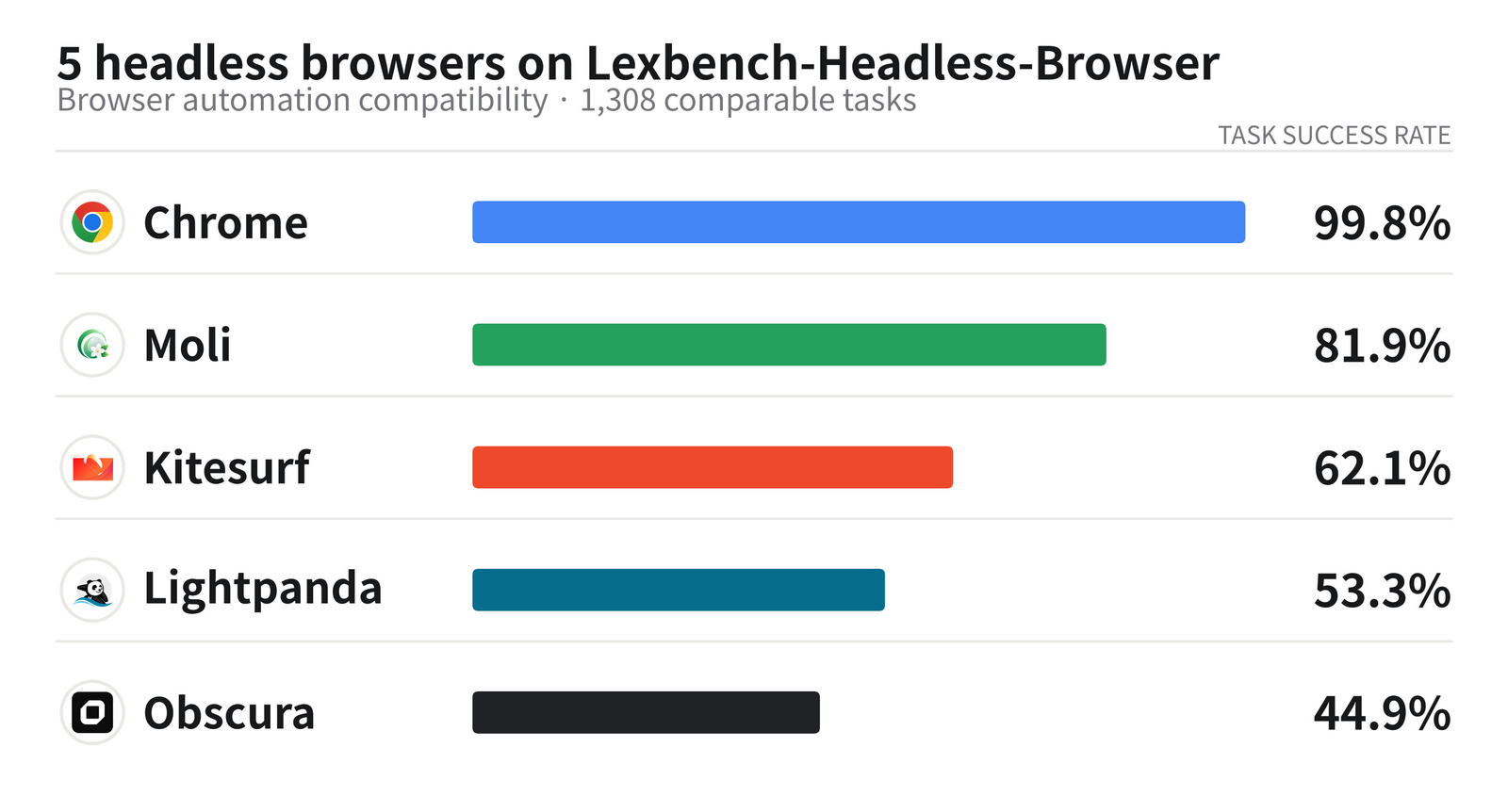
This is the part the headlines skip. The maker runs a big test suite of real automation tasks through many popular tools. Chrome passes almost all of them. Moli’s results depend heavily on which tool is driving it:
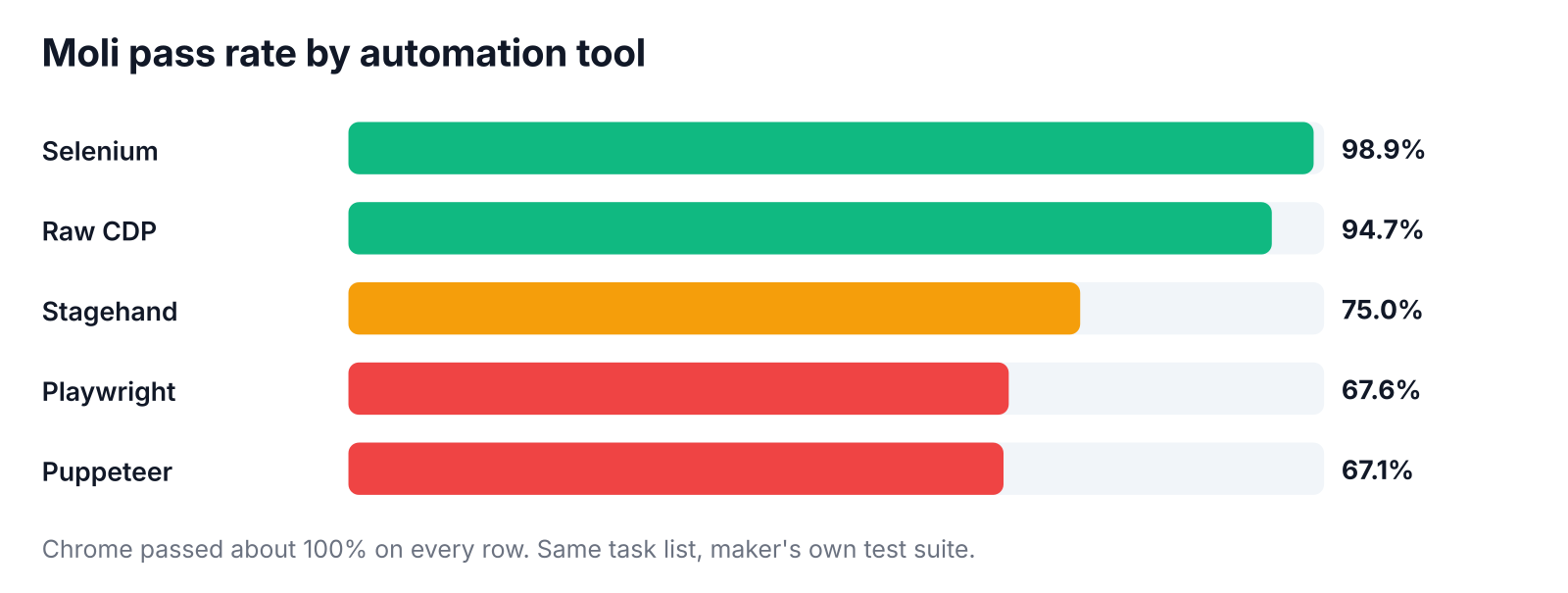
Selenium and raw CDP work almost as well as Chrome. Playwright (Microsoft’s popular browser automation library) and Puppeteer (Google’s) drop to about two in three. Stagehand (an AI-driven browser automation library) lands at three in four.
Across the whole suite, Moli passed about 82% against Chrome’s near 100%. That big run used an early Moli build, so newer versions may score higher.
One practical tip if you still try Playwright: start Moli with --layout. Playwright clicks an element at its position on screen, and Moli’s server only provides real positions and position-based clicks when started with that flag.
There is a fair point on Moli’s side. It is the clear leader among the lightweight browsers: Lightpanda (a headless browser written in Zig) and Obscura (another Rust one) both used less memory, but passed far fewer tasks. Moli sits in the middle: most of Chrome’s coverage, a fraction of its weight.
How do you try Moli in 5 minutes?
Install one binary, fetch a page as Markdown, and compare it with what your agent gets today.
Step 1. Install on Linux or macOS:
curl --proto '=https' --tlsv1.2 -fsSL \
  https://github.com/lexmount/moli/releases/latest/download/moli-installer.sh | sh
Step 2. Fetch a JavaScript-heavy page as Markdown:
moli fetch --dump markdown --wait-until done https://example.com
Step 3. For agents, ask for the compact page tree instead, which is smaller to send to a model:
moli fetch --dump semantic_tree_text --wait-selector body https://example.com
Step 4. To plug it into existing Chrome code, run it as a server, then point your tool at it:
moli serve --layout
import { chromium } from "playwright";
const browser = await chromium.connectOverCDP("http://127.0.0.1:9222");
On Windows, the repo has a one-line PowerShell installer too. Read any install script before you pipe it to your shell.
Get it here: Moli on GitHub
Should you swap Chrome for Moli?
Use Moli where your agent reads. Keep Chrome where your agent clicks through long flows.
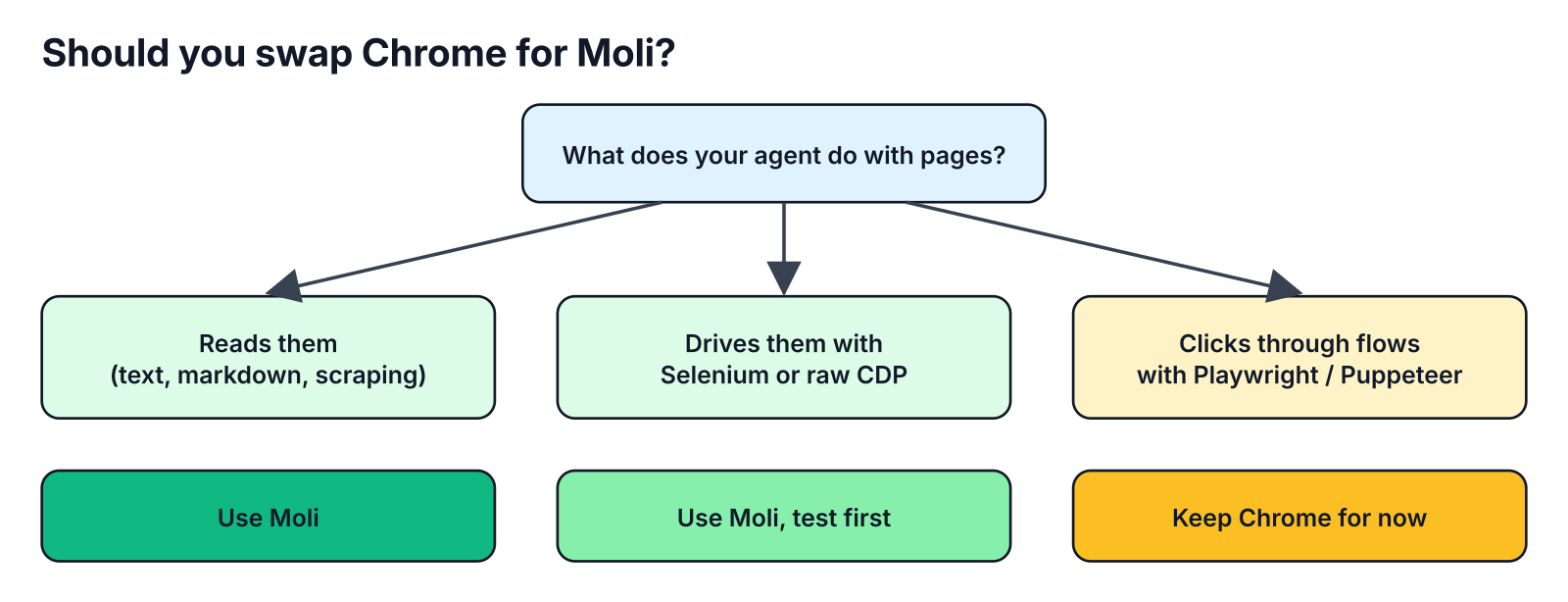
- Your agent reads pages (research, scraping, turning pages into Markdown): use Moli. You get Chrome-level coverage at a fraction of the memory.
- You drive pages with Selenium or raw CDP: Moli is a strong fit. Run your own test list first.
- Your agent clicks through logins, forms and checkouts with Playwright or Puppeteer: keep Chrome for now. One failed step in three kills the whole flow.
The two can also live side by side. Send the cheap reading work to Moli, and only hand the hard click-through jobs to Chrome.
The catch worth knowing: every benchmark here comes from the maker’s own test suite, and Moli moves fast. Run five of your real pages through both before you switch anything.
So the wardrobe stays flat-packed unless you need to look at it. Most of the time, your agent doesn’t.
FAQ
Is Moli free?
Yes. Moli is open source under MIT or Apache 2.0, your choice. The open-source browser works fully without the maker’s cloud service.
Does Moli work with Playwright?
Yes, through CDP with connectOverCDP. But in the maker’s own tests it passed about 68% of Playwright tasks, so test your flows before relying on it.
Is Moli faster than Chrome?
For reading pages, it finished in about the same time as Chrome while using far less memory. It also gets ready for a connection several times faster.
What is the difference between Moli and Lightpanda?
Both are lightweight headless browsers for agents. Lightpanda is lighter and quicker per page but handled fewer real pages and tasks; Moli covers more sites at a bit more memory.
Moli reads like Chrome at a fraction of the weight. It does not click like Chrome yet.