
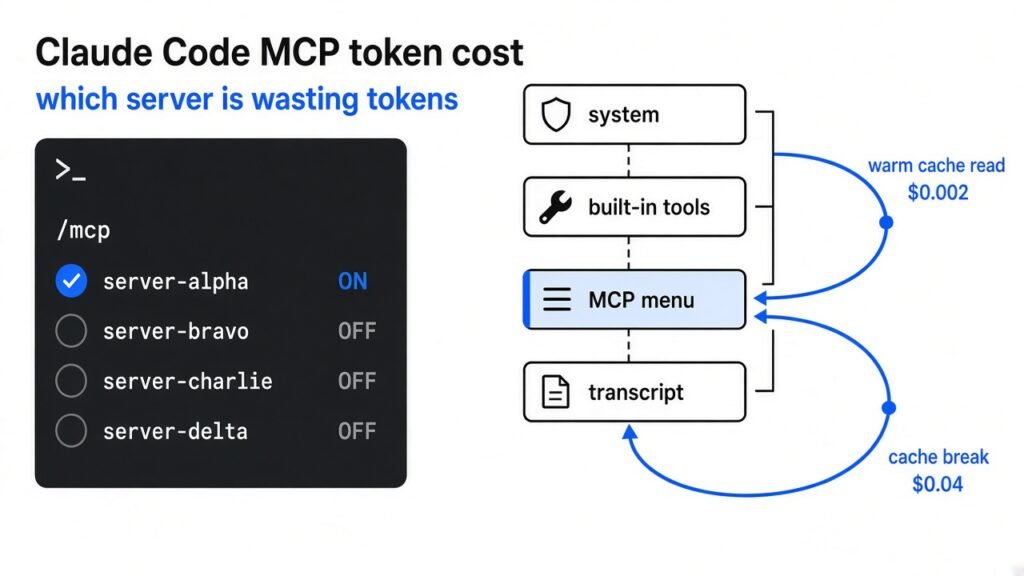
You can watch the session total climb and still not know which block to delete. Claude Code (the terminal agent that edits your repo) does not send only the sentence you just typed. It sends a prefix (the standing text in front of that sentence) and then it sends that prefix again on the next turn. You pay by the token (a small chunk of a word). Claude Code MCP token cost is the tool menu inside that prefix. It stays cheap only while the prompt cache holds. A cache break prices that menu like new input.
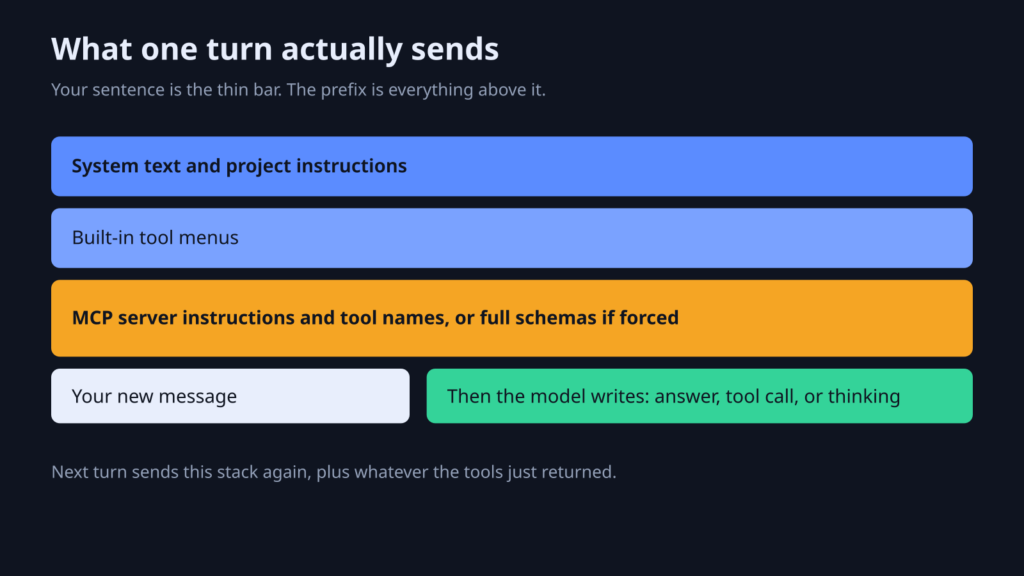
The menu is not one thing. MCP (a small server that lets the agent call a tool outside the chat) can show up as a short instruction, or as a full schema (the written shape of a tool, including its fields) on every turn. Those are different bills. I did not intercept a live session for this page. I priced both shapes off the same Opus 5.5 rates used in the compaction piece. Check /status before you treat the dollars as your invoice.
What does Claude Code send on every turn
Every turn sends the prefix plus your new text, not just the sentence you just typed.
The model has no memory between calls. The next call has to carry the old conversation or the agent forgets it. There is a ceiling on how much text fits. That ceiling is the context window (the max text one call can hold). When the window fills, Claude Code compacts, and a compaction rewrite can drop the exact line you needed.
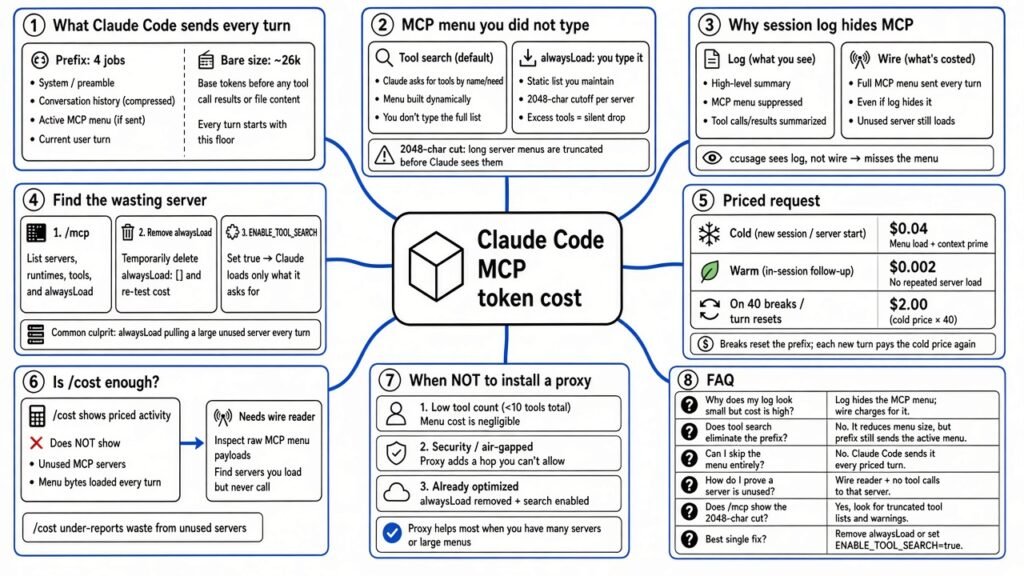
The prefix is doing four jobs before your sentence arrives.
- System text, including project instructions such as
CLAUDE.md(the file the session reads when it starts). - Built-in tool menus, so the agent can read a file or run a command.
- MCP server instructions, and sometimes the full tool schemas.
- The transcript so far: your old messages, the assistant’s old text, and tool results.
Then your new message. Then the model writes back. That write is output. It is a different price from the text you sent.
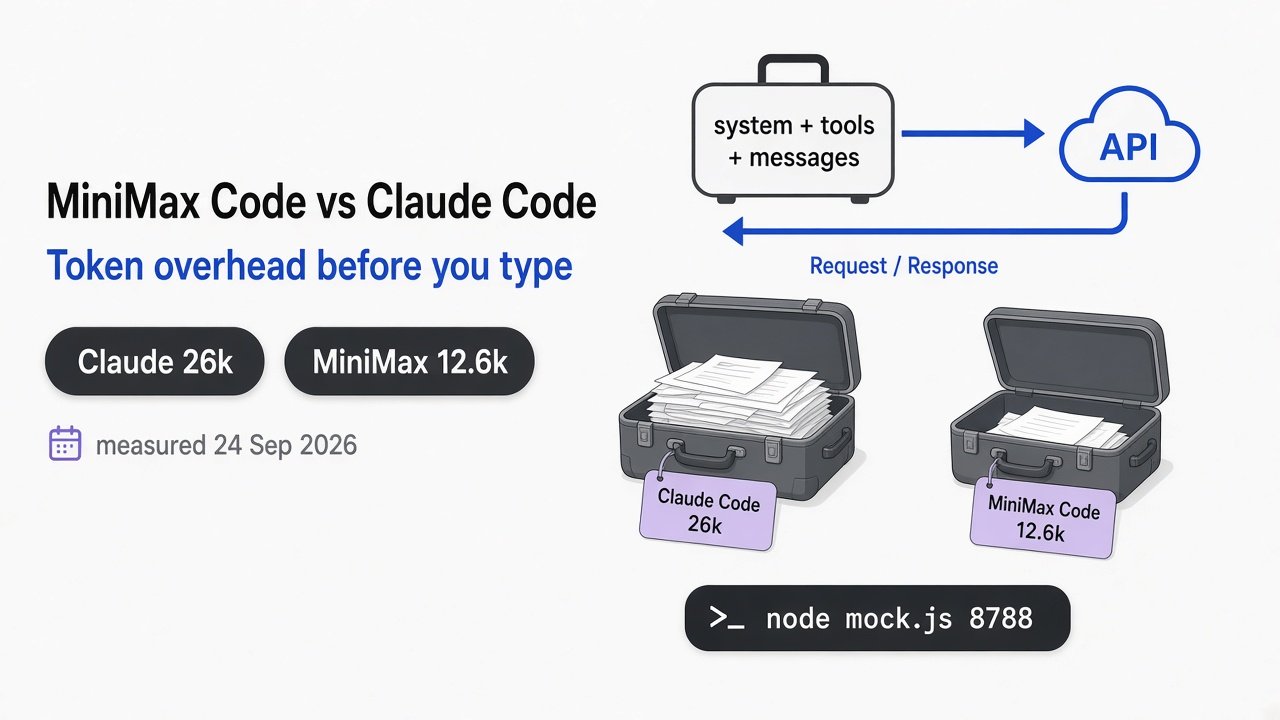
A bare session already spends on the order of 26,000 tokens before you type. That figure is from the token overhead test. It is the whole prefix. It does not say how many of those tokens are MCP. Do not subtract my fixture from 26,000 and call the remainder a measurement.
Claude Code MCP token cost: the menu you did not type
Claude Code MCP token cost is the server instructions and tool names sent up front, or the full schemas if you forced them to load.
The default is the small version. Tool search (loading a tool’s full schema only when the model asks for that tool) keeps names and server instructions in the prefix. The fat schema stays out until it is needed. Each tool description and each server instruction is cut at 2,048 characters unless you set CLAUDE_CODE_MAX_MCP_DESCRIPTION_LENGTH. That variable needs Claude Code v2.1.280 or later.
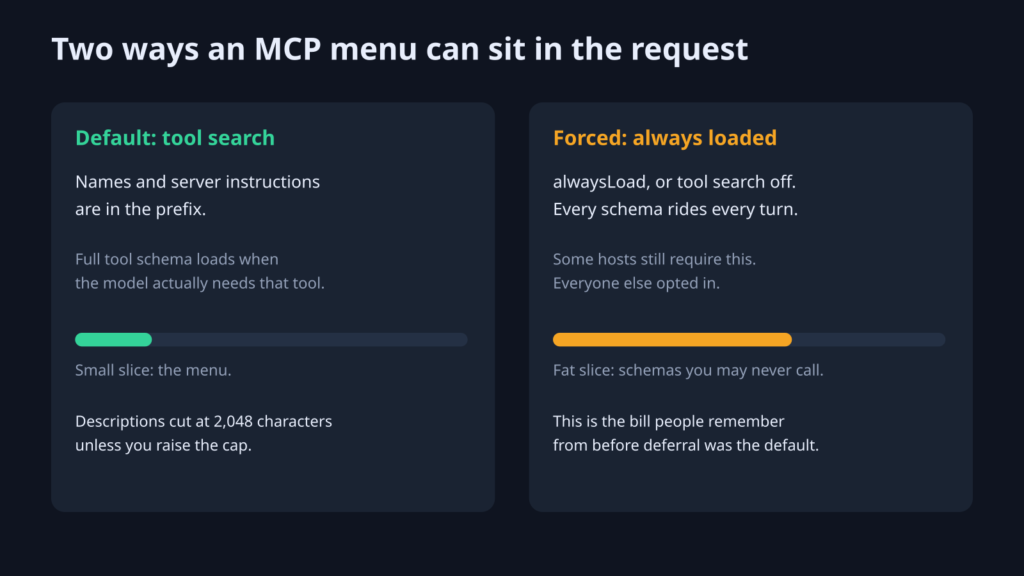
You opt into the fat version. Set alwaysLoad on a server, or set ENABLE_TOOL_SEARCH to false, and every schema rides every turn. Some hosts still require that, because they reject the deferred tool reference. The docs name older Google Agent Platform setups and Microsoft Foundry as two of those. If you are not on one of those hosts, a fat menu is a switch you flipped.
The official map of those switches is the MCP page in the Claude Code docs.
A third bill is easy to mix up with the menu. A tool result (the text a tool sends back, such as a file dump or a query) can be huge. The default warns past 10,000 tokens and caps the result around 25,000, unless you raise MAX_MCP_OUTPUT_TOKENS. That result lands in the transcript. The next turn pays to read it. The menu and the result are different rows. Turning off a server you never call does not shrink a result you already asked for.
Why does the session log hide MCP tokens
The session log stores the conversation after the run, and the tool menu is assembled at request time, so a log reader never sees it.
A transcript is the chat you can scroll: your lines, the assistant’s lines, the tool calls, the tool results. The system text, the built-in menus, and the MCP instruction block are glued on when the request is built. They are not written back into that scroll.
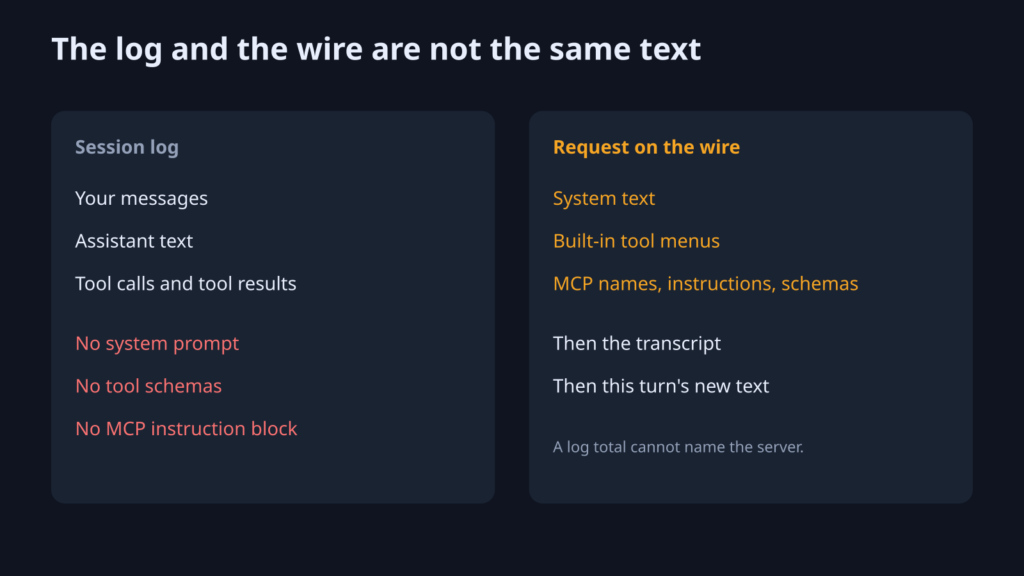
So a tool that reads local logs can tell you the session total, the cache split, and which tool result was long. It cannot tell you that a server you never called still owned a block of instructions. ccusage is a strong log reader. It is the wrong instrument for the menu.
The wire is the request the API actually received. A wire reader sits on the local path and attributes tokens to a source: system text, a built-in tool, one MCP server, a message, a result. cost-xray is that kind of tool for Claude Code and Codex. It is optional. The next section is the check you can do without it.
How do I find which MCP server is wasting tokens
Open /mcp, turn off servers you will not call, and remove alwaysLoad unless that server is useless without it.
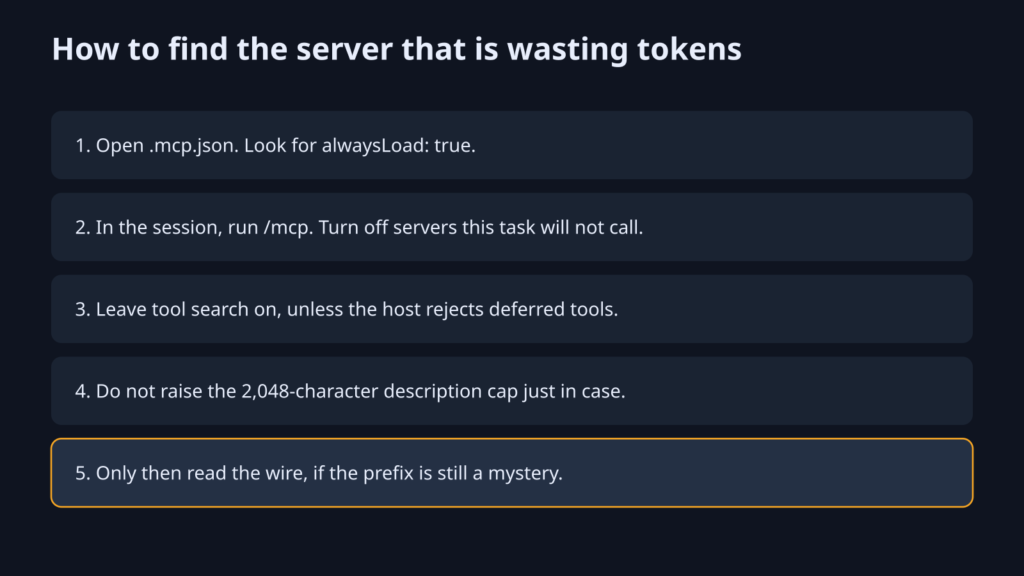
Ten minutes, on a repo you can throw away if you are nervous. I did not run this inside a Claude Code session for this page. The steps are the ones the product documents.
- Open
.mcp.jsonin the project, and the user config if you added global servers. If a server has"alwaysLoad": true, its tools are in every request. Remove that flag unless you have a reason. - Start Claude Code in that project. Run
/mcp. Turn off every server this task will not call. The off switch is stored for you. You do not have to delete the server to stop paying for it today. - If
ENABLE_TOOL_SEARCHis false, turn tool search back on, unless you are on a host that rejects deferred tools. - Leave
CLAUDE_CODE_MAX_MCP_DESCRIPTION_LENGTHunset. Raising it makes every instruction longer. Do that only when a server is wrong because the 2,048-character cut ate the one sentence it needed. - Do one real task. If the bill is still ugly, look at the tool result before you look at the menu. A 25,000-token dump is a result. It is in the log. The menu was not that dump.
If the config is already lean and the prefix is still a mystery, then read the wire. Until then a proxy (a local hop that copies the request on its way to the API) is extra machinery.
What does one priced request look like
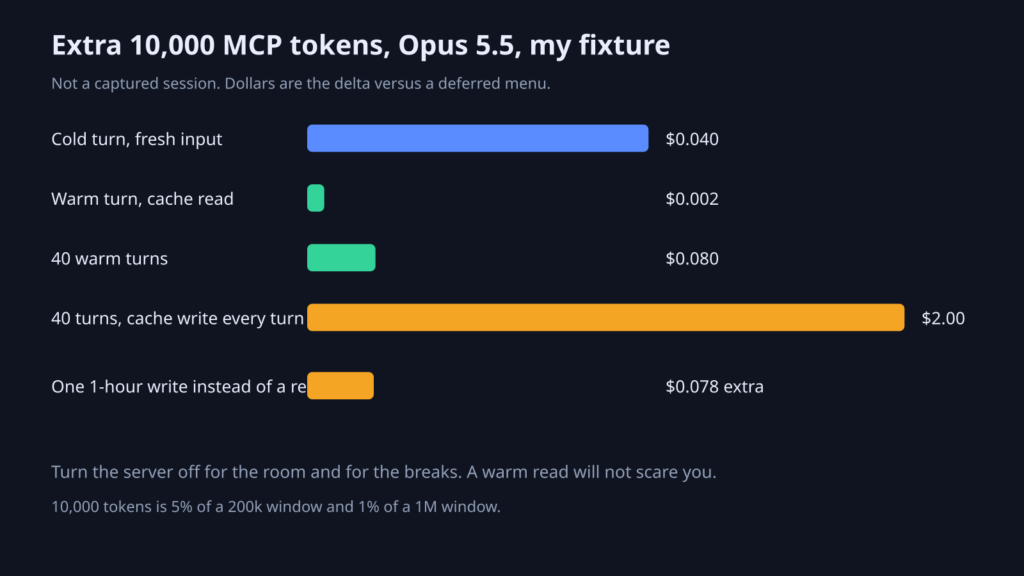
On these Opus 5.5 rates, forcing an extra 10,000 MCP tokens costs about $0.04 on a cold turn and about $0.002 on a warm cache read.
A token is not one price. Fresh input is text the cache does not already hold. A cache write (paying to store a prefix so the next turn can reuse it) costs more than fresh input: 1.25 times for a 5-minute cache, 2 times for a one-hour cache. A cache read (reusing that stored prefix) is the cheap one. Output is what the model writes, and on this model it is 5 times fresh input.
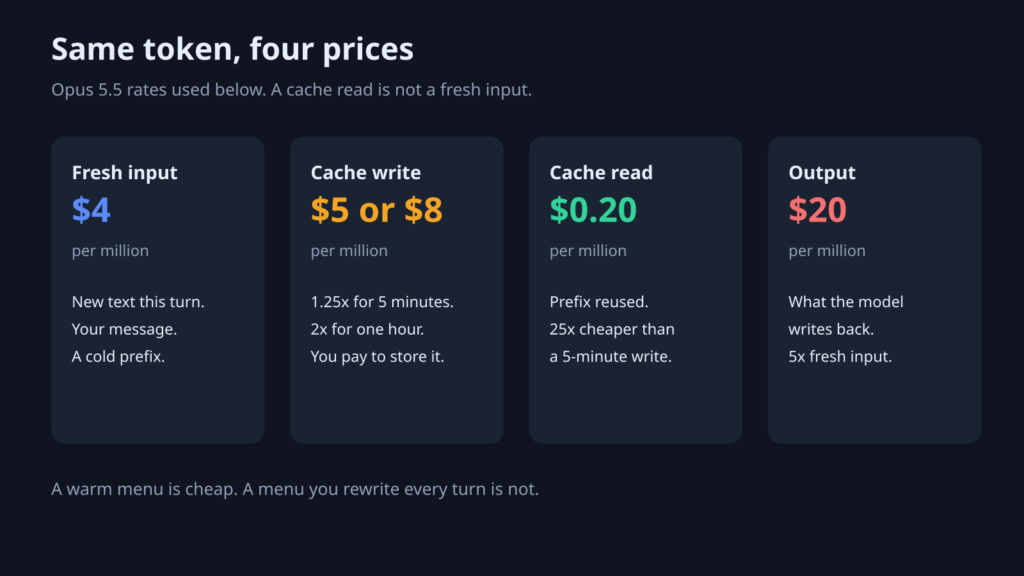
Rates I used, and nothing else. Opus 5.5 at $4 per million fresh input tokens and $20 per million output tokens. Cache reads at $0.20 per million. A 5-minute cache write is $5 per million. A one-hour cache write is $8 per million. Same input and cache-read rates as the compaction piece. If /status says you are not on Opus 5.5, keep the shape and swap the sticker. The default model note is why the sticker moves.
The fixture is a delta, not a captured trace. Deferred menu: 2,000 tokens of names and instructions. Forced menu: 12,000 tokens of schemas. The extra is 10,000 tokens. I ran that arithmetic. I did not run the session.
| What happened to the extra 10,000 | Dollars |
|---|---|
| Cold turn, fresh input | $0.040 |
| Warm turn, cache read | $0.002 |
| 40 warm turns | $0.080 |
| 40 turns that cache-write every turn, 5-minute rate | $2.00 |
| One 1-hour write instead of a read | $0.078 extra on that turn |
Read the warm row before you uninstall every server in a panic. Eight cents across 40 calm turns will not change your month. The $2.00 row is the one that matches a session whose prefix keeps breaking: a model switch, a mid-session edit to the menu, an image pasted into a long chat, a compact. A cache write costs 25 times a cache read at the 5-minute rate, and 40 times a cache read at the one-hour rate. One rewritten token is the expensive token. A longer menu makes every break bigger.
Room is the other reason, and it does not show up as a scary warm-cache dollar. 10,000 tokens is 5% of a 200k window and 1% of a 1M window. You feel it when the window fills and compaction runs, not when the warm read prints $0.002. The menu is part of why the window fills. It is not, by itself, why a warm session looks expensive.
A fat tool result can beat the menu on a single turn. 25,000 fresh input tokens at $4 per million is $0.10, more than the entire cold menu delta. If your log shows a huge result, fix the result. Do not blame the server instruction.
Is /cost enough to see Claude Code MCP token cost
No. /cost and a log reader can total the session, but they cannot name the MCP server that owned the menu.
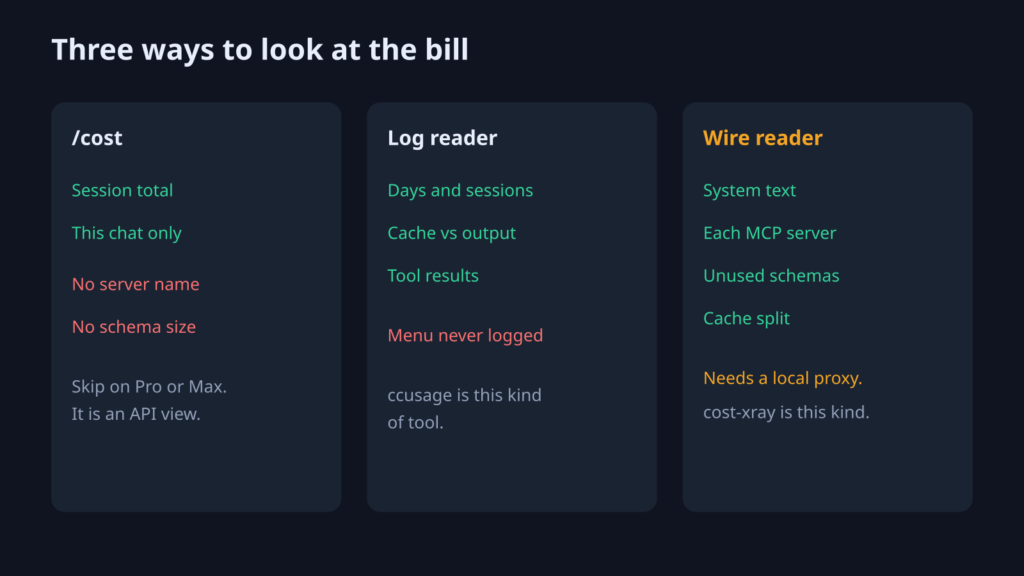
| Question | /cost | Log reader such as ccusage | Wire reader such as cost-xray |
|---|---|---|---|
| What did this session cost? | Yes, if you are on API billing | Yes, across days | Yes |
| Cache read versus cache write versus output? | Only as a session lump | Yes | Yes |
| Which tool result was long? | No | Yes, it is in the transcript | Yes |
| How big is the system text? | No | No | Yes |
| Which MCP server is in the prefix, including one you never called? | No | No | Yes |
/cost is the wrong first stop on a Pro or Max subscription. The product docs say that command is not meant for those plans. It also cannot see the menu, on any plan. The cost docs are the session total, not the split by source.
Use the table this way. If you only need how much today cost, stay on the log. If you need which server to turn off, start with /mcp and alwaysLoad. Open a wire reader when those two will not answer.
cost-xray installs a local proxy and shell wrappers, then attributes each token to a source. For Claude it can calibrate a local estimate against the token counter when you are already logged in. Skip it unless the prefix is still unexplained, and skip it on Windows. If the proxy is down, the wrapper runs the agent directly.
When should I not install a request proxy
Do not install a proxy if /mcp and alwaysLoad already explain the prefix, or if you will not let a local process see your API traffic.
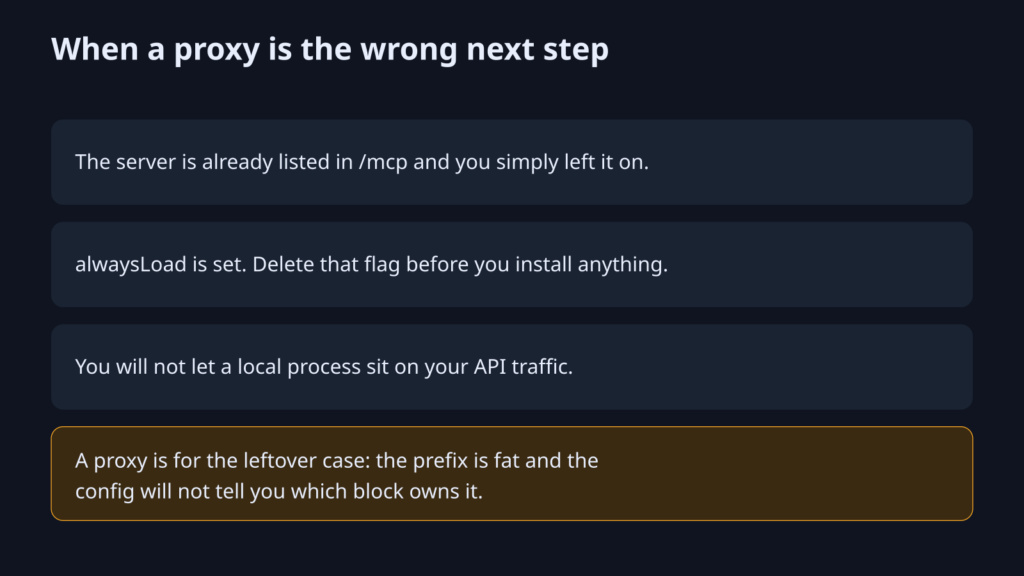
Three skips:
- The server is sitting in
/mcpand you left it on. Toggle it off. You are done. alwaysLoadis set, or tool search is off, and you are not on a host that requires the fat menu. Flip the switch. Measure again before you add software.- You do not want a proxy on the machine that holds your login. The config check does not need one.
A proxy earns a place only in the leftover case: the prefix is fat, the config looks lean, and you still cannot name the block. Even then, judge it on whether the server name in the breakdown matches a server you can turn off. A total you already had from /cost is not a reason to keep it.
One more limit. Disabling a server changes the prefix, so the next turn misses the cache on the text after that edit. You pay the write once, then the shorter prefix reads cheap. Do not toggle servers every few minutes and expect the warm row. Pick the set for the task, then leave it.
If a hook or a plugin is what turns servers on for you, know which switch you actually flipped. Mods versus plugins is the difference between a gate you can name and a pile of files the session might not load.
Common questions about Claude Code MCP token cost
Why does Claude Code burn tokens before I type?
Because the first call already sends the prefix: system text, built-in tool menus, and MCP names or instructions. Your sentence is not in that pile yet. A bare session is on the order of 26,000 tokens before you type. How much of that is MCP depends on alwaysLoad and on how many servers /mcp left enabled.
How do I find which MCP server is wasting tokens?
Run /mcp and turn off servers this task will not call. Then open .mcp.json and remove alwaysLoad unless you need the full schema on every turn. If the prefix is still unexplained, a wire reader can name the server. A log reader cannot.
Can ccusage show MCP schema tokens?
No. ccusage reads the session log. The schema and the server instruction are added at request time and are not written into that log. It can show tool results, cache reads, cache writes, and output. It cannot show a menu you never called.
Does a warm cache make unused MCP tools cheap?
Yes, in dollars, if the prefix is stable. On these Opus 5.5 rates an extra 10,000 tokens is about $0.002 a turn while the cache holds, and about $0.04 when it is cold. The same 10,000 tokens still take 5% of a 200k window. Turn them off for the room and for the turns where the cache breaks, not because a warm read looks expensive.
If you try one thing after this page, make it /mcp on a project that has servers you are not using. If the list was already empty and nothing is forced on, leave the proxy alone. The menu was not your bill.
5 comments