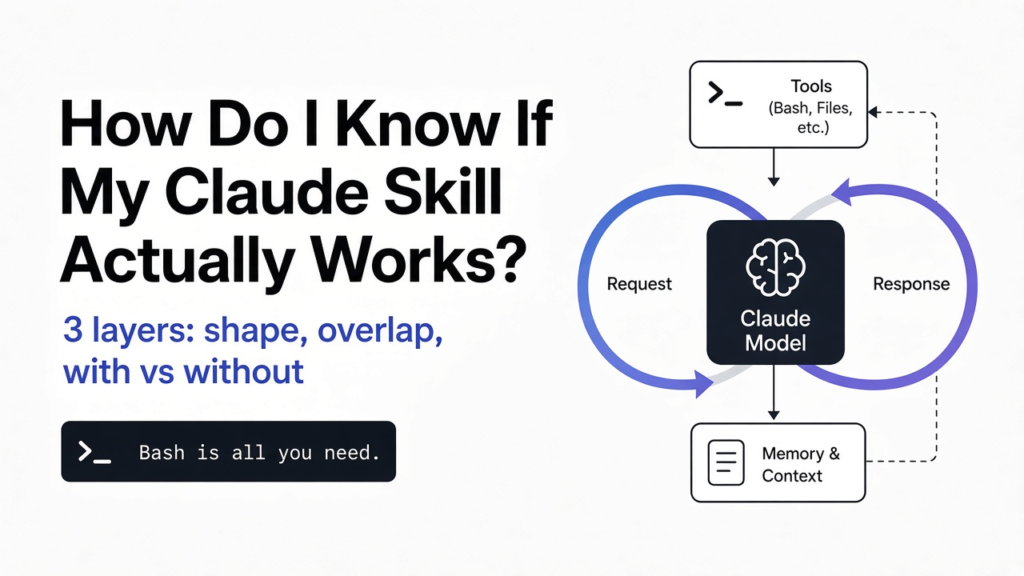
Short answer: here is how to test Claude skills in three layers. First check the file shape (name, description, length) so Claude can find it. Then check it does not repeat what other skills already say. Then run the same tasks twice, once with the skill and once without, and compare. Only that last test proves the skill helps.
You wrote a skill, Claude picked it up once, and the answer looked fine. So it works. Right?
Not yet. That one good answer might have happened without the skill too. The whole post rests on one idea: a skill only works if Claude does better with it than without it. Everything below is a way to measure that gap.
What is a Claude skill?
A skill is a folder of instructions Claude reads only when the job needs it. Knowing how it loads tells you what to test.
Start from the base. Claude has a context window (the amount of text it can hold in mind at once). Everything you load into it costs space, so you cannot stuff every rule you own into every chat.
A skill solves that. It is a folder with one main file, SKILL.md, plus any extra files it needs. The top of SKILL.md has a small header block called frontmatter (a few labeled lines between two --- marks) holding a name and a description.
Here is the trick. At startup Claude loads only the name and description of every skill. It opens the full SKILL.md only when your request looks like a match. Think of a library shelf: Claude reads every book’s spine, but pulls a book off only when the title fits your question.
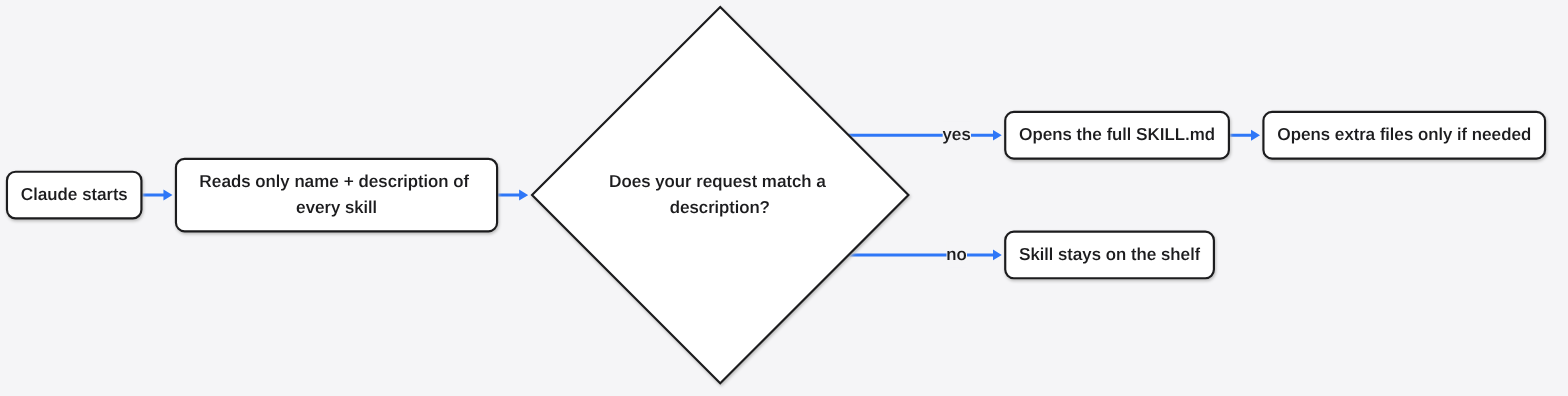
So a skill can fail in two separate ways. Claude never pulls it off the shelf, or Claude reads it and the answer gets no better. Each needs its own test.
Why is “it loaded once” not proof?
Seeing the skill load proves Claude found it, not that it helped. A strong model already does many tasks well on its own.
This is the same problem as trying a vitamin. You take it, you feel fine, but you might have felt fine anyway. The only honest test compares two groups: one with the vitamin, one without.
Skills work the same way. The fair version is an A/B test (running the same task two ways and comparing results). Run your tasks once without the skill to get a baseline (the score you get with nothing added). Then run them with the skill. The difference is the skill’s real value.

That gap can be big. NVIDIA ran this kind of test on more than 300 of its own skills, and average correctness rose from 46 to 87 out of 100 with the skills added. But the gain per product ranged from roughly +2 to +46, so some skills barely moved the needle. You only know which kind you have by measuring.
Layer 1: Is the file shaped so Claude can find it?
This layer is free, takes seconds, and catches the reason most skills never trigger. It needs no AI model at all.
The rules come straight from Anthropic’s skill guidelines. The name can be at most 64 characters of lowercase letters, numbers and hyphens. It cannot contain the words “anthropic” or “claude”.
The description must not be empty and can be at most 1,024 characters. Write it in third person (“Processes Excel files”, not “I can help you”). It should say what the skill does and when to use it. The body of SKILL.md should stay under 500 lines.
That “when to use it” part matters most. Remember the library shelf: the description is the spine. If the spine says what the book is about but never says who should pick it up, Claude has to guess.
I wrote a small checker for these rules and ran it on 52 real skills.
# skillcheck.py  - run: python3 skillcheck.py path/to/skill-folder
import sys, re, pathlib
import yaml  # pip install pyyaml

RESERVED = ("anthropic", "claude")

def check(folder):
    text = (pathlib.Path(folder) / "SKILL.md").read_text(encoding="utf-8")
    m = re.match(r"^---\n(.*?)\n---\n(.*)$", text, re.S)
    if not m:
        return [("FAIL", "no frontmatter block between --- lines")]
    head, body = m.groups()
    fields = yaml.safe_load(head) or {}
    name = str(fields.get("name", "") or "")
    desc = " ".join(str(fields.get("description", "") or "").split())
    out = []
    out.append(("PASS" if 0 < len(name) <= 64 else "FAIL", f"name length {len(name)} (max 64)"))
    out.append(("PASS" if re.fullmatch(r"[a-z0-9-]+", name or "x!") else "FAIL", "name uses only a-z, 0-9, -"))
    out.append(("FAIL" if any(w in name for w in RESERVED) else "PASS", "name avoids reserved words"))
    out.append(("PASS" if 0 < len(desc) <= 1024 else "FAIL", f"description length {len(desc)} (max 1024)"))
    out.append(("WARN" if re.match(r"(?i)(i |you |i'm|we )", desc) else "PASS", "description written in third person"))
    says_when = re.search(r"(?i)\b(use|used|trigger\w*|read|load)\b[^.]{0,60}\b(when|whenever|before|if)\b"
                          r"|\bwhen the (user|person)\b|\btriggers? on\b|\buse for\b|\bfor users\b", desc)
    out.append(("PASS" if says_when else "WARN", "description says WHEN to use it"))
    n = body.count("\n") + 1
    out.append(("PASS" if n < 500 else "WARN", f"body {n} lines (keep under 500)"))
    return out

for f in sys.argv[1:]:
    print(f"== {f}")
    for status, msg in check(f):
print(f" {status:4} {msg}")The results surprised me. Every skill passed the hard limits. But 13 of the 52 had a description that said what the skill does and never said when to use it.
The script only flags them, so I read each flagged description myself to confirm.
One event-planning skill describes the job well: birthday dinners to weddings, venues, guest lists, vendors and budgets. Clear and useful, with no line about when Claude should pick it. Another skill, ironically the one built to create skills, had a body just over the 500-line mark.
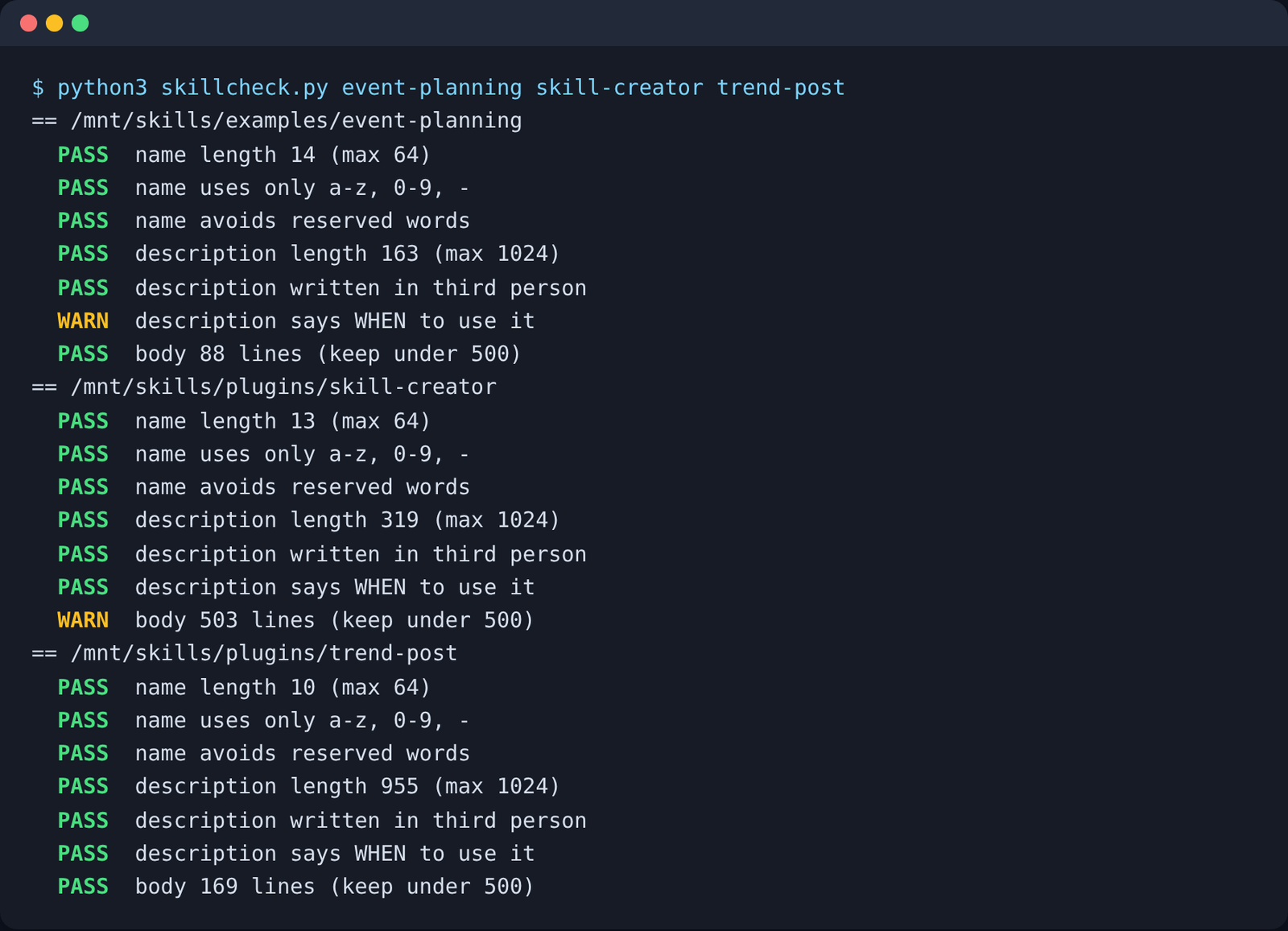
One more thing I learned the hard way. My first version read the header line by line, and it reported a long description as 1 character long. The description was written in YAML’s folded style (a > followed by text on the next lines), so a naive reader saw nothing. Parse the header with a real YAML library, or your checker will lie to you.

The fix for a missing trigger is one sentence. Add “Use when…” followed by the words a person would actually type, like “Use when the user asks to plan a party, wedding or dinner.”
Layer 2: Does the skill repeat what Claude already has?
A skill that copies other guidance wastes space and can confuse the choice between skills. This check is about repeated guidance, not security.
Safety is a separate check. If you install skills other people wrote, also scan a Claude Code skill before you install it.
Picture two shelf spines with nearly the same title. Claude reads both and has to pick one, and it might pick the wrong one. The same happens inside one skill when the same rule appears three times in slightly different words.
Tools find this with embeddings (a way of turning text into numbers so similar meanings land close together). Two paragraphs that say the same thing in different words still land near each other, so the overlap shows up even without matching words.
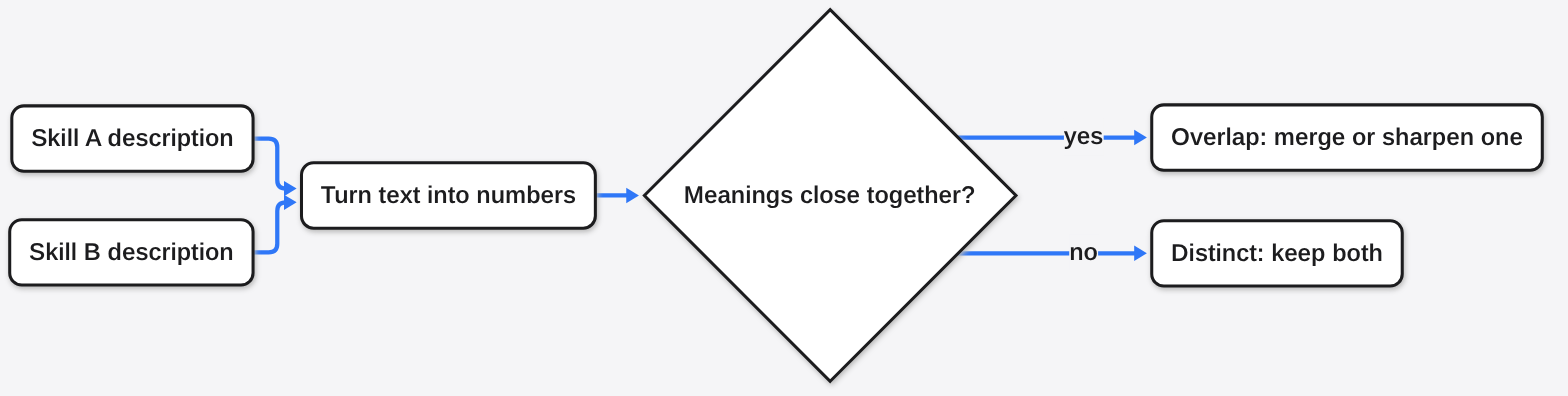
You can do a rough version by hand. Put all your skill descriptions in one list and read them side by side. If you cannot tell in one glance which skill a request should go to, Claude cannot either.
Layer 3: How do I run the with and without test?
This is the only layer that proves value, and it is simpler than it sounds. You need a few tasks, two runs, and an honest way to score them.
Anthropic’s own advice is to build the tests before writing long instructions. Run Claude on real tasks with no skill, note where it falls short, write at least three test scenarios around those gaps, then write only enough skill to close them. Also test with every model you plan to use, because a skill that helps a small model may add nothing to a large one.
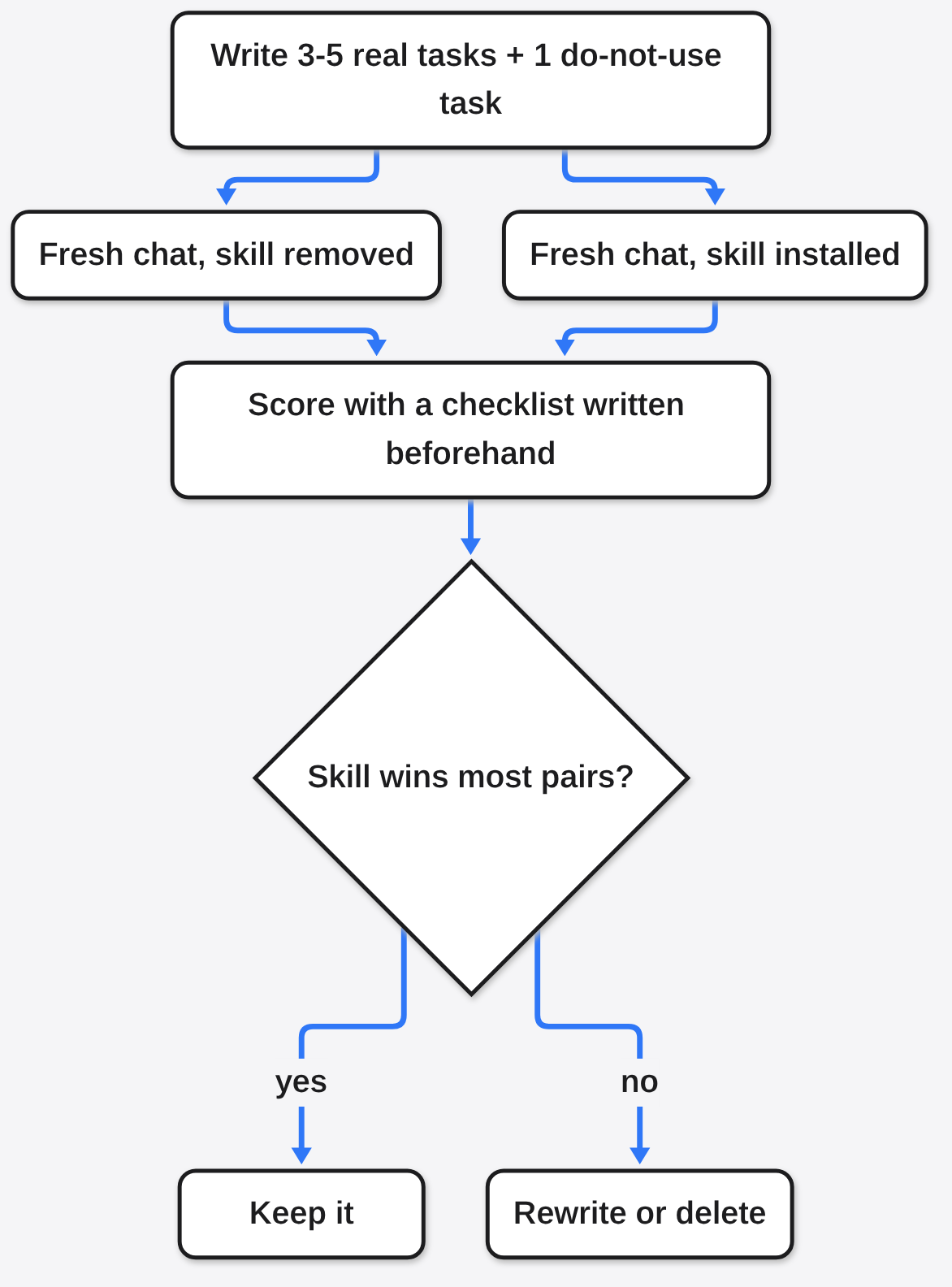
Here is a version you can run by hand:
- Write 3 to 5 real requests the skill is meant for.
- Add 1 request where the skill should NOT be used. This catches a skill that fires on everything.
- Run each request in a fresh chat with the skill folder removed. Save the answers.
- Put the skill back and run the same requests in fresh chats. Save those answers.
- Score each pair against a simple checklist you wrote before looking, like “used the right file format” or “named the correct command”.
- Count wins. If the skill does not win most pairs, rewrite it or delete it.
Fresh chats matter. If the first answer is still in the conversation, the second run learns from it and the test is ruined.
If you do this often, tools automate it. Anthropic’s skill-creator skill can write evals (small, repeatable tests with an expected result). It runs benchmarks that track pass rate, time and token use. It also runs blind A/B comparisons, where the judge does not know which answer had the skill.
NVIDIA’s SkillEvaluator is a free, open-source tool that covers all three layers. Its quality check runs offline with no API key. Its live test runs the agent with and without the skill inside a sandbox (a sealed-off space where the agent cannot touch your real files).
Get it here: SkillEvaluator on GitHub. Docs for the skill format: Anthropic skill best practices.
Can a skill make Claude worse?
Yes, and the most common way is cost, not wrong answers. A skill adds text Claude must read, and that text is not free.
The gap can go either way. Tokens are the small chunks of text an AI model reads and bills by. In NVIDIA’s tests, one skill cut the tokens a task needed from 617,306 to 142,540, a drop of about three quarters. Another skill more than doubled them, from 25,227 to 55,582. Same kind of tool, opposite effect.
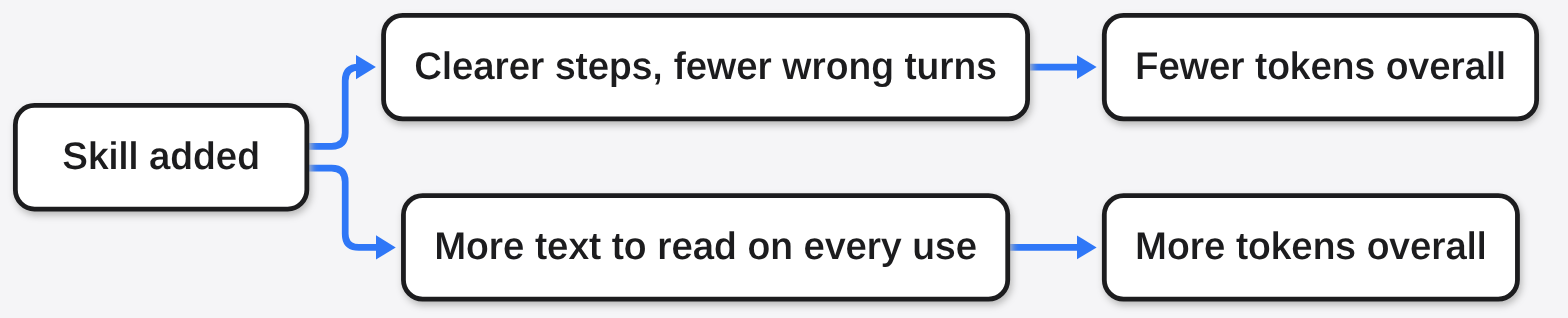
So measure cost in Layer 3 too, not just correctness. There is a fair case for keeping a skill that costs a bit more if it fixes real mistakes. But a skill that costs more and wins nothing is pure overhead.
The same logic applies to tools you plug in: see which MCP server is wasting tokens.
If you have piled up skills you no longer use, autoharness for Claude Code skills covers pruning them.
Which test should I run first?
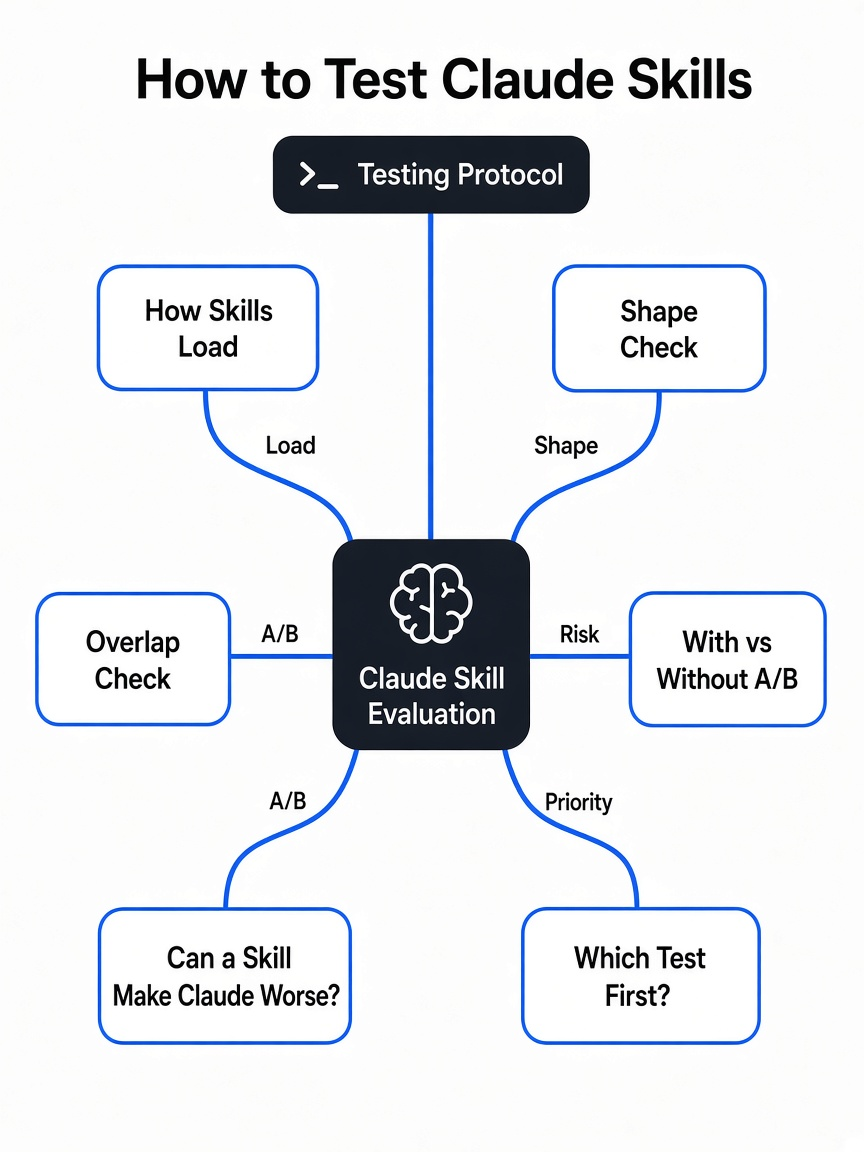
Run Layer 1 first, because it takes one minute and fixes the most common failure. Then run Layer 3 on the one skill you rely on most.
Layer 2 can wait until you own enough skills that they start to look alike. Most people with a handful of skills will never need a tool for it.
The order matters because each layer depends on the one before. A skill Claude never opens cannot win an A/B test, and a skill that wins nothing is not worth tidying.
| Layer | What it answers | Cost | Proves value? |
|---|---|---|---|
| 1. Shape check | Can Claude find and load it? | Free, seconds, no model | No |
| 2. Overlap check | Does it repeat other guidance? | Free by hand, or embeddings | No |
| 3. With vs without | Does Claude do better with it? | Model runs on 4-6 tasks | Yes |
So go back to that one good answer you saw. Run it again without the skill. If the answer is just as good, you just learned the most useful thing about your skill.
Common questions about testing Claude skills
Why is my Claude skill not triggering?
Usually the description says what the skill does but not when to use it. Add a “Use when…” sentence with the exact words people type, and check the name and description limits.
How many test cases does a Claude skill need?
Anthropic recommends at least three evaluations. Add one case where the skill should not be used, so you catch a skill that fires too often.
Do I need an API key to test a Claude skill?
Not for the shape check. A simple script or SkillEvaluator’s quality check runs offline, but any test that runs Claude itself needs normal model access.
What is the 500-line limit in SKILL.md?
Anthropic recommends keeping the SKILL.md body under 500 lines. Move long reference material into separate files the skill points to, so Claude reads them only when needed.