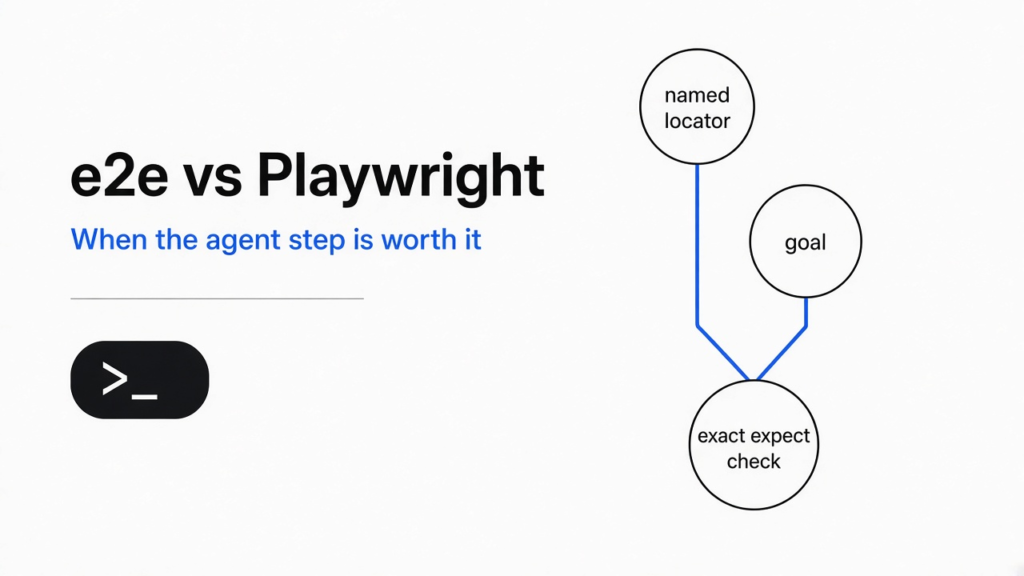
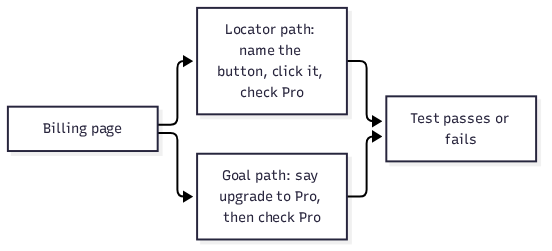
I had a tiny billing page. A button said Upgrade. A line under it said Free, and a click changed that word to Pro. I wanted a check that would fail if that click ever stopped working. An end-to-end test (a script that drives the real page, not a copy of the logic) is that kind of check. Playwright (the tool that opens a browser and clicks what you name) already does this. e2e does it too, and on the web it still drives the browser through Playwright. I ran the locator version with no model. It passed. Add a goal only for the part of the screen you cannot name yet, and keep an exact check after it.
Use e2e beside Playwright when one stretch of the page is easier to describe than to point at. Keep a locator (a name for one thing on the screen, such as the Upgrade button) on the result. On the web you are not throwing the browser driver away. You are choosing which steps a model (the AI service that reads the screen and answers) is allowed to invent.
What is an end-to-end test, in plain words
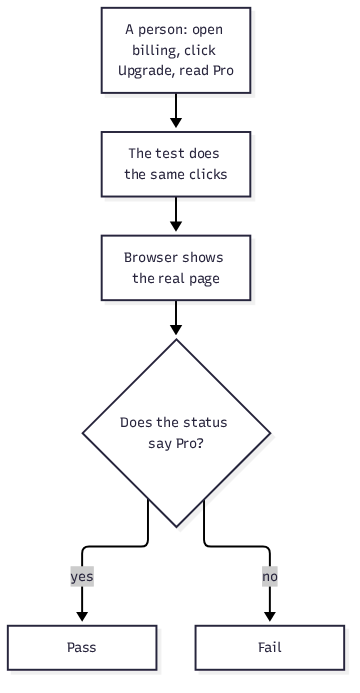
An end-to-end test opens the real app and does what a person would do, then checks the screen. A unit test (a check of one function, with the rest of the app faked) never sees the button. This one does.
A browser (the program that shows the page, such as Chrome) is the stage. Your app is the thing on the stage. The test is a second program that opens the browser, finds a control, and clicks it. If the word you expected is missing, the test fails. That failure is the point. You hear about the broken Upgrade button before a customer does.
The thing that usually breaks is not the idea. It is the address of the button. A script that says “click the third div inside the card” dies the day someone redesigns the card. A script that says “click the button named Upgrade” dies only when that button is gone or renamed. Start with the name a person can see.
e2e vs Playwright: what actually changes
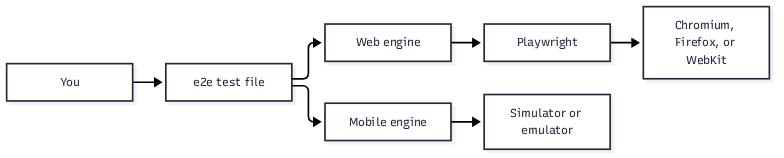
e2e vs Playwright is a choice of how you write the step, not a choice of which browser opens. For a web app, the e2e web engine (@e2e-dev/web) drives Chromium, Firefox, and WebKit through Playwright. The same click can be a locator or a goal (one sentence that says what should happen, not which button to press).
I kept the locator. The page was local. The test imported test from @e2e-dev/web and expect from e2e. It opened /, clicked the button named Upgrade, and checked that the status contained Pro. The report said passed. The click step was recorded as getByRole("button", name: "Upgrade"). No agent (a model that looks at the screen and chooses the next click) was configured, so no model was called.
| Question | Playwright by itself | e2e on the web |
|---|---|---|
| Who opens the browser? | Playwright | Playwright, through the web engine |
| How do you name a button? | A locator, such as getByRole | screen.getByRole, same idea |
| Can you describe a goal instead? | No. You write each click | Yes. agent.act takes one sentence |
| Do you need a model? | No | Only for agent steps |
| What about the next run? | Same script, no model bill | A checked act can replay with no model. assert still calls the model |
| Phone apps? | A different stack | A separate mobile engine, and a simulator |
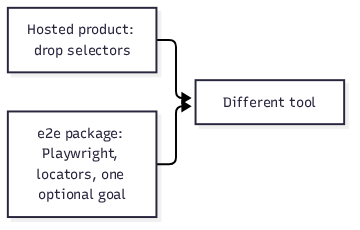
The hosted TesterArmy product is a different tool. Its migration notes tell you to drop selectors and let a vision agent do every step. The open-source package does not do that. It lets one file mix a goal and an assertion (a check that fails the test when the screen is wrong). If a blog post says “e2e means you never write a locator,” it is talking about the hosted product, or it is wrong about this package.
How to use e2e without a model
You can use e2e without a model when every step names a control. I did that. The config had a web target and a page URL. It had no agents block. The run did not ask for a key.
You need Node 22.12 or newer. On Windows, use WSL (a Linux shell inside Windows). Install the runner, the web engine, and Playwright. Playwright is a peer dependency (a package e2e needs but does not install for you). If you only run npx e2e init --yes, the wizard writes a config and an example test and does not install those packages. Install them yourself:
npm install e2e @e2e-dev/web playwright
Point the config at the page. I used a local file server. You can point app.url at a dev server you already started, or let app.command start it.
import type { E2EConfig } from 'e2e';
import { web } from '@e2e-dev/web';

export default {
  targets: [
    {
      engine: web(),
      app: { url: 'http://127.0.0.1:8765' },
    },
  ],
} satisfies E2EConfig;
The test is three lines of work. app, screen, and expect are fixtures (objects the test is handed so you do not build the browser yourself).
import { test } from '@e2e-dev/web';
import { expect } from 'e2e';

test('the plan name shows after the click', async ({ app, screen }) => {
  await app.open('/');
  await screen.getByRole('button', 'Upgrade').click();
  await expect(screen.getByRole('status')).toContainText('Pro');
});
Then:
npx e2e run tests/billing.e2e.ts
The first run may download a browser. After that, my passing attempt took under a second. The report status was passed, and the click step named the Upgrade button. That is the 10-minute check. If your button has a visible name, copy this shape before you add a model.
One setup trap: if the page is a Next.js dev server, opening 127.0.0.1 while the server thinks it is localhost can leave the page blank. Use the same host in both places, or allow that host in the dev server. A static page does not have this problem. Mine did not.

When should I let the agent click?
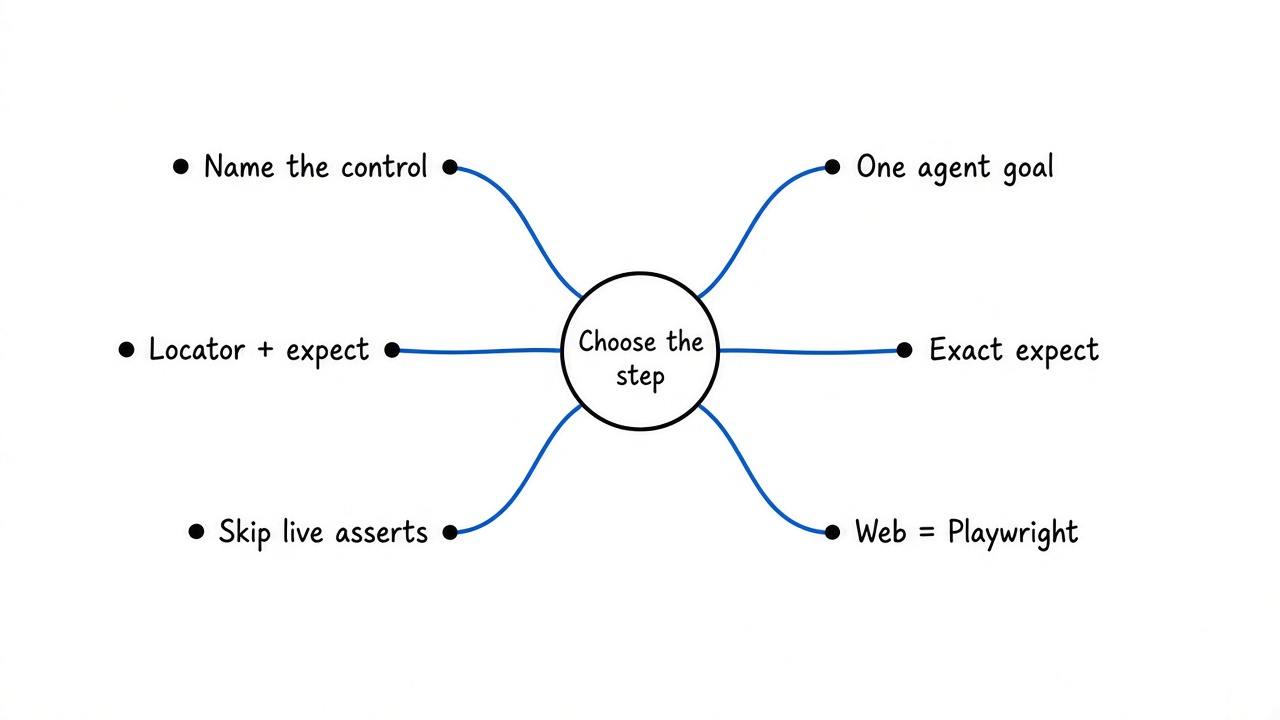
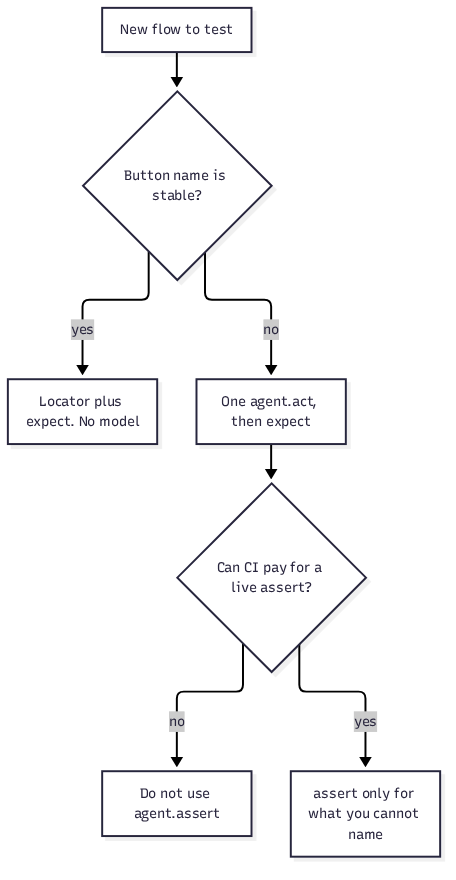
Let the agent click when you can say the outcome and you cannot honestly name every control along the way. A checkout that moves the button, changes the copy, and still means “pay with the test card” is that case. One goal, then an exact check:
await agent.act('complete checkout with the test card');
await expect(screen.getByRole('status')).toContainText('Paid');
Give act one goal. “Upgrade, then open invoices, then download the PDF” is three goals. Split them. A step has a deadline and a model-call budget. If it runs out, the step fails instead of wandering. That limit is useful. A long coding session can also drop a rule you already wrote, which is a different failure: why compaction drops your instructions.
Do not use a goal for a button you can name. The model can click a different Upgrade. It also costs a call. The same instinct that stops a coding assistant from writing a large rewrite for a one-line fix applies here: how to stop Claude Code from overengineering. Name the button.
agent.assert, agent.waitFor, and agent.extract are judgments. They always call the model. They are not a free way to say “looks fine.” If you know the text, use expect.
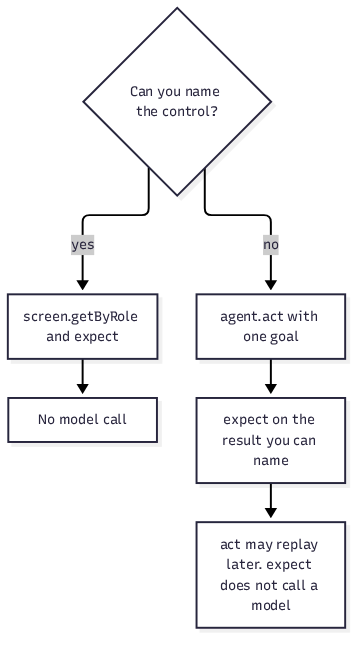
To turn the model on, put an agents.default.model in the config. You can sign in with a ChatGPT, GitHub Copilot, or SuperGrok subscription (npx e2e login), or set a gateway key, or point at a local server. Tests that never call agent still need none of that.
Does the replay cache skip the model?
The replay cache (a saved list of clicks the next run repeats without asking the model) skips the model only for an agent.act that a later check has verified. The check can be expect on a locator, a URL, agent.assert, or agent.waitFor. The runner stores the actions and a short picture of the end state. The next run plays those clicks back.
It hands the step back to the agent when the screen no longer matches. A missing control, two controls that look the same, a different path, or an end state that changed all count. After that hand-off, the rest of the step is live and costs model calls again.
Judgments do not get this discount. agent.assert, agent.waitFor, and agent.extract run live every time. A suite that “asserts” in English on every line will bill a model on every run, even when nothing moved. Put the English on act. Put the stable fact on expect.
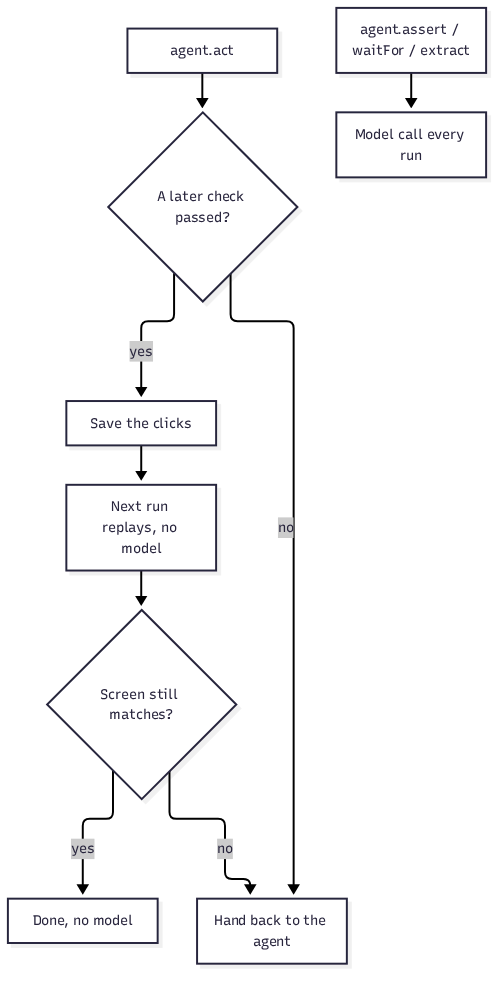
A few things throw the recording away. Renaming the test, changing the sentence, or changing ordinary parameters misses the cache. A value that changes every run, such as a timestamp, misses every time unless you wrap it so the replay fills in the current value. More than 50 actions, or a typed value that is huge, is not a clean recording. npx e2e run --no-cache forces a live run. --strict-cache fails the step instead of quietly calling the agent when the recording is stale.
Can I use e2e instead of Playwright?
You can use e2e instead of a hand-written Playwright script. You cannot use it instead of Playwright on the web, because the web engine is Playwright. Your old locators have a near neighbor: screen.getByRole, getByLabel, getByText, getByTestId. expect stays an assertion. What you drop is the chain of waits and CSS paths, and only where a goal is clearer.
Keep Playwright knowledge. Traces, the accessibility role of a button, and “the name a screen reader would use” all still matter. If getByRole('button', 'Upgrade') fails, the page has no button with that name. An agent will not fix a missing button. It will click something else, or it will fail the goal. Look at the page first.
Mobile is the real “instead.” @e2e-dev/mobile drives an iOS simulator or an Android emulator through a device bridge. That path needs Xcode or the Android SDK. It is not a browser test. npx agent-device doctor tells you what is missing. I did not run a phone test.
A coding assistant can write these files for you. npx e2e init installs a skill (a file of instructions the assistant reads before it edits) and can register MCP (a local connector that lets the assistant call tools). e2e mcp opens the app so the assistant can try a locator against the live page. Each assistant session gets its own session, so two of them do not have to share one browser. Ask it for one goal and one expect. If it writes a novel, cut it back to the button name.
Is e2e worth it, and when is it not?
e2e is worth it when you want one TypeScript runner for a named click and, later, one sentence for a flow you cannot name. It is not worth it when you already have a stable Playwright suite and you would be paying a model to retype locators you trust.
Do not switch a whole suite in one sitting. Move the flaky path first: the one that breaks when a class name changes but the button label does not. Leave the rest. The package is still on the way to 1.0, so pin the version you ran. The CLI I used printed e2e v0.16.0. A later minor can change config.
Turn telemetry (anonymous notes about which commands you ran) off if you do not want that: npx e2e telemetry disable, or set E2E_TELEMETRY_DISABLED=1. I set the variable for my run.
Skip e2e, and stay on plain Playwright, when:
- Every step already has a role and a name, and the suite is green.
- CI must not call a model, and someone on the team will be tempted to use
agent.assertas a shortcut. - You need phone tests but you do not have a simulator.
- You wanted the hosted product, which is a different install and a different style.
If the button has a name, I would keep the locator. I would add one goal only for the stretch I cannot point at, and I would put expect on the word the page must show. That is the whole decision.
Common questions about e2e vs Playwright
Can I use e2e instead of Playwright for web tests?
For web tests, e2e sits on Playwright. Use it instead of writing every click yourself. Keep Playwright for the browser, the roles, and the locators you already trust.
How do I run e2e without an API key?
Leave out agent steps and leave out the model in the config. Install e2e, @e2e-dev/web, and playwright, point app.url at the page, and run npx e2e run. A locator test does not ask for a key. I ran one that way and the report passed.
Does agent.assert still call the model on every run?
Yes. agent.assert, agent.waitFor, and agent.extract always call the model. Only a verified agent.act can replay from the cache with no model call. If the fact is stable, use expect instead of agent.assert.
Is the TesterArmy app the same thing as the e2e package?
No. The hosted app is a separate product whose steps are natural language and whose notes tell you to drop selectors. The e2e package is the open-source runner. On the web it uses Playwright, and a test can mix a goal with a locator check.
Docs for the runner: e2e quickstart and how the cache works. The repo is tester-army/e2e. Locator roles are documented by Playwright.