
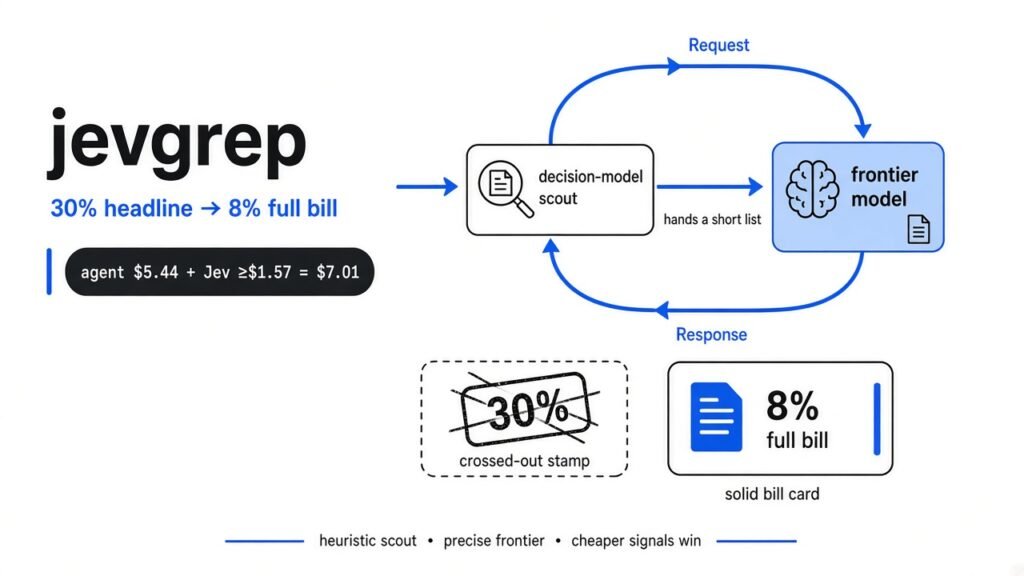
Short answer: jevgrep is a free command-line search tool that lets a coding agent find the right files using a tiny, cheap “decision model” instead of the expensive main model. The headline says about 30% cheaper. When you add back the search model’s own bill, the same test shows about 8%, and most of that came from one task.
The problem this tool is trying to fix
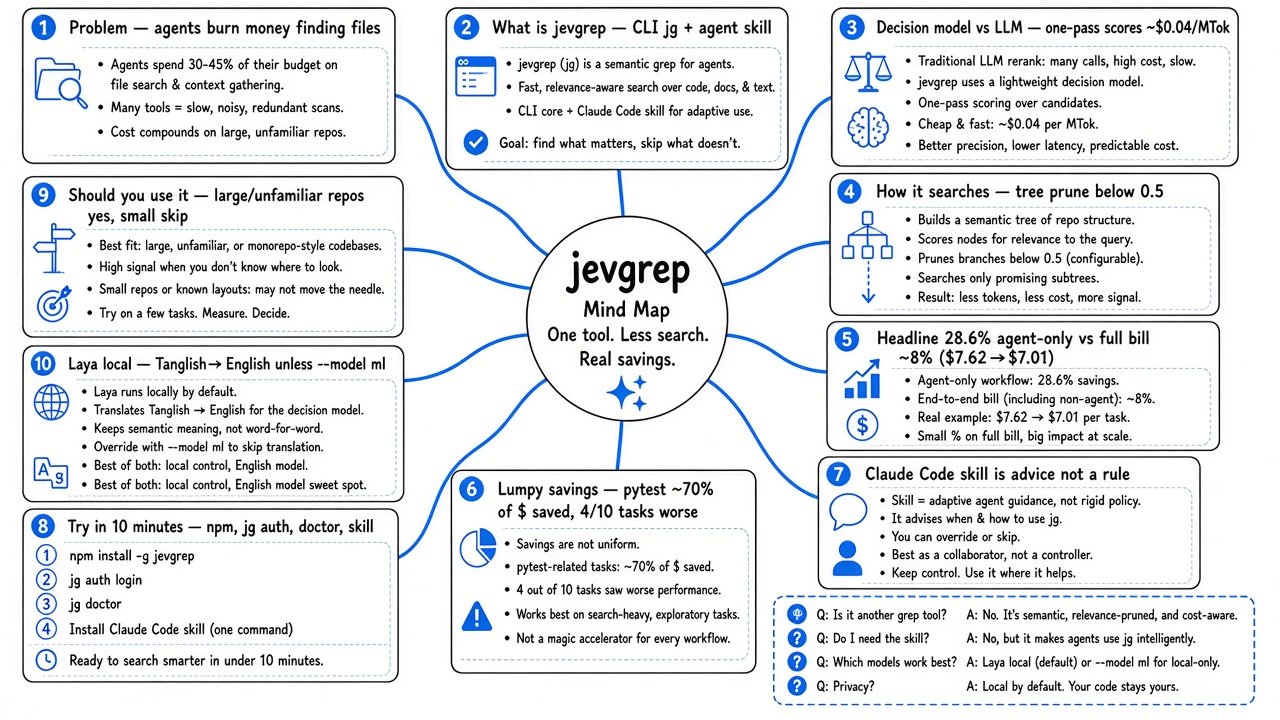
Coding agents spend a big chunk of your money just looking for the right file.
When you ask Claude Code, Codex or any coding agent (an AI that reads and edits your project for you) to fix a bug, it first has to find where the bug lives. It lists folders, runs searches and opens files, many of them wrong.
That search is costly because of how these agents pay. Every AI model reads text in tokens (small chunks of text, roughly three quarters of a word each), and you pay per token. The model has no memory between steps, so every single step re-sends the whole conversation so far.
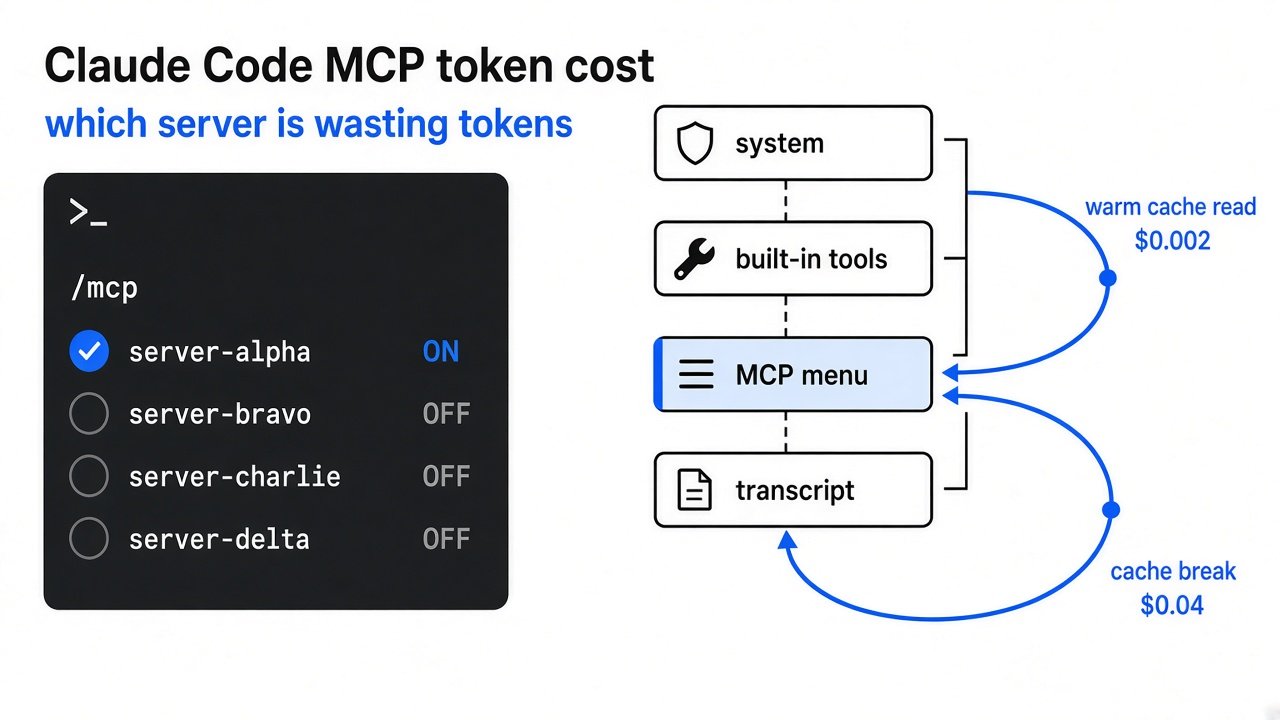
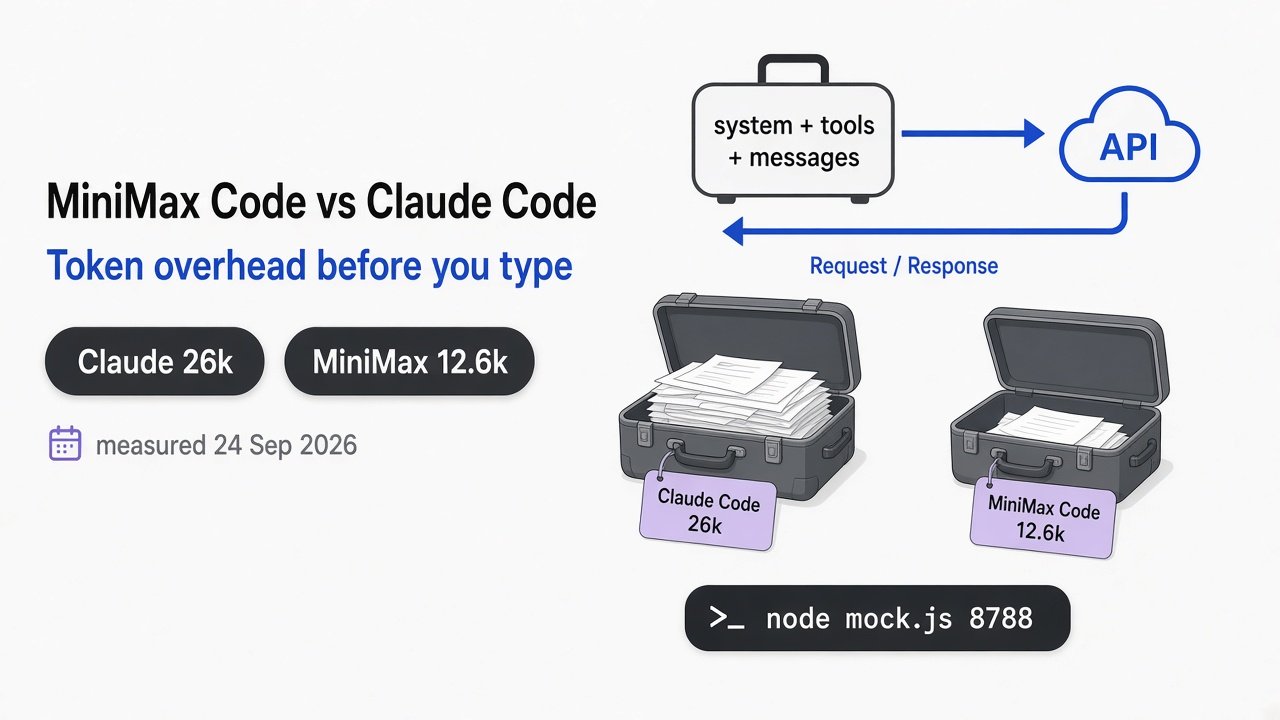
So each extra “let me open another file” step is not just one file. It is the entire prompt again, billed at the price of your most expensive model. (We measured how big that starting prompt is in Claude Code MCP token cost.)
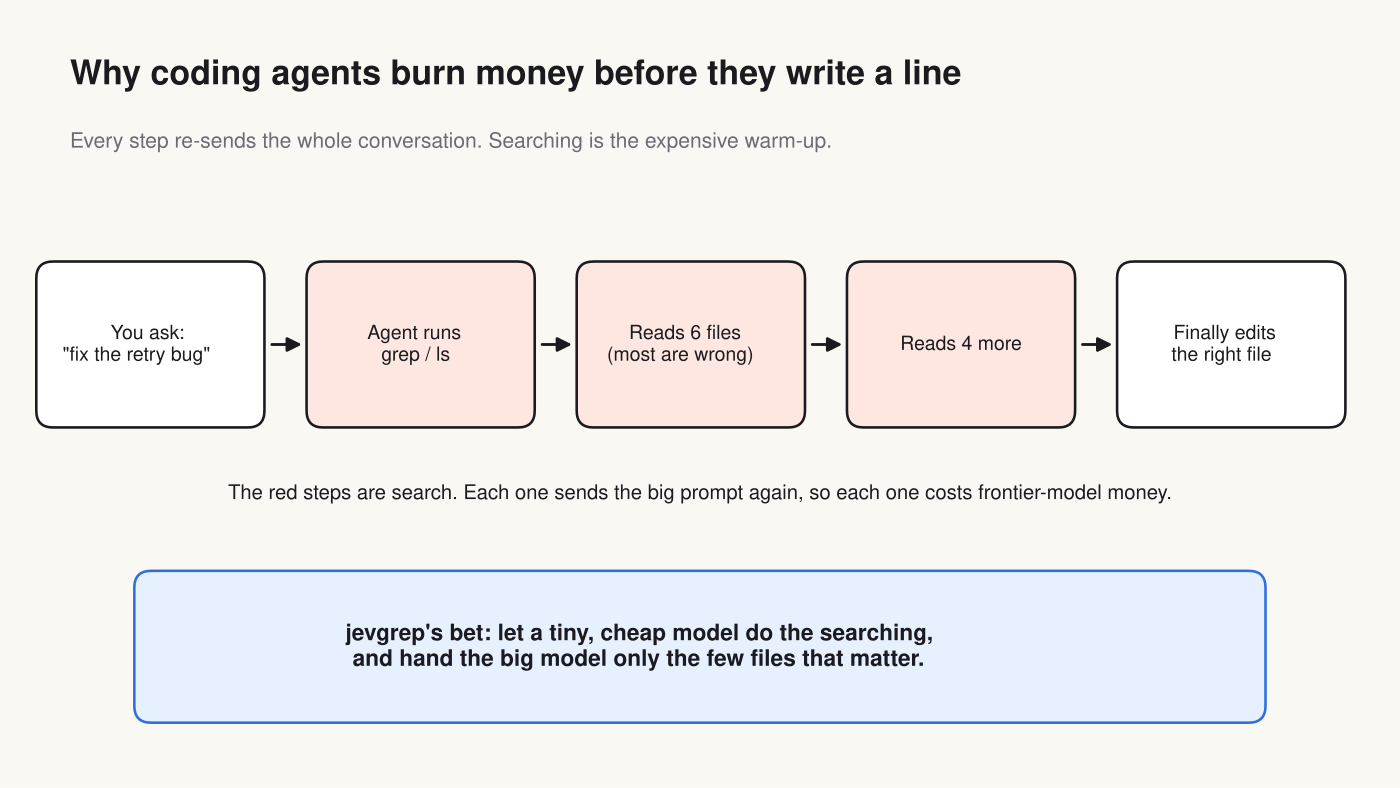
jevgrep’s idea is simple: let a very cheap model do the hunting, then give the expensive model only the few files that matter. This post checks whether that really saves money, using the tool’s own published numbers, recalculated.
What is jevgrep?
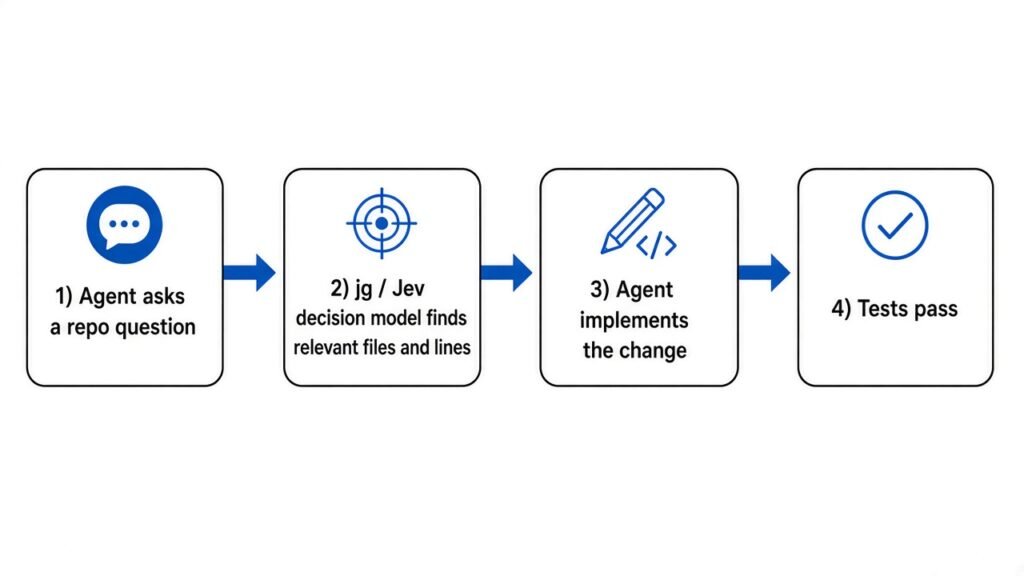
jevgrep is a search tool your agent calls instead of opening files one by one.
You type a question in plain English, such as “Where are expired tokens rejected?”, and the jg command returns a short list of relevant files, the exact lines that matter, and their line numbers. It runs as a CLI (a tool you run by typing commands in the terminal).
It is different from grep (the classic tool that finds exact words in files). Grep needs you to know the word. If you ask grep for “expired token” and the code says if row.revoked_at, grep finds nothing. jevgrep searches by meaning, so it can still land on that line.
It also ships an agent skill (a small instruction file that teaches an agent when and how to use a tool). The skill tells Claude Code or Codex: “before exploring, ask jg.”
What is a decision model, and why is it so cheap?
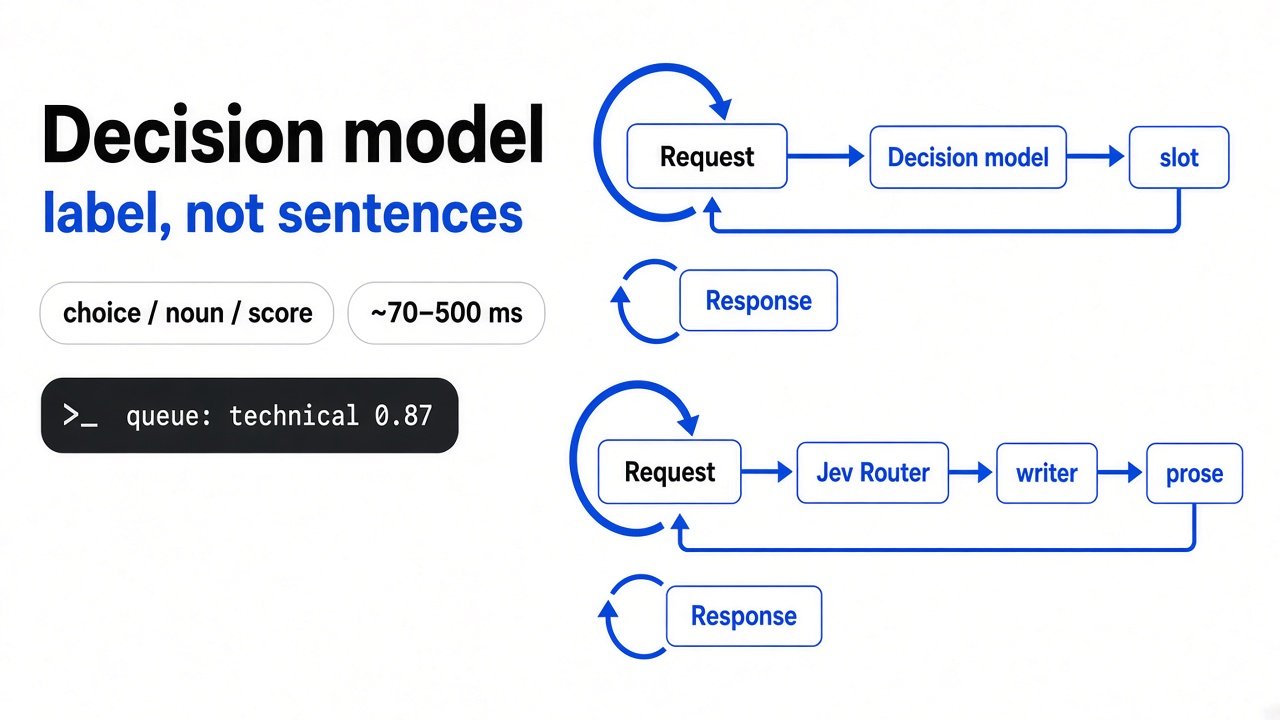
A decision model does not write sentences. It only picks from answers you give it, which makes it far faster and cheaper.
Start with how a normal chat model works. An LLM (large language model, the kind of AI behind ChatGPT and Claude) writes one word at a time. Each new word is a full pass through the model. A 50-word answer is 50 passes.
Now build on that. Many questions an agent asks are not essays. “Is this file relevant: yes or no?” only has two possible answers. Writing a paragraph to reach “yes” wastes 49 of those 50 passes.
A decision model (a model that scores a fixed list of answers instead of writing text) skips the writing. It reads the question and the allowed answers together, then gives each answer a probability in one pass. For example: yes 0.91, no 0.09. Your code reads that number directly, with nothing to parse.
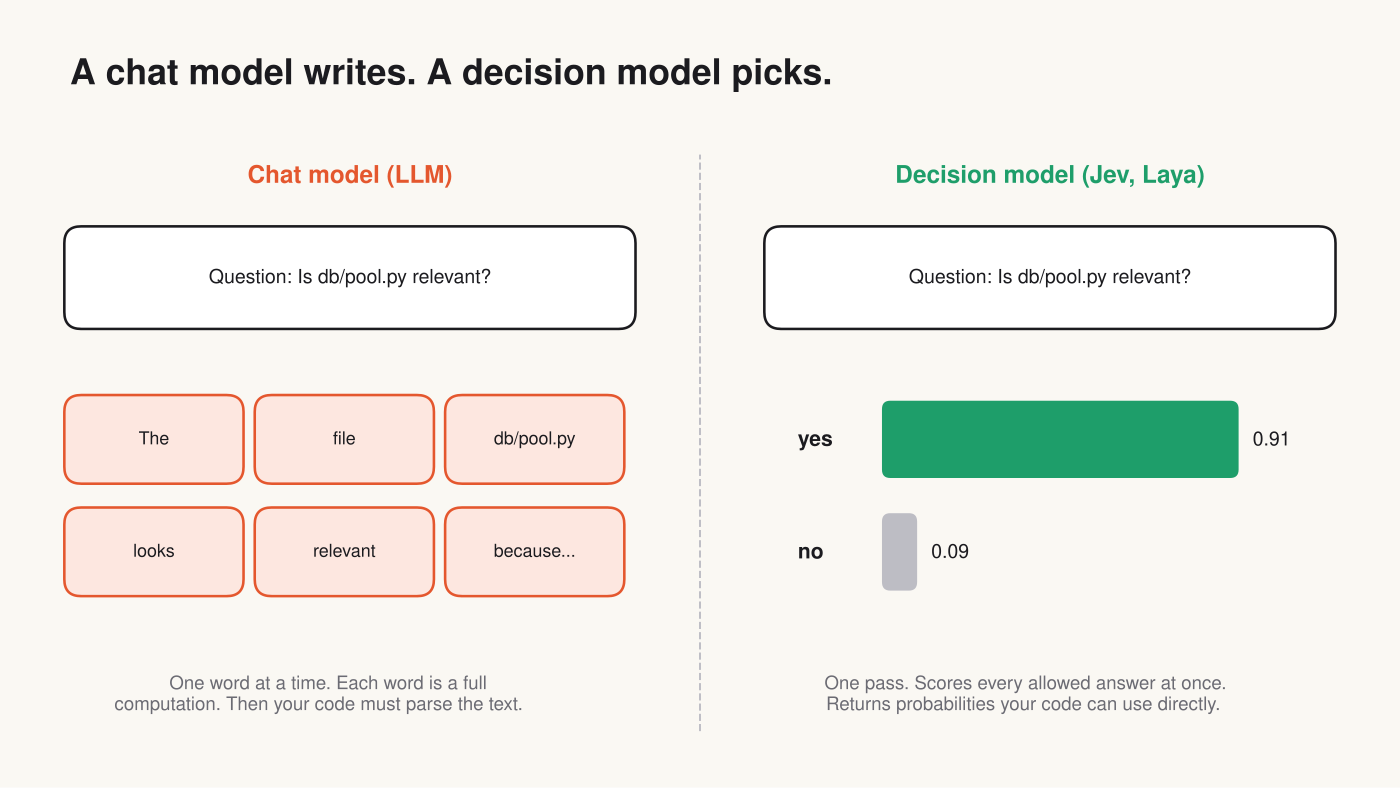
jevgrep uses a hosted decision model called Jev. Its input price is about $0.04 per million tokens. A top coding model often costs between 50 and several hundred times that per token, which is the whole reason the idea is attractive.
Jev has an open-source cousin called Laya that you can run on your own machine. Under the hood it is an encoder (a model that reads text all at once, rather than writing it) plus a small scorer that turns each answer option into one number. A softmax (a formula that turns a list of scores into probabilities that add up to 1) then gives the final percentages.
How does jevgrep use it to search your code?
It walks your folders like a tree and asks “is this relevant?” at every branch, dropping the branches that score low.
jevgrep starts at the top of your project. For each folder it asks the decision model whether the folder could hold the answer. Folders that score low are never opened. Inside the folders that pass, it previews files, scores them, and keeps anything above a cut-off of 0.5 (a 50% “relevant” score).
For the files it keeps, it pulls out the useful functions and hands your agent a compact report: summary, file list, exact source lines with line numbers.
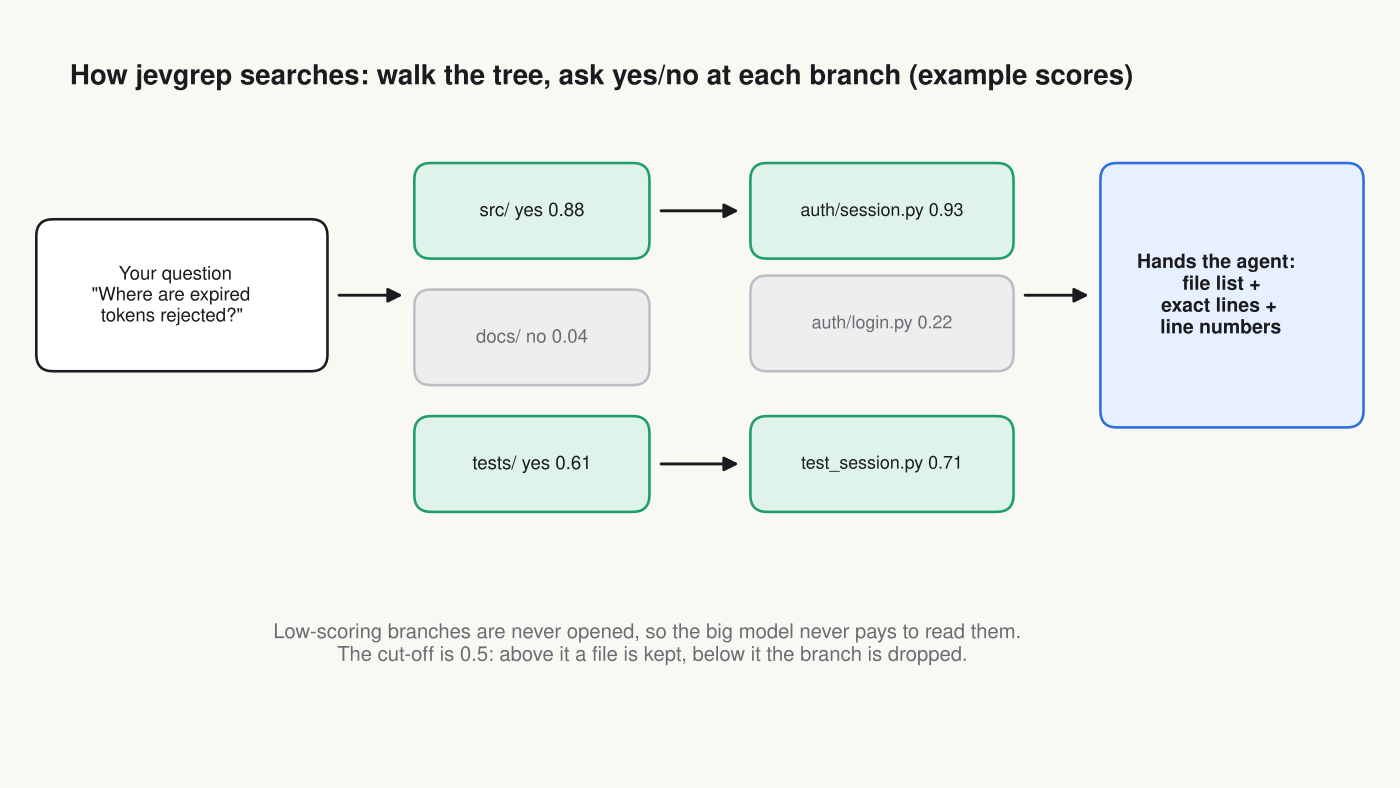
The saving comes from what never happens. Your expensive model never opens docs/ or the ten wrong files, so it never pays to read them.
Does jevgrep really cut coding agent cost by 30%?
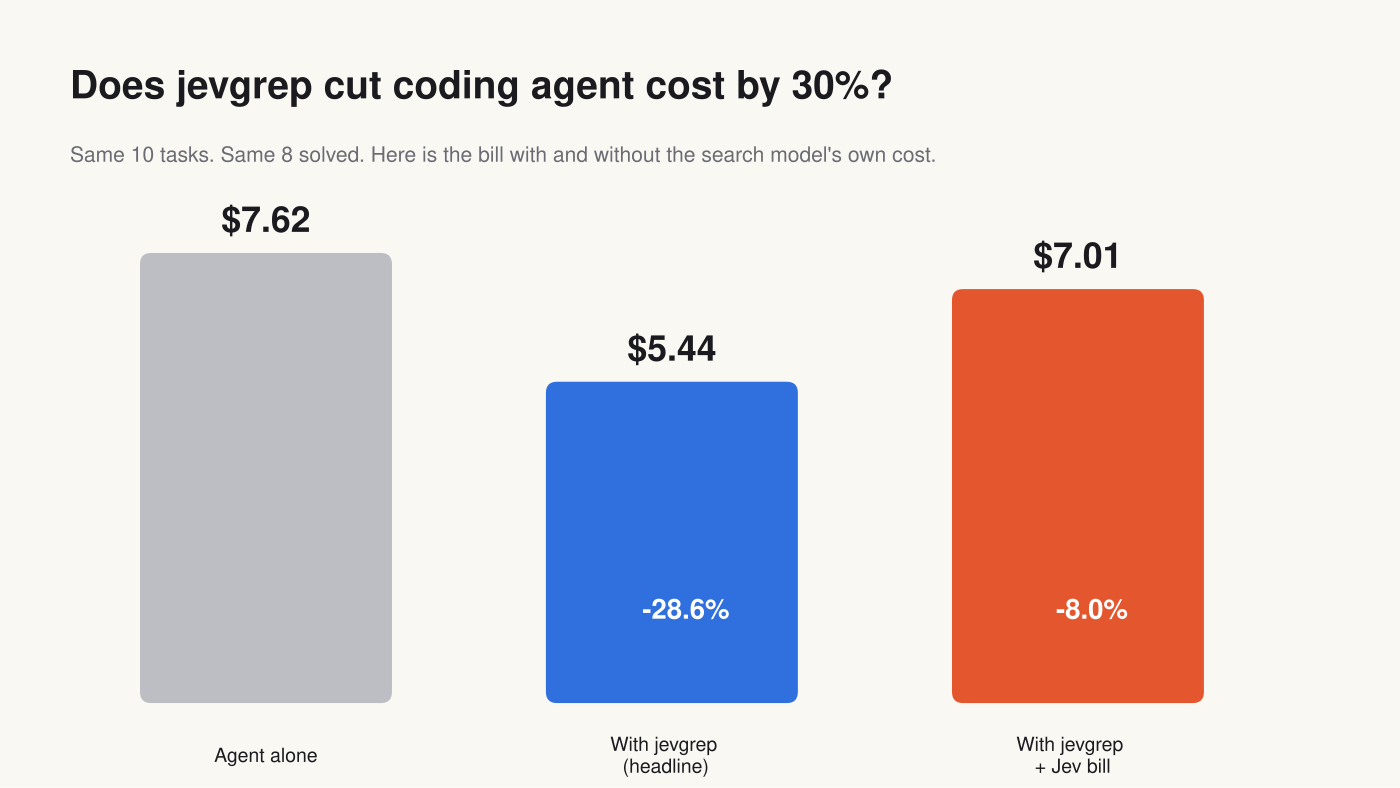
On the published test, the agent’s own bill dropped 28.6%. Add the search model’s bill and the saving shrinks to about 8%.
The test used 10 real bug-fix tasks from SWE-bench (a standard set of real GitHub issues from popular Python projects, used to test coding agents). The agent ran each task twice: once alone, once with jevgrep. Both versions solved the same 8 out of 10.
Here are the totals, recomputed from the per-task table:
| Setup | Agent cost | Search model cost | Total |
|---|---|---|---|
| Agent alone | $7.62 | $0 | $7.62 |
| Agent + jevgrep (headline) | $5.44 | not counted | $5.44 |
| Agent + jevgrep (full bill) | $5.44 | at least $1.57 | $7.01 |
The headline number clearly says it excludes Jev’s cost. That is honest labelling, but it is also the line most people will quote. When you pay for both, you pay $7.01 instead of $7.62. That is an 8% saving, not 30%.
One fair point in jevgrep’s favour: it caches answers on your machine by default. If you ask about the same code again, the search model is not paid twice. So in daily use on one project, the Jev share may be smaller than in a one-time test.
Where did the saving actually come from?
One task produced about 70% of the dollars saved, and 4 of the 10 tasks got more expensive.
Looking task by task tells a different story from the total. The pytest task dropped from $2.34 to $0.83. That single task is $1.52 of the $2.18 saved.
Meanwhile four tasks cost more with jevgrep: sympy, astropy, requests and pylint. Pylint went up 71%, though it was unsolved either way.
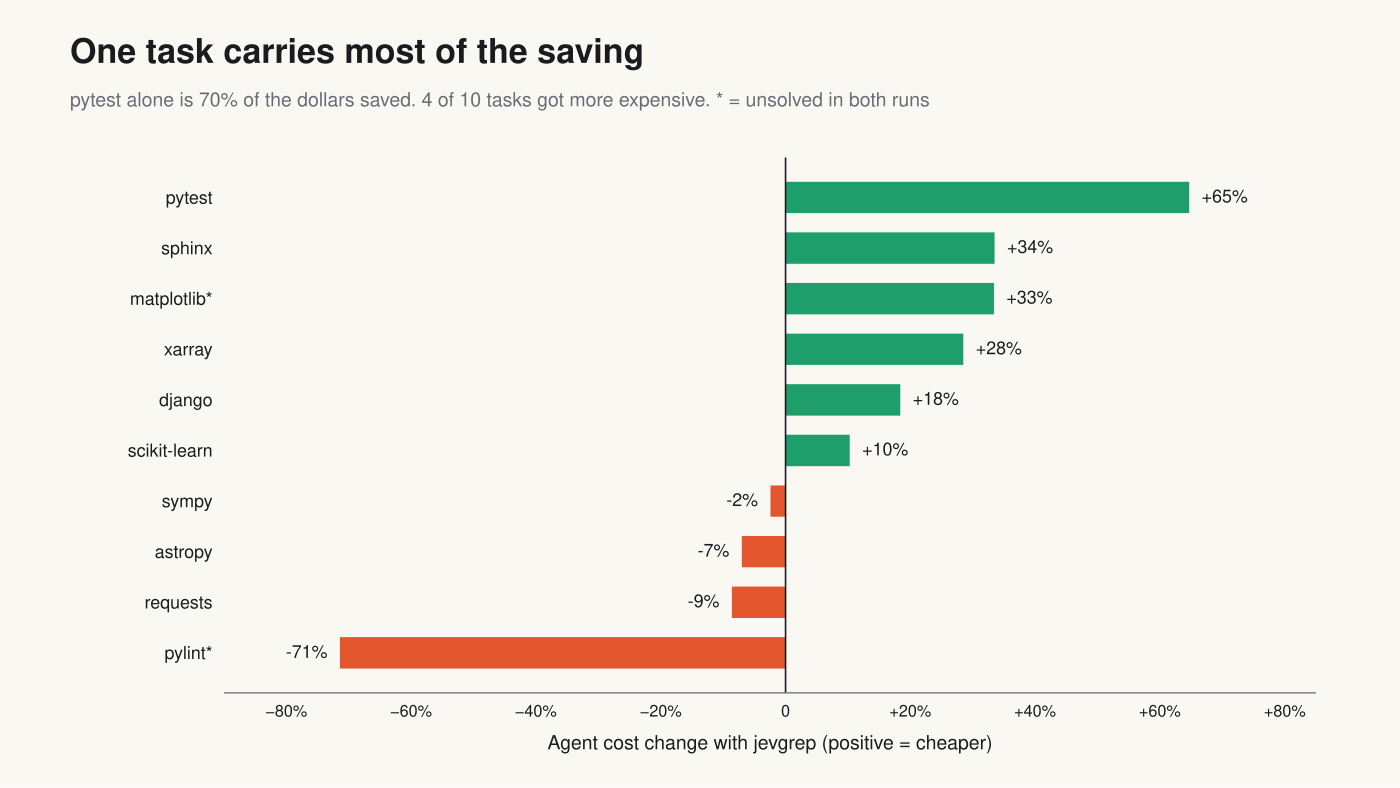
Take pytest out, and the agent-only saving falls to about 13%. Give those nine tasks even a fair share of the Jev bill, and jevgrep costs more than it saves on them.
This does not mean the tool is bad. It means the saving is lumpy. jevgrep shines when the agent would otherwise get lost in a big, confusing codebase, and adds overhead when the agent would have found the file quickly anyway. The makers also note this was one run per task on tasks they used while tuning the tool, so it cannot prove cause and effect.
Will Claude Code actually use it?
Only if the skill convinces it to. An agent can ignore a suggested tool, and the published test did not run on Claude.
The test agent ran on Sol, OpenAI’s mid-tier model, not on Claude. Different agents explore differently, so your saving on Claude Code could be higher or lower.
Also, a skill is advice, not a rule. Claude Code decides for itself which tool to call. If it keeps using its own search out of habit, you pay for jevgrep’s skill text in every prompt and get nothing back. Check your session logs to see whether jg is really being called.
How to try jevgrep safely in 10 minutes
Install it, run it on one real question, and compare the full bill on a few real tasks before you trust any percentage.
You need Node.js 22 or newer (the JavaScript runtime), macOS or Linux, and an API key from Vercel AI Gateway, TypeSafe, OpenRouter or OpenCode Zen.
1. Install:
npm install -g @dzhng/jevgrep2. Add your key:
jg auth3. Check it works:
jg doctor4. Ask a real question:
jg "Where is authentication checked before a request reaches a handler?" .5. Teach your agent to use it:
jg skill6. Run 5 normal tasks with and without it, and compare total spend including the provider bill.
One privacy warning: jevgrep sends your source code to the search model through your provider. It skips hidden files, dependencies and obvious secret files, but that is not a guarantee. Point it only at code you are allowed to send out.
Get it here: jevgrep on GitHub
Should you use it?
Try it if your repo is large or unfamiliar to the agent. Skip it for small projects where the agent already finds files fast.
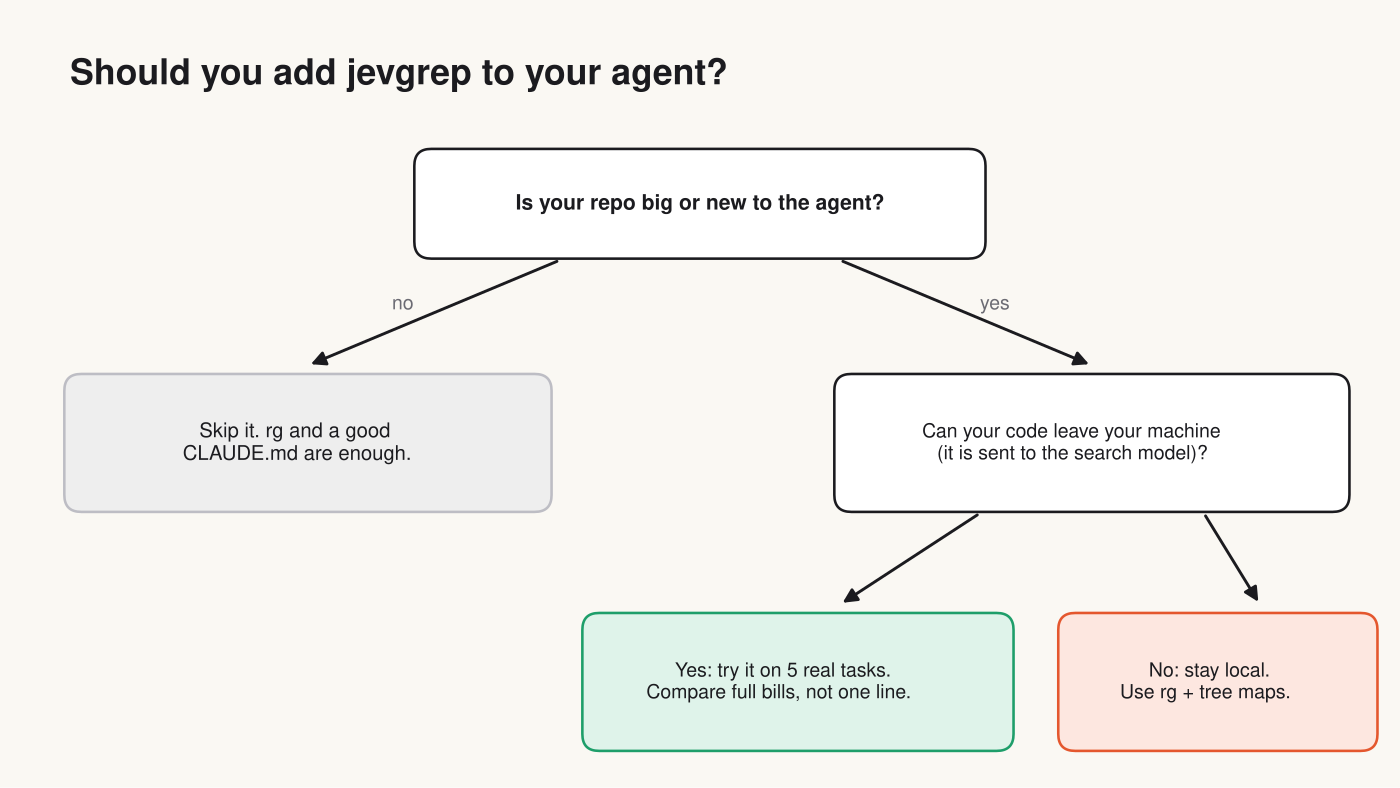
If your agent mostly works in a small project it already knows, a good project notes file and plain rg (ripgrep, a very fast grep) are enough. The search step is already cheap there.
If your code cannot leave your machine, stay local. For “map the codebase first” style help, compare it with the local options in Does Claude Code need a code graph, or is grep enough?
Can you run a decision model yourself, for free?
Yes. Laya is the open-source option, but watch how it handles Indian languages typed in English letters.
Laya installs with pip install laya and runs on your own computer, so nothing leaves your machine. It routes each request to an English model or a multilingual model based on the script (the alphabet the text is written in).
I ran its router on the same refund request three ways. Tamil script and Hindi (Devanagari script) went to the multilingual model, correctly. Tanglish (Tamil typed in English letters) went to the English model, because the letters look English and the language was not recognised.
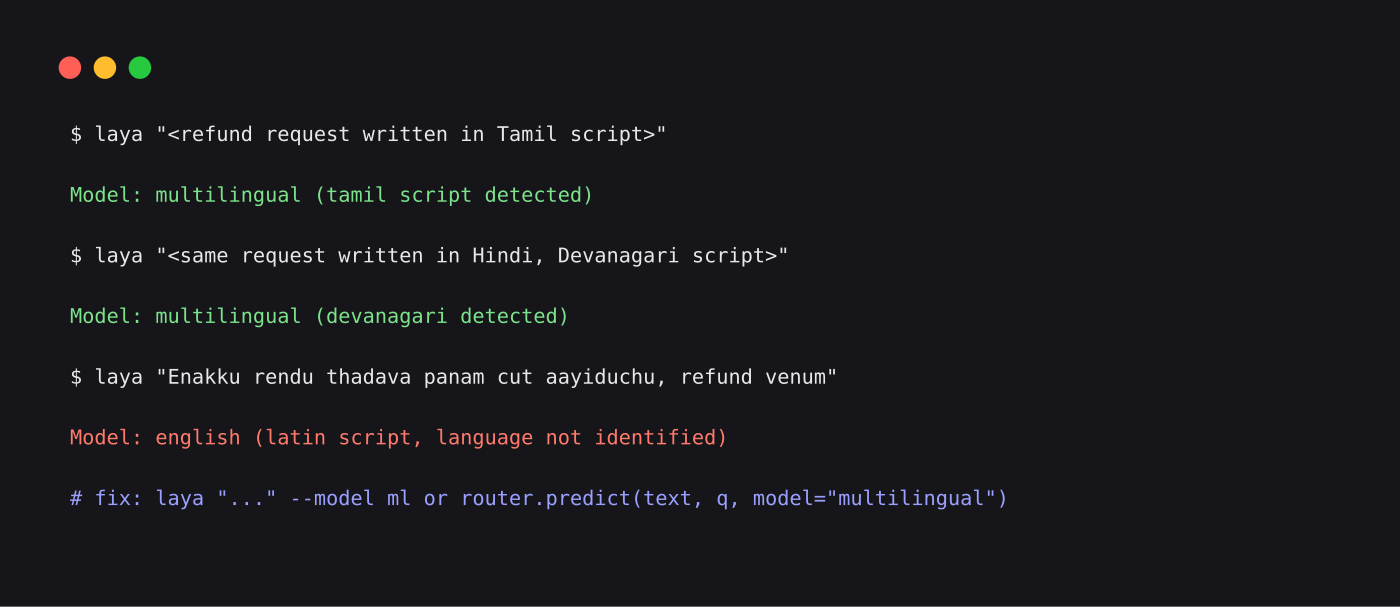
If your users type Hinglish or Tanglish, force the multilingual model with --model ml on the command line, or model="multilingual" in code. Otherwise the English model will read words it was never trained on.
Laya also needs training on your own examples to be accurate. Out of the box its base score on a typed-decisions test is low; after fine-tuning (extra training on your own labelled examples) it jumps to about 0.77. Our full breakdown is in Is Laya worth it for routing code?, and a local setup is in Ollaya vs Jev Router.
Common questions about jevgrep coding agent cost
Is jevgrep free?
The tool is free and open source (MIT license). You pay your provider for the Jev calls it makes, which are very cheap per search but not zero.
Does jevgrep work with Claude Code?
Yes. jg skill installs a skill for Claude Code, Codex, OpenCode and others. Whether Claude actually calls it is up to the agent, so check your logs.
What is the difference between Jev and an LLM?
An LLM writes text one word at a time. Jev only scores answers you list (like yes or no) and returns probabilities in one pass, so it is much faster and cheaper but cannot write code or explanations.
Is my code sent anywhere?
Yes. jevgrep sends the parts of your code it searches to the Jev model through your chosen provider. Use it only on code you are allowed to share with that provider.
The cheap model does the looking. You still have to check the bill.


1 comment