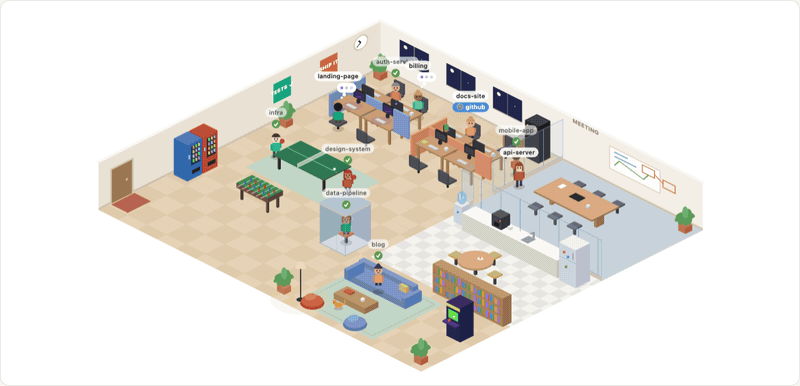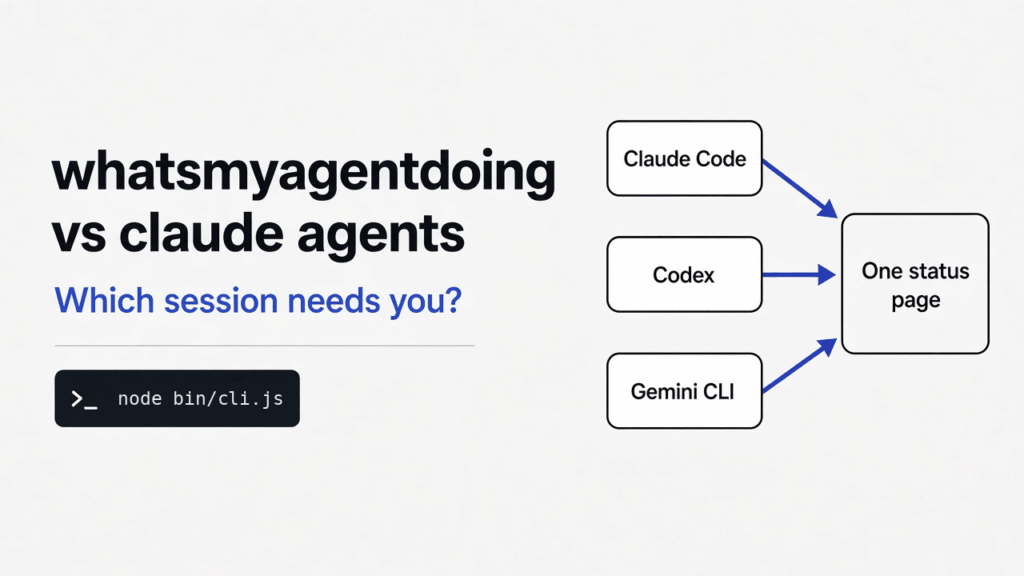
Four terminals, and I could not tell which one was waiting on me. Claude Code is the terminal app that edits a project for you. Codex is the other one, from a different company, doing the same kind of job. Gemini CLI is Google’s version of that terminal. claude agents is the screen already inside Claude Code that lists its own sessions. whatsmyagentdoing is a small local page that reads the logs those tools already write and draws every session in one place.
Use claude agents when every session is Claude Code and you want to answer one without leaving the terminal. Use whatsmyagentdoing when Codex or Gemini is in the mix, or when you want that list on a second screen. It does not start the agents. It only reads.
What is whatsmyagentdoing?
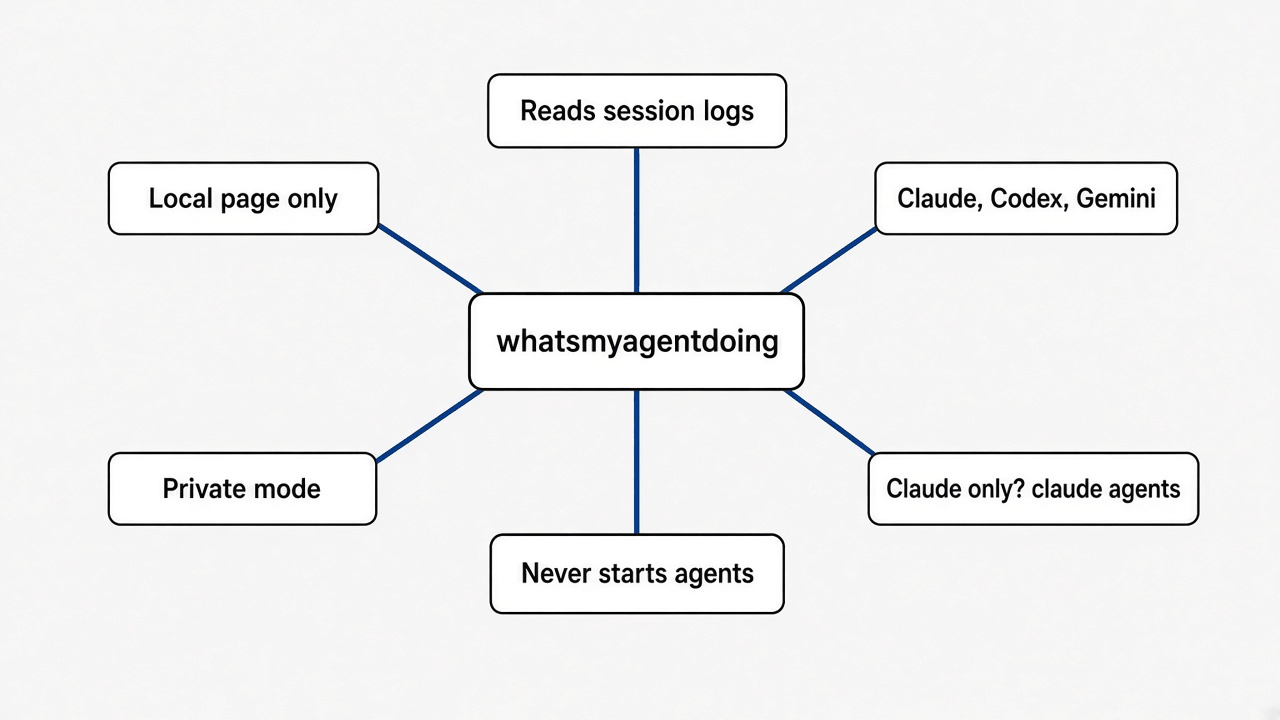
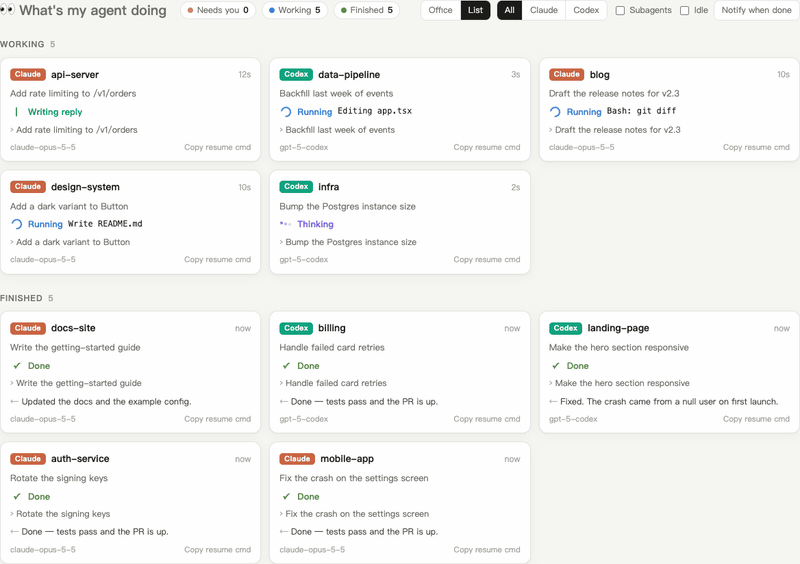
whatsmyagentdoing is a local page that shows what each Claude Code, Codex, Gemini CLI, and OMP session is doing right now.
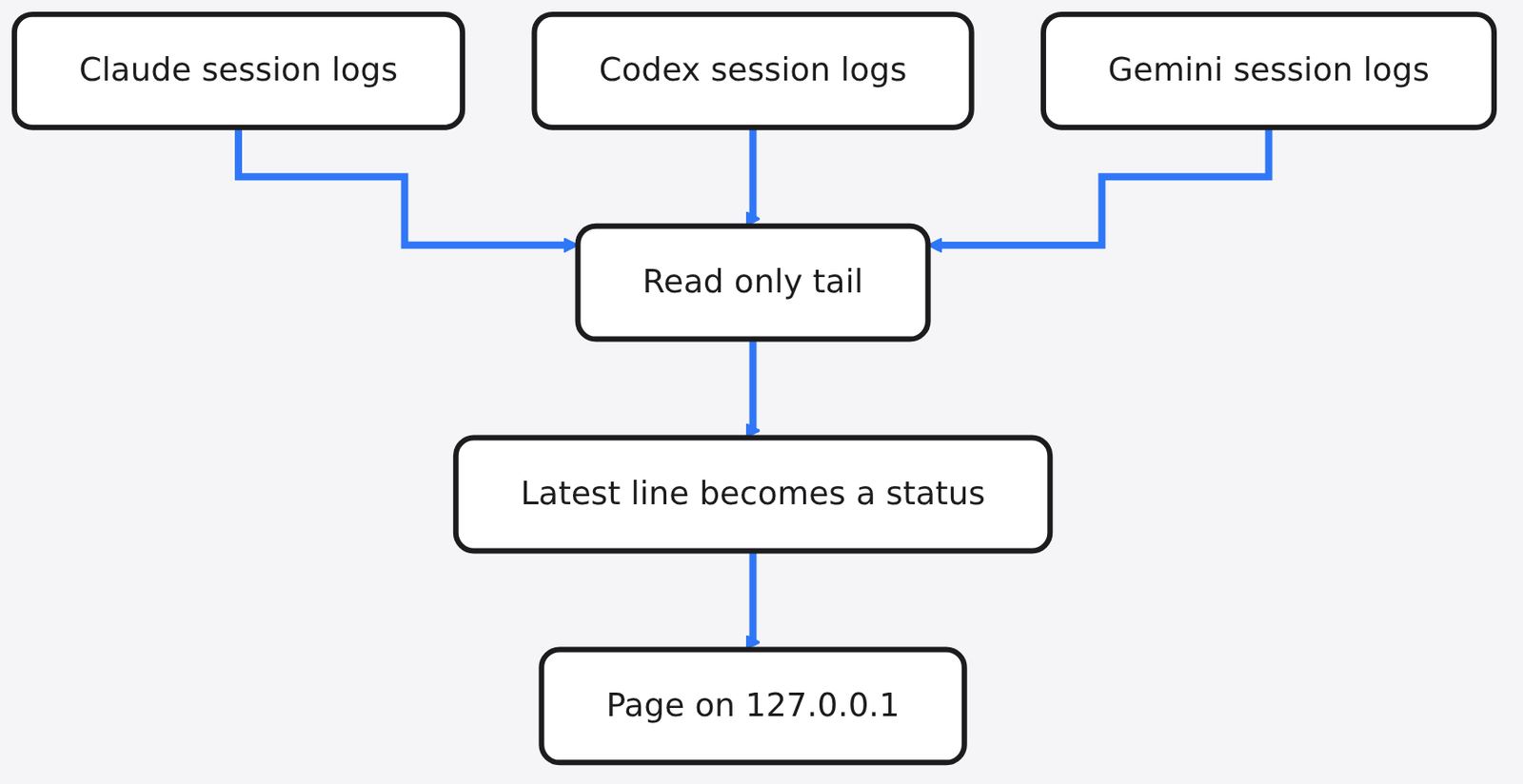
OMP is another coding agent that keeps the same kind of log. The page does not watch the process list. It does not install a hook. It tails the session files those tools already append, one JSON object per line, and turns the latest line into a status. Claude Code writes under ~/.claude/projects. Codex writes under ~/.codex/sessions, in a folder for the day the chat started. Gemini CLI writes under ~/.gemini/tmp. OMP writes under ~/.omp/agent/sessions. If your Claude files live somewhere else, set CLAUDE_CONFIG_DIR. Codex uses CODEX_HOME. Gemini uses GEMINI_CLI_HOME.
The statuses are plain. Thinking means the model is reasoning, or it just got a tool result back. Running means a tool call is in flight, and the line names it, such as Bash: npm test. Writing reply means a reply block landed and the turn is not over. Waiting for you means it asked a question or needs approval. Done means the turn finished. Interrupted, error, and idle are the leftovers.
That is the whole product. A browser tab on your own machine. The office view is optional decoration: working agents sit at desks, finished ones wander off. The list view is the useful one.
whatsmyagentdoing vs Claude agents
Use claude agents for Claude Code alone. Use whatsmyagentdoing when the other terminals are in the room too.
claude agents is built in. From a Claude Code session you press the left arrow, or you run claude agents in a terminal. The screen takes over and groups sessions into needs input, working, and completed. A row that needs you is the one waiting on a question, a permission, or a sandbox prompt. You can peek, answer, and go back. You can send a session to the background with /bg, or start one already in the background with claude --bg. While a session is working, the one-line summary on that row refreshes from its own recent output, at most about every 15 seconds, without a new model call. A smaller model writes a fresh summary when the turn ends.
That screen cannot see Codex. It cannot see Gemini CLI. It lives inside the Claude terminal, so it is gone when you are looking at another window.
whatsmyagentdoing is the opposite shape. It sees Claude, Codex, Gemini CLI, and OMP, because it reads their logs. It cannot reply for you. There is a copy button for a resume command, claude --resume or codex resume, and then you still go back to that terminal. The page is a map, not a steering wheel.
| claude agents | whatsmyagentdoing | |
|---|---|---|
| What it sees | Claude Code sessions only | Claude Code, Codex, Gemini CLI, OMP |
| Where it sits | Inside the Claude terminal | A local browser page |
| Can you answer there | Yes | No, you resume the session |
| How it knows the state | The live Claude session | The latest line in the log |
| Claude permission prompts | Shown as needs input | Shown as running, until you answer |
| Codex approval prompts | Not visible | Shown as waiting |
| Sends the prompt anywhere | Stays in Claude | Stays on this machine, plus one version check |
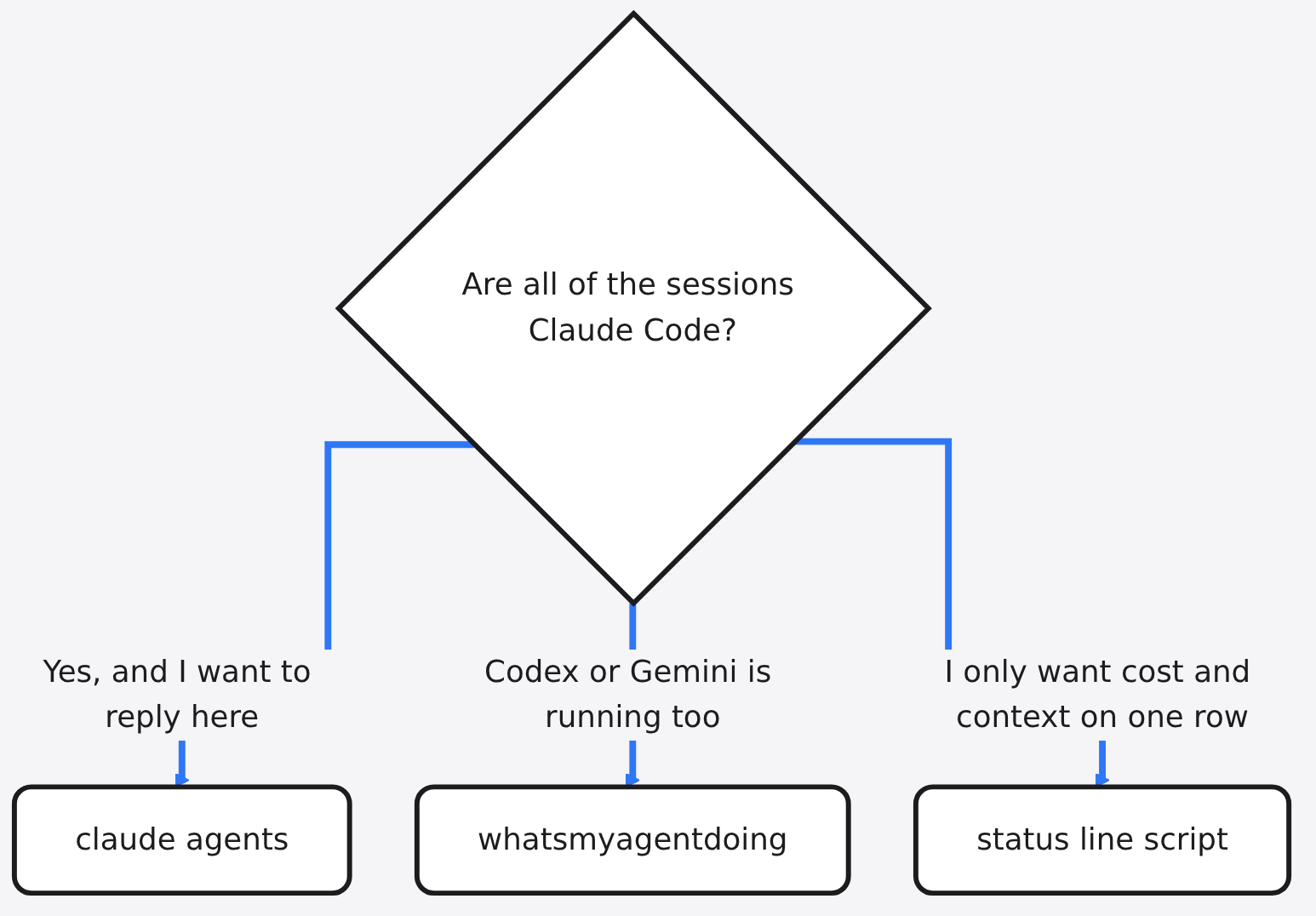
The third box is a different job. A status line is one row at the bottom of a single Claude screen: model, context, cost. It does not list the other sessions. If two agents are editing one folder and overwriting each other, neither of these tools fixes that. A git worktree does.
How do I see what my coding agents are doing?
Clone the repo into the skills folder, then type /myoffice, or run the same program from a terminal.
You need Node 18 or newer. There is no npm install. The files run as they are.
git clone --depth 1 https://github.com/Charonyuu/whatsmyagentdoing ~/.claude/skills/myofficeCodex uses ~/.codex/skills/myoffice instead. Then start a new session and type /myoffice. If you would rather not install a skill, clone anywhere and run:
node bin/cli.js --no-openThat prints a local address, http://localhost:4545 unless that port is taken, in which case it tries the next one. Add --json when you only want a snapshot in the terminal and no page. Add --hours 2 to ignore sessions that have been quiet longer than two hours. The default window is 24. Add --demo if you want a made-up team and you do not want it to read your real logs.
Running it again while it is up only reopens the tab. Stop it with node bin/cli.js --stop or /myoffice stop.
I pointed it at four logs I wrote
A Bash line stayed “running”. A question to the user became “waiting”. A finished turn became “done”. A Codex approval became “waiting”.
I did not have four live agents on this machine. I wrote four session logs in the shape those tools already use, pointed CLAUDE_CONFIG_DIR and CODEX_HOME at that folder, and ran node bin/cli.js --json --hours 2.
| Log I wrote | Status it printed | Activity line |
|---|---|---|
| Claude, last line a Bash tool call | tool | Bash: run the invoice tests |
| Claude, last line AskUserQuestion | waiting | AskUserQuestion |
| Claude, reply finished | done | none, and it kept the reply text |
| Codex, an approval request | waiting | Needs your approval |
The prompts came back too: “fix the invoice total”, “should I rotate the signing key”, “rename the readme heading”, “deploy the api”. So the snapshot is not a status light. It is a short copy of what you typed and what the agent last said.
The useful miss is the Bash row. Claude Code does not write a log line when it is waiting for you to allow a shell command. The code only treats two Claude tool names as waiting: AskUserQuestion and ExitPlanMode. Everything else, including Bash, is “running” until a later line arrives. If a Claude session looks busy and the activity is a shell command, it may be sitting on a permission prompt. Codex does write the approval, so that one shows as waiting. That split is the reason a mixed desk still needs this page, and the reason you cannot trust a Claude “running” badge on its own.
Logs are written per finished block, not per token. “Writing reply” means a block landed. It is not a live typing indicator.
What private mode actually hides
Private mode hides the prompt, the reply, and the title. It does not hide the folder name, and it chops the activity line down to the first word.
I ran the same four logs again with --private. Every prompt and reply came back empty. The Bash activity shrank from Bash: run the invoice tests to Bash. The Codex line shrank from Needs your approval to Needs. The project field was still billing, auth, docs, and api, and the working directory was still the full path.
So the flag is enough to stop a screen share from showing the sentence you typed. It is not enough if the folder name is the secret. And if you use it to watch Codex approvals, the word Needs does not tell you what it needs. Leave private mode off when you are alone and you want the real activity line.
Does this page send my prompts anywhere?
The page stays on this machine. One background check downloads a public version file, and you can turn that off.
I started the server with --demo --no-open. A request addressed to localhost got a normal answer. The same request with a fake host name got rejected. The server only listens on 127.0.0.1. A page on the public internet cannot read your prompts through it, because the host check refuses anything that is not localhost.
The session logs are not uploaded. The update check is a separate request. About every half hour the running page downloads the public package.json from the project and compares the version. That request sends a user agent string and nothing from your logs. Set WMAD_NO_UPDATE_CHECK=1 if you do not want even that. --json does not start the check. Updating, if you ask for it, is a git pull in the folder you cloned.
The log formats are not a public contract. If Claude or Codex changes the shape of those files, the statuses go stale until this program catches up. Google Antigravity is not in the list. It does not write these logs.
Do not put this page on a shared screen with private mode off. The prompt text is right there. And do not treat the office animation as a monitor for a production service. It is a picture of local sessions.
When should I stay on Claude agents?
Stay on claude agents when you only run Claude Code and you want to answer a stuck session without a browser.
That is the common case. One tool, a few background tasks, and the thing you need is to type a yes. whatsmyagentdoing makes you copy a resume command and jump back. claude agents lets you answer in place. It also knows about Claude permission prompts, which the log reader misses.
Stay on the status line when the question is “how full is this chat”, not “which chat is stuck”. Stay on a worktree when the question is “two writers, one folder”, which is the problem OpenRig versus git worktrees is about. If the agent is writing too much code, a dashboard will not make it lazier. The overengineering checks are the other lever. Running Claude and Codex as a pair, with a plan for who owns which checkout, is covered in Claude Code and Codex together.
Reach for whatsmyagentdoing when the desk is mixed. Codex is waiting on an approval in a terminal you buried. Gemini is still thinking. Claude looks busy and might only be blocked on a shell prompt. One list, on localhost, is faster than clicking through tabs. Skip it if that list would tempt you to paste prompts into a screenshot.
How do I install whatsmyagentdoing?
Clone it, confirm Node is 18 or newer, and open the page once before you trust it with a real session.
node --version
git clone --depth 1 https://github.com/Charonyuu/whatsmyagentdoing /tmp/myoffice
cd /tmp/myoffice
node bin/cli.js --demo --no-open
The line it prints says demo team. That path does not read your logs. Stop it with node bin/cli.js --stop. --json is a different switch: it prints a snapshot of the real logs and ignores --demo. Use the demo server first. After that, the skill install is the clone into ~/.claude/skills/myoffice from earlier. Type /myoffice in a new session.
If port 4545 is already yours, pass --port 5000. If you share your screen, start with --private and remember the folder names still show. If the machine should not phone out, export WMAD_NO_UPDATE_CHECK=1 before you start it.
The project is MIT licensed. The office drawings in the 3D view are separate and free to use. You do not need the 3D view. The list is the part that answers the question.
Common questions about whatsmyagentdoing
Is whatsmyagentdoing safe?
Yes, for a machine you already trust with those logs. The server binds to localhost, rejects other host names, and does not upload the session text. Turn off the version check if you want zero network. Do not expose the port.
Does whatsmyagentdoing replace Claude agents?
No. claude agents is how you steer Claude Code sessions and answer them in the terminal. whatsmyagentdoing is how you see Claude, Codex, and Gemini at the same time. Keep both.
Can it see Codex and Claude Code on one screen?
Yes. That is the reason to install it. Claude’s own agent view cannot see Codex. This page can, because both tools already write a log.
Why does a Claude session stay on running?
Because a Claude permission prompt is not in the log. A shell call stays “running” until the next line. If the activity says Bash and nothing has changed, look at that terminal. Codex approvals do show up as waiting.
I would install it the afternoon I start leaving Codex in a side terminal. Until then, claude agents is the shorter path, and it can hear the permission prompt this page still misses.