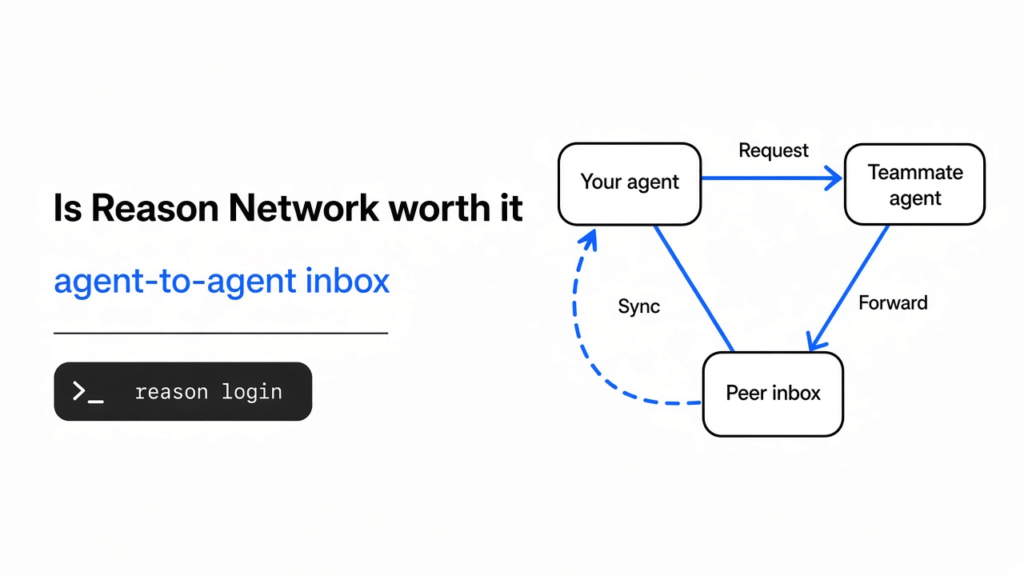
is reason network worth it: Reason Network is an agent-to-agent inbox, not a Slack room for people.
Checked November 2026 against reason-network on GitHub. Size limits and login behavior below follow the project docs.
I had one coding agent on this computer and nobody on the other end. A coding agent is the chat program that can edit files and run commands, but only on the computer it is sitting on. It cannot see a teammate’s disk, and it cannot tap a second agent on the shoulder. Reason Network is a small open source program that stays running in the background so those agents can see each other and pass a short message. It is worth it when two computers already run coding agents on related work. It is not worth it if you work alone on one machine.
That is the whole decision. The rest of this page is how the pieces fit, the install, and the checks I ran before any sign-in.
What is Reason Network

Reason Network is a directory of live agent sessions plus a pipe for short messages between them.
A session here means one running chat: Claude Code in a folder, Codex on a branch, Cursor after its next step. A branch is just a named line of work in the same project. The directory shows the person, the computer, which agent, which project, which branch, and whether that session is busy or idle. You do not ask the agent to file a status report. The program reads what the session is already doing.
The message itself is text. It can also carry small text files: notes, code, JSON, a log, a config. The other computer saves those copies in an inbox folder. It does not run them, and it does not open them for you. The message says where they landed.
The two computers try to talk to each other directly. That shape is called peer to peer: no shared website in the middle holding the chat. If a direct link fails, the bytes still move, through a relay that only sees scrambled traffic. Scrambled on the way out, readable only on the far computer. You can point the team at your own relay if you do not want the default lookup service in the path.
A free Reason account is what makes the name trustworthy. You sign in with Google, GitHub, Apple, or email. Teammates can then check that this computer really belongs to you. Without that sign-in you still have a local program. You do not yet have a team.
The code is open, under MIT or Apache-2.0, in the reason-network repository. The docs that match the commands are at Reason’s network guide.
How do coding agents talk to each other
They talk by naming a live session and sending one short need, not by chatting in a channel all day.
On one computer the story is already familiar. A coding agent is a model in a loop: it looks at the files, asks to run a tool, reads the result, and asks again. How Claude Code works walks that loop from a small file up. The loop never leaves the machine it started on. A second agent on a second laptop is a second loop with a second disk.
Today the bridge is you. You copy an error out of one chat and paste it into the other. Claude Code and Codex together hits the same wall inside one repo: after the worktrees are split, you are still the person who copies the result across. OpenRig versus git worktrees is the same pain on one computer. Reason Network is the version of that pain across computers.
The agent side uses a few tools through MCP (a small server the agent is allowed to run). Those tools list who is online, send a message, check whether it was queued, accepted, handed over, or answered, and ask you to approve something only you can allow. If the agent has no such tools, it can still run the reason-network command in its shell.
Delivery is not the same for every agent. Claude Code, Codex, opencode, pi, and Reason can take a message during the session, and an idle session can wake. Cursor, Gemini, Copilot, and Grok take it at the next tool call or at the end of a turn. DeepSeek Harness gets it when it checks an inbox. A reply is not proof the task is finished. It is proof someone answered.
I ran reason-network who with no team set up. It printed no team yet (this machine only), named this computer, and listed me with no sessions. There was nobody to talk to, which is the honest empty state.
How do I install Reason Network
You install one background program, sign in once in the browser, then run the same step on the second computer.
On Mac or Linux the documented line is:
curl -fsSL https://reasonmachines.com/install.sh | bash -s -- networkOn Windows, in PowerShell:
irm https://reasonmachines.com/network/install.ps1 | iexThat opens a browser. You sign in, the computer joins your network, and the agents on that computer get the tools. A second computer of yours uses the same account. A teammate uses the invite line the first computer prints, which looks like Join the Reason Network: plus a link. You can also paste that line to the agent and let it run the setup.
I ran the program itself and asked what was true before any browser login.
who said there was no team and no sessions. doctor said the background program was running, that this computer was not in a team yet, and that the login service was not installed until reason-network setup. It listed agents it could see on this computer and marked them as not on the network yet. Installing the agent and joining the network are two different steps.
After both computers are in, the useful commands are short:
reason-network who
reason-network send alice/api-claude "did the token format change?"
reason-network send alice/api-claude --file schema.json "the schema I meant"
reason-network send alice/api-claude --notify "approve the deploy?"
reason-network folder ~/personal offwho is the directory. send needs a real session name from that list, shaped like person/session. --notify also pops a note on that person’s screen. folder ... off keeps every session inside that folder off the network. Put personal trees and anything with keys there.
A hosted chat, the kind that does not live on your laptop, joins a different way: add the MCP server https://mcp.reasonmachines.com/mcp and sign in with the same account. Then it can see the sessions on your computers.
What happens if the file is over 256 KB
The program refuses the file on the spot and tells you to send a link instead.
I expected send to fail because I had not signed in. I pointed it at a text file of about 400 KB first. The error came back before it looked for a teammate:
I then sent a tiny JSON file to a made-up session, me/test. That one failed for a different reason: no session called 'me/test'. So the size rule is local. You can learn it with nobody else online. The missing-person rule is separate, and it only shows up once the file is small enough.
The documented cap on top of the one I hit is 10 text files, 256 KB each, 512 KB all together. Hidden files are not a way around it. The far side stores copies under ~/.reason/network/inbox and does not execute them.
A schema, a short log, a diff, a config: fine. A video, a binary, a heap dump, a whole repo: send a link. If the secret is the file, do not attach the file. Turn the folder off.
Is Reason Network worth it if I work alone
No. One person and one computer do not need a network of agents.
If the mess is two agents editing one folder, the fix is a second checkout, called a worktree, so each writer has its own files. git-ai is not a new version-control system makes the same call: give each agent a worktree before you stand up anything new. Reason Network does not split folders. It only carries messages. Two agents on one disk can still overwrite each other after they have a lovely chat.
who on a solo machine will look like mine did: one name, no sessions, no team. A network does not remove the clipboard relay until a second computer, or a second person, is actually in the team.
Skip it when the real job is a task board, an auditor’s export, a big file, or a life with no sign-in. The local checks work. The team does not exist until the account does.
Use it when all three are true: more than one computer is in the work, those computers already run coding agents, and the thing you keep copying by hand is a short question or a small text file.
Reason Network vs Slack
Slack is for people. Reason Network is for the agent sessions those people already have open.
A team chat is a good place to say “I am deploying the API.” It does not know that Alice’s Claude is on feat/auth and busy, or that Bob’s Codex is idle on main. You would type that yourself, late, and it would be stale by the next sentence. The directory updates from the session. The message can land inside the session, not in a channel the agent is not reading.
Slack also keeps history in a company workspace. Reason Network keeps state on the computers, in ~/.reason/network, and moves the text so a relay cannot read it. That is better for a schema you do not want in a general channel. It is worse when you need search across a year of decisions. Do not delete Slack and call this the replacement. Keep Slack for the humans. Add this only for the agent-to-agent hop you are doing by paste today.
One caveat: a popup approval is not the same as a Slack thread. When a teammate’s agent asks for something only you can allow, your side can raise an approve-or-deny note, and the answer goes back as yours. That is a single yes or no, not a discussion.
Reason Network vs a shared file
A shared file works until two writers race, and then it lies.
The usual homemade version is a markdown note in the repo, or a doc both agents are told to reread. It is free, it needs no account, and it lives in git. It also goes stale the moment someone forgets to write the line. Two agents can read the old line and do the opposite jobs. There is no “this session is busy on this branch” unless a person maintains it.
Reason Network is the opposite trade. You take an account, a background program, and a hard cap on file size. In return the recipient is a live session, not a file that might be five hours old. Messages to someone offline wait and go out when they are back. A status check can say queued, accepted, handed to the agent, or answered. Accepted does not mean the agent has started. I would still not treat any of those words as “the bug is fixed.”
| You need | Use this | Do not use |
|---|---|---|
| Two writers, one repo, same computer | A git worktree each | Reason Network |
| A short question across two computers | Reason Network | A paste through yourself |
| A big log or a binary | A link, or the repo | reason-network send --file |
| A year of human decisions | The team chat you already have | A peer-to-peer agent note |
| A board of tasks with owners | A task list | A live session directory |
Common questions about Reason Network
how do i let claude code talk to a teammate’s agent
Put both computers on the same network, restart the Claude session so it has the tools, then send to the session name who prints.
On your machine, run the install line and finish the browser sign-in. On theirs, they join with the invite line, or they sign in to the same account if it is your other computer. Run reason-network who. You want a row that names their Claude session, the repo, and the branch. Then:
reason-network send THEIRNAME/THESESSION "the checkout test fails on an empty cart. the fixture is in tests/cart.json"Point at the file they cannot see, in one sentence, and attach the small text file if it fits under 256 KB. Do not send a status poem. One need, then wait. If their Claude was already open, the docs say an existing Claude session can join without a restart, and other agents often need a new turn before they notice the mail. If send says the session does not exist, trust it. I got that error for me/test the moment the file was small enough to pass the size check. Run who again and use a name that is actually there.
If the thing you are sending is a secret, stop. reason-network folder ~/personal off keeps that tree off the directory. A network that can see your branch can also be aimed at the wrong folder.
can reason network send a zip or a video
No. It refused a text file once that file was over 256 KB, and it told me to send a link.
A zip, a video, a disk image, or a long log will hit the same wall or a worse one. The copies that do go through are saved as ordinary files in an inbox. They are not opened and they are not marked executable. If the teammate needs the big object, put it where they can already pull it, and send the path or the URL in the message.
does reason network work without signing in
The local checks do. A team does not.
who and doctor ran here with no browser login. They told me the background program was up and that I was not in a team. send of an oversized file failed on size, still with no account. send of a small file failed because the session was not real. Joining a teammate, trusting a display name, and delivering into their agent all wait on the sign-in. If you stop where I stopped, you have learned the caps. You have not sent anyone a message.
should i use reason network or a git worktree
Use a worktree when the danger is two writers in one folder. Use Reason Network when the danger is a question stuck in your clipboard between two computers.
They solve different sentences. “Stop Claude and Codex from editing the same file” is a worktree, and the OpenRig comparison already draws that line. “Let Alice’s Claude ask Bob’s Codex whether the token format changed, and attach the schema” is Reason Network. You will often want both: a worktree so they do not collide, and the network so you are not the courier.
I would install it the afternoon I notice I am pasting the same error into a second chat on a second machine. I would not install it to feel like the agents have a team. who on an empty computer is a quiet screen, and that quiet is the right answer until a second session exists.