
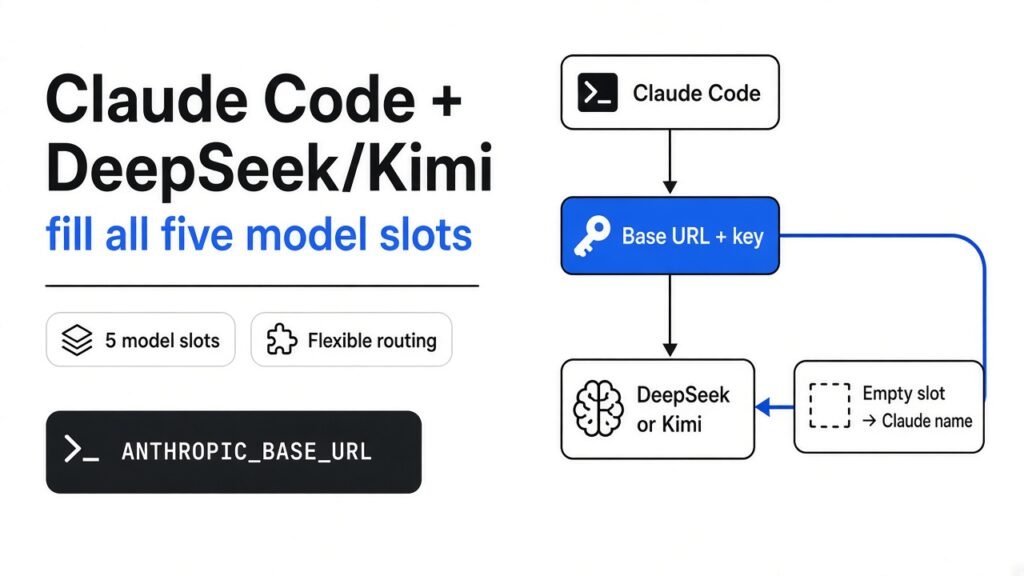
Pointing Claude Code at DeepSeek or Kimi takes one line. Pointing all of it there takes a few more, and nothing warns you when you skip them.
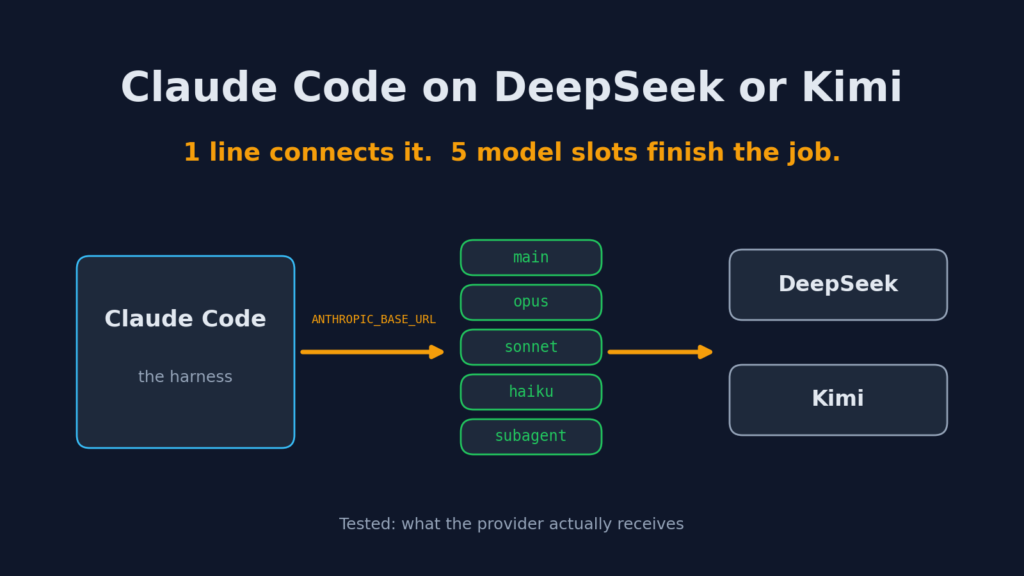
Short answer: to run Claude Code on DeepSeek or Kimi, set ANTHROPIC_BASE_URL to the provider’s Anthropic-style address, put your key in ANTHROPIC_AUTH_TOKEN, and then fill every model slot: the main model, the opus, sonnet and haiku slots, and the subagent slot. Set only the main model and some background requests still ask for a Claude model the provider does not sell. magpie, a free open-source app, fills all the slots for you and can undo it cleanly.
Why would you run Claude Code on another model?
![Mind map — Claude Code with DeepSeek or Kimi: five slots, [1m] suffix, magpie undo](https://techwavearena.com/wp-content/uploads/2026/09/mindmap-9-768x1024.png)
Because the tool is the part people love, and the model is the part that costs money.
Claude Code is a coding agent (a program that reads and edits your project, and runs commands, from your terminal). It has two layers. The harness (the app that holds your files, tools and chat) and the model (the AI “brain” that decides what to write). Normally both come from Anthropic.
The harness does not care much who the brain is. It talks to the model over an API (a fixed set of messages two programs agree to send each other). DeepSeek and Moonshot, the company behind Kimi, both run a copy of Anthropic’s message format on their own servers. So Claude Code can talk to them as if they were Anthropic.
People do this for three reasons: a lower bill, a model that is strong at one job, or a limit on their Claude plan they keep hitting. The catch is that “talk to them” has more parts than most guides show.
How does Claude Code decide where to send a request?
It reads a few environment variables when it starts, and those decide the address, the key and the model name.
An environment variable (a named setting your terminal hands to every program it starts) is how you steer Claude Code without touching its code. Three do the basic wiring:
ANTHROPIC_BASE_URLis the address. Change it and every request leaves for that server instead of Anthropic.ANTHROPIC_AUTH_TOKENis your key for that server. In my test Claude Code sent it as a normal “Authorization: Bearer” header, which is what these providers expect.ANTHROPIC_MODELis the model name for your main chat.
For DeepSeek the address is https://api.deepseek.com/anthropic. For Kimi it is https://api.moonshot.ai/anthropic. Think of the base URL as the phone number and the model name as the person you ask for once someone picks up.
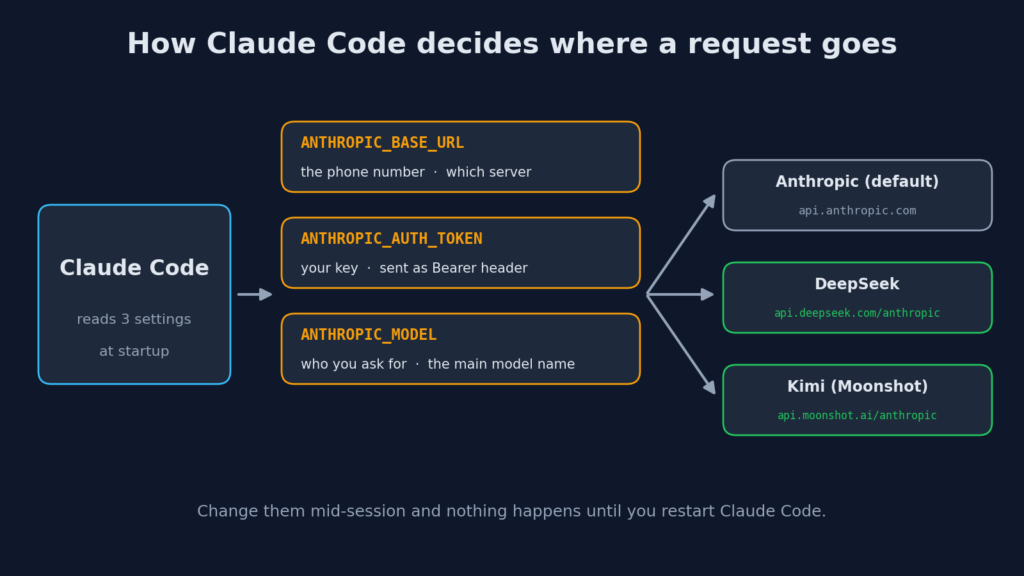
Claude Code reads these at startup. Change them while a session is open and nothing happens until you restart it.
Why is one model variable not enough?
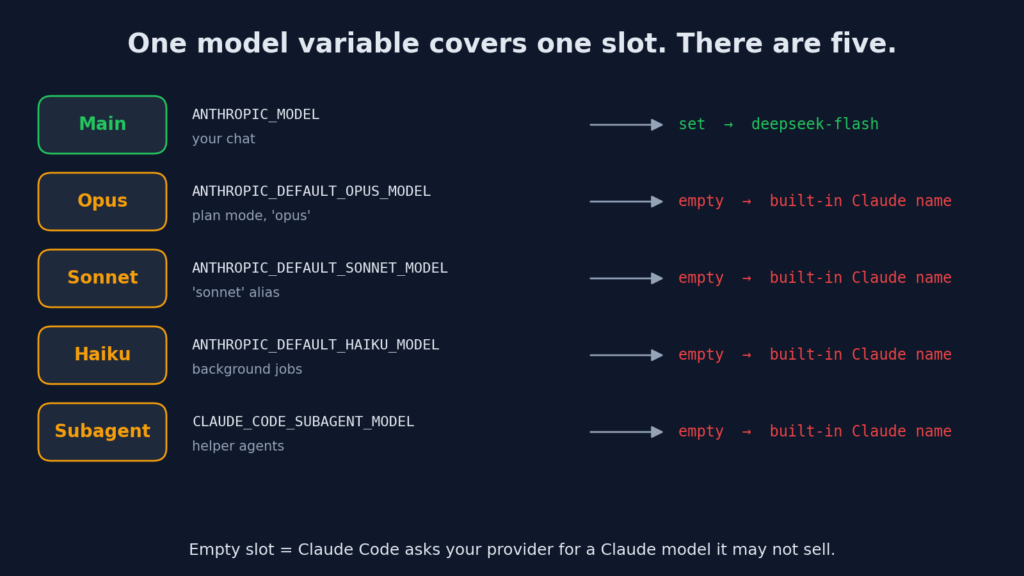
Claude Code does not use one model. It uses a main model plus several helper slots, and each slot has its own variable.
A slot (a named job inside Claude Code that gets its own model) exists so cheap jobs can use a cheap model. Here are the five that matter:
| Slot | Variable | What uses it |
|---|---|---|
| Main | ANTHROPIC_MODEL | Your chat in this session |
| Opus | ANTHROPIC_DEFAULT_OPUS_MODEL | Anything that asks for “opus”, like plan mode |
| Sonnet | ANTHROPIC_DEFAULT_SONNET_MODEL | Anything that asks for “sonnet” |
| Haiku | ANTHROPIC_DEFAULT_HAIKU_MODEL | The “haiku” alias and background jobs |
| Subagent | CLAUDE_CODE_SUBAGENT_MODEL | Subagents (helper agents Claude Code starts for side tasks) |
If a slot is empty, Claude Code falls back to its built-in Claude name for that slot. Anthropic’s server knows that name. DeepSeek’s server may not.
Moonshot’s own setup page for Kimi warns about exactly this: configuring only some of the variables makes the matching features fail silently. I wanted to see what “silently” looks like, so I tested it.
I tested the half setup and the full setup. Here is what the provider saw
With only the main model set, one background request still asked for a Claude model. With all five slots set, none did.
The test needs no API key. I wrote a tiny fake provider (a local server that speaks Anthropic’s message format, logs every request, and returns a short reply). It refuses any model whose name starts with “claude-“, the way a provider refuses a name it does not sell. Then I ran Claude Code against it twice from a clean home folder, with the same one-line task: hand a small job to a helper.
Run A, the half setup, set only the address, the key and ANTHROPIC_MODEL=deepseek-flash:
- 13 requests reached the fake provider.
- 12 asked for
deepseek-flash. - 1 asked for
claude-sonnet-5. It was a short background check Claude Code ran before using a tool. The provider refused it. - The session still finished with “hi from mock” and no error on screen.
Run B, the full DeepSeek setup with every slot filled:
- 12 requests, all for
deepseek-flash. Zero Claude names.
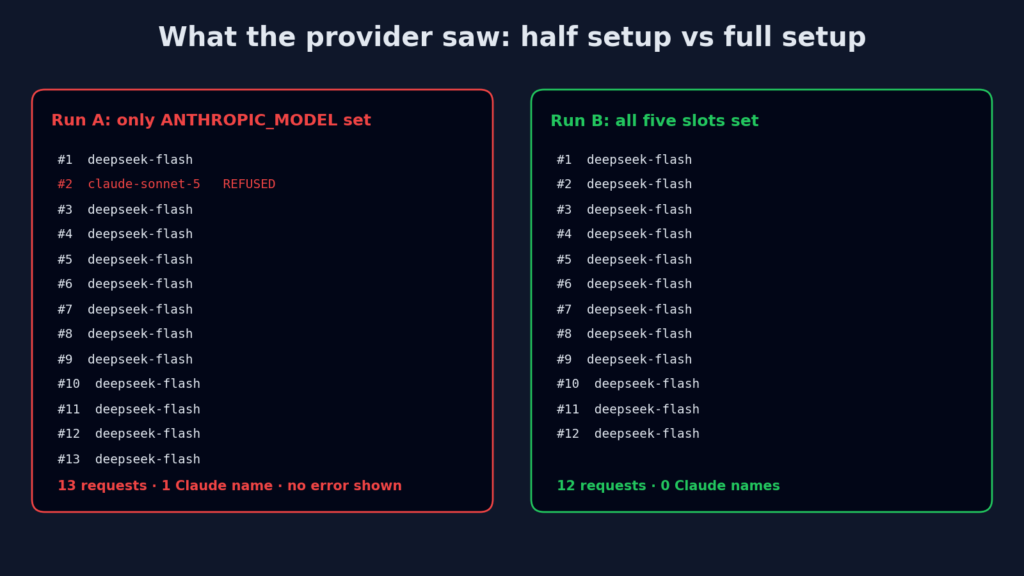
That refused request is the whole problem in one line. You see a working session. Underneath, one piece asked the wrong server for the wrong model and gave up. A real provider may refuse like my fake one did, or quietly answer with its own default model. Either way you are not in control of which brain did that job.
What does the [1m] at the end of a model name do?
It tells Claude Code the model can hold one million tokens. Without it, Claude Code assumes 200,000 and compacts early.
A token (a chunk of text, about three quarters of a word) is how models measure reading. The context window (how much text a model can hold in mind at once) is counted in tokens. When the window fills, Claude Code runs compaction (it squeezes old messages into a short summary to make room). Compaction is also where instructions get lost, which is its own headache: why Claude Code compaction drops your instructions.
Claude Code cannot ask DeepSeek how big its window is. So it guesses from the name. In my runs:
deepseek-flashwas treated as a 200,000-token model.deepseek-flash[1m]was treated as a 1,000,000-token model.- In both runs the provider received plain
deepseek-flash. Claude Code strips the tag before sending.
That is why DeepSeek’s setup page puts [1m] on the main, opus and sonnet slots. Only add it when the model really takes a million tokens. Tell Claude Code a bigger window than the model has and it will stuff in more text than the provider accepts.
![The [1m] suffix changes the assumed context window from 200,000 to 1,000,000 tokens](https://techwavearena.com/wp-content/uploads/2026/09/05-claude-code-1m-context-suffix-1024x576.png)
What does a full setup look like for DeepSeek and Kimi?
Seven lines for DeepSeek, a few more for Kimi, copied straight from each provider’s own setup page.
DeepSeek (Mac or Linux terminal):
export ANTHROPIC_BASE_URL=https://api.deepseek.com/anthropic
export ANTHROPIC_AUTH_TOKEN=your-deepseek-key
export ANTHROPIC_MODEL='deepseek-flash[1m]'
export ANTHROPIC_DEFAULT_OPUS_MODEL='deepseek-flash[1m]'
export ANTHROPIC_DEFAULT_SONNET_MODEL='deepseek-flash[1m]'
export ANTHROPIC_DEFAULT_HAIKU_MODEL=deepseek-flash
export CLAUDE_CODE_SUBAGENT_MODEL=deepseek-flash
claudeKimi goes in the env block of ~/.claude/settings.json (Claude Code’s own settings file):
{
  "env": {
    "ANTHROPIC_BASE_URL": "https://api.moonshot.ai/anthropic",
    "ANTHROPIC_AUTH_TOKEN": "your-moonshot-key",
    "ANTHROPIC_MODEL": "kimi-k3[1m]",
    "ANTHROPIC_DEFAULT_OPUS_MODEL": "kimi-k3[1m]",
    "ANTHROPIC_DEFAULT_SONNET_MODEL": "kimi-k3[1m]",
    "ANTHROPIC_DEFAULT_HAIKU_MODEL": "kimi-k2.7-code",
    "ANTHROPIC_DEFAULT_FABLE_MODEL": "kimi-k3[1m]",
    "CLAUDE_CODE_SUBAGENT_MODEL": "kimi-k3[1m]"
  }
}Two Kimi traps. kimi-k2.7-code always thinks (writes hidden reasoning before answering), so turn thinking on in Claude Code or it returns a “400 invalid thinking” error. And that file now holds your key in plain text, so keep it out of git.
What is magpie, and what does it change?
magpie is a free, open-source app that fills every slot for you, routes the traffic through your own computer, and puts the file back the way it was when you switch off.
It has three parts. A config editor (it changes only the settings keys it needs and leaves the rest alone). A local gateway (a small server on your own machine, at 127.0.0.1:3425, that translates between Anthropic, OpenAI and Gemini message formats and forwards to the real provider). And a picker, in the menu bar, a window or the terminal, that lists every agent and its model on one screen. It supports Claude Code, Codex, Gemini CLI, OpenCode and many more.
I built the terminal version from source on Linux and ran it against a Claude Code settings file that already had my own rules in it. After magpie claude <provider>/deepseek-flash:
- It added 9 variables to the
envblock: the address, the key, and all the model slots, including the olderANTHROPIC_SMALL_FAST_MODEL. - It added a top-level
"model"line. - My existing permission rules, my own variable and my theme were untouched.
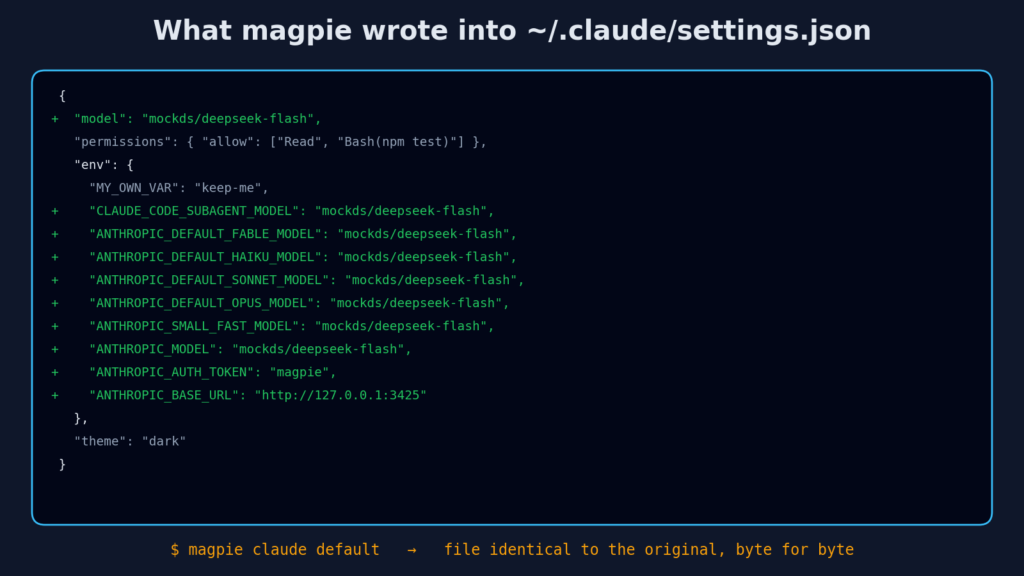
Then I ran Claude Code through it. The fake provider received plain deepseek-flash, so magpie strips its own provider prefix. magpie usage showed the call with its tokens and timing. When I told magpie the provider holds a million tokens, it rewrote every slot with [1m].
Last, magpie claude default. The settings file came back identical to the original, byte for byte. That undo is the part hand-editing does not give you. The project lives at github.com/yetone/magpie.
magpie vs setting the variables yourself: which should you use?
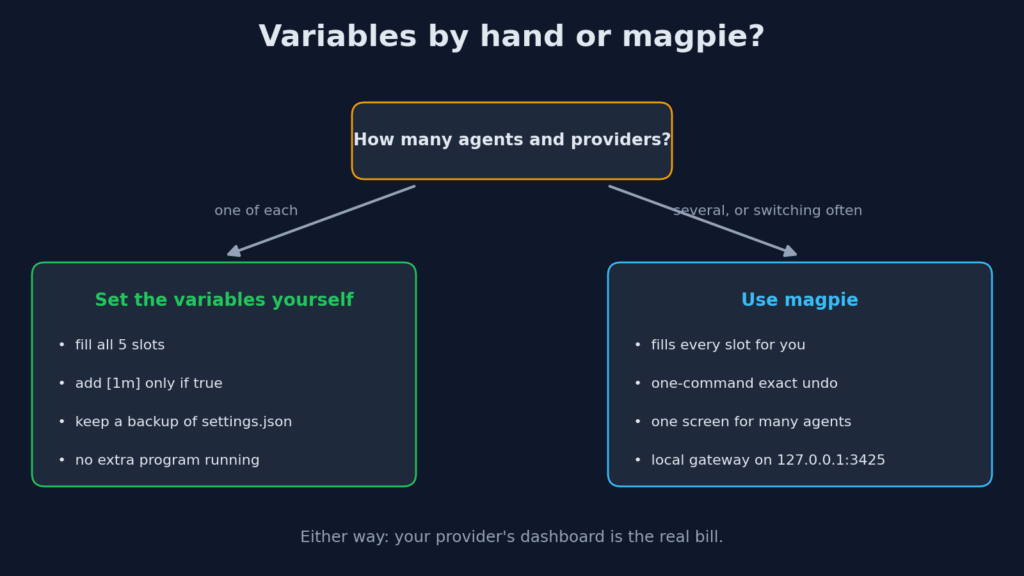
Set the variables yourself for one agent and one provider. Use magpie when you switch often or run several agents.
| Question | Variables by hand | magpie |
|---|---|---|
| Fills every model slot | Only if you remember all five | Yes, all of them |
| Undo to your old settings | You keep your own backup | One command, exact restore |
| Several agents (Claude Code, Codex, Gemini CLI) | Different files and names for each | One screen |
| Extra program running | No | Yes, a local gateway |
| Shows usage per agent and model | No | Yes, as estimates |
| Sends anything home | No | An anonymous daily install count, off with DO_NOT_TRACK=1 |
Two honest limits. magpie put the same model in every slot, including background jobs; if you want a cheaper model there, set that field yourself. And its cost numbers are estimates from price lists, not your bill. The same goes for the dollar figure Claude Code prints on a non-Anthropic provider. Your provider’s dashboard is the real meter.
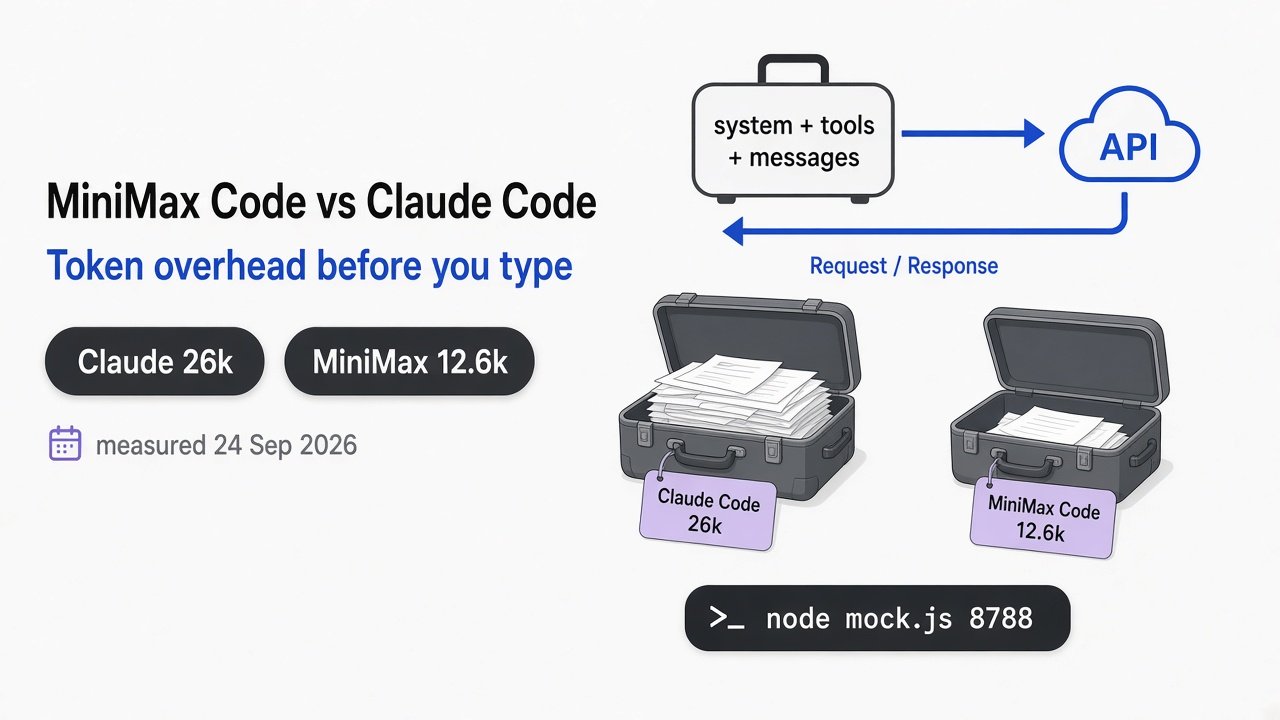
If money is the reason you switched, the model is only half the bill. Every request also carries Claude Code’s tool list. In my test each main request carried 21 tool descriptions, about 57,000 characters, before my one-line task. See how much Claude Code sends before you type and which MCP server is wasting tokens.
What stops working when Claude Code is not on Claude?
The harness keeps working. Anything that depends on Anthropic’s own servers, or on a Claude name you forgot to replace, may not.
- Any empty slot, as shown above.
- Price labels. Claude Code does not know your provider’s price, so its cost line is a guess.
- The window size, unless you add
[1m]or tell it the real size withCLAUDE_CODE_MAX_CONTEXT_TOKENS. - Quality. The harness was tuned on Claude. Another model may call tools differently. Try a small real task before you trust a big refactor to it.
To check which model a session is on, run /status inside it. More on that in check your Claude Code default model.
Try this in 10 minutes
Log what your Claude Code really sends, with no API key and no cost.
- Save a tiny server that logs the
modelfield of each request and replies with a short text message in Anthropic’s format. - Start it on port 8811.
- Run the one-liner below.
- Read the log. Every model name that is not
test-modelis a slot you left empty. - Fill that slot, run again, and confirm the log shows only your model.
ANTHROPIC_BASE_URL=http://127.0.0.1:8811 ANTHROPIC_AUTH_TOKEN=x ANTHROPIC_MODEL=test-model claude -p "hello"If your log is clean, your real provider will only ever be asked for models it sells.
Common questions about Claude Code with DeepSeek or Kimi
Can I use Claude Code with DeepSeek for free?
Claude Code itself is free to install, but DeepSeek bills per token through your DeepSeek API key. You pay DeepSeek, not Anthropic, for those requests.
Do I need a Claude subscription to run Claude Code on Kimi?
No. With the base URL and your Moonshot key set, requests go to Moonshot and your Claude login is not used for them.
Why does Claude Code still ask for a Claude model after I set ANTHROPIC_MODEL?
Because ANTHROPIC_MODEL only covers your main chat. Background jobs, subagents and the opus, sonnet and haiku aliases each read their own variable, and fall back to Claude names when it is empty.
Is magpie safe to use?
It is open source, its gateway listens only on your own computer by default, and it restored my settings file exactly. It sends one anonymous daily install count unless you set DO_NOT_TRACK=1 or build it from source.
Pointing Claude Code at DeepSeek or Kimi takes one line. Pointing all of it there takes a few more, and nothing warns you when you skip them.
2 comments