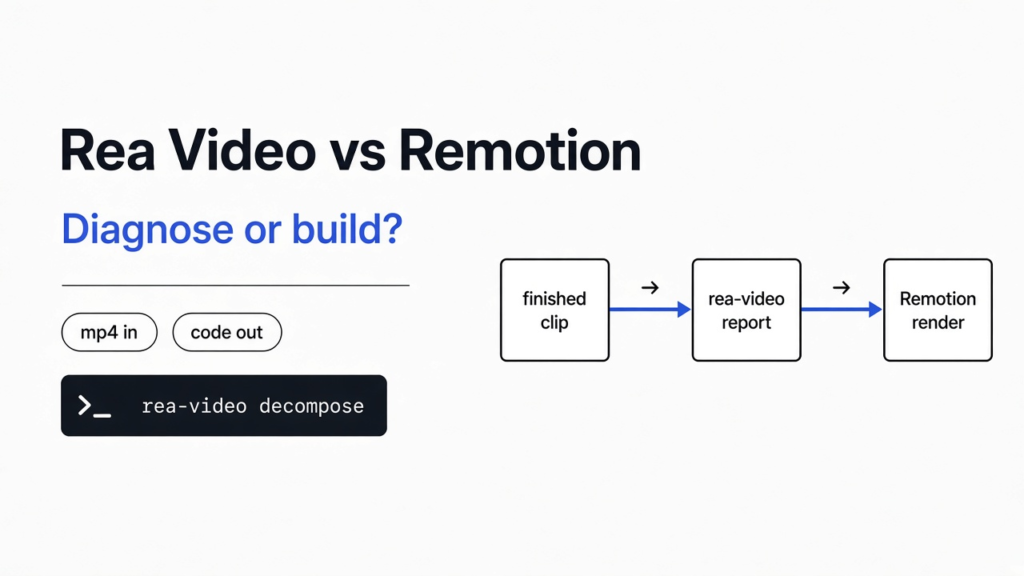
I had a three second file on disk and no idea which tool should touch it next. The picture was colored blocks drawn by a video program, not a person with a camera. The sound was one held beep. Remotion is the usual next step when you want that kind of picture written as code. rea-video is the step before that: it looks at a finished file and says whether each piece was filmed, generated, or drawn by code. For rea video vs remotion, use rea-video when you already have a clip and you need that split. Stay in Remotion when you already know the piece is code and you need the project that plays it. They are not substitutes. One writes the diagnosis. The other writes the picture.
What is rea video
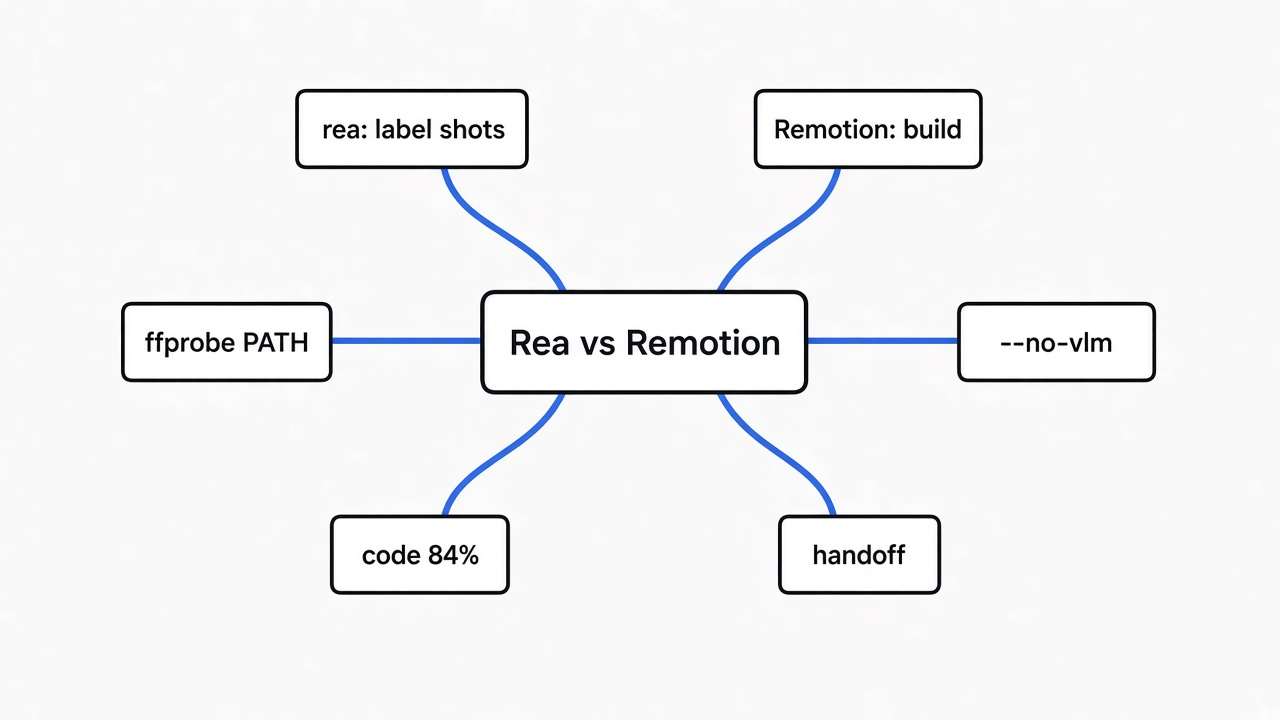
rea-video reads one video file and returns a report, not a new video.
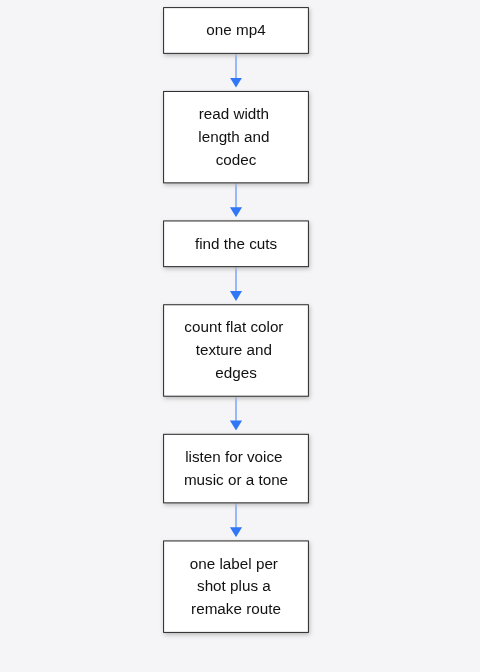
A video file is a stack of still pictures plus a sound track, packed by a codec (the recipe that squeezes those pictures into the file). A shot (one unbroken stretch of picture between two cuts) is the unit the report talks about. If nothing cuts, the whole file is one shot. That was my case.
The report tries to answer three questions a tired person actually has. What is the base picture of this shot: a real camera, a generated clip, a 3D render, a screen recording, or code. What is the sound: voice, music, or a tone. What should you do next: film it, generate it, or rebuild it in a code project.
It can run with no paid key. A vision model is optional. A vision model here is a VLM (a model that can look at a picture, not only text). I left that off. The tool still printed a verdict, and it also printed the limit in the same breath: without something that can see the frames, live action, generated video, and 3D are separated by pixel counts only, so the confidence is capped.
What is Remotion
Remotion is a way to build a video in code, the same way you build a web page, and then render that code to a file you can play.
You describe frames with React components. A component here is a small function that returns a piece of the picture: a title, a bar, a chart. Time is a number you can read, so a box can move because the frame number changed, not because you dragged a clip on a timeline. When you render, Remotion walks the frames and writes the video file.
That is a construction tool. Hand it an idea, or a layout, and it can make the pixels. Hand it a stranger’s mp4 and it does not tell you how that stranger made it. If you start in Remotion with only a reference video, you are guessing the shots yourself and then coding them.
The timeline shape of the same job is tracks, a playhead, text sitting on top of video. Remotion can end up looking like that once it is rendered. The source is still code.
Rea Video vs Remotion
rea-video labels the shot. Remotion builds the shot. Pick by which of those you do not have yet.
| You already have | Open this | You get |
|---|---|---|
| A finished mp4 and a question about how it was made | rea-video | A shot list, a label, and a route: film, generate, or code |
| A label that says the shot is code, plus the layout | Remotion | A project you can change and a rendered file |
| Neither a file nor a layout, just a sentence | Remotion, or any other code renderer | A first draft you will still have to watch |
| A filmed talking head you are not allowed to copy | Neither, until you film your own | A plan is not a license |
I would not install Remotion to answer “is this generated.” I would not ask rea-video to export the final mp4. Its own remake plan, on my run, stopped at “one code project” and named Remotion as the place to build that project. That is the handoff, not a rivalry.
If the code path is the one you take, the license fork with another code renderer is a separate decision. That comparison, including when a company outgrows a free tier, is HyperFrames vs Remotion.
Checked against rea-video on a synthetic ffmpeg clip and Remotion docs, Nov 2026.
How do I install rea video
You need three things before the command will even start: Python 3.10 or newer, ffmpeg, and ffprobe (the small program that reads a video file’s width, length, and codec).
ffmpeg draws, cuts, and encodes. ffprobe only looks. They ship together in a normal install, and they do not always land on the same path. My first run failed before any frame was read. The message was exact: ffprobe not found on PATH, then a one-line hint to install ffmpeg. The encoder was already installed. The reader was not on the path the tool searches. I put ffprobe next to ffmpeg and ran again.
Then, from a folder you can write to:
git clone https://github.com/JuneYaooo/rea-video
cd rea-video
bash scripts/install_skill.sh
rea-video --helpThe install script puts the command on your machine and links a folder of instructions into the coding tool you already use, if that tool’s home folder is present. I installed the package into a local environment instead of the script, because I only wanted the command. --help listed decompose as the command that takes a video apart, plus probe for the container facts alone.
probe does not judge the picture. On my file it returned width 640, height 360, 30 frames a second, duration 3.0 seconds, codec h264, and no AIGC tag. An AIGC tag (a label some generators write into the file) would have been a hard clue. Mine was empty, which is what you should expect from a file you encoded yourself.
What did the test clip come back as
It came back as code, in one shot, at 84 percent, in under two seconds.
The file was ffmpeg’s moving test picture, testsrc2, three seconds, 640 by 360, 30 frames a second, with a 440 Hz sine tone mixed in. Colored blocks move. Nothing was filmed. I ran:
rea-video decompose bars.mp4 -o out-bars --no-vlm --no-ocr --no-packaging --no-stems --lang en--no-vlm keeps the paid look-at-the-picture step off. --no-ocr skips reading text burned into the frame. --no-packaging skips stickers and caption timing. --no-stems skips splitting the sound into voice and music, which would have downloaded a separate model. I wanted the base verdict, not every extra pass.
The log said detected 1 shots, then shot_001 00:00.000-00:03.000 det=code_render(84%) dynamic, then done in 1.9s. The printed summary was:
{
  "verdict": "code / template render 100%",
  "shots": 1,
  "confidence": 0.844
}The report under that number is more specific than the headline. Probabilities for that one shot: code or template render 84 percent, 3D render 9 percent, screen recording 2 percent. It described the picture as procedural rainbow colour fields with almost no material texture, 77 percent flat colour blocks, 95 percent of the pixels using only 80 colours, and 60 percent axis-aligned edges. The remake line said to rebuild it in Remotion or HTML, with no generative model needed.
The sound check was the part that looked useless on a beep, until it was not. I had mixed a pure 440 Hz tone. The report said: not music, one held pitch at about 431 Hz, no melody, no beat, like a test tone. Loudness was minus 21.1 dBFS, peak minus 17.7 dBFS. dBFS (a volume number where 0 is as loud as the file format allows) is just a way to say the tone was present and not clipping. The 431 against my 440 is the tool’s own measurement. Not close enough to treat the hertz as lab grade.
What this does not prove: a phone video, a compressed upload, or a face. The tool said so in the same JSON. Without a VLM, confidence is limited, and an agent that can see images should run rea-video review, look at each shot, and merge with apply-review. That review pass was skipped here. One synthetic clip labeled correctly is a real result. It is not a score for every video on the internet.
On the first decompose it also downloaded a small face-detection file into its cache, even with the vision step off. If your network blocks that download, expect a pause there before the verdict.
When should I stay in Remotion
Stay in Remotion when the label is already “code” and the next hour is drawing, not detecting.
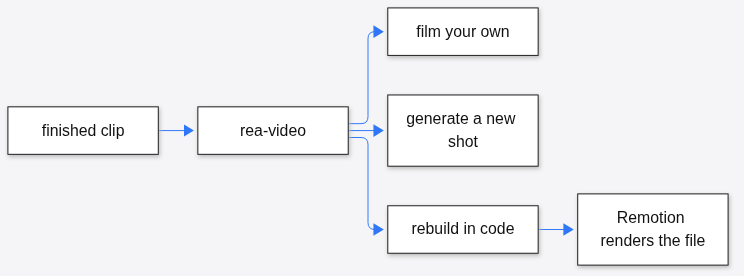
My report’s remake section did not offer a render button. It said one code project, part 1, from 0.0 to 3.0 seconds, and it pointed at a procedural colour field: a shader or a canvas, time passed in as a number each frame. That is a Remotion job. Opening rea-video again would only reprint the same label.
Stay in Remotion when you are making the first version and there is no reference file, when you already know the frames are titles or charts, or when you need a file tonight and ffprobe is not on the path yet. Fix the path later. Do not block the render on a forensic pass.
Leave Remotion, and open rea-video first, when someone hands you an mp4 and asks which parts you have to film. Guessing that from memory is how a generated face gets coded as if it were a title card.
This is also not the job on rea vs Ghidra. That page is for reading a program: JavaScript as text, a binary with another tool. A moving picture is a different file. If the drawing you need is a math clip rather than a product title, the painter question is the one on ManimGX vs Manim. rea-video sits upstream of both. It only tells you that the shot wants a painter.
How do I try this on a short clip
Make a clip you already understand, run the short command, and read the one-line verdict before you read the long report.
- Confirm both programs answer:
ffmpeg -versionandffprobe -version. If the second fails, the decompose will fail with the path error I hit. - Make a three second file you know the answer to. A test picture is enough. A screen recording of your own desktop is a better second try, because you know it is a screen, not a camera.
- Run
rea-video probe your.mp4and check duration and size. If those are wrong, stop. The rest of the report cannot outrun a bad read. - Run
rea-video decompose your.mp4 -o out --no-vlm --lang en. Add--no-stemsif you do not want a model download for the voice split. - Read the JSON line first:
verdict,shots,confidence. Then openreport.mdin that folder. The remake section is the only part that should change what you install next.
If the verdict says code, scaffold Remotion and use the shot times as the composition length. If it says live action, you film. If it says generated, a generator is the route, and rea-video still will not press that button for you. There is a later command, remake-run, that can spend money on a companion tool. That remake-run pass was not run here. Treat it as off until you have read the dry-run flag.
A coding tool can run the same command if you paste the install line and the path to a file you are allowed to read. The folder of instructions exists so it calls decompose instead of inventing a label from the file name. You do not need that tool for the three second check. The terminal is enough, and the terminal is what I used.
Does rea video need an API key
No, not for the pass I ran.
decompose with --no-vlm finished, wrote report.html, and named a remake route. No key, no account. The optional look-at-the-picture step wants three environment variables: a base URL, a key, and a model name, for any service that speaks the common chat API and can see images. Skip them until a real clip comes back uncertain.
Common questions about rea video vs remotion
Can rea video render the remake
No. The report tells you the route. Remotion, a camera, or a generator does the work. On my clip the route was one code project and the words “no generative model needed.” The frames were not re-rendered. If you need the mp4 tonight and you already know it is titles and shapes, open Remotion and skip the diagnosis.
What if ffprobe is missing
The command stops before the first frame, with ffprobe not found on PATH. Installing the encoder is not the same as having the reader on the path. Check ffprobe -version in the same terminal, then decompose. There is nothing to debug in the report, because the report was never written.
Should I switch a Remotion project over to rea video
No. A Remotion project is source. rea-video reads a finished video, not your components. Keep the project. If you want a check, render a short mp4 and run decompose on that file. If it comes back as something other than code, your render looks like a camera or a generator to the pixel counters. I would trust that check more after you turn the vision step on. My 84 percent was on blocks that are obviously drawn. A title over a photograph is a harder file, and that harder file was not run here.
The decision is small once the two jobs are separate. If the thing in your hand is a file and the question is how it was made, run rea-video and read the one line. If the thing in your hand is a layout and the question is please play this, stay in Remotion. I ran the first job on a clip I understood. The label matched. That is enough to install it before the next reference video, and not enough to let it render anything.