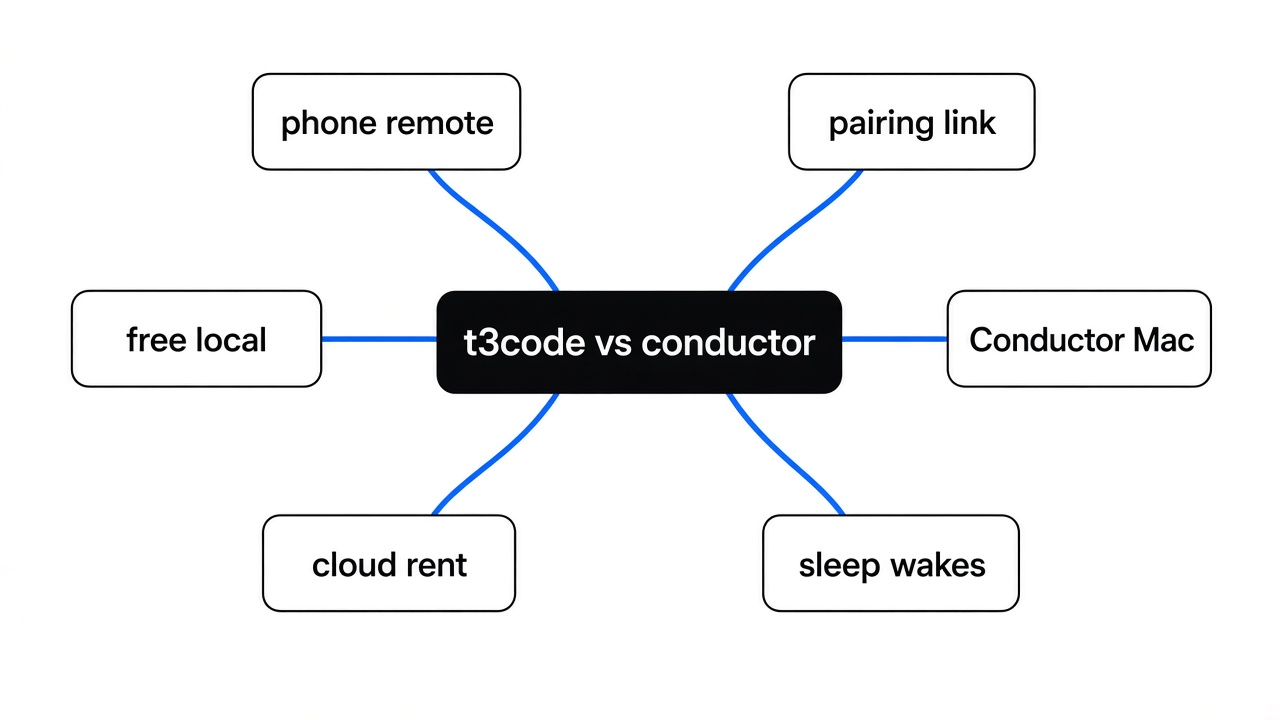
t3code vs conductor: T3 Code is a free phone remote for a local coding agent; Conductor is the Mac app that can also rent a cloud machine.
The laptop is in the other room, and the program that edits your project is waiting on a yes. That program is a coding agent. Claude Code is one. Codex is another. T3 Code is not a third agent. It is a free window on that same computer, and a remote you can open on a phone. Conductor is the Mac app people put next to it. Conductor can also rent you a cloud computer, and that part is paid. For t3code vs conductor, use T3 Code when the work should stay on a machine you own, including Linux or Windows. Use Conductor when you are on a Mac and you want those cloud computers.
Checked November 2026 against t3code on GitHub and Conductor Mac product pages. Pairing and install steps below follow the project README.
A model only guesses the next words. It does not open your folder. The coding agent is the program around the model: it reads files, runs commands, and saves the edit. T3 Code does not do that job. It starts the agent you already installed, shows you the thread, and lets another screen join. The phone does not hold the repository. The computer that is awake does.
What is T3 Code
T3 Code is a control window for coding agents that are already logged in on a computer you control.
People mix up three layers, and the mix-up is why the wrong app gets installed. First is the model, the part that writes text. Second is the agent, the program that uses the model to change a project. Third is the window you look at. A terminal is a window. An editor is a window. T3 Code is a window too, plus a small server on the same machine so a phone or another browser can be that window from somewhere else.
I checked this against the program, not against a slogan. The Linux build’s own help text says: run T3 Code in this terminal and open it in your browser, and run t3 up if you want other devices. The subcommands under that are a server, a pairing token, projects, and threads. There is no command that downloads a model. There is no command that replaces Claude Code. If Claude is not installed and logged in, T3 Code has nothing to drive.
That split is the whole product. Conductor is the same kind of window, with a different machine list and a price on the cloud half. Comparing either of them to Claude Code as if they were rival models is a layer mistake. You still pay whoever already bills you for the agent.
t3code vs conductor
Use T3 Code if you want a free remote on Mac, Windows, or Linux, with the code staying on your computer. Use Conductor if you are on a Mac and you will pay so the work can move to Conductor’s cloud, and so the iPhone app is included.
Conductor’s own pricing page is plain about the split. The free plan runs agents on your Mac and lets you bring the subscriptions you already pay. Pro is $50 a month. That paid plan is what adds Conductor Cloud and the Conductor mobile app. Teams is $60 a month per person. Cloud computers are hosted for Pro and above, with no extra compute fee called out yet, and a note that usage pricing is planned. Local Conductor workspaces are Mac only.
T3 Code’s release is MIT licensed, and the binary I ran is a local server. Its help text offers a browser on this machine, a background service, Tailscale, the local network, SSH-style environments, and a connect option for other devices. Phone apps exist for iPhone and Android. The agent list it claims, if those tools are already installed, includes Claude Code, Codex, Cursor, Grok, OpenCode, Antigravity, and fx. The help text is enough to see the shape: your subscriptions do the work, and T3 Code does not sell a model seat.
| T3 Code | Conductor | |
|---|---|---|
| What you pay the app | Nothing | Free on a Mac for local work. Pro is $50 a month. |
| Phone | iPhone and Android apps, on the free app | The mobile app is on the paid plan |
| Where the files live | On your computer, or one you reach yourself | On your Mac, or on Conductor’s cloud once you pay |
| Systems | Mac, Windows, Linux, browser | Local app is Mac |
| Can you read the program | Yes, MIT | No |
| What it will not do | It will not code if the agent is missing, and it will not continue after that computer sleeps | The free plan will not give you the cloud computers or the phone app |
A worktree is the detail that keeps two agents from stomping each other. It is a second folder checked out from the same project, on its own branch, so one agent is not saving over the other agent’s lines. The picture below is the older map of how branches split and join. The idea to steal is the split, not the whole release ritual. If two windows share one folder, the last save wins, whether the window is T3 Code, Conductor, or a bare terminal. For that file fight, a second checkout is the fix, and OpenRig vs git worktrees is the page that walks the two-agent case.
Ports, databases, and secret files can still be shared even when the folders differ. A worktree is not a locked room. It only stops the overwrite.
How do I control Claude Code from my phone
If you only use Claude, start with Claude’s own remote control in the Claude phone app. Use T3 Code when you also want Codex or another agent on that same computer, or when Claude’s remote control will not start.
Claude’s phone app can drive a Claude Code session that is already running on your computer. The code stays on that computer. The phone is a window. That path needs the Claude subscription login. A bare key is not enough for it. If you pointed Claude Code at another provider, that is a different setup, and the walkthrough is Claude Code with DeepSeek or Kimi. T3 Code does not care which provider the CLI uses. It starts the program that is already on the machine.
The order that actually works:
- On the computer that holds the project, install the agent and log it in. T3 Code cannot invent that login.
- Install T3 Code and run
t3, ort3 serveif you do not want a browser to pop open. - For a phone, run
t3 upand follow the path it offers, or runt3 pairwhile the server is up and scan what it prints. - Leave that computer awake. A closed lid is not a server. The phone cannot finish the edit if the machine is asleep.
Conductor’s phone path is the paid one. If the reason you wanted a phone was “I am away from the desk for an hour and the Mac is on,” T3 Code does that without the $50. If the reason was “finish this after the laptop is in a bag,” you want a cloud session: Conductor Cloud on the paid plan, or Claude’s own cloud sessions. A remote control pointed at a sleeping laptop will not become a cloud computer because you installed a nicer window.
Is a T3 Code pairing link safe
No, not if you treat it like a casual QR code. t3 pair mints an invite, and the default invite is allowed to do real damage.
I ran t3 pair --help on the Linux build. The token lasts 5 minutes unless you pass another time, such as 5m or 1h. Five minutes is how long someone can redeem the invite. It is not a small permission. The same help text prints the default set that invite grants, and it includes filesystem:write, terminal:operate, and access:write, along with source control and settings. In : the paired screen can change your files, run a terminal, and change who else is allowed in. You can pass --scope to hand out less. If you do not, you handed out the wide set.
Treat the link the way you treat a password. Do not put it in a screenshot, a chat, or a bug report. If the phone is lost, revoke that session from the sharing settings on the computer. A short timer on the invite does not shrink what the phone can do after it has joined.
There is a second switch inside the agent itself, and the remote does not replace it. T3 Code’s permission notes name four modes. Supervised asks before commands and file edits. Auto-accept edits lets file edits through and can still ask about other actions. Auto leans on the provider’s own review. Full access allows commands and edits with no approval prompt. Full access plus a phone means a tap away from the desk runs as you. If you want a fence around that, the fence has to be outside the window. Which cage is your coding agent in? is the page for the operating-system fence. A prompt that says “be careful” is not that fence.
How do I install t3code
Install the agent first, then T3 Code, then check that the command prints a version before you pair a phone.
The project’s one-line installer is:
curl -fsSL https://t3.codes/install.sh | sh
t3 --versionOn a Mac, Homebrew also works: brew install --cask t3-code. On Windows, winget install T3Tools.T3Code is the packaged path. The command I actually ran was the Linux release binary, after the published checksum matched the file. It printed:
The top of t3 --help says the default action opens a browser, and t3 up is how other devices get in. t3 serve stays in the terminal. t3 service install is the background service. t3 pair is the invite. t3 uninstall removes the program and keeps your projects and threads.
Two checks before you trust it with a real repository. First, t3 --version must print. If it does not, you do not have the server, and a phone app has nothing to join. Second, start one thread in a copy of a project, not in your home folder, and watch which directory it writes. If two agents share that directory, stop and give each one its own checkout. The overwrite problem is older than either app.
npx t3@latest is the documented try-without-install path. It downloads the same kind of release archive. If that extract fails, use the release binary or the installer instead of retrying the same command and hoping. The failure I hit was the archive step, and the binary itself was fine.
Is t3code worth it
Yes, if you already pay for one or more agents, you want them on a computer you control, and you want a phone or a browser on that server without paying another $50. No, if you only use Claude and Claude’s own remote control already works, or if you need the job to survive a laptop that sleeps.
Worth it, in practice:
- You use Claude and Codex on the same machine and you are tired of two terminals.
- You are on Linux or Windows, so Conductor’s local app is not an option.
- You will leave the computer on, at home or on a desk, and check it from the phone.
- You want to read the program, or you refuse a closed Mac-only app.
Skip it, in practice:
- One agent, one terminal, and you are sitting in front of it. A window will not make the agent better. If the agent writes extra code you did not ask for, that is a habit problem, and how to stop Claude Code from overengineering is the page for that, not a remote control.
- You need company login, an admin portal, and a support contract. Conductor Enterprise is built around that. T3 Code is not.
- You wanted the work to continue in a data center after you close the lid. Pay for a cloud session, or leave a machine on. Do not expect the free remote to invent a cloud computer.
I would install T3 Code on the machine that already has the agents, pair the phone with a narrow --scope if I can, and leave full access off. I would pay Conductor only for the cloud computers, and only on a Mac, and only after the local remote had already failed the “laptop is in the bag” test.
Common questions about t3code vs conductor
can i use t3 code with more than one agent
Yes. That is the reason to pick it over Claude’s own phone remote, which only drives Claude.
Each agent still has to be installed and logged in on the computer. T3 Code does not share one login across them. A thread should get its own checkout so they do not save the same files. Secrets in the environment are still visible to a process running as you. If that is unacceptable, the remote is the wrong layer. Put the agent in a real cage, or do not point it at that machine.
does t3 code replace claude code
No. Uninstall Claude Code and T3 Code has nothing to drive.
The bill does not move either. You still pay the Claude plan, the Codex plan, or the key you already use. T3 Code’s price is zero because it is the window. Conductor’s $50 is for Conductor’s cloud and Conductor’s phone app, not for a smarter model.
what if the computer sleeps
The session stops being useful. The phone cannot wake a closed laptop into a cloud computer.
Leave the host on, plug it in, and stop it from sleeping, or move the job to a cloud session. Conductor Cloud is the paid version of that move. Claude’s cloud sessions are the other. A VPS you already rent, with T3 Code installed there, is the do-it-yourself version: the phone still talks to a machine that stays awake, and the files live on that machine, not on the phone.
Pick the machine first, then the window. If the machine is yours and it stays on, T3 Code is the free window, and the pairing link is a key, not a sticker. If the machine is a Mac and you need the work to outlive the lid, Conductor’s paid cloud is the product that matches the sentence. The agent, either way, is the program you already had.