
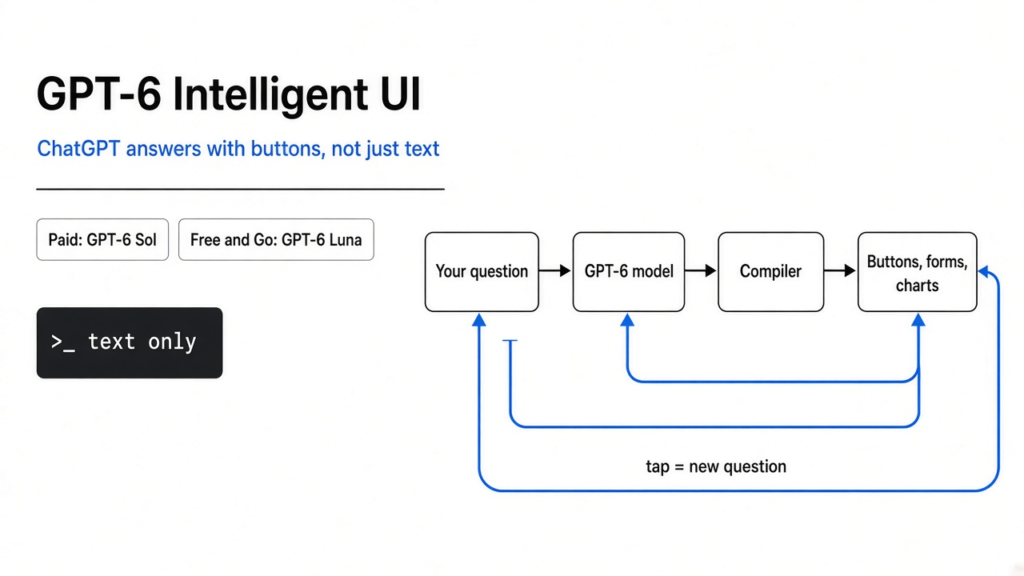
If you only remember one thing: on 7 October 2026, ChatGPT’s Chat tab started answering with buttons, forms, and charts, not only paragraphs. Paid plans get a model called GPT-6 Sol. Free and Go get GPT-6 Luna from 8 October. The models behind Work and Codex did not change.
On 7 October 2026, OpenAI (the company that makes ChatGPT, a website and app where you type a question and get a written answer) began a global rollout of what it calls Intelligent UI (a reply that can mix writing, pictures, and controls you can tap, instead of one block of text). OpenAI says more than 1.2 billion people use ChatGPT each week. The new reply shape is the product. The model name is just which engine draws it.
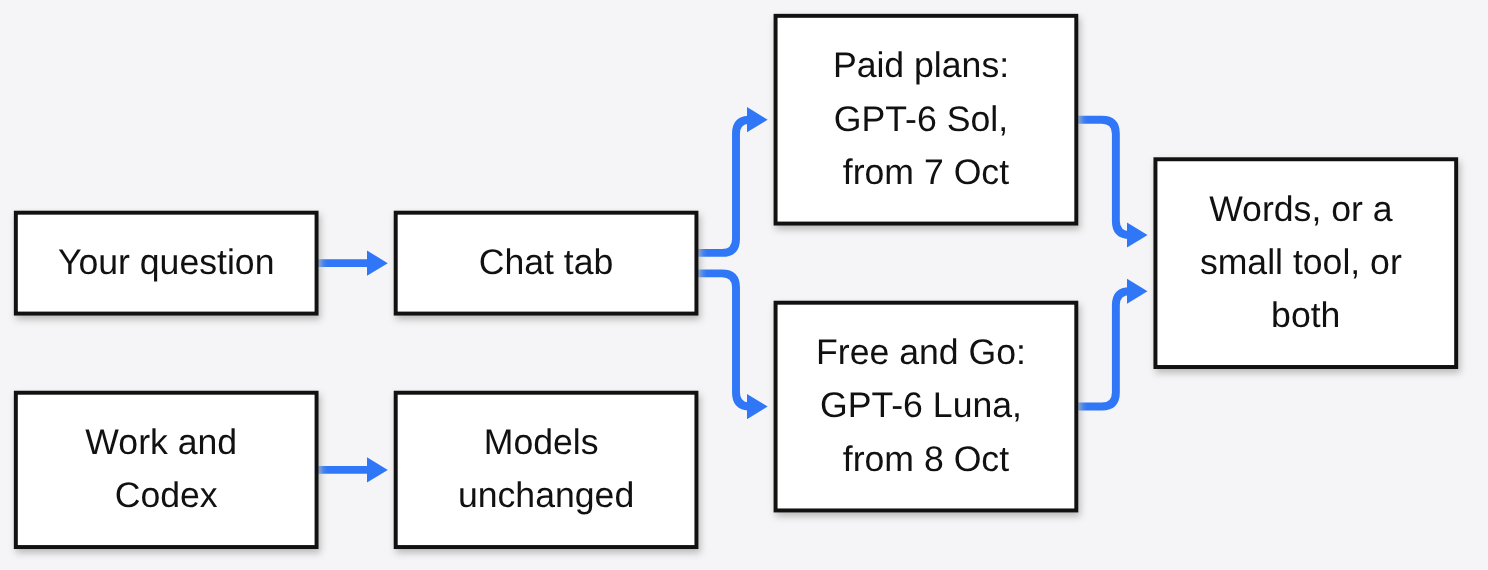
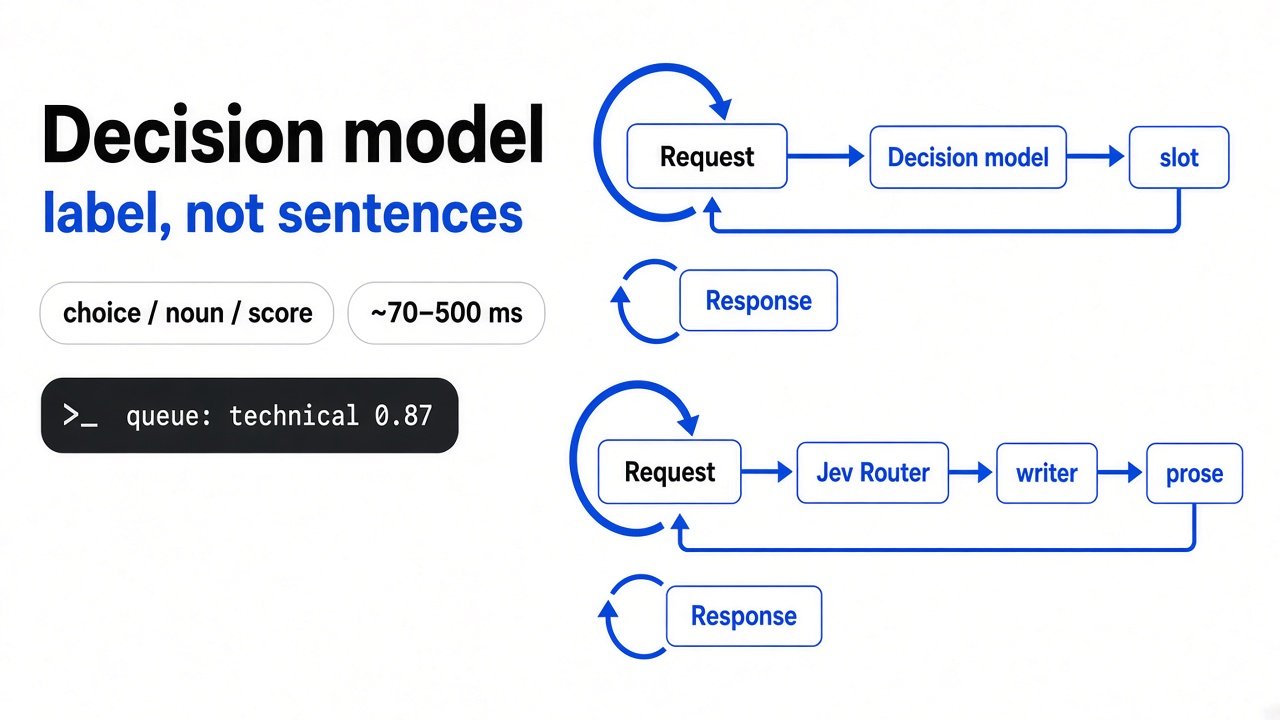
The picture above is the whole map. The rest of this piece builds each box from the thing before it, and defines each new word in parentheses the first time it appears.
Who gets it, and who does not
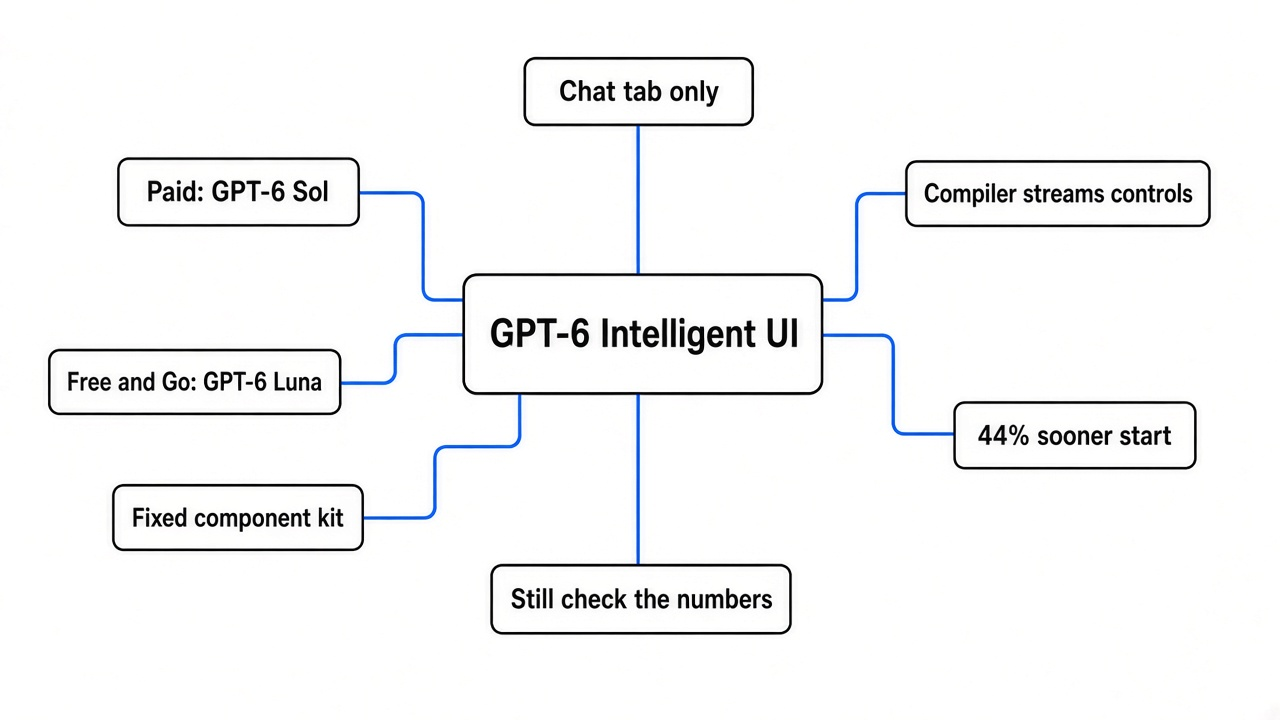
A plan (the subscription you pay for, or the free account) decides the model (the specific trained program that writes the answer). A tab (one section of the product, such as Chat versus a coding tool) decides whether this release even applies.
| Where you are | When it starts | What answers you |
|---|---|---|
| Chat tab on Plus, Pro, Business, Enterprise | 7 October 2026 | GPT-6 Sol |
| Chat tab on Free and Go | 8 October 2026 | GPT-6 Luna |
| Work, and Codex | Not in this release | Whatever you had yesterday |
Enterprise (the workplace plan an admin controls) only gets this if that admin turns it on. OpenAI says both Sol and Luna are tuned for everyday conversation. It does not, on the pages used here, publish a parameter count (a rough count of how many adjustable numbers sit inside a model) for either one. Do not invent a size gap from the names.
Work (OpenAI’s work-oriented ChatGPT surface) and Codex (OpenAI’s coding agent, a program that edits a software project for you) keep their existing models. If your coding agent felt the same on 8 October, that is the design, not a broken account.
A model only writes the next small piece of text
Start before the buttons. A large language model (a program trained on huge amounts of writing so it can continue a passage) does not contain a bicycle, a wing, or a roast. It contains patterns of language. When you type, your question is split into tokens (chunks of text, often one word or a piece of a word, which are the units the model counts and predicts). The model guesses the next token, sticks it on the end, and guesses again. A paragraph is that loop, run until the model stops.

That loop is why ChatGPT spent years answering like an essay. An essay is what next-token prediction naturally makes. A button is not a token. A slider is not a token. Something else has to turn a stream of guessed text into a control your finger can hit. That something else is the rest of this story.
Why every answer used to have the same shape
A user interface (the parts of a program a person sees and uses: words, buttons, forms, charts) is usually designed in advance, for a job the maker already knows. A calculator has a fixed keypad because the job is arithmetic.
Chat was built the other way around. The job shows up when you type. A recipe, a rent question, and a question about flight all had to fit one shape, so the shape was a blank box plus a paragraph. Pictures pulled from the web were an extra. The answer itself was still prose.
Aarush Selvan, a product manager at OpenAI, told TechCrunch that ChatGPT has predominantly been a text interface, and that for a recipe, a trip, or learning something, the most helpful answer is not only text. That sentence is the product brief. It is not a new kind of intelligence. It is a new shape for the same kind of answer.
A component is a ready-made part, not a new app
A component (one finished piece of interface, such as a button, a number stepper, a chart, or a form field) is how you get variety without letting the model draw an arbitrary webpage.
OpenAI says it built a library of native, streamable components (a fixed kit of real interface parts, drawn by the app itself, that can appear piece by piece while the reply is still being written). The model chooses which parts to use, what the labels say, and how they sit next to the sentences. The kit gives every answer a familiar look. The model does not get to invent a new operating system inside the chat.
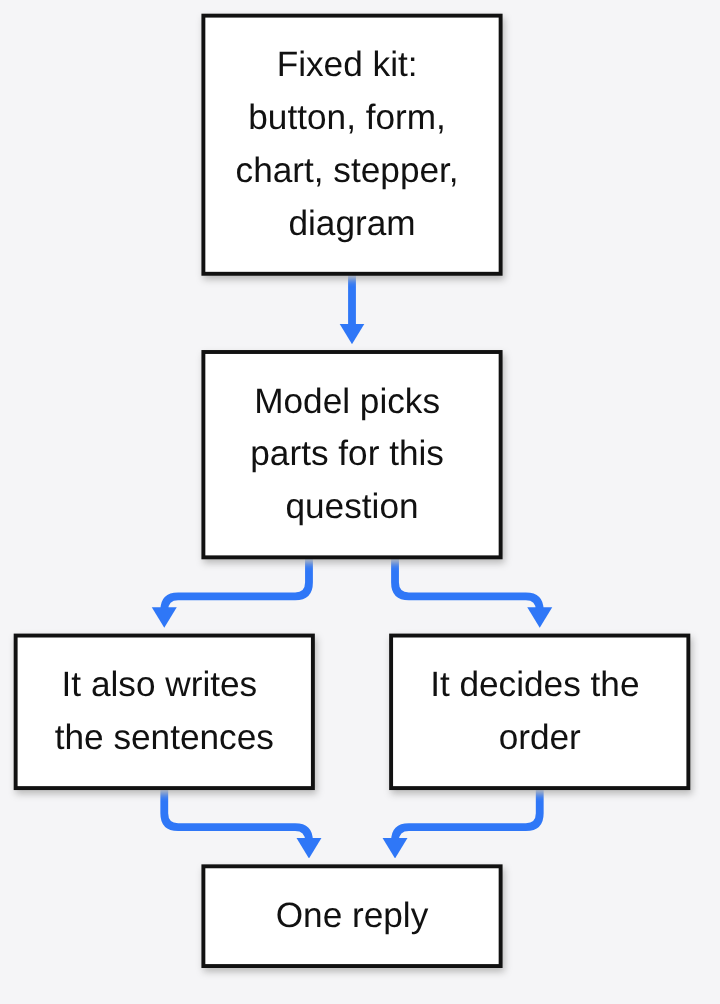
OpenAI says training was expanded so the model is scored on those layout choices: clarity, usefulness, completeness, and the decision to stay in plain text. Selvan told WIRED that a design team spent a long time on when a diagram or a button helps and when it feels cluttered. If you do not want the pictures, you can tell ChatGPT to use fewer of them. SiliconANGLE, reporting the same day’s briefing, says a basic question still comes back as text, and you can ask for a more interactive version if you want the controls.
WIRED also notes that Google has been showing a related idea in Search, under the name generative UI (an answer that arrives as a custom interactive graphic rather than ten blue links). Same family of idea. Different product. Do not treat the ChatGPT version as the invention of buttons.
The compiler is the piece the headlines skip
A compiler, in the ordinary meaning, is a translator: it takes a description and turns it into something a machine can run. OpenAI uses the word here for a program that reads the interface the model is describing and turns that description into the actual controls on your screen.
It does not wait for the full answer. OpenAI says the compiler processes the interface as the model generates it. Streaming (sending a result in pieces, as soon as each piece is ready, instead of holding everything until the end) is why a card can grow while the model is still writing.
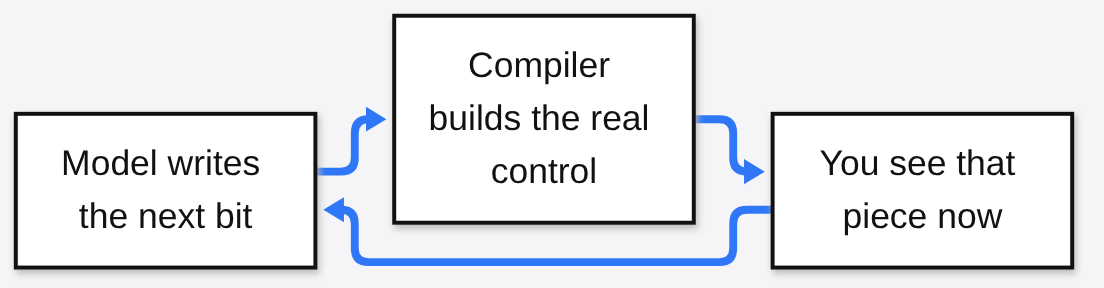
This is also the trap. The frame can arrive before the thought is finished. The number inside the frame is still a guess from the same loop of tokens. OpenAI has not said, in the posts used here, that every figure in a generated tool is computed by a separate, ordinary calculator. Read a widget as a clearer view of the model’s answer. Do not read it as a second system that checks the first one.
What the 44 percent number actually measures
OpenAI’s announcement on its developer community says GPT-6 Instant starts answering questions that need a web search 44 percent sooner, on average, than GPT-5.6 Instant. The noun matters. That is time to begin, not time to finish. A reply can open faster and still take as long to complete. A reply can open with a chart and still be wrong.
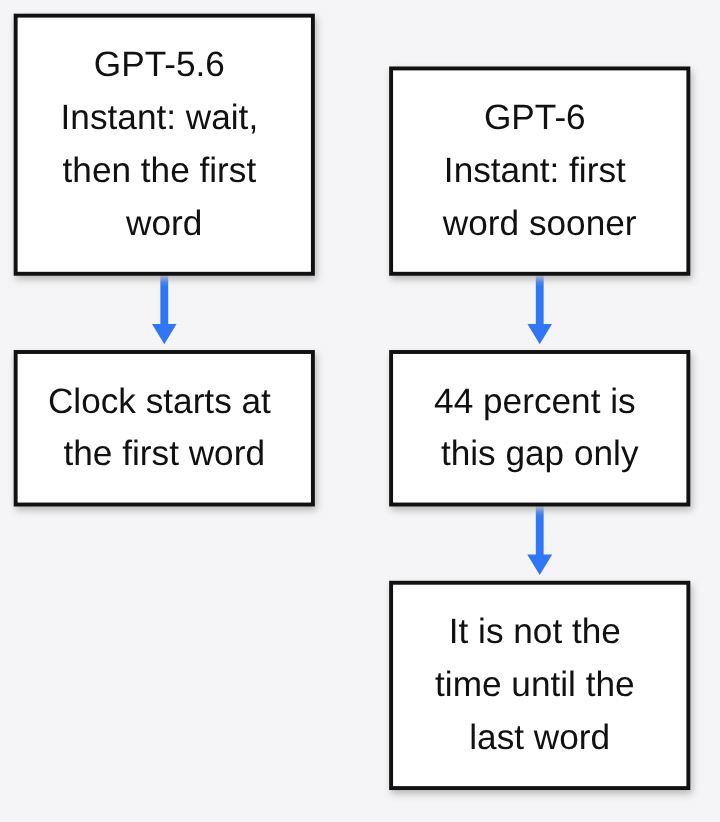
Instant, in that sentence, is OpenAI’s name for the fast answering setup in the comparison. The Chat tab rollout itself names Sol for paid plans and Luna for Free and Go. Those are the names to look for in the product. Instant is the name in the speed claim. OpenAI does not spell out, on these pages, a one-line identity between Instant and Sol. Quote the claim as a start-time claim. Do not promote it into a total-speed claim.
Four jobs the buttons are for
OpenAI’s own demos fall into four jobs. Each one is a case where a paragraph makes you do the sorting in your head, and a control lets you sort by tapping.
Look at the parts of a thing. OpenAI’s demo breaks a 7-speed bicycle into frame, wheels, drivetrain (the chain, gears, and cranks that turn pedaling into motion), brakes, and cockpit, with a button for each. The figure below shows what a drivetrain does. The chat version is the same idea: one picture, then a tap for the part you actually asked about. A gain ratio (how many times the wheel turns for one turn of the pedals, set by the size of the gears) is the kind of number that belongs on the drivetrain button, not in a preface.

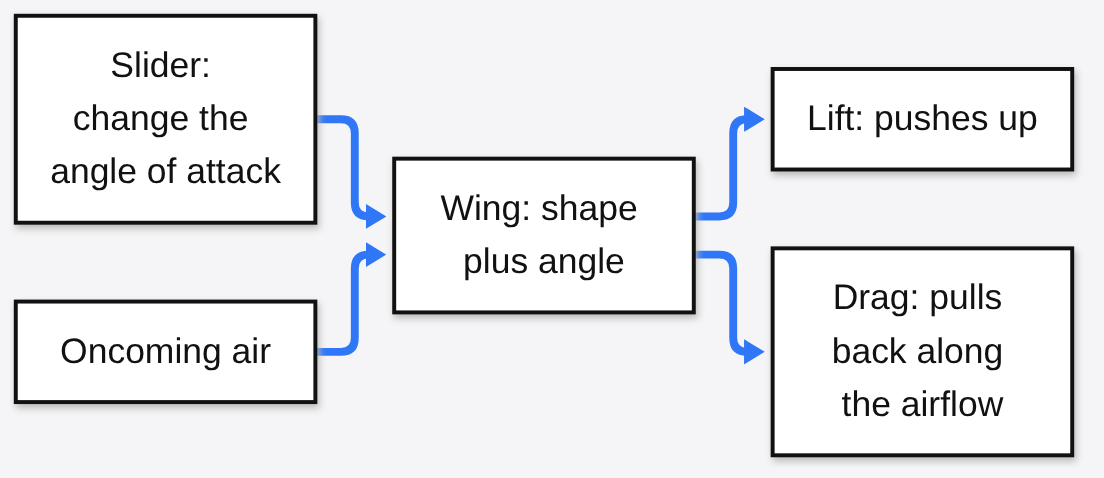
Learn a cause by changing an input. In the briefing, Selvan asked the product to explore how an airplane wing generates lift. Lift (the upward force a wing gets from moving through air) depends on the shape of the wing and on angle of attack (how steeply the wing meets the oncoming air). A paragraph can define those words. A slider lets you change the angle and watch the other arrows move. The diagram is what that explanation is trying to become.
WIRED’s Reece Rogers tested a build before launch. A slug diagram came back with a button per body part, from the upper tentacles to the muscular foot. A San Francisco apartment calculator used sliders for income and other costs and showed what share of take-home pay a unit would eat. An airplane seat explorer compared four Alaska and Delta cabins, highlighted exit rows in green, and let him tap a seat. Those three are the feature working: parts, a number you can drag, and a map you can press.
Make a small tool for a job you have right now. OpenAI lists a savings calculator, a bill splitter, and a small game inside the conversation. The Sunday roast demo is the cleanest. The menu stays still. A guest-count control recalculates the shopping list, because the headcount was the unknown. The tool lives in that chat. You do not install it.
Change the answer without retyping the question. The same guest counter is this job. So are the follow-up controls OpenAI shows under the roast, such as adjusting for five people, adding a vegetarian side, or making the plan gluten-free. The button is a new question the model already guessed you might ask.
Prompts that match the feature, and one that should stay plain
Use the Chat tab. Codex is the wrong room.
- “Break down a 7-speed bicycle. One button per major part, and one sentence on what that part does.”
- “Show how a wing makes lift. I want to change the angle of attack and see what the forces do.”
- “People are coming over and I do not know if it is 6 or 10. Build a roast plan with a headcount control and a shopping list that updates.”
- “Split a dinner across 5 people. One person did not drink. Give me steppers, not a paragraph.”
And one that should stay a sentence, if the training did its job:
- “What is 17 times 23?”
If that comes back as a dashboard, the unfinished design judgment OpenAI already admits just showed up. Reply: “text only.”
The same Wednesday, the cheap model next door got cheaper
You can ignore this section if you only use the ChatGPT app. You should not ignore it if you pay an API bill. An API (a door that lets another program send text to a model and pay by the token) is how companies run these models at volume. On 7 October 2026, Anthropic (the company that makes Claude) released Claude Haiku 5.5 and called it the cheapest, fastest, and most capable small model it has shipped.
| Price per million tokens | Haiku 5.5, prompt up to 100,000 tokens | Haiku 5.5, prompt over 100,000 tokens | Haiku 4.5 |
|---|---|---|---|
| Input | 0.10 dollars | 0.50 dollars | 1 dollar |
| Output | 0.50 dollars | 2.50 dollars | 5 dollars |
Anthropic says prompts under 100,000 tokens are about 90 percent of older Haiku traffic, and that a realistic mix costs about 75 percent less to run than Haiku 4.5. It also halved the price of cache reads on Sonnet 5.5. A cache (a stored copy of prompt pieces the model can reuse instead of rereading them from scratch) is why a long agent loop gets cheaper when that price falls.
On Anthropic’s own card, not an independent lab, the offline subset of OSWorld 2.1 (a test where the model has to operate a computer and finish tasks) is 72.4 percent for Haiku 5.5, 48.9 percent for GPT-6 Luna, and 83.9 percent for Claude Sonnet 5.5. A vendor table is an advertisement with a method. Use it to see the comparison the seller chose. Do not use it as a verdict.
The link to Intelligent UI is practical, not poetic. Luna is the free ChatGPT model that just grew buttons. Haiku 5.5 is the small model a developer would call thousands of times. Same week, two bets. OpenAI made the consumer reply more visual. Anthropic made the bulk worker cheaper and, on its own computer-use test, stronger than the free OpenAI model it chose to print.
Where a prettier answer still fails you
OpenAI says it ran alignment checks through training. Alignment (steering a model so it stays within the limits its makers set, including honesty about what it cannot do) is the word on the system card, not a badge on the chart. OpenAI says GPT-6 is better at noticing when it lacks the information or the tool to answer. That is a claim about refusal and humility. It is not a claim that a drawn calculator has been audited. For the honesty bar OpenAI set inside the GPT-6 family, see why GPT-6.1 Astra did not ship.

Hold these, in order:
- A control can show a wrong quantity. The lamb weight in a roast plan is only as good as the rule the model used. If it looks odd, multiply it yourself.
- OpenAI says design judgment is unfinished. Clutter is their remaining problem, not a critic’s insult.
- An Enterprise workspace stays on the old chat until an admin enables this.
- Work and Codex did not move. Do not debug a coding agent against a Chat tab screenshot.
- OpenAI has not said whether a visual reply spends more tokens than the same answer in prose. If you pay per token, read one real bill before you call the pictures free.
- Nothing in this release is an ad product. A sponsor card mixed into a tool would be harder to spot than a labeled sentence. That is a thing to watch later. It is not a feature announced here.
What to do with it today
On Plus, Pro, Business, or an Enterprise workspace that has the switch on, open the Chat tab and ask for one tool. A headcount control, a seat comparison, a part-by-part diagram. If a tap changes the numbers, you are looking at Intelligent UI. If you only get a paragraph, ask once for the interactive version.
On Free or Go, the same test starts 8 October, on Luna rather than Sol.
If you live in Codex, ignore the screenshots.
Common questions about GPT-6 Intelligent UI
What is GPT-6 Intelligent UI?
It is ChatGPT’s new reply shape in the Chat tab. An answer can mix writing with buttons, forms, sliders, charts and diagrams, picked by the model from a fixed kit of components and built on screen by a compiler while the reply streams. The global rollout started on 7 October 2026.
Which ChatGPT plans get GPT-6 Sol and which get GPT-6 Luna?
Plus, Pro, Business and Enterprise get GPT-6 Sol in the Chat tab from 7 October 2026, with Enterprise only after an admin turns it on. Free and Go get GPT-6 Luna from 8 October 2026.
Does GPT-6 change Codex or Work?
No. Work and Codex keep their existing models in this release. If your coding agent behaves the same as before, that is by design.
Is GPT-6 really 44 percent faster?
OpenAI says GPT-6 Instant starts answering questions that need a web search 44 percent sooner, on average, than GPT-5.6 Instant. That is time to the first word, not time to the last word.
Can I turn the buttons off?
You can tell ChatGPT to use fewer visuals, or reply “text only”. Basic questions should still come back as plain text, and you can ask for the interactive version when you want controls.
1 comment