The file on disk is about 23 GB. The laptop has 16 GB of memory, and the system is already using some of it. Ollama is the usual way to run a model on your own machine: you name a model, it loads that model, and a small server answers locally. Edge0 is a different runner, built for one kind of large file. It leaves most of that file on the SSD and reads only the blocks the next word needs. If you are choosing between edge0 vs ollama, use Edge0 when the model is a sparse pile of specialists and the whole file will not fit in RAM. Use Ollama when a smaller model already fits and you want one command on Linux, Windows, or a Mac.

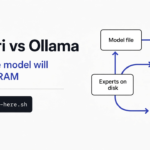
One side of that picture stuffs the whole pile into the memory chip. The other side leaves the pile on the disk and moves a few blocks across. That is the choice, before any install command matters.
A normal language model is one pile of stored numbers. A parameter is one of those numbers. Every parameter can take part in the next word, so fast memory has to hold the pile or the machine swaps pieces out to the SSD and back. Ollama is the right path when the pile fits.
Checked on October 30, 2026 against the Edge0 README, its Python guide and server code, and Ollama’s documentation. The Edge0 speed, memory and quality numbers below are the project’s own. Edge0 itself was not run for this article, because its Python engine needs an Apple Silicon Mac; the memory test further down was run on a Linux machine.
What Edge0 is and how it streams experts from the SSD
Edge0 is a runner for a mixture of experts (many specialist blocks, only a few used for each word). The idle blocks stay on the SSD. Peak memory is then the size of the blocks in use, not the size of the whole file.

The disk in that picture sends one block into a small memory chip. The rest of the blocks stay put. That is the whole shape of the read.
A layer is one step in the stack the model walks for every word. Inside a sparse layer, a router (the picker that chooses which blocks to open) does not open all of them. The published 35B tier is stored in 4-bit form (four bits per weight, not the usual sixteen), which shrinks the file and costs some accuracy. It has 40 layers and 256 experts. An expert is one specialist block. The smaller tier is about 4.2 GB on disk, 24 layers and 128 experts, built on Ling 3.0. The 35B tier is built on Qwen3.6-35B-A3B, a Qwen sparse model. Both ship as one folder: the base weights, a LoRA file (a small patch trained to win back accuracy after the shrink), and a prerouter file (a second picker that guesses the next blocks one step early). The license is Apache-2.0. The code is in the Edge0 repo. The large checkpoint (the saved model folder) is Edge0-35B-A3B-preview, and the small one is Edge0-8B-A1B-preview.
The patch stays unmerged. That means it is applied while the model runs and is not baked into the big file, so one frozen base can wear a new patch without a second 23 GB download.
The early guess is there because a disk read is slow next to the math. Decode is the part where the model writes the answer, one piece at a time. Prefill is the earlier part, where it reads your whole prompt. If the runner learns which experts it needs only after the current step finishes, the SSD read sits in the middle of the answer. If a trained head guessed those experts during the current step, the read can overlap the math. The project reports, in its technical report and README, that this overlap can raise decode speed by as much as 59 percent. The gain grows when the disk is slower, the model is larger, or the router opens more experts. On the 35B tier that lookahead width, called K, is 4. On the 8B tier it is 8.

The scout in that picture leaves for the disk while the current block is already in the processor. That is the prerouter. Without it, streaming still saves RAM, and the answer waits on the SSD more often.
How Edge0 uses less RAM than Ollama
Edge0 uses less RAM because it does not read the whole file into memory. Ollama’s job is the model you named, held so the next word is fast. Edge0’s job is a sparse model whose idle experts never have to sit in RAM.
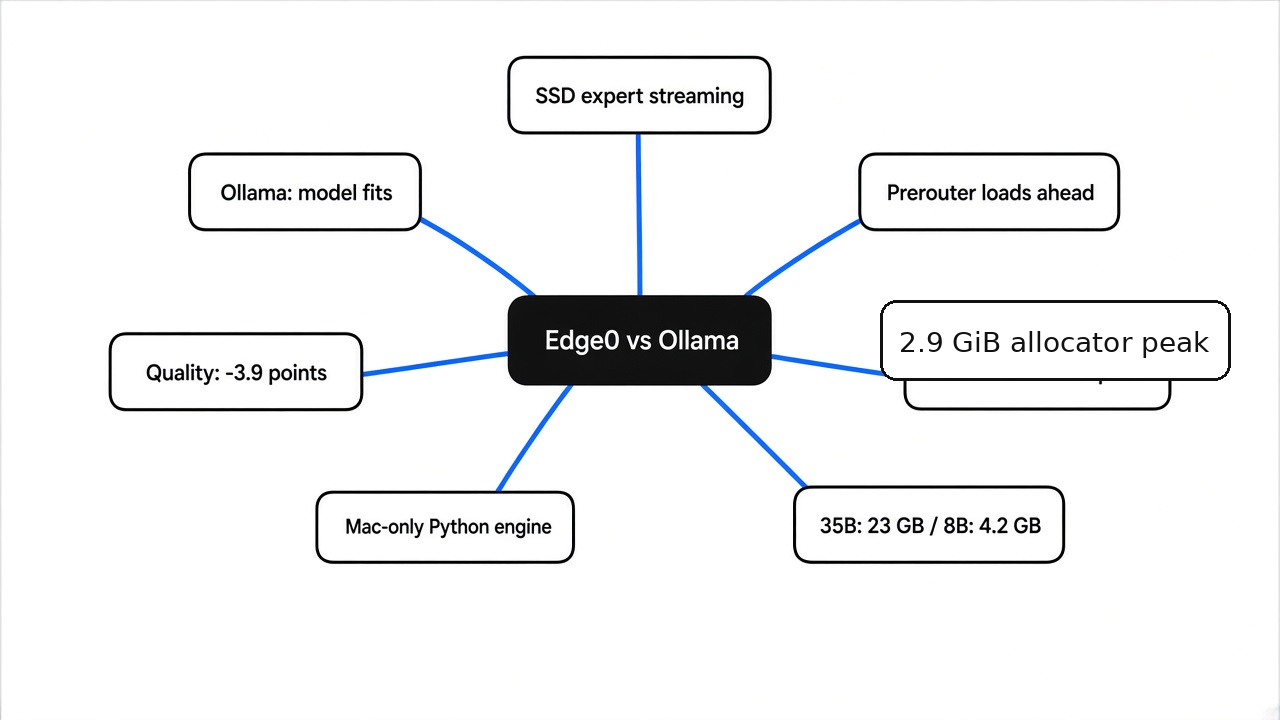
The project’s own bench is a Mac mini with an M4 Pro and 24 GB of memory, on a 3.3k-token prompt followed by 200 generated tokens. The 35B tier writes at 14.9 to 17.7 tokens a second. Prefill on that run is 113 tokens a second on a cold start and 140 once the pages are warm. Cold means the first request after the process starts, when experts still have to come off the SSD. Warm means a later request, while those pages are still in the file cache. Peak memory inside the MLX allocator is 2.9 GiB. MLX is the Apple library this Python engine uses for the math. That 2.9 GiB is mlx.core.get_peak_memory() after decode. It is not the number Activity Monitor shows for the process. The 8B tier writes at 23.9 to 25.3 tokens a second, prefills at 500 cold and 1428 warm, and peaks at 1.0 GiB in that same allocator. They also say the same 35B build runs on a 16 GB M2. Leave room for the system, for the tokenizer (the step that splits your text into pieces), and for the scratch pad of earlier words. That scratch pad is the KV cache. It grows when the chat gets long, even if the experts stay on the SSD.
The memory shape those claims rest on is easy to check. On a Linux machine, make a 256 MiB file as a stand-in for a weight file, then do the two things a runner can do with a file that size.
In a run on October 30, 2026, reading every byte into memory raised resident memory, RSS (the RAM the process is actually holding), by 262,528 KiB, about 256 MiB. Mapping the file and touching only the first 4 MiB raised RSS by 4,476 KiB, about 4.4 MiB, in under a millisecond. A map, mmap (a view of the file that loads only the pages you touch), does not copy the file up front. In both runs the virtual size grew by about 256 MiB. The process looked huge on paper and small in RAM.

The tall bar is the full read, about 256 MiB of extra RSS. The short bar is the 4 MiB touch, about 4.4 MiB of extra RSS. Same file. Different pages touched.
You might expect the map to cost the full file, because the virtual size jumps by about 256 MiB. It does not. Virtual size is the address space the process claimed. RSS is what it is holding. A full read pays for every byte. A map that touches a slice pays for the slice. Edge0’s claim is that second shape, applied to experts. The 2.9 GiB figure is the project’s allocator peak on a short Mac run. It is not a promise that Activity Monitor will say 2.9 GB, and a long chat still grows the scratch pad.
You can repeat that in a few minutes. On Linux the RSS number is VmRSS in /proc/self/status. Save this as memtest.py:
import mmap, os, sys

def rss_kib():
    for line in open('/proc/self/status'):
        if line.startswith('VmRSS'):
            return int(line.split()[1])

path = 'weights.bin'
before = rss_kib()
if sys.argv[1] == 'read':
    data = open(path, 'rb').read()          # copy every byte into RAM
else:
    m = mmap.mmap(os.open(path, os.O_RDONLY), 0, prot=mmap.PROT_READ)
    touched = sum(m[i] for i in range(0, 4 * 1024 * 1024, 4096))  # first 4 MiB only
print(sys.argv[1], 'RSS grew by', rss_kib() - before, 'KiB')Then make the 256 MiB file and run both modes:
head -c 268435456 /dev/urandom > weights.bin
python3 memtest.py read
python3 memtest.py mapIf the full read grows by about the file size and the touch grows by about the prefix, you have seen why a streaming runner can quote a small number next to a large file.
Edge0 vs Ollama, side by side
Edge0 and Ollama are not two speeds for the same file. Ollama loads the model you picked and serves it, usually at http://127.0.0.1:11434. Edge0 serves these two saved model folders, on a Mac, at http://127.0.0.1:8000/v1/chat/completions.
| Question | Ollama | Edge0 |
|---|---|---|
| What it runs | A large catalog of models that fit the machine | Two sparse tiers, about 23 GB and about 4.2 GB on disk |
| What must sit in RAM | The model you selected, enough of it to run | The active experts, plus the scratch pad. Their 35B allocator peak is 2.9 GiB on a short chat |
| Disk | Whatever that model file takes | About 23 GB for the 35B tier, about 4.2 GB for the 8B tier |
| Where the usual install runs | Linux, Windows, and Mac | Python path: Mac with Apple Silicon |
| Other apps | The Ollama apps | Separate Mac, Windows, iPhone, and Android engines in the same repo |
| Server | Chat completions on port 11434 | Chat completions on port 8000 |
| Quality cost | You pick how small the file is. Smaller files lose more | Their 35B average is 79.2 against 83.2 for the 16-bit base |
| Wrong tool when | The file will not fit and you have no other plan | You need Linux and only have this Python engine, or a smaller model already fits |
The quality rows are the project’s own, run with OpenCompass under the same settings on both sides, scores out of 100. Contest math: 86.6 for the 35B Edge0 tier, 92.7 for the 16-bit base. HumanEval, short programming tasks: 90.9 against 95.1. GPQA-Diamond, hard science questions: 79.8 against 81.8. MMLU-Pro, a broad exam: 81.0 against 84.6. IFBench, following instructions: 57.9 against 61.7. Average 79.2 against 83.2, a loss of 3.9 points. The 8B tier averages 69.9 against 72.7, a loss of 2.8. On the broad exam that smaller tier is higher than its base, 70.1 against 65.8. Instruction following drops from 60.6 to 53.9, and contest math drops from 73.3 to 63.3. If the job is contest math or tight instructions, stare at those rows. If the job is a useful model on a 16 GB Mac, the gap is the price of fitting.
How to install and run Edge0 on an Apple Silicon Mac
On a Mac with Apple Silicon, install the Python package, download one tier, and start the server. The Python engine does not run on Linux or on an Intel Mac. A CUDA slot exists in the code layout for an NVIDIA path. It is not a backend you can install today.
From the python directory of the repo:
python3.12 -m venv .venv && .venv/bin/pip install -e '.[dev,fetch]'
.venv/bin/python scripts/fetch_models.py --tier edge0-35b --target-dir models
export EDGE0_35B_MODEL=$PWD/models/edge0-35b
edge0 serve edge0-35bPython 3.10 or newer is enough. 3.12 is what they recommend. The fetch step can also be a plain download of Edge0/Edge0-35B-A3B-preview into models/edge0-35b. For the smaller file, swap the tier name to edge0-8b and set EDGE0_8B_MODEL. You can also skip the variable and pass the folder: edge0 serve models/edge0-8b. Start there if you want to see the server work without a 23 GB download.
A one-shot check, before you leave the server up:
edge0 chat edge0-35b --prompt "Explain streaming inference in one sentence." --max-new 64Then:
curl http://127.0.0.1:8000/v1/chat/completions \
  -H 'Content-Type: application/json' \
-d '{"model":"edge0-35b","messages":[{"role":"user","content":"Hello!"}],"max_tokens":32}'python -m edge0 is the same command as edge0. If mixed-language output looks garbled on an A18 iPhone chip, the MLX build is too old. The versions they pin for that fix are mlx==0.30.6 and mlx-metal==0.30.6, with mlx-lm==0.31.0. A missing patch file fails on purpose. The folder should contain the base weights plus lora_edge0_35b.safetensors and prerouter_edge0_35b.safetensors. You can pass --no-prerouter or --no-lora to run the plain base. That drops the two pieces this runner is for.
Windows, iPhone, and Android builds live in the same repo as separate apps. Read the README in windows/, ios/, or android/ before you assume edge0 serve exists there.
When Edge0 is worth the 23 GB download
Edge0 is worth it when you want the 35B sparse tier on a Mac that cannot hold 23 GB in RAM, and you can live with a few points of quality and a speed in the mid teens of tokens per second. It is not worth it when a model already in Ollama answers well enough. Then you pay a download and a Mac-only setup for a problem you do not have.

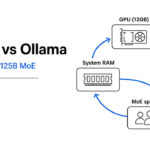
The fork in that picture is the real one. One machine has a big disk and a modest memory chip. The other has a graphics card and room to load a model the normal way. If that card is an Nvidia one, read whether unlocking it makes local AI faster before you buy anything. Pick the path that matches the machine on the desk, not the larger number in the model name.
The first request is the slow one. Experts come in from the SSD. Later requests are warmer if the file cache still holds those pages. A long chat is a different bill, because the scratch pad grows with context, and the 2.9 GiB number is a short run. Do not budget a 16 GB Mac as if 2.9 GiB were the whole machine.
Speed is not the reason to switch if Ollama is already comfortable. Fifteen to eighteen tokens a second is fine for reading along, and poor if you wanted a coding model that fills a file in one breath. Use the 8B tier as the trial download. It is the wrong tier if you came for the larger scores.
How to run a big model on low RAM
You run a big model on low RAM by refusing to load the idle weights. On a Mac, for these two files, that is Edge0. On a machine with an NVIDIA card and a lot of normal RAM, the matching write-up is a different project: Strata vs Ollama needs 12 GB of video memory and 32 to 64 GB of system RAM for a different large Qwen file. That is not this SSD recipe, and it is not a Mac install.
Colibri is a different program with the same family of bet. It also leaves idle specialists on disk and reads the ones the model asks for. Colibri vs Ollama is the page for that runner. Read it if you have not picked a file yet. Come back here when the file in front of you is the Edge0 35B or 8B tier, because the install, the patch files, and the Mac server are not the same steps.
If the model is dense, every weight is used on every word, and hiding it on disk only adds stalls. Layer streaming, which pushes a dense model through the card one slice at a time, is a different trade, covered in can I run a 70B model on a 4GB GPU. Shrink the file, or pick a smaller one. A hosted model is the honest path when the file is enormous. Reflection Beam is about a terabyte at full size: should you download Reflection Beam. Mistral Large 4 is a huge sparse model you rent. What is in the DeepSeek download is an engine release, not the weights.
The check is boring, and it works. Write down three numbers before you download: free disk, free RAM after the system, and whether the model is sparse. Sparse means most blocks are idle on any one word. If the file is one of these two Edge0 tiers, you are on a Mac, and free RAM is far under the file size, start with the 8B tier. If the file is dense and smaller than free RAM, start with Ollama. If you need a data-center model, do not pretend a laptop runner will absorb it.
Edge0 vs llama.cpp and GGUF files
Use llama.cpp, or Ollama on top of it, when you want many models, a GGUF file, and a runner that already works on Linux and Windows. GGUF is the file format those tools expect. Use Edge0 when the file is one of these two Edge0 folders and you want the trained early guess plus the quality patch that ship beside them.
llama.cpp can map a GGUF file, and it can run sparse models. Mapping is not the same as keeping only the active experts hot while a trained head overlaps the disk read. Edge0 is narrower. It knows these folders, the adapter names, and the prerouter. That is why the memory number is interesting, and why the catalog is two tiers instead of hundreds.
If you already have a GGUF you like, do not switch to chase a RAM story that belongs to a different file. If the 35B Edge0 file is the one you actually want, llama.cpp is not a drop-in for that prerouter file and that LoRA file.
Bottom line: pick by the file, not the logo
Pick with the file, not with the logo. If the file is one of these two sparse files and the Mac cannot hold it, Edge0 is the runner built for that shape. If any smaller model in Ollama already does the job, stay there. The 256 MiB test is how you see the shape before you spend an evening on a 23 GB download.
Common questions about Edge0 vs Ollama
Is Edge0 better than Ollama?
No. Edge0 is the better fit only when the model is a sparse file that will not fit, and you can run the Apple path or the matching app in the repo. Ollama is the better fit when the model fits, when you are on Linux, or when you want the catalog.
Can I run Edge0 on Windows or Linux?
The Python server is macOS on Apple Silicon only. The repo also has a Windows engine, C++ with Vulkan, plus Android and iPhone apps, each with its own build steps. Linux is not a supported target for this Python package. On Linux, Ollama is the practical local runner.
How much disk does Edge0 need?
About 23 GB for the 35B tier and about 4.2 GB for the 8B tier, plus a little room for the Python environment and the temporary download. The experts are mapped from that disk. They are not copied into RAM up front. Disk, not RAM, is the number that has to match the file size. RAM has to match the active slice, the system, and the growing scratch pad.
Does Edge0 work with Claude Code?
Not directly. Claude Code sends requests in Anthropic’s Messages API format, and the Edge0 server answers only OpenAI-style routes, /v1/chat/completions and /v1/models, on port 8000. Ollama is the easier path for Claude Code: since version 0.14 it also serves the Anthropic Messages API on port 11434, and ollama launch claude sets it up. To put Claude Code on Edge0 you would need a proxy that translates between the two formats. Tools that do speak chat completions and let you set the base URL can point at http://127.0.0.1:8000/v1. Confirm one short prompt with the curl above before you point a coding tool at it. A coding session with a long transcript also grows the scratch pad past the short-chat memory number, so a 16 GB Mac that survived “hello” can still fall over on a large repo chat.