
You drop a 40-page contract into your project folder. You ask Claude Code to pull pages 3 to 5 into a new file. It reads those pages fine, then stalls, or starts writing a Python script you never asked for.
That gap has one simple cause. Claude Code can see a PDF, but it has no hands for one. This post shows why, what I measured, and the two ways to give it hands, with the exact commands.
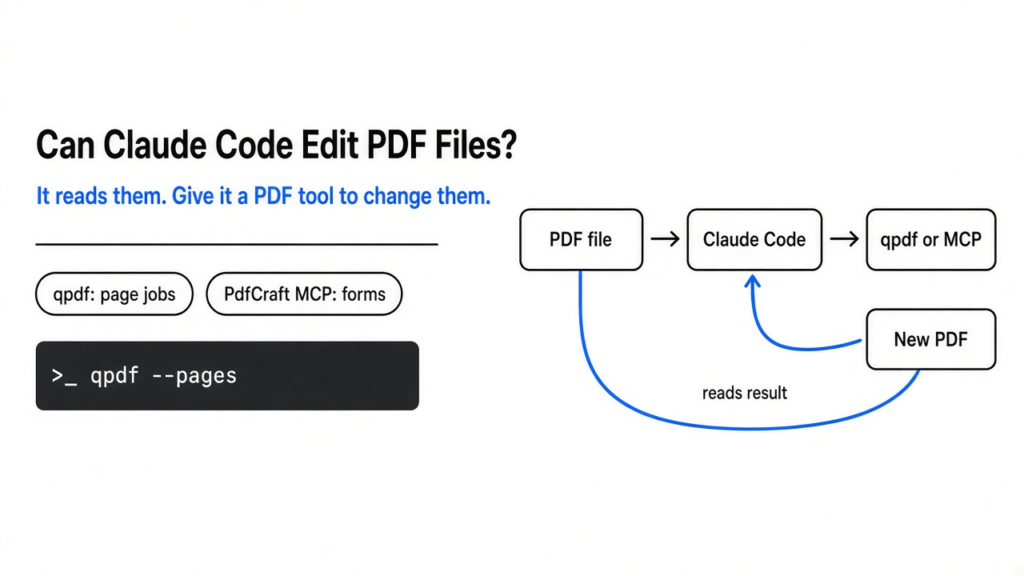
The short answer is partly. Claude Code can read a PDF and tell you what is inside. It cannot change one by itself, because its edit tool only works on plain text and a PDF is not plain text. To merge, split, rotate, redact or fill a PDF, give it a PDF tool: a small terminal program like qpdf, or a local MCP server like PdfCraft.
Can Claude Code read PDF files?
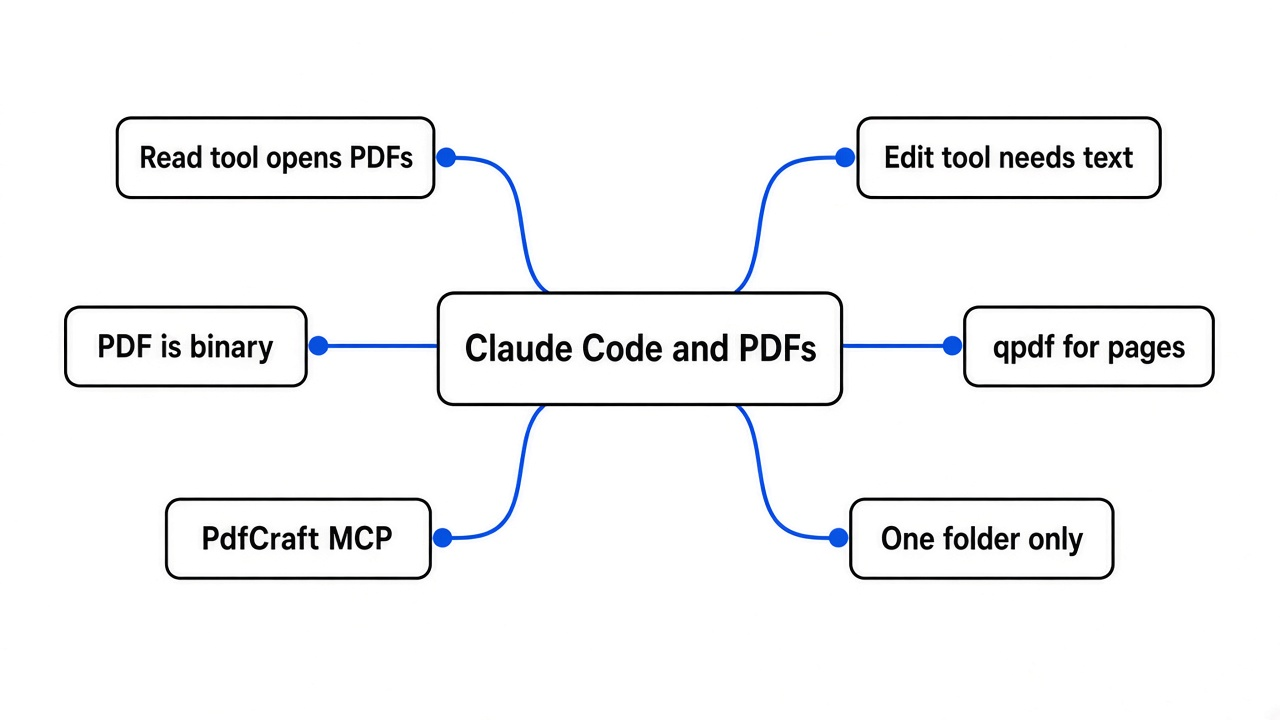
Yes. Its built-in Read tool opens PDFs directly, so summaries and questions work with no setup.
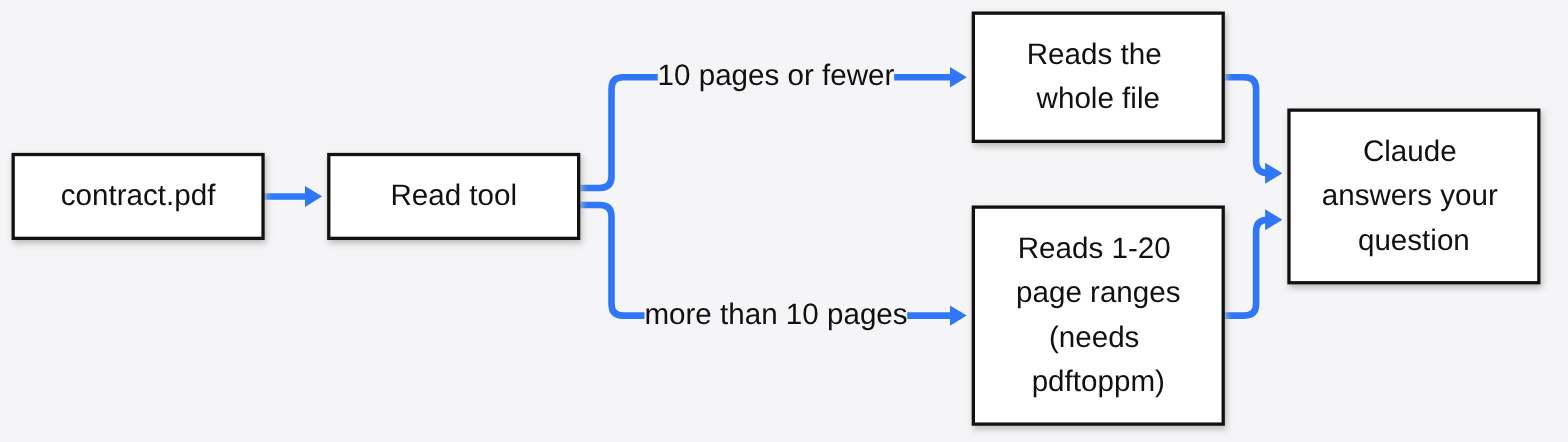
Claude Code works through tools (small built-in abilities like “read a file” or “run a command”). The Read tool is the one that opens files, and it understands PDFs, not just code.
Short PDFs are read whole. For a PDF longer than 10 pages, Claude reads it in page ranges, up to 20 pages at a time. Those page-range reads need a small free program called pdftoppm, which comes in the poppler-utils package (brew install poppler on Mac, sudo apt-get install poppler-utils on Ubuntu).
So reading is solved. Changing the file is where it breaks.
Why can’t Claude Code edit a PDF directly?
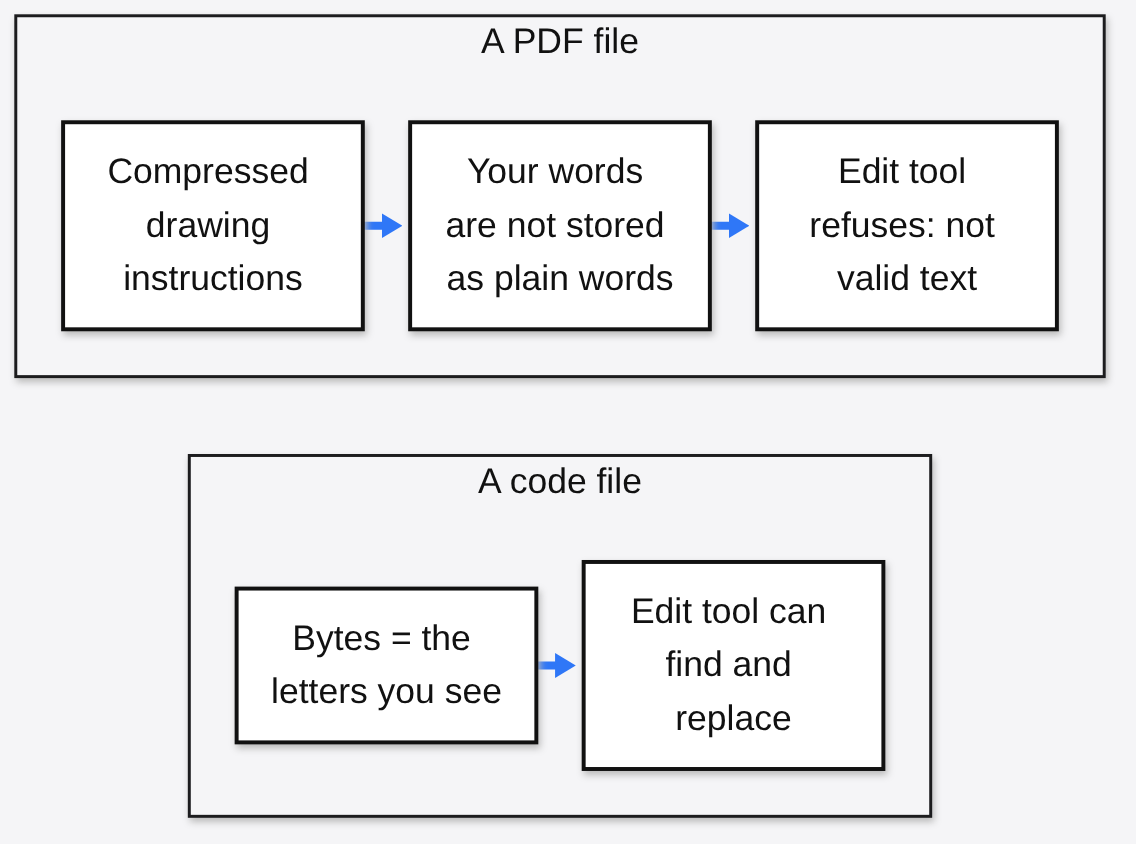
Its Edit tool swaps one piece of text for another, and a PDF file is not text. It is packed, often compressed, binary data.
Start with the base fact. A code file is plain text: the letters you see are the bytes on disk. Claude’s Edit tool finds an exact string and replaces it, like find-and-replace in a notes app.
A PDF works differently. It is closer to a sealed box of drawing instructions (“put this font here, draw these letters at these spots”). Most PDF makers squeeze those instructions with compression (the same idea as a zip file), so the words you read on screen are not sitting in the file as words.
I checked this on a test file I made. Every page says “Invoice total 1,250”. Here is what the raw file looks like to a text tool:
$ grep -c "Invoice total" report.pdf
0                                  # zero matches in the raw bytes
$ pdftotext report.pdf - | grep -c "Invoice total"
3                                  # three matches once a PDF tool unpacks it
$ python3 -c "open('report.pdf','rb').read().decode('utf-8')"
UnicodeDecodeError: 'utf-8' codec can't decode byte 0x93 in position 10That last line matters. Claude’s Edit tool only changes files that are valid UTF-8 (the standard way computers store text). On binary files it refuses and leaves the file alone, which is the safe choice. Forcing a text edit into a PDF would corrupt it.
So the fix is not a better prompt. Claude needs a tool that speaks PDF.
What does Claude Code need to change a PDF?
A PDF tool it can call. You have two routes: a terminal program it runs, or an MCP server it plugs into.
Route one uses the terminal. Claude Code can already run commands, so if a PDF program is installed, Claude can type the command for you, after you approve it.
Route two uses MCP (Model Context Protocol, a standard plug that lets AI apps use outside tools). An MCP server is a small program that hands Claude a menu of named actions, like “split this document” or “find this text”, with clear inputs.
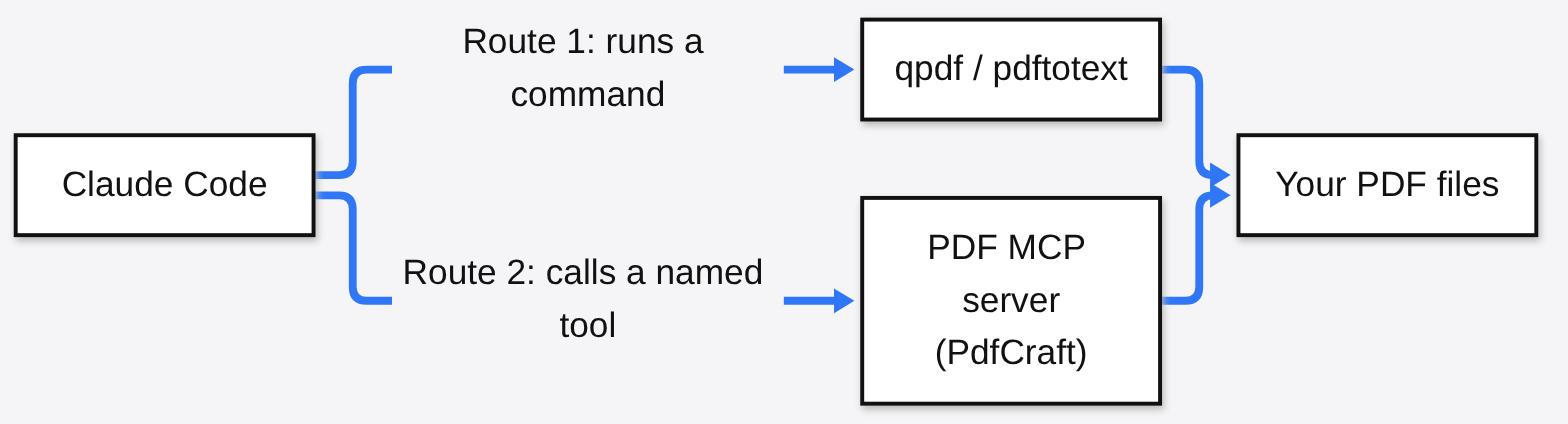
The terminal route is lighter. The MCP route can do far more. Here is each one.
How do you edit PDFs with Claude Code using the terminal?
Install qpdf, a free open source PDF tool, and Claude Code can merge, extract, split and rotate pages with one command each.
qpdf changes the structure of a PDF (which pages, in what order) without touching what is drawn on them. That makes it safe and fast for page jobs.
- Install it:
brew install qpdfon Mac,sudo apt-get install qpdfon Ubuntu, orwinget install QPDF.QPDFon Windows. - Open Claude Code in the folder with your PDFs.
- Ask in plain words: “Merge report.pdf and appendix.pdf into combined.pdf with qpdf. Keep the originals.”
These are the commands Claude needs, and the output from my own run:
$ qpdf --empty --pages report.pdf appendix.pdf -- combined.pdf
real 0m0.079s                      # 3 + 2 pages merged
$ pdfinfo combined.pdf | grep Pages
Pages: 5
$ qpdf combined.pdf --pages . 1,3 -- highlights.pdf
Pages: 2                           # pages 1 and 3 pulled out
$ qpdf --split-pages=2 combined.pdf part-%d.pdf
part-1-2.pdf part-3-4.pdf part-5-5.pdfEvery command writes a new file, so your original stays untouched. By default, Claude Code asks before it runs each command, so you see exactly what will happen.
Pair it with pdftotext (from the same poppler-utils package as above) when Claude needs to search a long PDF for a phrase before deciding which pages to pull.
How do you give Claude Code a full PDF toolkit with MCP?
Connect PdfCraft’s MCP server, and Claude gets named tools for pages, comments, forms, redaction and more, locked to one folder.
PdfCraft is a free, open source PDF workbench written in Rust (a programming language known for speed and safety). It is a clean-room rebuild of Adobe Acrobat, meaning it was written from the public PDF standard and from watching how PDFs behave, never from Adobe’s code. It is licensed MIT or Apache-2.0, and it ships a desktop app plus pdfcraft-cli, a command-line version with the MCP server built in.
Setup takes three steps:
- Download the
pdfcraft-clibuild for your system from the PdfCraft releases page (a universal zip for Mac, tar.gz files for Linux) and put it on your PATH (the folders your terminal searches for programs). - Make one folder for the PDFs you want Claude to touch, for example
~/pdf-work. - Add the server to Claude Code:
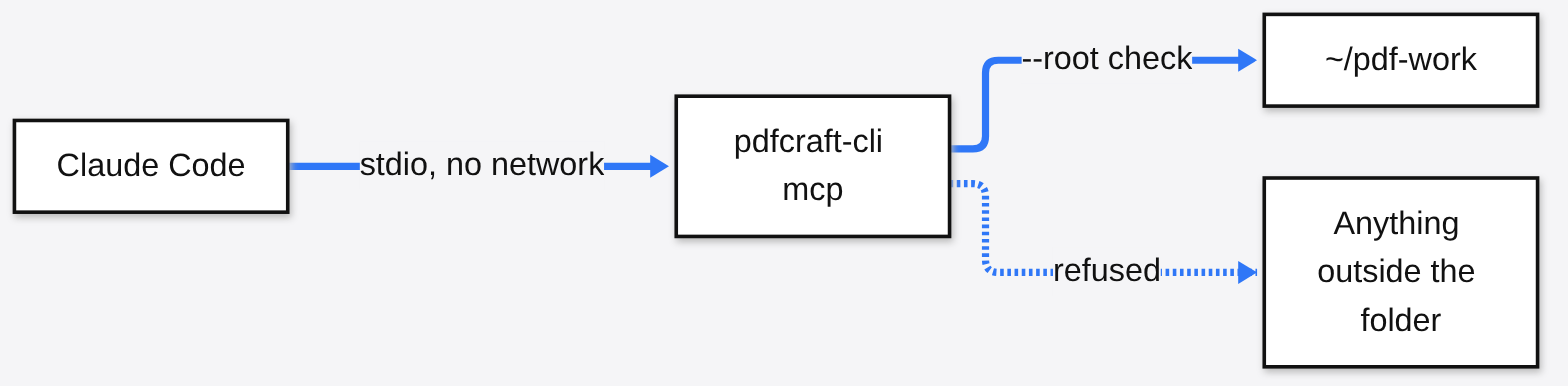
claude mcp add --transport stdio pdfcraft -- pdfcraft-cli mcp --root ~/pdf-work --compactThe -- matters. Everything after it is passed to PdfCraft untouched, so Claude Code does not mistake --root for its own option. Run /mcp inside Claude Code to check the server shows as connected.
PdfCraft’s MCP source code shows the four things that matter for safety:
- One folder only. With
--root, every path is checked against that folder before anything is opened or saved, and links that point outside it are refused. - No network. The server talks only over stdio (plain input and output between two programs), opens no port, and stops when Claude Code closes it.
- A short menu. The full server offers about 140 tools.
--compactshows Claude 15 core ones plus two helpers that find and run the rest, which keeps its context window (the amount of text Claude can hold at once) free for your work. - Labels on risky tools. Each tool is marked read-only or destructive, so Claude Code’s permission prompt tells you when an action can remove content.
Is it safe to let an AI agent edit my PDFs?
Yes, if the damage it can do is small: one folder, copies not originals, and a prompt before anything destructive.
There is a fair worry here. An agent (an AI that takes actions, not just answers) that misreads “remove page 5” as “remove pages 5 onward” can ruin a signed contract. The tool cannot fix a wrong instruction.
So shrink the blast radius. Copy files into the work folder instead of pointing Claude at your real documents. Keep the default permission prompts on. If you want reading to flow without prompts, allow only the search tools in your settings, for example mcp__pdfcraft__text_*, and let everything else ask.
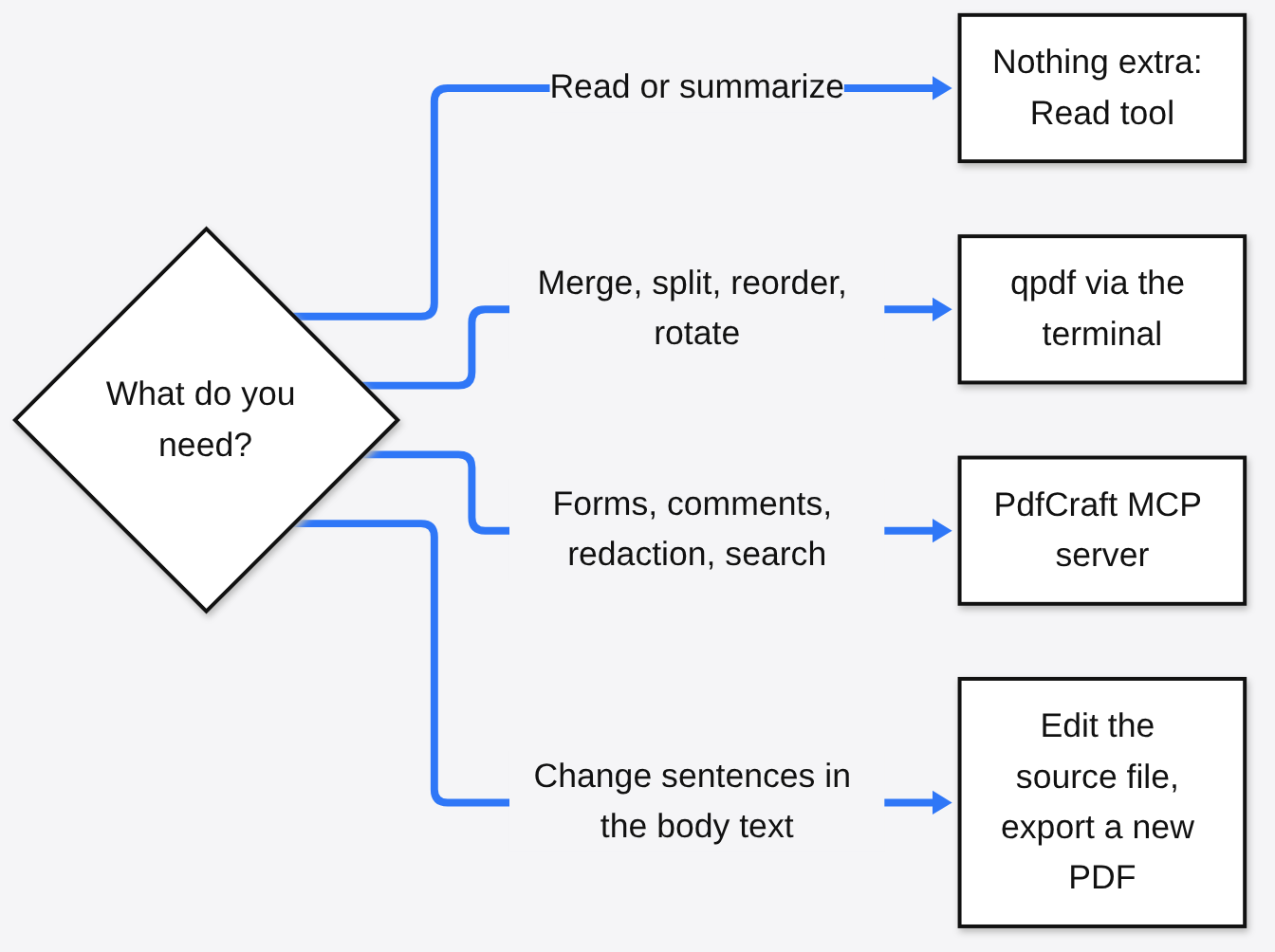
Which route should you pick?
Use qpdf for page jobs, PdfCraft for forms, comments and redaction, and the original Word or Docs file when you need to rewrite sentences.
PdfCraft deserves one honest warning. It calls itself alpha, and its own notes list editing text that is already in a PDF as weak. That is true of almost every PDF tool, because of the sealed-box problem above. If you have the Word or Google Docs file the PDF came from, edit that and export again.
For everyone else, the split is clear. qpdf is tiny, mature and enough for most page jobs. PdfCraft is the pick when you want Claude to fill forms, leave comments or redact, and you are fine testing on copies first.
For more ways to extend Claude Code, see how to make Claude Code draw real diagrams and how to show context usage in the status line. Before you connect any MCP server, read how MCP tool arguments can be abused. PdfCraft’s sibling app is tested in the free Photoshop alternative post.
Claude Code already has eyes for PDFs. Give it hands, and keep them in one folder.
Common questions about editing PDFs with Claude Code
Can Claude Code read PDF files?
Yes. Its Read tool opens PDFs directly. Files over 10 pages are read in ranges of up to 20 pages, which needs pdftoppm from poppler-utils installed.
Why does Claude Code fail when I ask it to edit a PDF?
A PDF is binary, usually compressed data, not plain text. Claude’s Edit tool only changes valid text files, so it refuses rather than corrupt the PDF.
How do I merge PDFs with Claude Code?
Install qpdf and ask Claude to run qpdf --empty --pages a.pdf b.pdf -- combined.pdf. It writes a new file and leaves both originals untouched.
Is there a free PDF MCP server for Claude Code?
Yes. PdfCraft is free and open source, and pdfcraft-cli mcp --root <folder> gives Claude PDF tools locked to one folder with no network access.
Can Claude Code rewrite the text inside a PDF?
Not reliably. PdfCraft is alpha and lists editing existing text as weak. If you have the Word or Google Docs file the PDF came from, edit that and export a new PDF.

1 comment