

Yes. Stirling-PDF and OmniTools are both free, open source, self hosted alternatives to iLovePDF. Stirling-PDF (Stirling-Tools/Stirling-PDF) is the full toolbox: OCR, Word to PDF and user logins, all on your own server. OmniTools (iib0011/omni-tools) is the light one: it merges, splits and compresses PDFs inside your browser, so the file never reaches any server, not even yours.
You need to merge two scanned pages of a rental contract. The first site that says free PDF merger wants you to drop the file in. If you only need to convert a single file without uploading it, that path is shorter than hosting a full toolbox. It feels like the file stays with you. It does not.
So the thread of this whole post is one question: where does the work on your PDF actually happen? Once you can answer that for each tool, picking one takes about ten seconds.
Why Does iLovePDF Need to Upload Your File?

Because the work happens on their computer, not yours. A PDF is just a file of bytes on your disk. To merge or shrink it, some program has to read those bytes.

On a website, that program runs on the company’s server. A server is just a computer that is always on and sits in a data center. So your browser has to send the file there first. That trip is the upload.
iLovePDF is open about this. It says uploaded files are automatically deleted within 2 hours, on servers kept under European law. That is a fair policy. Still, for those 2 hours a copy of your contract, ID scan or payslip sits on a machine you did not choose.
That is the gap self hosting tries to close.
What Does Self Hosted Actually Mean?
Self hosted means you run the same kind of website on a computer you control. It can be a home server, an old laptop, or a small rented server. You open it in your browser like iLovePDF, but the address is your own.
Most self hosted apps ship as a Docker image. Docker is a tool that packs an app and everything it needs into one sealed box. The packed box is called an image. When you start an image, the running copy is called a container.

Think of an image like a frozen meal and the container like the meal after you heat it. Same food, now ready to use. One command downloads the image, and one more starts it.
But here is the catch most guides skip. Self hosted tells you whose computer it is. It does not tell you which part of that computer does the work.
Where Does the Work Happen in Stirling-PDF and OmniTools?
Stirling-PDF works on your server. OmniTools works inside your browser tab. That one difference explains almost everything else in this post.
Stirling-PDF does server-side processing (the file travels to the server, the server does the work, the result comes back). It is the iLovePDF model, moved onto your own box. Your laptop uploads the PDF to your server over your network.
OmniTools does client-side processing (the work runs on your own device, inside the browser). Its server only hands your browser the web page and the tool code. After that, your browser does the merging by itself.

How can a browser do heavy work like that? Through WebAssembly (a way to run fast, compiled programs inside a web page). Big PDF engines that were written for desktops get converted into WebAssembly, and the browser runs them like any other page code.
So with OmniTools, the PDF never leaves your device. With Stirling-PDF, it leaves your laptop but stays on your server. Both are private. They are private in different places.
What Is Inside the Two Docker Images?
Both official images were opened on disk. The difference in size is about thirty times. Containers were not started for this write-up, so there are no speed numbers here. These are the sizes and contents of what lands on your disk.
| OmniTools | Stirling-PDF (default image) | Stirling-PDF (ultra-lite image) | |
|---|---|---|---|
| Download size | 39.9 MB | 1.13 GB | 360 MB |
| Size on disk | 157 MB | 3.51 GB | 957 MB |
| What runs inside | nginx, a small web server | Java app plus many PDF programs | Java app, core PDF tools only |
| Memory the docs suggest | not stated | 4 GB | 2 GB |

Why is Stirling-PDF so big? I listed the layers of the image (each layer is one step that added files). The biggest one is LibreOffice, the free office suite, at about 746 MB.
After that comes Calibre for ebooks at about 491 MB, a Python toolkit at about 327 MB and Java at about 201 MB. Ghostscript and qpdf, two command line PDF tools, ride along too. That office suite in a box is why Stirling-PDF can turn a Word file into a PDF and OmniTools cannot.
And why is OmniTools so small? Its image starts nginx, a plain web server that hands out files and does nothing else. The tools are 48 MB of web page files. There is no program in that image that could receive your PDF and work on it, which is the strongest proof that the work really happens in your browser.
Does OmniTools Really Work Without the Internet?
Partly. Merge and split run from files inside the image. Compress, protect, OCR and video tools fetch their engines from public servers the first time you use them. This is the finding that stands out.
A search of the tool code shows outside web addresses. A CDN is a public network that serves shared files, like code libraries, to anyone’s browser. Four OmniTools features load their engine from one:
- Compress PDF and protect PDF load Ghostscript (the PDF engine that shrinks and locks files) from a public CDN.
- Video and audio tools load ffmpeg (the standard program for converting video and sound) from unpkg, another public CDN.
- Image to text loads Tesseract (an open source OCR engine, OCR meaning reading text out of a picture) from jsDelivr.
- Remove background downloads its AI model from the company that makes that model.
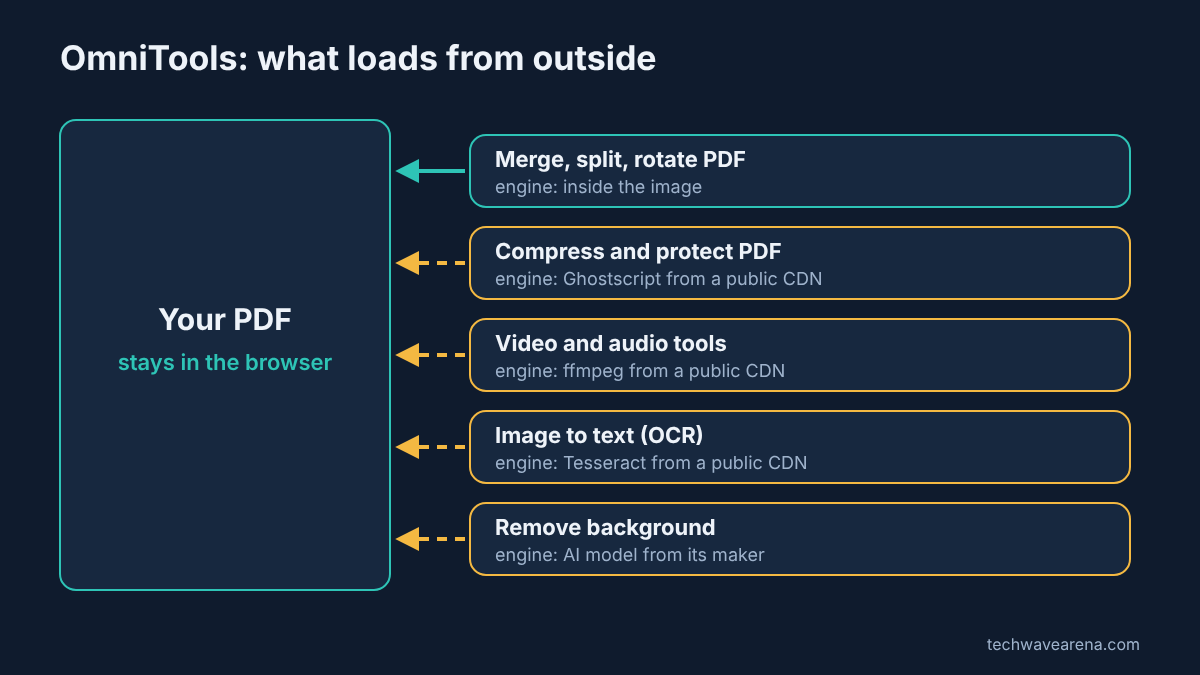
Your PDF still does not travel. Only the engine code comes in. But two things follow from that. First, on a network with no internet, like a locked office network, those four features fail while merge and split keep working. Second, your browser contacts those outside servers when you use them, which some workplaces block.
The PDF code for merging and splitting had no outside address at all. So the honest answer is: the file always stays on your device, and some engines arrive from outside.
Which PDF Jobs Can Each One Actually Do?
Stirling-PDF covers almost every iLovePDF job. OmniTools covers the everyday ones. Here is the split for the jobs people use iLovePDF for most.
| PDF job | Stirling-PDF | OmniTools |
|---|---|---|
| Merge, split, rotate | Yes | Yes |
| Compress | Yes | Yes (engine loads from a CDN) |
| Add a password | Yes | Yes (engine loads from a CDN) |
| PDF to images | Yes | Yes (PDF to PNG) |
| Images to PDF | Yes | Yes |
| OCR a scanned PDF into searchable text | Yes | No (only text from a single image) |
| Word, Excel, PowerPoint to PDF | Yes, through LibreOffice | No |
| Sign a PDF | Yes | Yes, inside its PDF Editor |
| PDF to EPUB ebook, PDF form builder | Not the focus | Yes |
| Works for many users with logins | Yes, free up to 5 users | No logins, anyone on the page can use it |

OmniTools also brings a lot of non-PDF tools in the same page. It has more than 100 small tools in total, like image resize, video to GIF, CSV to JSON, JSON tidy-up and QR codes. If you came for a PDF tool, that bonus kit is a pleasant extra.
How Do You Set Up Each One?
Each one is a single Docker command, but Stirling-PDF needs one extra safety step. You need Docker installed on the machine that will host it. If you already share files over WiFi without installing an app, the same home box can run one of these containers. OmniTools starts with this:
docker run -d --name omni-tools --restart unless-stopped -p 8080:80 iib0011/omni-tools:latestThen open http://localhost:8080. The -p 8080:80 part means port 8080 on your machine leads to port 80 inside the container. A port is a numbered door on a computer that one program listens behind. Stirling-PDF starts the same way (see the official Docker install docs), with a memory cap:
docker run -d -p 8080:8080 --memory 4g --restart unless-stopped docker.stirlingpdf.com/stirlingtools/stirling-pdf:latestThen open http://localhost:8080 and sign in with admin and stirling. Change that password straight away, because everyone who reads the docs knows it. If you only want core PDF tools without logins, use the latest-ultra-lite tag and plan for 2 GB of memory. It leaves out OCR and LibreOffice, so no Word to PDF.

If you run both on the same machine, give one of them a different outside port, like -p 8081:8080. And never open either one straight to the internet. Put it behind your home network, a VPN (a private tunnel into your home network) or a login, because a public PDF tool with no lock is a free service for strangers.
Which Self Hosted iLovePDF Alternative Should You Pick?
Pick OmniTools if you mostly merge, split, compress and sign. Pick Stirling-PDF if you need OCR on scanned PDFs, Word to PDF, or logins for several people. That is the whole decision.
There is a fair case for Stirling-PDF even for simple jobs. It is one place for everything, it has user logins, and its free plan includes every PDF tool. If your server has spare memory, the size barely matters.

But on a small home server or a cheap rented box, the gap is hard to ignore: 157 MB against 3.51 GB on disk, and no memory budget to plan for. And for the most private files, OmniTools has the stronger answer, because the PDF never leaves the device in your hand. That is the same privacy idea as Filee vs CloudConvert: convert files without uploading them, aimed at PDF jobs.
So answer the one question first: where should the work on your PDF happen? Then pull the matching image, OmniTools or Stirling-PDF. For comics and Kindle PDFs, see how to put manga on Kindle.
Common questions about Self Hosted iLovePDF Alternatives
Is Stirling-PDF really free?
Yes for most people. The free plan includes every PDF tool and the API, for up to 5 users on one server. Paid plans add things like more users, single sign-on with SAML and audit logs.
Is OmniTools safe for private PDFs?
Yes. Files are processed in your browser and are never sent to the OmniTools server. Some tools download their engine from a public CDN, but your file itself is not sent.
Can I use OmniTools without installing anything?
Yes, there is a public demo at omnitools.app that works the same way in your browser. Self hosting it just means you control the page and its updates.
What is the lightest way to run Stirling-PDF?
Use the latest-ultra-lite image. It is about 360 MB to download and the docs suggest 2 GB of memory, but it drops logins, OCR and Word to PDF.


1 comment