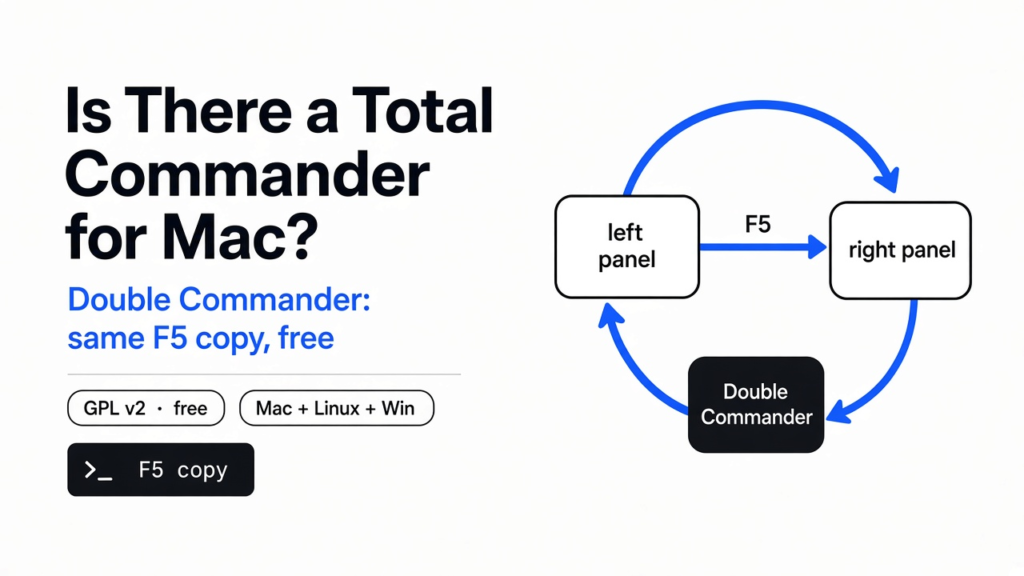
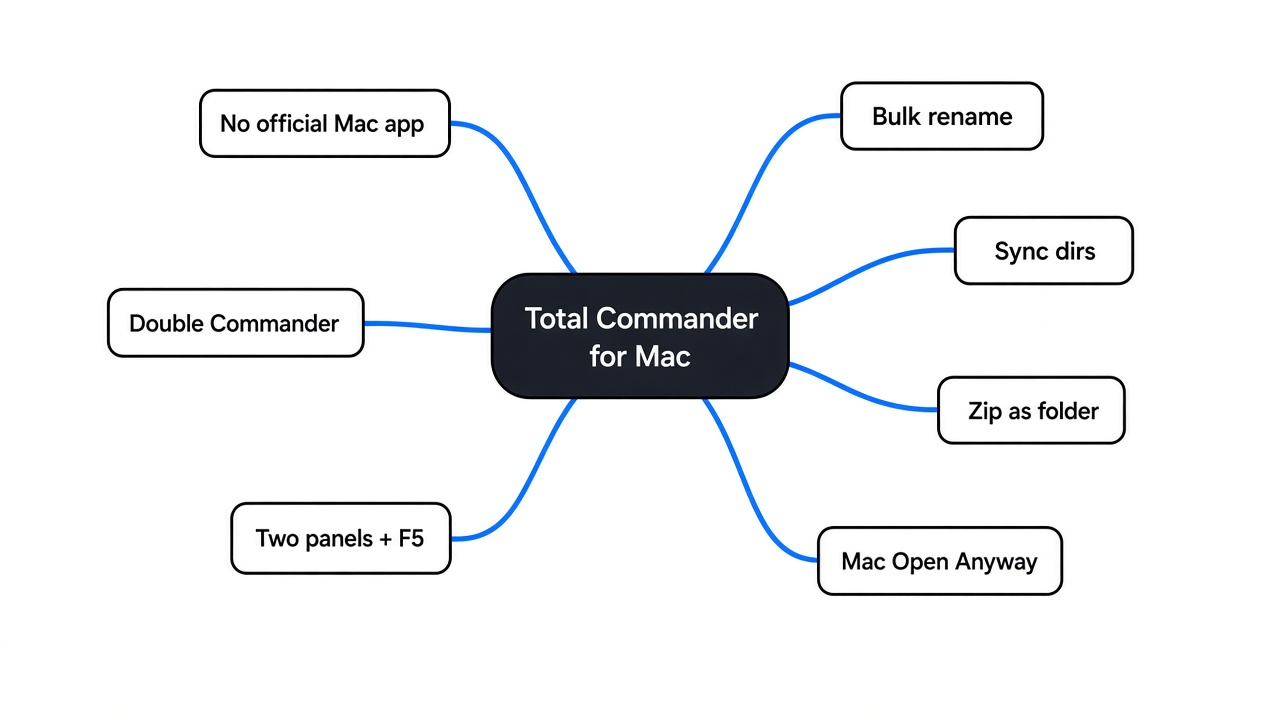
Short answer: No official total commander for mac exists. Total Commander only runs on Windows (plus a separate mobile version). The closest free match for Mac and Linux is Double Commander, an open source two-panel file manager built to work like Total Commander. It runs natively on Apple Silicon and Intel Macs, but on a Mac you must approve it once in Privacy & Security.
Checked against the Double Commander site and GitHub releases in November 2026. The three feature tests below ran on the Linux GTK build; the Mac install path follows Apple’s Open Anyway guide.
You just moved from a Windows PC to a MacBook. You open Finder, and the first job is simple: copy last month’s invoices to a USB stick. Two windows, drag, drop, miss, try again. On Windows this was one key. That one key is the thread of this whole post.
What Makes Total Commander Different From a Normal File Manager?
Start with what a file manager is. A file manager (the app you use to see, copy, move and delete files, like Finder on Mac or File Explorer on Windows) usually shows one folder per window.
Total Commander uses a different layout called two-panel (also “orthodox” or “commander-style”: two folder lists sit side by side in one window). The left side is the source (where files come from). The right side is the target (where they go).
Now the key. Select files on the left, press F5, and they copy to the folder open on the right. F6 moves them. F7 makes a folder. F8 deletes. Your hands stay on the keyboard, and you always see both ends of the job.
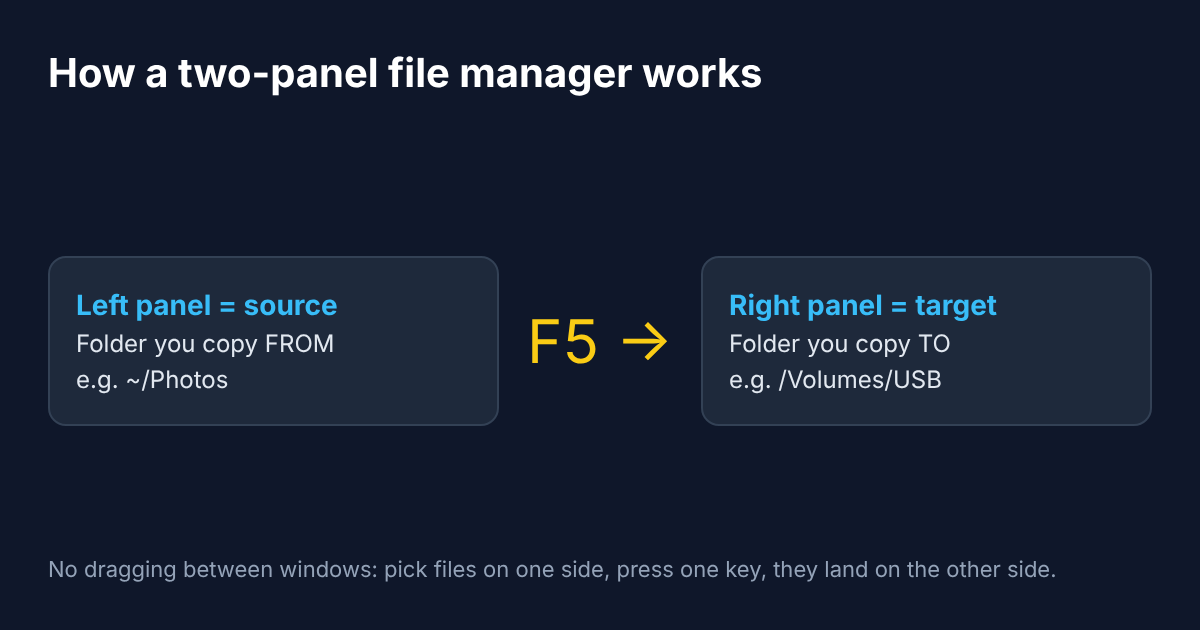
That is why people who learned on Total Commander feel slow in Finder. The layout is not just a look. It removes the “find the second window” step from every single copy. If you also need to search Mac files by content rather than by name, keep that as a separate tool — Double Commander is about moving files, not full-text Spotlight.
Does Total Commander Run on Mac or Linux?
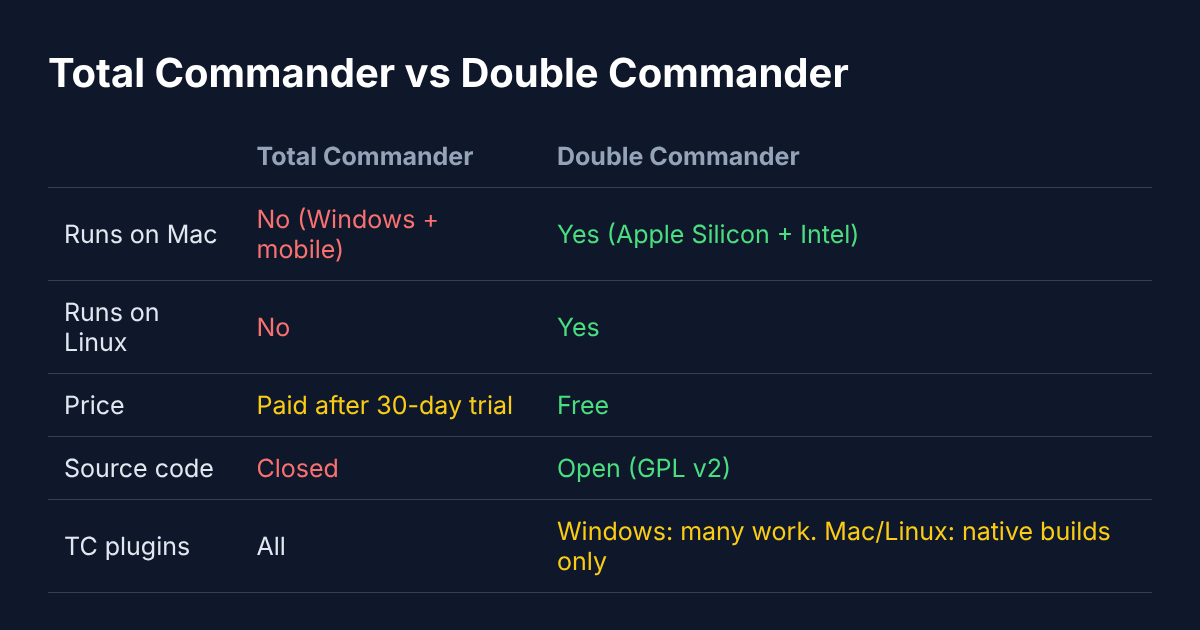
It does not. Total Commander is made for Windows, and it is shareware (software you can try for free, then must pay for). Its order page says you can evaluate it for 30 days, then buy it or remove it. The mobile versions are free, but there is no desktop version for macOS or Linux.
So the real question becomes: which app copies the Total Commander way of working onto a Mac or Linux machine? Plenty of paid Mac apps try. One free app was built with that exact goal.
What Is Double Commander?
Double Commander is a free, open source (the code is public and anyone can read or change it) two-panel file manager. Its license is GPL version 2 (a rule that says the code must stay free and open, even in copies other people make).
Its own help files say it plainly: the project aims to be “close to TC in operation,” with “maximum compatibility via the plugins and configuration files.” TC is short for Total Commander. They also say it is not Total Commander for Linux. It is a different program from different people, built to feel the same.
It runs on Windows, Linux and macOS. On Mac there are two builds: aarch64 for Apple Silicon (the M-series chips in newer Macs) and x86_64 for older Intel Macs.
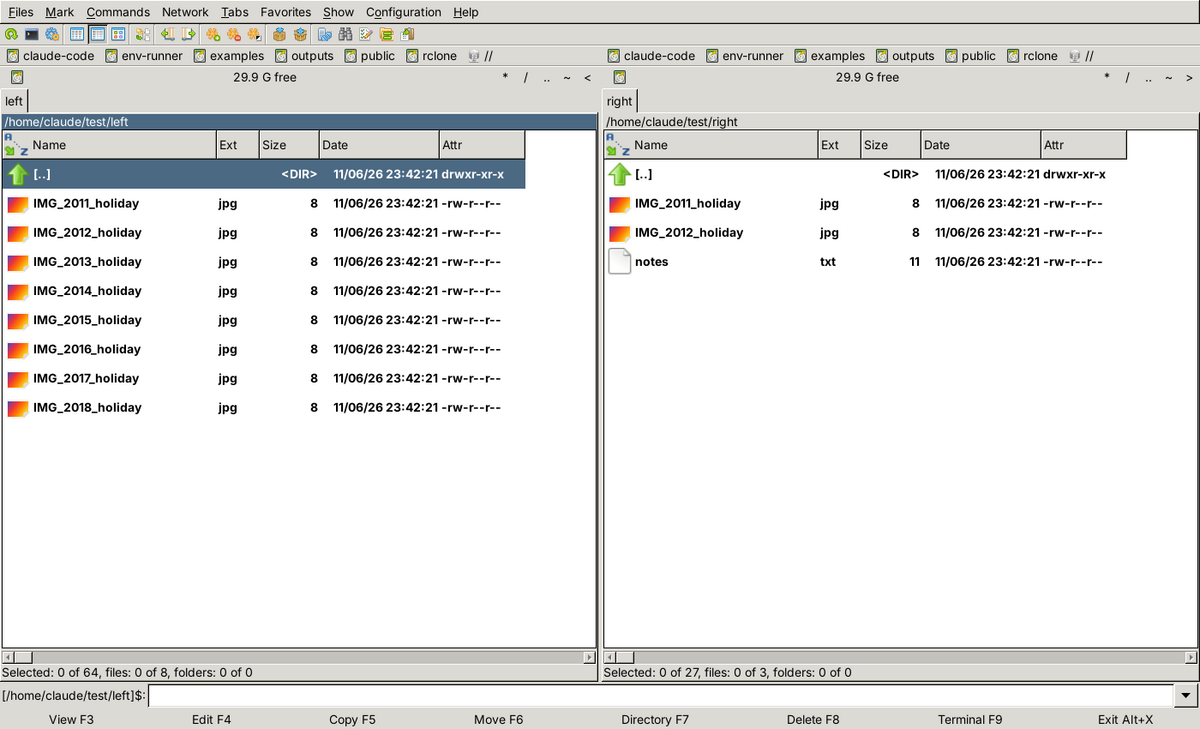
That screenshot is from my test machine. Notice the bottom row: View F3, Edit F4, Copy F5, Move F6, Directory F7, Delete F8. Same keys as Total Commander, same spots. If your fingers know one, they know the other.
What I Tested, and What Happened
Promises are cheap, so I installed it and ran three everyday jobs. My test machine was Linux, using the GTK build from the standard Ubuntu package list. The Mac app is the same program with a Mac-style interface, so the features below behave the same way.
The window opened in under a second, and the running app used about 60 MB of memory. That is light for a desktop app.
Test 1: Rename 8 Photos in One Go
Phones name photos like IMG_2011_holiday.jpg. I wanted Goa-trip_01.jpg to Goa-trip_08.jpg.
I selected all eight and pressed Ctrl+M to open the Multi-Rename Tool (a screen that renames many files at once using a pattern). I typed the mask Goa-trip_[C]. A mask is a name template, and [C] means “put a counter here.” I set the counter width to 2 digits so the numbers came out as 01, 02 and so on.
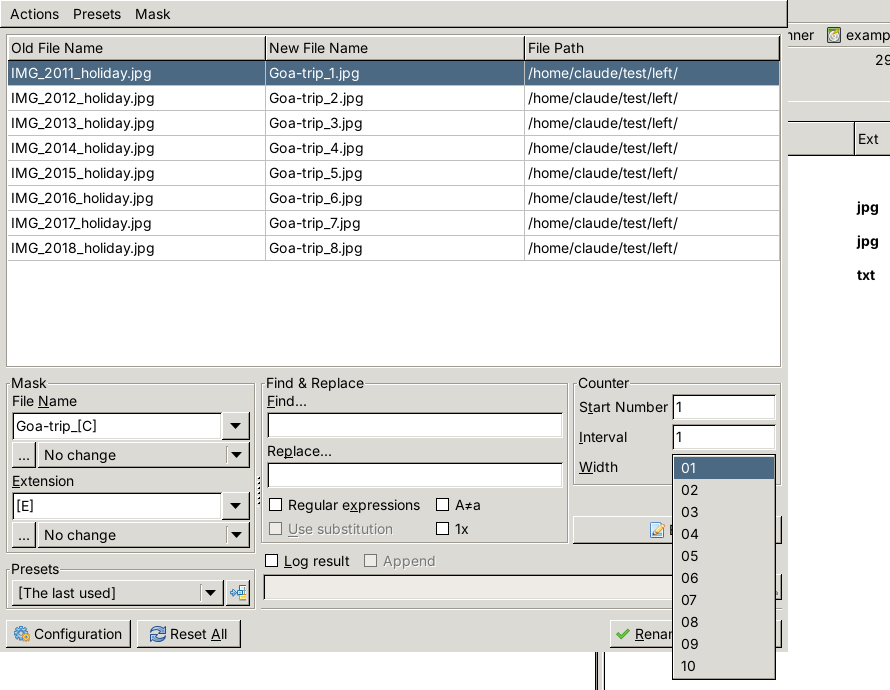
The best part is the live preview. The middle column shows each new name before anything changes. I clicked Rename, and all eight files were renamed correctly in one click. Nothing to undo, nothing to guess.
Test 2: Sync a Laptop Folder With a USB Stick
This is the job from the opening. My “laptop” folder had five files. My “USB” folder had two of the same invoices, an older copy of my resume, and one old backup that only lived on the USB. When the other machine is on the same Wi‑Fi and you would rather skip the stick, share files over the local network with a one-line server instead.
I opened Commands → Synchronize dirs, ticked by content (compare what is inside each file, not just the name and date), and clicked Compare.
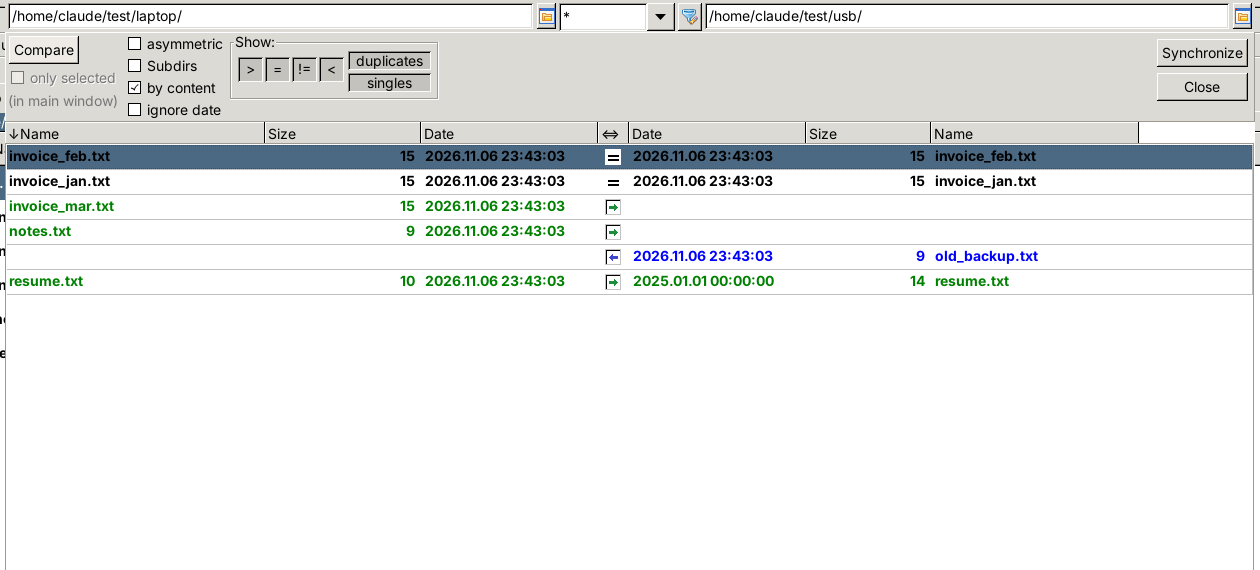
Read the middle column like traffic signs. = means both copies are identical, so nothing happens. → means copy from left to right. ← means copy from right to left. The status bar summed it up: 2 identical, 1 different, 2 only on the left, 1 only on the right.
When I clicked Synchronize, it showed a summary first: copy 3 files left to right, copy 1 file right to left, delete nothing. Then it stopped at the resume.
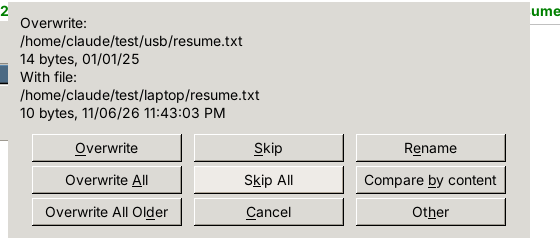
It showed both files with size and date and asked before replacing the older one. That pause is the safety net. After I clicked Overwrite, I checked both folders with a checksum (a short fingerprint of a file’s contents, so two files with the same fingerprint are identical). All six files matched on both sides.
Test 3: Open a Zip Like a Normal Folder
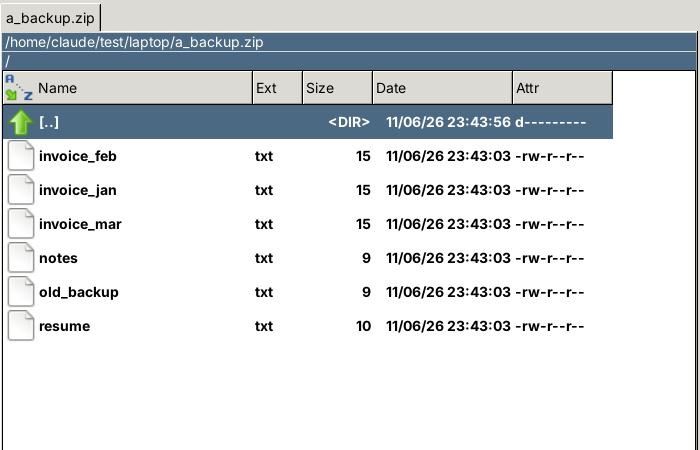
I zipped the laptop folder, selected the zip and pressed Enter. Double Commander opened it like any other folder. The files were listed inside, ready to copy out with F5, with no “extract to…” step.
Do Total Commander Plugins Work in Double Commander?
First, what a plugin is: a small add-on that teaches the main app a new trick. Total Commander has a big library of them, and this is where most switchers get confused.
Double Commander uses the same plugin system (the same “plug shape,” so to speak) and supports four Total Commander plugin types, plus one of its own:
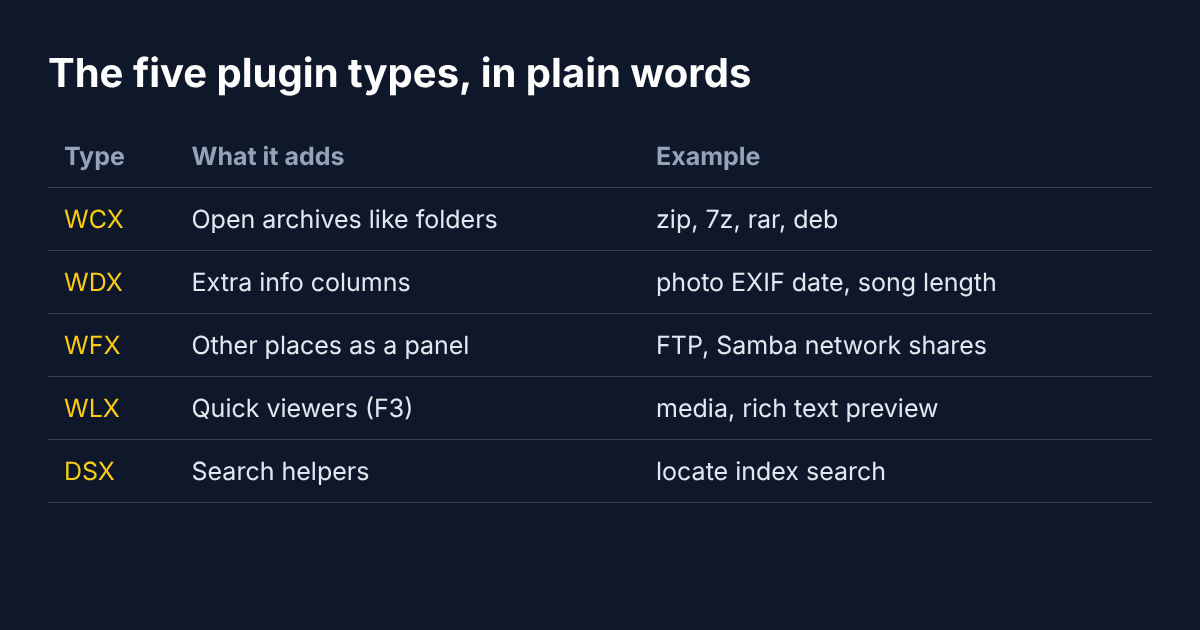
- WCX opens archives (compressed bundles like zip or 7z) as folders. That is what made Test 3 work.
- WDX adds extra info columns, like the date a photo was taken.
- WFX shows other places as a panel, like an FTP server (a remote computer you copy files to over the internet) or a shared network folder.
- WLX adds quick viewers you open with F3.
- DSX is Double Commander’s own type for search helpers.
Here is the catch. A plugin is compiled code (code already turned into machine instructions for one operating system). Total Commander plugins are Windows files. The Double Commander docs say that “under Windows you can use plugins from Total Commander,” and many work.
On Mac and Linux, a plugin must be built for that system. The common ones (zip, 7z, rar, FTP, network shares) come built in or have Mac and Linux versions, but a rare Windows-only plugin you loved will not carry over.
How Do I Install Double Commander on a Mac?
On Linux it is one command. On Ubuntu or Debian:
sudo apt install doublecmd-gtkOn Windows, download the installer from the official site. On a Mac there is one extra step, and it is the step most guides skip. Same idea as picking a free download manager for Mac — get the official build, then clear the Gatekeeper prompt once.
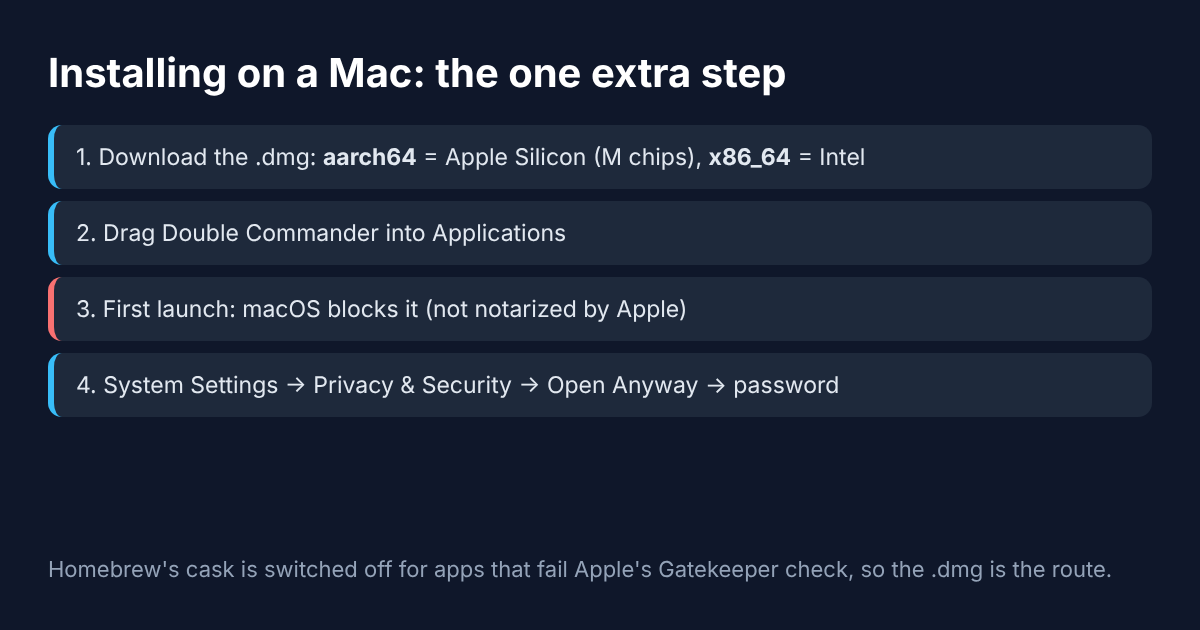
- Download the
.dmg(a Mac disk-image file, like a zip that opens as a virtual drive) from the project’s GitHub releases page. Pick aarch64 for an M-series Mac and x86_64 for an Intel Mac. - Drag Double Commander into Applications.
- Open it. macOS will block it the first time.
- Go to System Settings → Privacy & Security, scroll to Security, click Open Anyway, and enter your password.
Why the block? macOS has a guard called Gatekeeper (it blocks apps Apple has not scanned and approved, a process called notarization). Double Commander is not notarized. That is a paperwork step, not a sign of malware, and Apple’s own guide shows the Open Anyway route.
This is also why brew install --cask double-commander stopped working. Homebrew (a popular command-line installer for Mac) switched off app packages that fail the Gatekeeper check, and Double Commander’s package is one of them. The .dmg is the route.
Is Double Commander a Good Total Commander Alternative?
It depends on what you need from it, so let me give both sides.
It is not a perfect clone. The interface looks plainer than Finder or paid Mac apps, a few menus feel very “Windows,” and some rare Total Commander plugins will not work on Mac or Linux. If you want a polished, Mac-only app and you are happy to pay, there are commercial two-panel apps worth a look. For other Windows habits on a Mac, the same free-first path shows up in a safe CCleaner alternative.
But for the job most switchers actually have (two folders, keyboard shortcuts, bulk rename, folder sync, archives as folders) it did everything I asked, for free, with the same keys. My three tests worked on the first try, and the sync screen asked before overwriting the one file that mattered.
So back to the MacBook and that USB stick. Left panel, invoices. Right panel, USB. Select, press F5. One key again.
Common questions about Total Commander for Mac
Is there an official Total Commander for Mac?
No. Total Commander’s desktop version is Windows only; there are mobile versions, but no macOS or Linux build.
Is Double Commander free?
Yes. It is free, open source software under the GPL version 2 license, with no trial period.
Does Double Commander work on Apple Silicon Macs?
Yes. There is a native aarch64 build for M-series Macs and an x86_64 build for Intel Macs.
Why does my Mac say Double Commander cannot be opened?
It is not notarized by Apple. Open System Settings, go to Privacy & Security, click Open Anyway, and enter your password.