
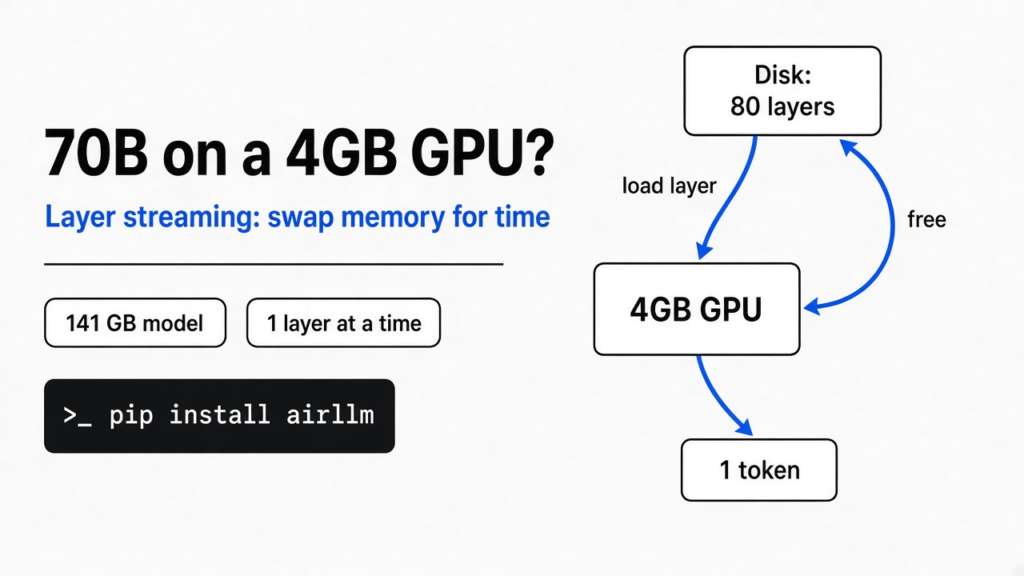
Short answer: Yes, you can run a 70B model on a 4GB GPU, with a trick called layer streaming, which loads the model one slice at a time from disk. The catch is speed. Every word the model writes means reading the whole model off your disk again, so expect seconds to minutes per word. For chat, a 4-bit model split between GPU and system RAM is the better route.
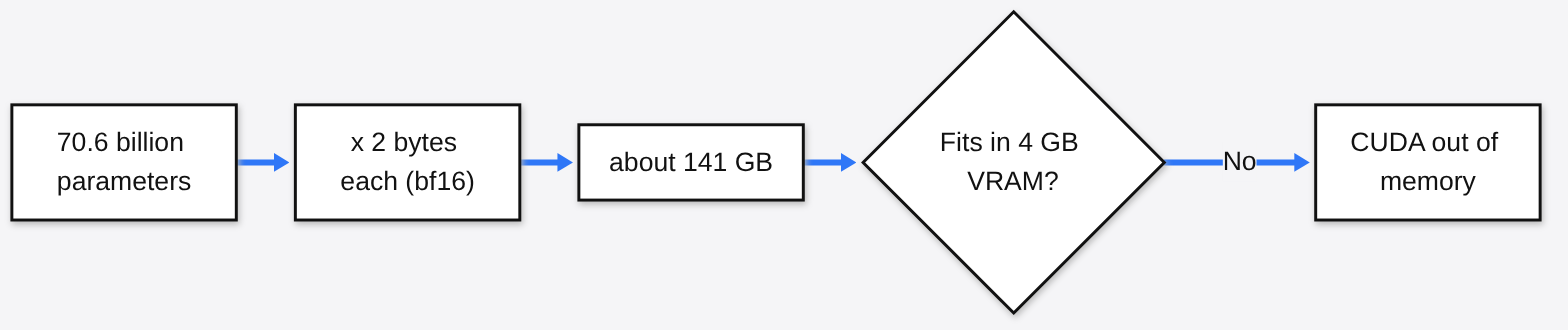
You download a big open model, hit run, and get “CUDA out of memory”. Your card has 4GB. The model wants something like 140GB. That gap looks impossible.
It isn’t. One tool closes it completely, and you can try it on a laptop in ten minutes. But it trades memory for time, and that trade is the whole story of this post. The thread to hold on to: you can always swap memory for time, and the only question is how much time you can stand.
Why does a 70B model need so much memory?
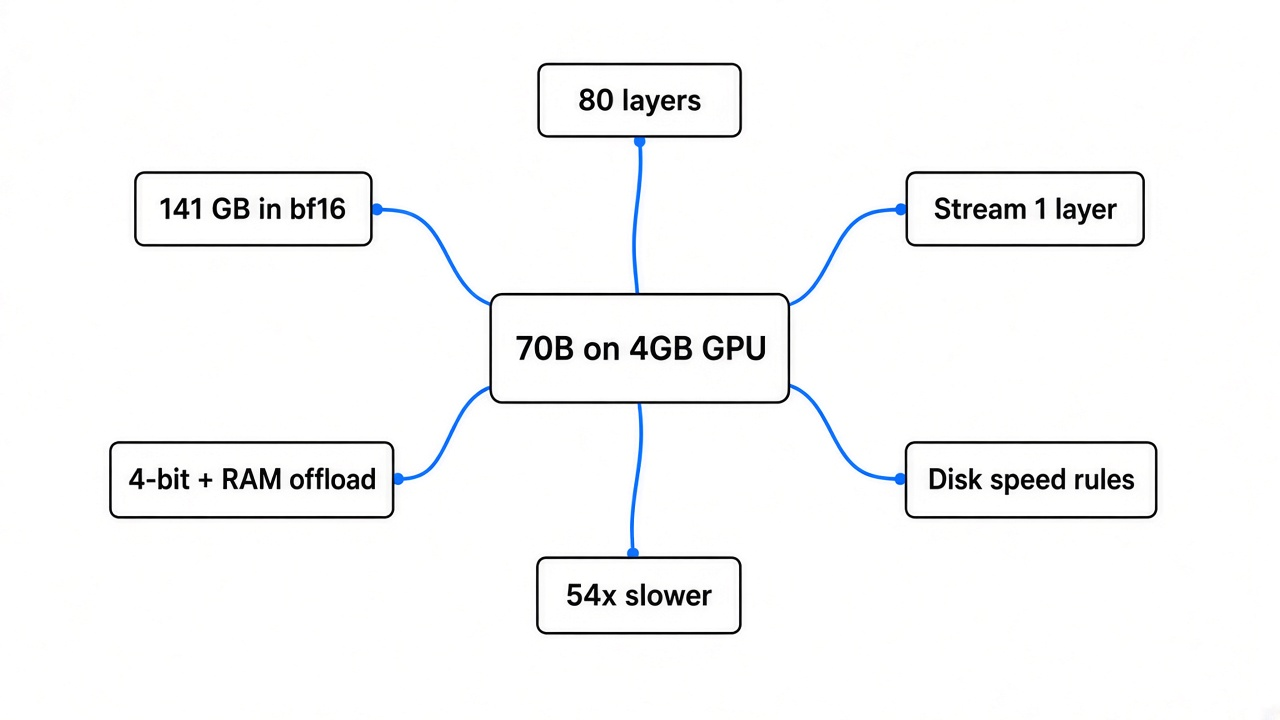
A model’s size in memory is just its number of parameters times the bytes each one takes. Everything else in this post builds on that one line.
Start at the base. A parameter (one learned number inside the model) is like one knob on a giant mixing desk. A “70B” model has about 70 billion of those knobs. To answer you, the GPU needs every knob within reach in VRAM (the graphics card’s own fast memory, separate from your normal RAM).
Each knob is stored as a number. The usual format, bf16 (a 16-bit number, so 2 bytes each), makes the math simple. The figures below come from Llama 3.3 70B’s published config:
| Model | Parameters | Bytes each | Memory needed |
|---|---|---|---|
| Llama 3.3 70B, full precision (bf16) | about 70.6 billion | 2 | about 141 GB |
| Same model, 4-bit | about 70.6 billion | about 0.5 | about 35 to 43 GB |
| Your GPU | 4 GB |
That last row is the problem. Even squeezed to 4-bit with quantization (storing each knob with fewer bits, trading a little accuracy for a lot of space), the model is about ten times too big for the card.
So how can a 4GB card run it at all?
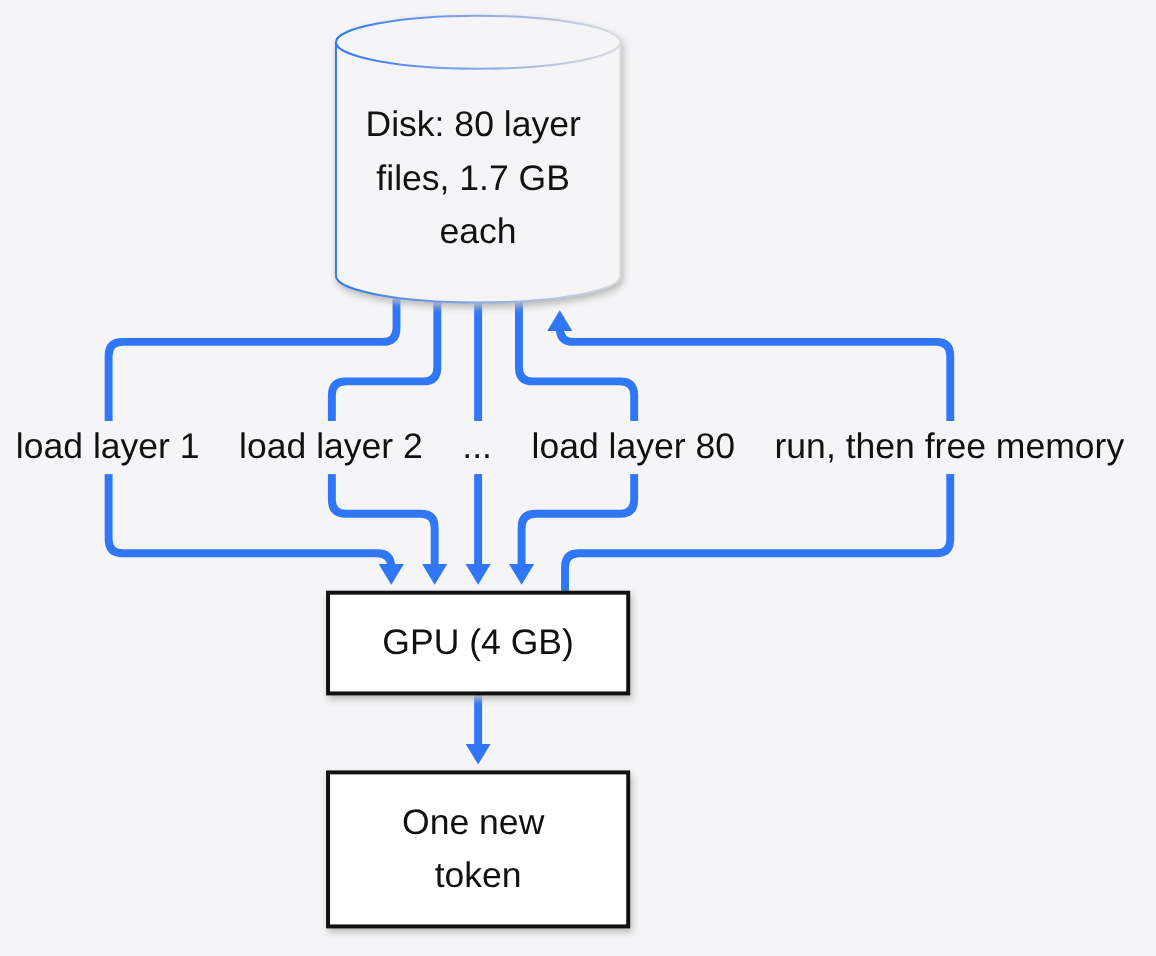
The model does not need to be in VRAM all at once. It only needs one layer at a time.
Here is the prerequisite. A model like this is built as a stack of layers (blocks of math the text passes through, one after another, like floors in a building). Llama 3.3 70B has 80 of them. Your text enters at the bottom floor, gets transformed, and is handed up to the next floor. Floor 40 never needs floor 3’s knobs while it works.
Then the idea. If each floor is small, you can bring one floor into VRAM, run it, throw it out, and bring in the next. One layer of this model has about 856 million parameters, roughly 1.7GB in bf16. That fits on a 4GB card with room to spare.
This is called layer streaming, and AirLLM is the open source tool that packages it. Think of reading a 1,000-page book on a desk that only holds one page: you can still read the whole thing, you just keep walking to the shelf.
What does layer streaming cost you?
Speed. Every new token means reading every layer off disk again.
A token (a chunk of text, roughly three quarters of a word) is the unit a model writes in. To produce one token, your text has to climb all 80 floors. With streaming, that means loading all 80 layer files. Then the model writes the next token, and the climb starts again from floor one.
So the best case is simple division: seconds per token is roughly the model’s size on disk divided by how fast your disk reads.
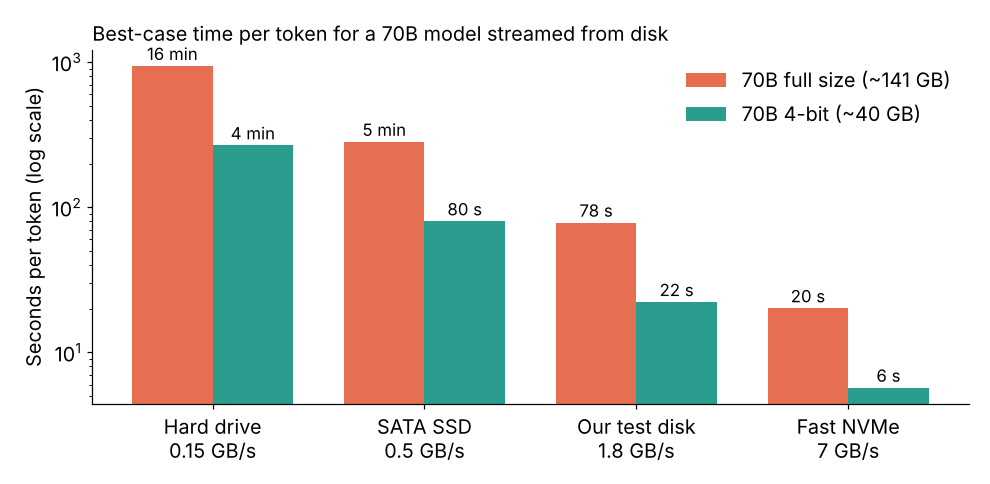
On a fast NVMe drive (the small SSD stick that plugs straight into the motherboard) reading about 7GB per second, the full model takes about 20 seconds per token. On an ordinary SATA SSD it is closer to 5 minutes. A one-paragraph answer is around 100 tokens. Do that math once before you start a download.
That is the floor, not the real number. Real runs add the time to set up each layer on the GPU, which leads to the test below.
How slow is it really? We ran the same model both ways
On the same machine, with the same answer, streaming was about 54 times slower.
The question was simple: how much does one-layer-at-a-time cost on its own, before a slow disk even enters the picture? To isolate that, we used a tiny model, Qwen2.5 0.5B Instruct, that fits easily in memory, on a plain 2-core cloud machine with no GPU.
We asked both setups the same prompt (“Explain in one sentence why the sky is blue”) and made each write exactly 20 tokens.
- Normal loading, whole model in memory: 2.12 seconds, about 0.11 seconds per token.
- AirLLM layer streaming: 113.70 seconds, about 5.7 seconds per token.
- Both wrote the same sentence, word for word.
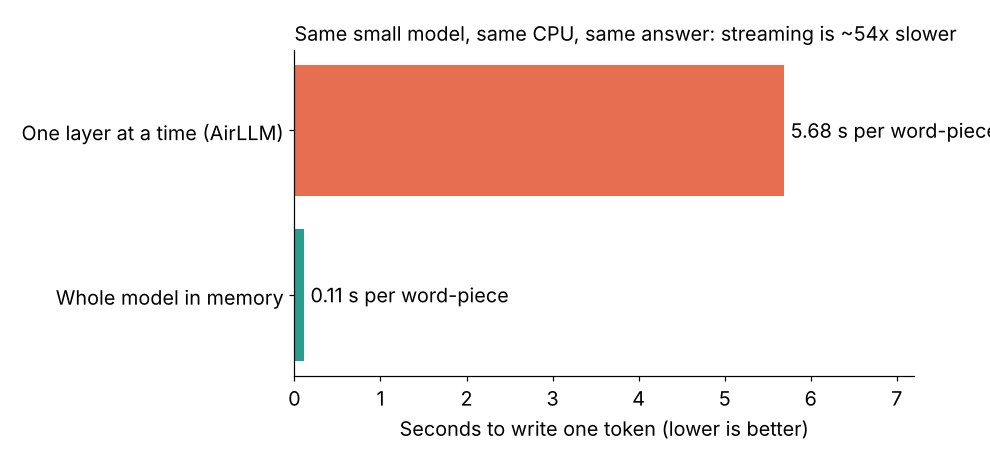
What it means: the answer quality is identical, because the math is identical. Only the waiting changes. And this was a best case, since the whole tiny model sat in RAM after the first pass. A 70B model will not fit in most machines’ RAM, so it pays the disk cost on top.
The catch: this was CPU only and one small model, so treat 54 times as the shape of the cost, not a fixed rule. A GPU run of a big model is dominated by the disk math in the section above.
Want to repeat it? It takes about ten minutes:
pip install airllmfrom airllm import AutoModel
from transformers import AutoTokenizer
import time
name = "Qwen/Qwen2.5-0.5B-Instruct"
tok = AutoTokenizer.from_pretrained(name)
ids = tok("Explain in one sentence why the sky is blue.", return_tensors="pt").input_ids
model = AutoModel.from_pretrained(name, device="cpu") # use "cuda:0" on a GPU
t = time.time()
out = model.generate(ids, max_new_tokens=20, use_cache=True, do_sample=False)
print(f"{(time.time() - t) / 20:.2f} s per token")
print(tok.decode(out[0][ids.shape[1]:], skip_special_tokens=True))The first run splits the model into one file per layer, so you need free disk space for a second copy of the model.
Is there a faster way to run a big model on a small GPU?
Yes. Shrink the model, then split it between your GPU and normal RAM instead of your disk.
The fix comes straight from the first section. RAM is much faster to read than a disk, and quantization shrinks the model by roughly four times. Put those together and most of the waiting disappears.
This is called partial offloading (keeping some layers on the GPU and the rest in system RAM, where the CPU runs them). llama.cpp does this out of the box, and Ollama, which is built on it, does it for you automatically. The 4-bit Llama 3.3 70B download in Ollama is about 43GB, so you need roughly that much RAM and VRAM combined, plus some room for your system.
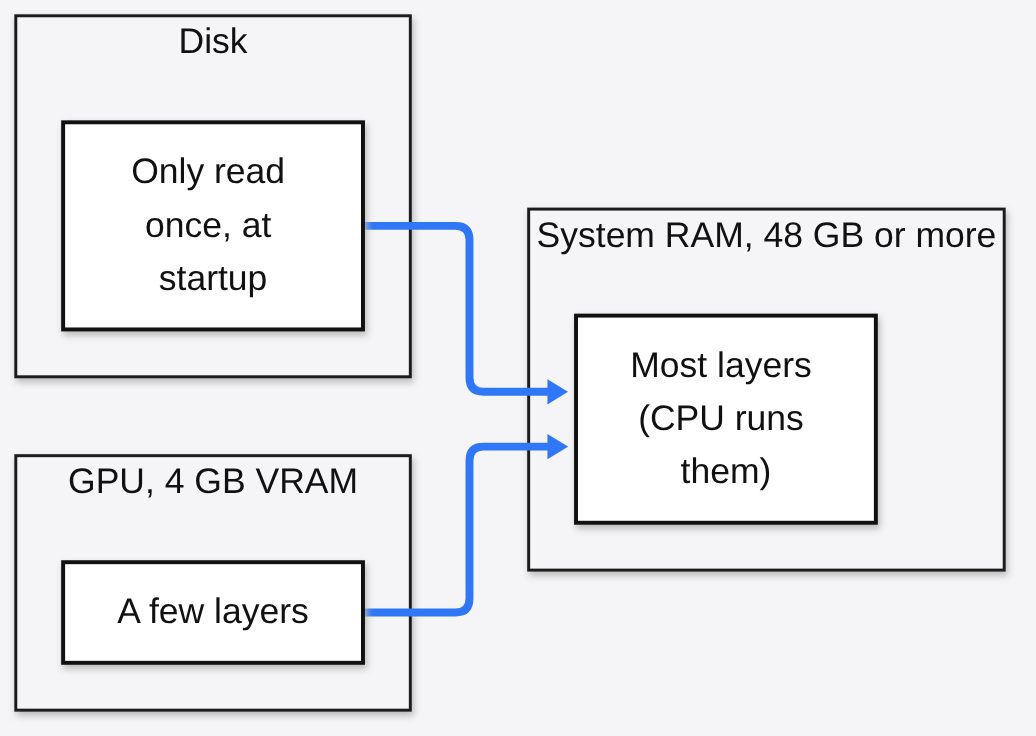
It will still be slow compared to a big GPU, because most of the work runs on the CPU. But the disk is read once when the model loads, not once per token, and that is the difference between waiting seconds and waiting minutes.
AirLLM also has a 4-bit option (compression='4bit'), which cuts how much it reads per token. It needs the bitsandbytes package installed.
Which option should you pick?
Pick by how much RAM you have and how long you can wait for an answer.
| Your situation | What to use | What to expect |
|---|---|---|
| 4GB GPU, 48GB+ RAM, want to chat | 4-bit model with partial offload (Ollama or llama.cpp) | Slow but usable |
| 4GB GPU, little RAM, want to chat | A smaller model (7B to 14B at 4-bit) | Fast, fits fully on the card |
| 4GB GPU, little RAM, need 70B quality, can wait | AirLLM layer streaming on an NVMe drive | Seconds to minutes per token |
| Batch jobs overnight (summaries, labels) | AirLLM, 4-bit compression on | Fine, if nobody is waiting |
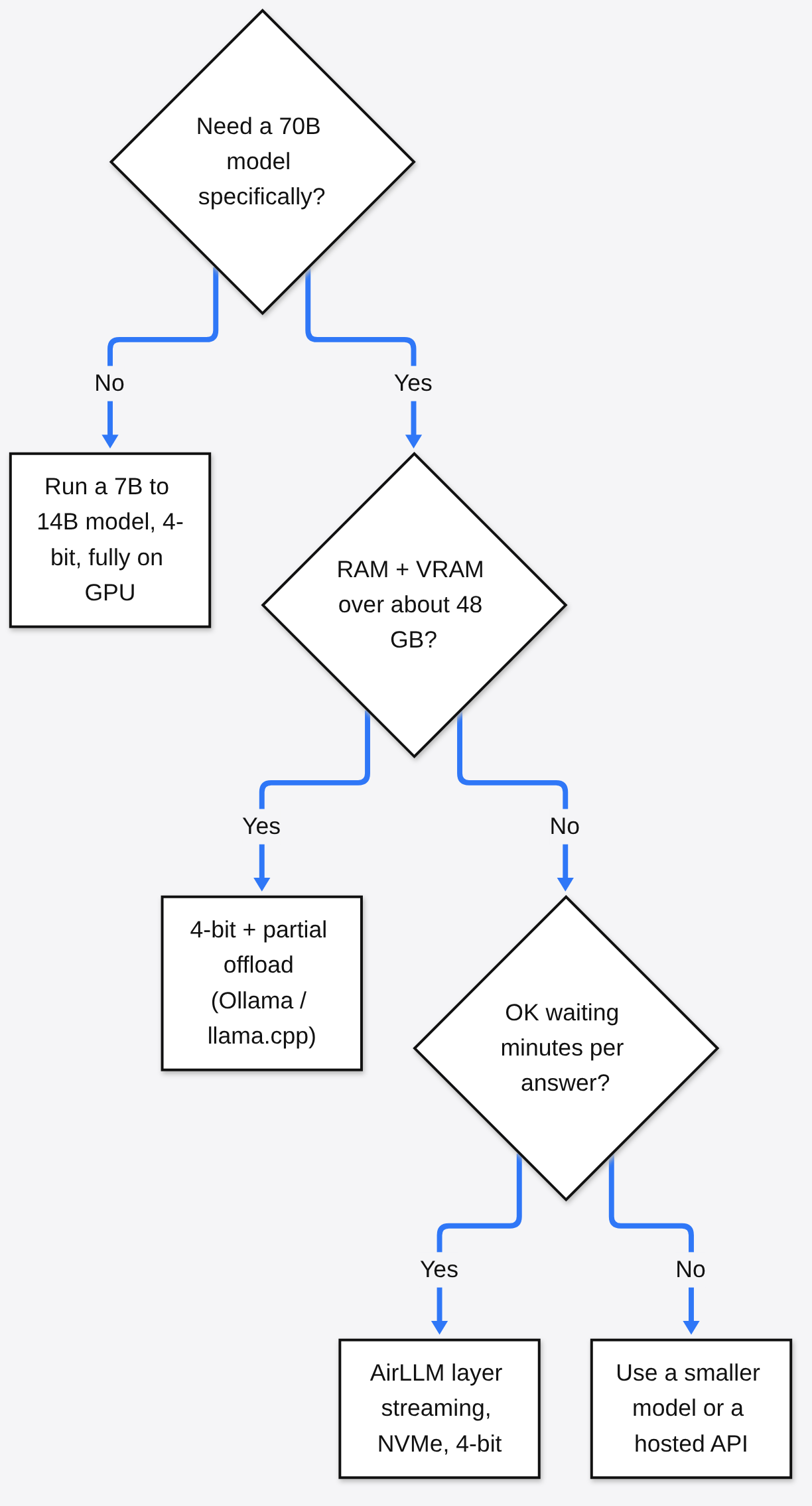
There is a fair case for streaming. If your job runs while you sleep, nobody cares if a token takes 20 seconds, and you get the big model’s quality on hardware you already own. For anything interactive, though, the waiting wins the argument.
It is the same local-first trade we keep coming back to, from searching your Mac files by what is in them to converting a file without uploading it: your data stays on your hardware, and you pay in speed.
So, can a 4GB card run a 70B model? Yes. It just pays in time what it saves in memory. Check your disk speed before you check your GPU.
Common questions about running a 70B model on a 4GB GPU
How much VRAM do I need to run a 70B model normally?
About 141GB for full bf16 precision, or roughly 35 to 43GB at 4-bit. Below that, you need offloading or streaming.
Does layer streaming make the model dumber?
No. Without compression it runs the exact same math, so answers match a normal run. Our test produced the same sentence both ways.
Does AirLLM work on a Mac or without a GPU?
It supports Apple silicon Macs through MLX and also has a CPU mode. Our benchmark above ran on CPU only.
Why is my AirLLM run so much slower than the disk math says?
The math is a floor. Each layer also has to be set up in memory before it runs, and our test showed that overhead alone can be about 54 times the normal time on a small model.

6 comments