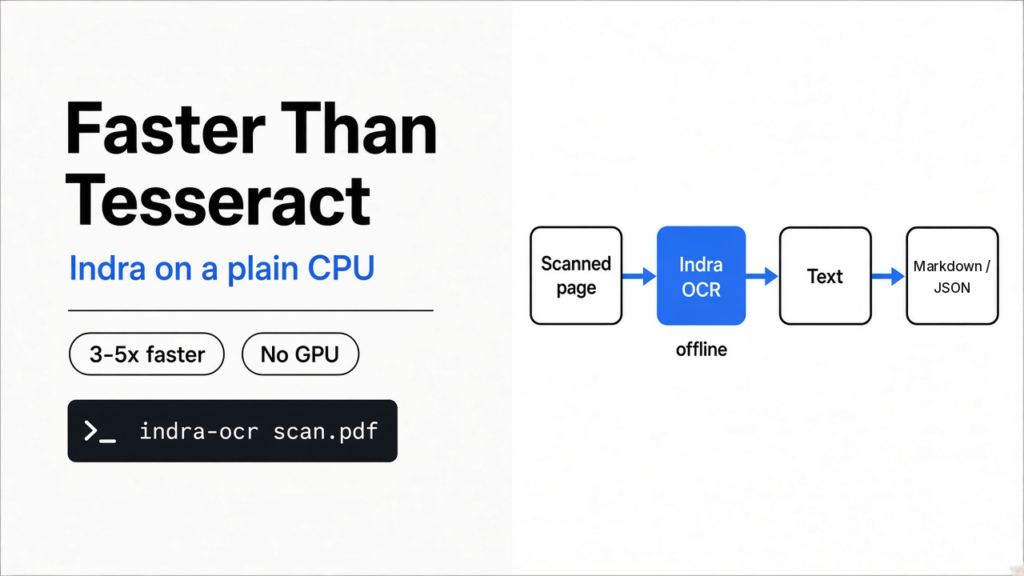
Yes. Indra OCR is a free Tesseract alternative with open source code that reads scanned pages and PDFs on a normal CPU, with no GPU. On my 2-core test machine it read 20 scanned pages about 3x faster than Tesseract on one core and 5x faster on two, with the same accuracy on clean print. It also fixed an upside-down page and kept every number in a ruled table, where Tesseract slipped.
You have a folder of scanned invoices. The text is right there on screen, but you cannot search it, copy it or paste it into a spreadsheet, because to the computer each page is just a photo.
So you need OCR. The usual free fix is Tesseract, and it works. It is also slow, and a few hundred pages can tie up your machine for a long time. This post shows a faster option I ran myself, what it does better, and where you should still use something else.
What does OCR actually do?
OCR turns a picture of words into real text you can search and edit.
To see why, start from the base fact. A scan is only a grid of tiny colored dots called pixels. A computer sees “dark dot here, light dot there”, not letters.
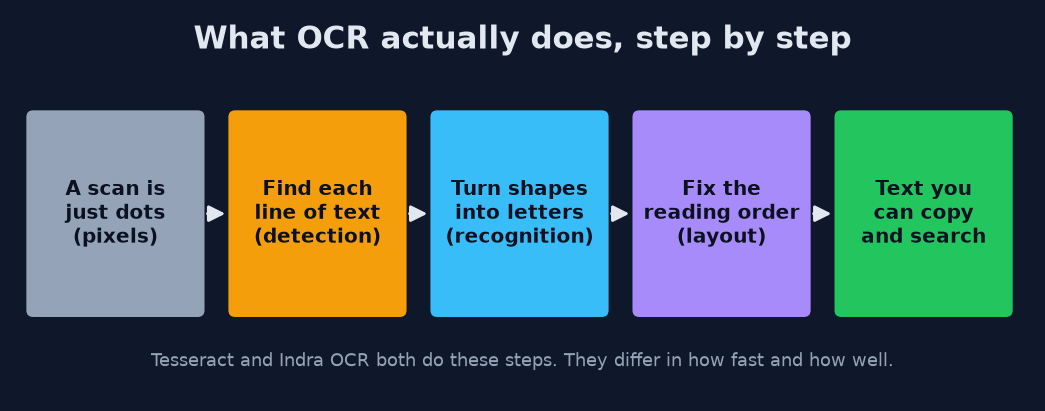
So OCR (optical character recognition: software that reads text out of images) works in steps. First it finds where each line of text sits on the page, called detection. Then it reads the shapes in each line as letters, called recognition. Last, it puts the lines in the order a human would read them, called layout.
Think of it like a person reading a messy notice board: first spot the notes, then read each one, then decide which to read first. Every OCR tool does these three jobs. The difference is how fast and how well.
Why is Tesseract slow?
Tesseract is accurate on clean print, but on a normal CPU it reads only about one page per second.
Tesseract is the classic free OCR engine and it still reads clean typed pages well. In my test it made zero mistakes on a normal printed page.
But accuracy has a cost, and the cost is time. On my small 2-core machine it managed about one page per second, even with two pages running at once. That is fine for one letter. For a 1,000-page archive, it means about 16 minutes of a busy computer.
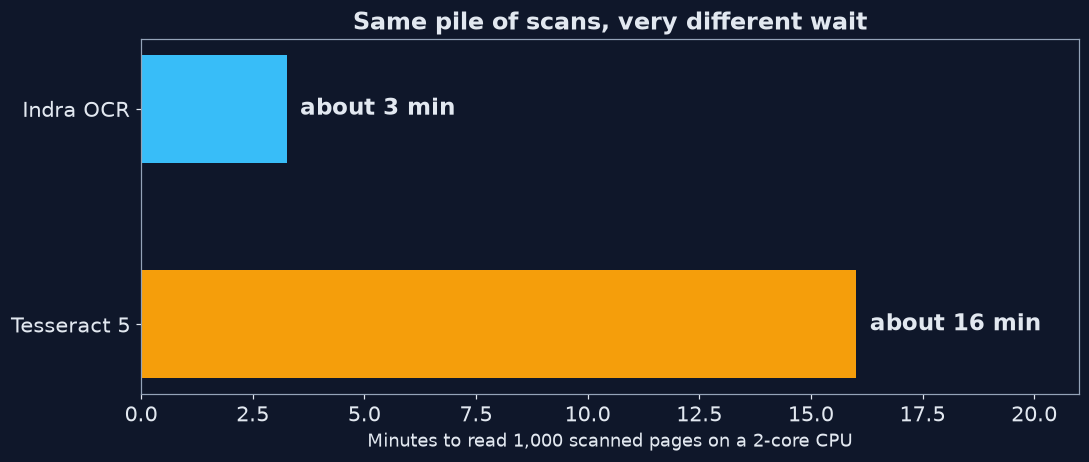
That wait is the gap Indra OCR is built to fill, so the next question is what makes it different.
What is Indra OCR?
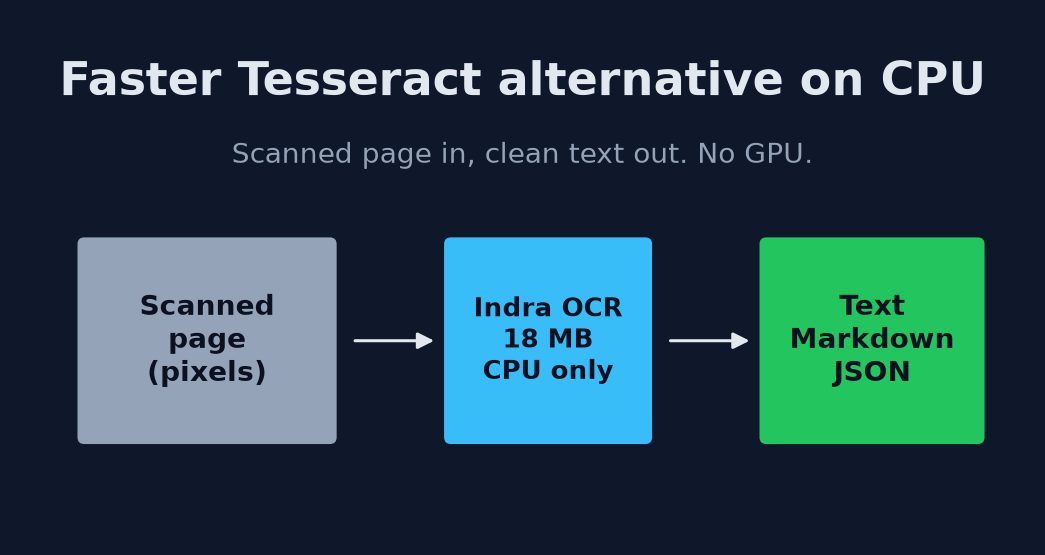
Indra OCR is a tiny OCR model that runs on ONNX Runtime and needs about 18 MB of model files.
A model here is the trained “brain” file that knows what letters look like. Most modern OCR models are hundreds of megabytes and want a GPU (a graphics card that does many small sums at once). Indra’s main reader has about 1 million parameters (the adjustable numbers inside a model), which is very small, so it runs fast on an ordinary CPU.
It runs on ONNX Runtime (a light engine that runs trained models without heavy AI libraries like PyTorch). That is why the install stays small and needs no graphics card.
It gives you three kinds of output: Markdown with headings and tables, plain text, or JSON with a box around every line. If your PDF already has real text inside it (a “digital” PDF), Indra reads that text directly and only runs OCR on the parts that are pictures.
How do you install and run it?
One pip command, one run command, and the first run downloads the models.
Before you start, check one thing. You need Python 3.10 or newer. It is tested on Linux and on Macs with Apple chips.
- Install it:
pip install indra-ocr - Read a PDF to Markdown:
indra-ocr scan.pdf - Save one file per input:
indra-ocr *.pdf --out results/ - Get plain text:
indra-ocr scan.png --format text - See boxes over the page in your browser:
indra-ocr-viewer
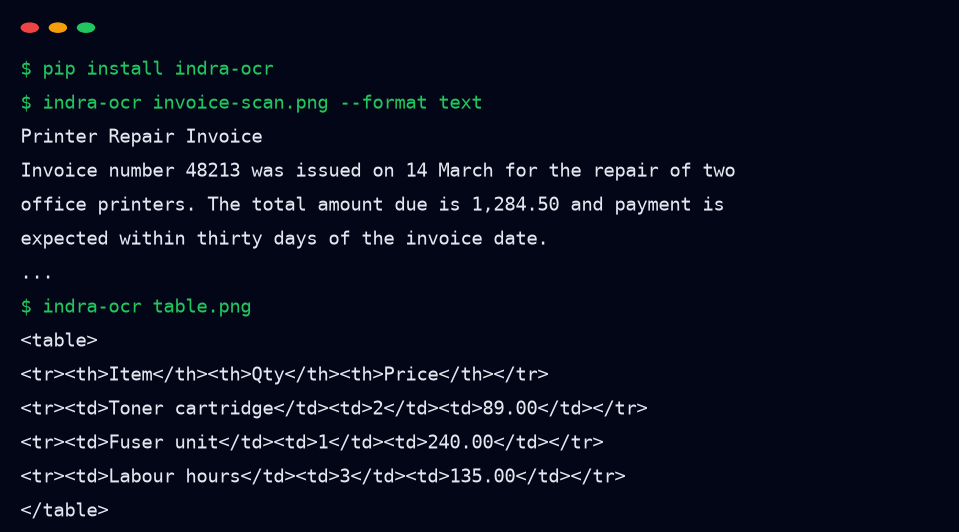
The first run fetched about 18 MB of models in under two seconds. After that, everything runs offline, so your pages never leave your machine. That matters for invoices, contracts and anything private. It is the same local-first idea as converting a file without uploading it or transcribing audio on your own computer for free.
How much faster is it, really?
On a small 2-core machine, Indra read about 3x faster than Tesseract on one core and 5x faster on two.
To check the speed claim, I made a 20-page PDF of scan-like pages: printed text, rotated slightly, blurred and speckled like a cheap office scanner. Then I ran both tools on the same machine, a 2-core cloud CPU with no GPU.
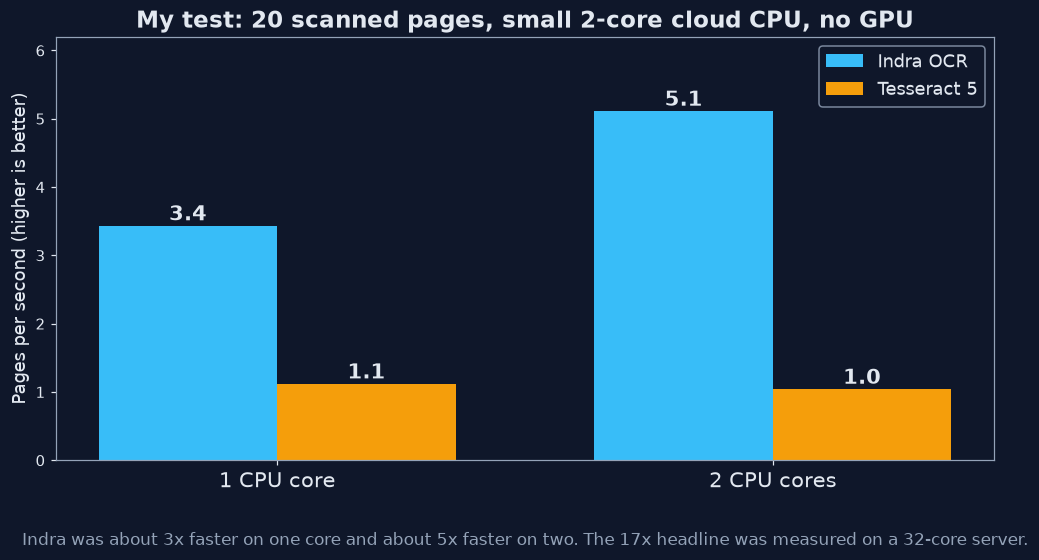
Indra read the 20 pages in 3.9 seconds using both cores, about 5 pages per second. Tesseract took 19.2 seconds running two pages at a time, about 1 page per second. On a single core it was 5.8 seconds against 17.9 seconds, roughly 3x.
The Indra team reports up to 17x on a 32-core server. Speed grows with cores, so a small laptop will not see that number. Expect 3-5x on a normal machine. On mine, that 16-minute wait for 1,000 pages drops to about 3.
So where does the time go? Inside one page, the work splits cleanly. On my machine Indra spent about 60 ms finding the page’s direction, 55 ms finding lines, 100 ms reading them and a few ms ordering them, about 215 ms in total.
Is it as accurate as Tesseract?
On clean printed pages, both made zero errors. The differences showed up on messy pages.
I compared each output to the true text, letter by letter. On the clean page, the noisy scan and a half-resolution copy, both tools scored 0% errors. So for plain print, speed is the only difference.
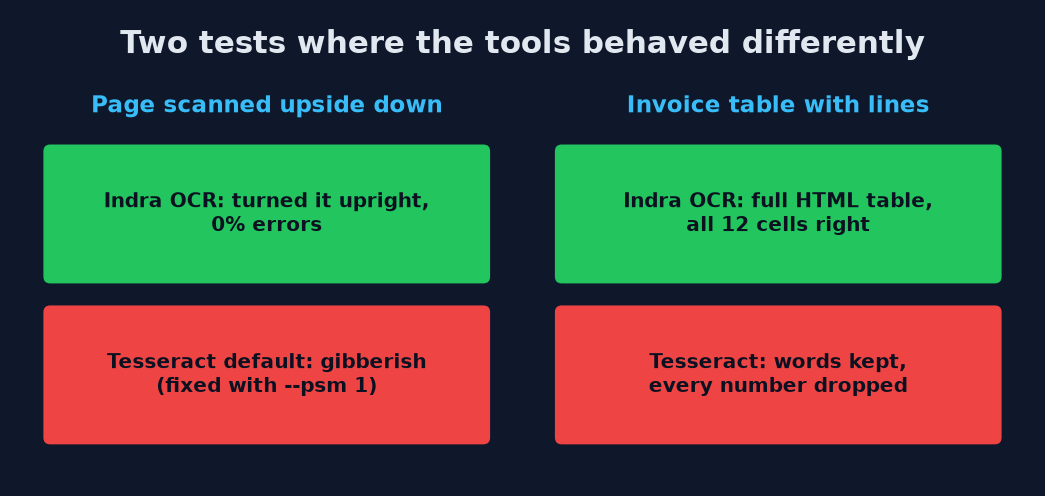
Then I tried two harder cases. First, the same scan turned upside down. Indra noticed, turned it upright and read it perfectly. Tesseract, with default settings, returned upside-down gibberish. To be fair, adding --psm 1 (a Tesseract setting that checks page direction first) fixed it, but you have to know that switch exists.
That was a settings problem. The second case was not: a small invoice table with ruled lines: item, quantity, price. Indra returned a proper HTML table with all 12 cells right. Tesseract kept the item names and dropped every number, which is the part you needed.
What can’t it do?
It is built for clean print. Handwriting, very old scans and some scripts are its weak spots.
Those wins have limits. Every tool has a catch, and this one is clear about its own. Handwriting is not supported. Faded, old or very low-quality scans read poorly. Complex tables with merged cells can land in the wrong rows.
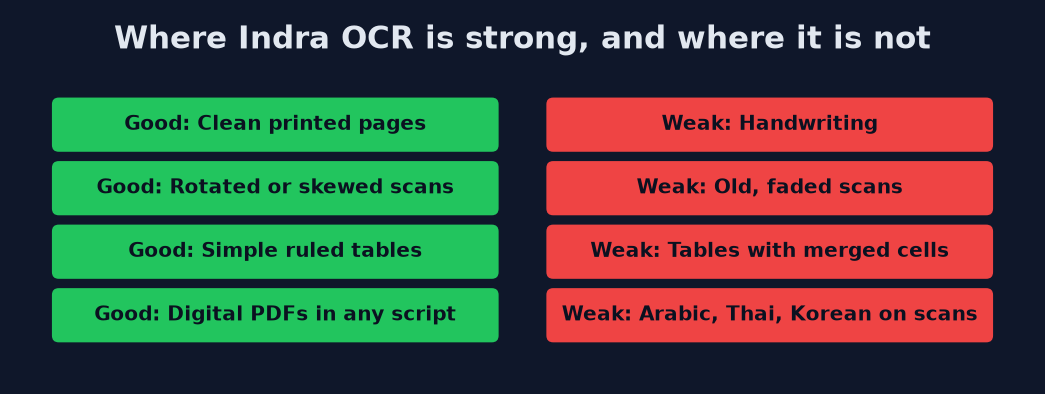
Beyond page quality, languages matter too. On scans it reads Latin-script languages (about 50, including English, French and Spanish), plus Cyrillic, Greek, Devanagari, Bengali and Chinese. Arabic, Hebrew, Thai, Japanese kana and Korean work only when the PDF already has real text inside it. On a scanned Korean page, it outputs wrong characters.
Can you use it at work?
The code is free for almost any use, but the model weights have a separate license with limits.
This is the part most people skip. A license is the rulebook for how you may use software, and Indra has two of them.
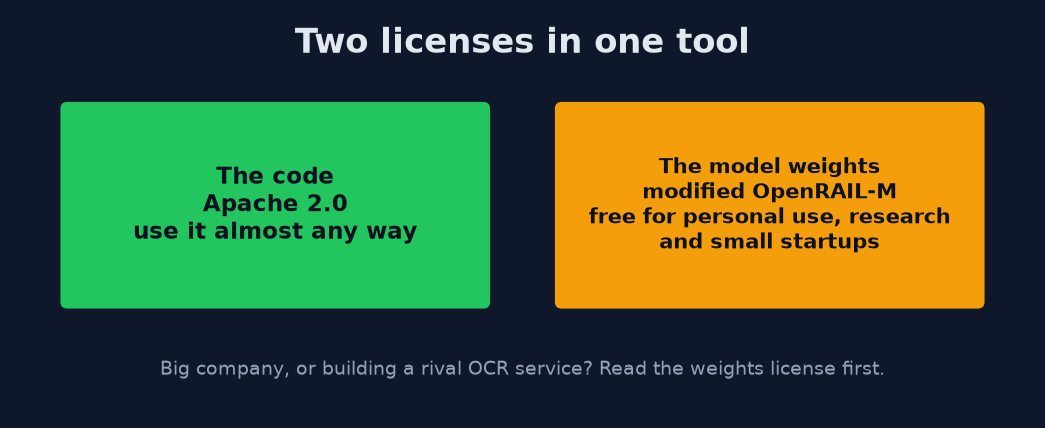
The code uses Apache 2.0, a very open license. The model weights (the trained brain file) use a modified OpenRAIL-M license. It is free for research, personal use and startups under 20 million dollars in funding or revenue, and it cannot be used to compete with the company’s own paid OCR service. If you work at a large company, read that license before you ship anything.
Which OCR tool should you pick?
Pick by what you are reading, not by which tool gets talked about most.
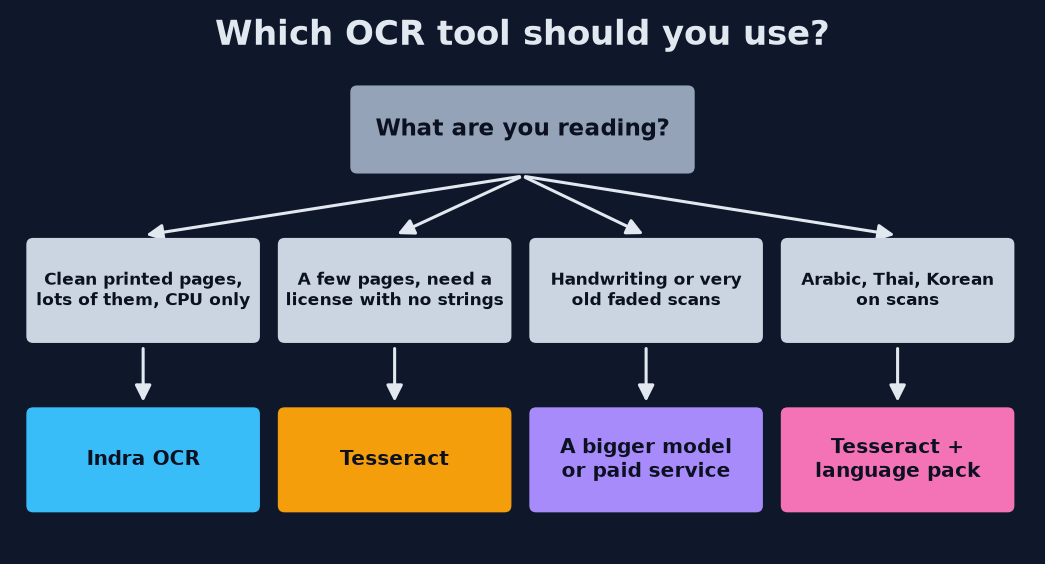
- Lots of clean printed pages, no GPU: Indra OCR. It was the faster of the two by a wide margin.
- A few pages and you want no license strings: Tesseract. Add
--psm 1if pages may be rotated. - Handwriting or very old scans: a larger model or a paid service. Small fast models are not built for these.
- Arabic, Thai or Korean scans: Tesseract, with the language pack for that script installed.
So for that folder of scanned invoices, the move is simple. Install Indra, point it at the folder, and you will have searchable text, numbers included, before your coffee cools.
Common questions about Tesseract alternatives
Does Indra OCR need a GPU?
No. It runs on a normal CPU using ONNX Runtime, and the models are about 18 MB.
Does Indra OCR work offline?
Yes, after the first run downloads the models. Pages are processed on your own machine.
Can Indra OCR read handwriting?
No. Handwriting is not supported, so use a larger model or a paid service for handwritten notes.
Is Indra OCR free for commercial use?
The code is Apache 2.0. The model weights are free for personal use, research and startups under 20 million dollars in funding or revenue; larger companies need to check the weights license.