
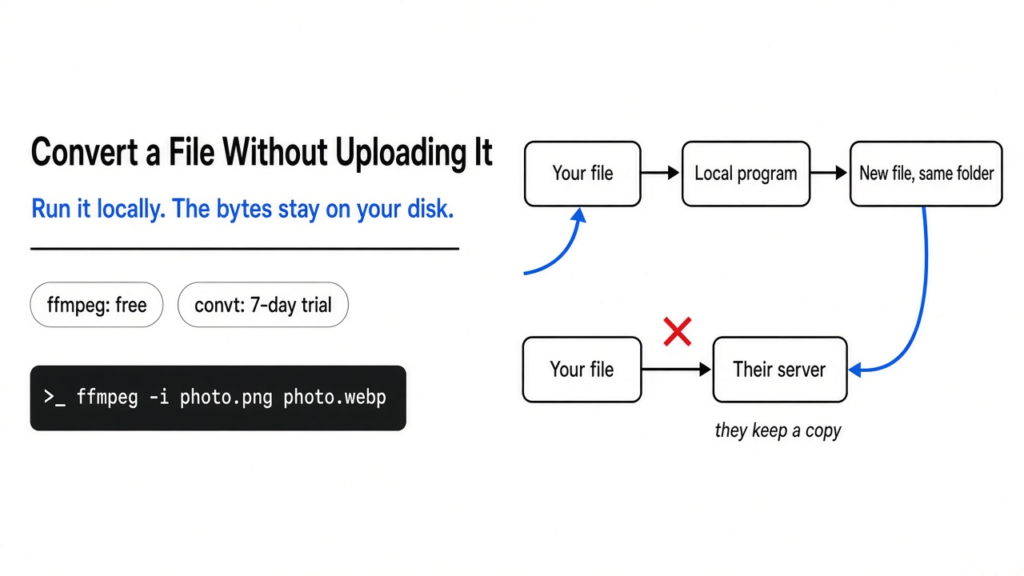
I almost dropped a phone photo into the first website that said free converter. The site wants the file. Once it has the file, I do not control the copy. convt is a program that converts on the computer you are sitting at. ffmpeg is the older program that moves pictures, sound, and video between formats, and convt calls it for that part of the job. I converted two pictures here. Nothing left the machine. The packaged convt build then reported a free trial with 7 days left.
You convert a file without uploading it by running a local program, so the bytes stay on your disk.
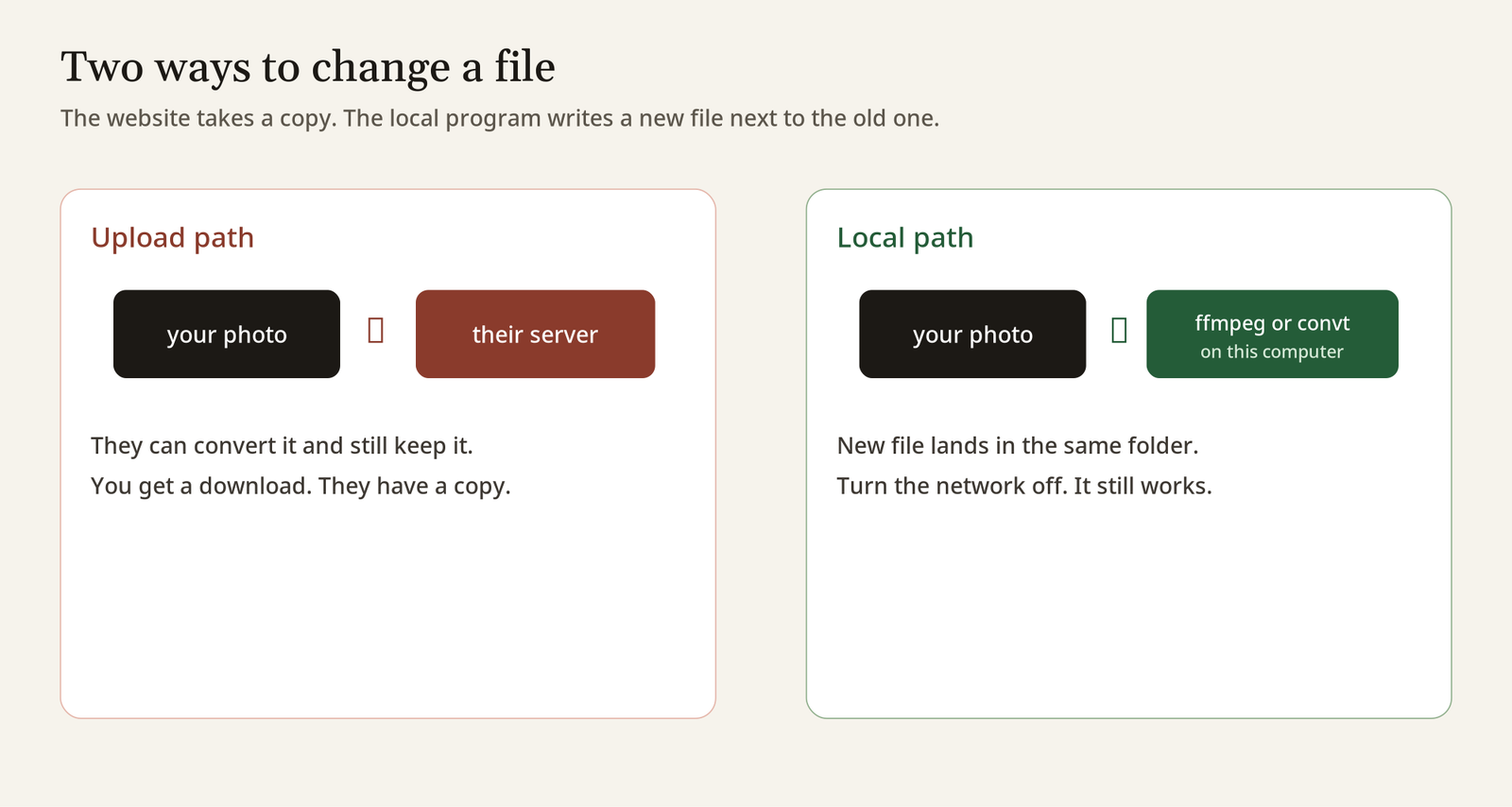
The left path is the website. The right path is the one I actually used.
Why online file converters want the upload
They want the upload because the conversion happens on their computer, not yours. A file is just bytes with a name. To change those bytes, some program has to read them. If the program is a website, the read happens after the file travels to their server. That trip is the upload. The page can show you a download link and still keep a copy. A contract, a scan of an ID, or a photo of a kid does not belong on a machine you did not choose.
This is in contrast to a program installed on your laptop. It reads the path you give it, writes a new file next to the old one, and the network can be off. I had the network on for other work. The conversion commands themselves did not send the pictures anywhere. The new files appeared in the same folder.
If a chat box offers to convert the file after you paste it, that is the same trip. The bytes go to whoever runs the model. Keep the file local, and keep the chat for the question. When a long chat starts dropping your own instructions, that is a different mess, covered in why Claude Code compaction drops instructions.
How do I convert a file without uploading it?
Run ffmpeg on the file, and write the result beside it. ffmpeg is a command-line program: you type one line, and it does not open a window. For a photo named pattern.png, this made a WebP, which is a newer picture format that is usually smaller than a photo JPEG:
ffmpeg -y -i pattern.png -quality 80 pattern.webp-i is the input. -quality 80 tells the WebP writer how hard to squeeze, on a scale that runs up to 100. -y means replace the output if it already exists. The original png stayed put. ffmpeg reads one media file and writes another. The picture never has to leave the computer.
For a video or a voice memo, the same shape works, with a different ending:
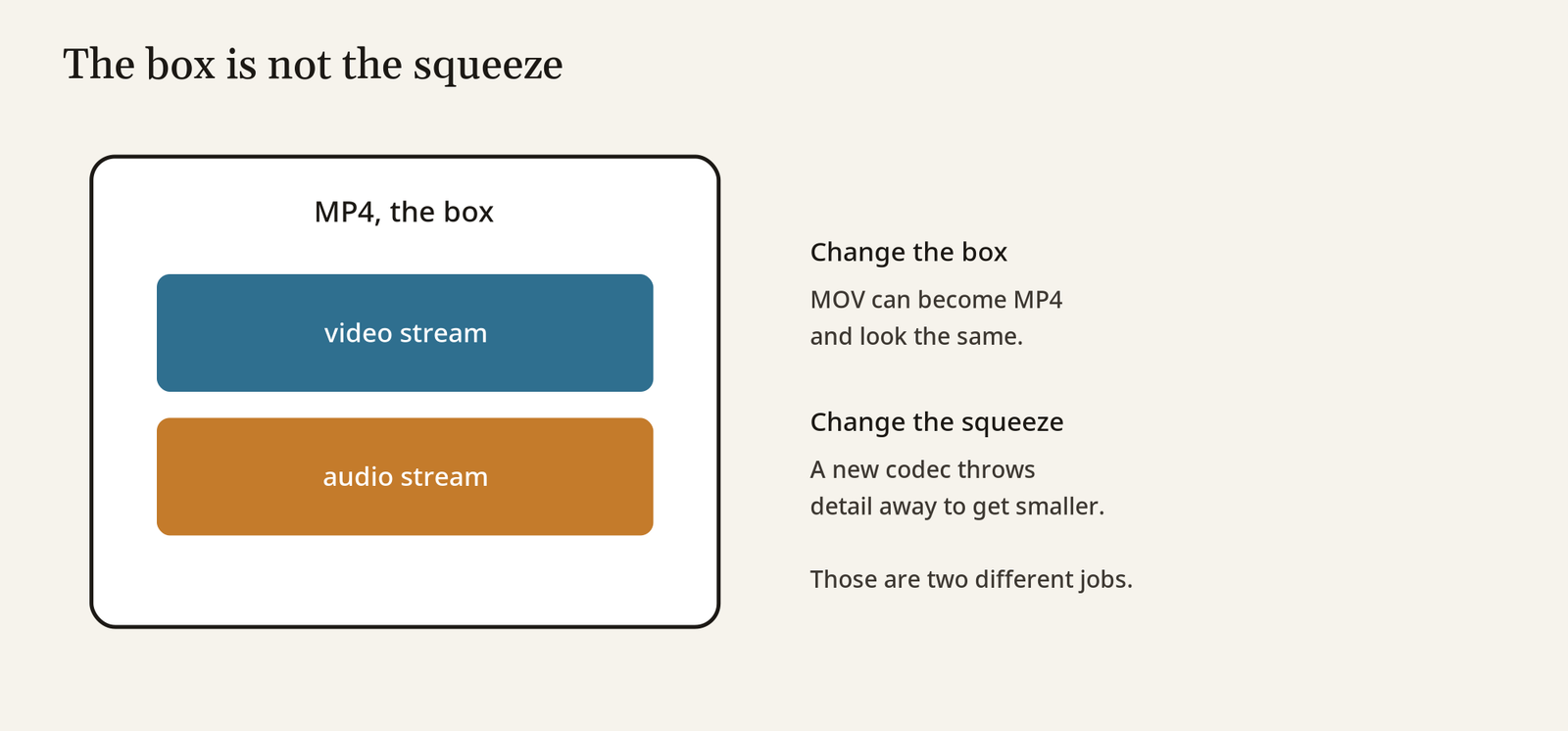
ffmpeg -i clip.mov -c:v libx264 -c:a aac clip.mp4libx264 is a video codec (the method that squeezes the frames). aac is the matching method for the sound. The .mp4 at the end is only the box that holds the picture stream and the sound stream together. You can change the box without changing the picture, and you can change the picture without changing the box. That is why a MOV can become an MP4 and still look the same, and why a smaller MP4 is a different job: that one recompresses the frames and throws detail away.
I do not point ffmpeg at a file I am not allowed to convert. A file you shot, exported, or were given to edit is the normal case. A file you copied out of someone else’s product to strip a watermark is not this article.
What changed when I converted two pictures
A flat blue square and a patterned test card did not shrink the same way. I made both with ffmpeg, 640 by 480 pixels, then wrote a JPEG and a WebP of each. JPEG is the old photo format. PNG is the format that keeps flat color and sharp edges without the photo method.
| Picture | PNG | JPG | WebP |
|---|---|---|---|
| Flat blue | 1,970 bytes | 3,823 bytes | 630 bytes |
| Test pattern | 14,405 bytes | 20,674 bytes | 5,528 bytes |
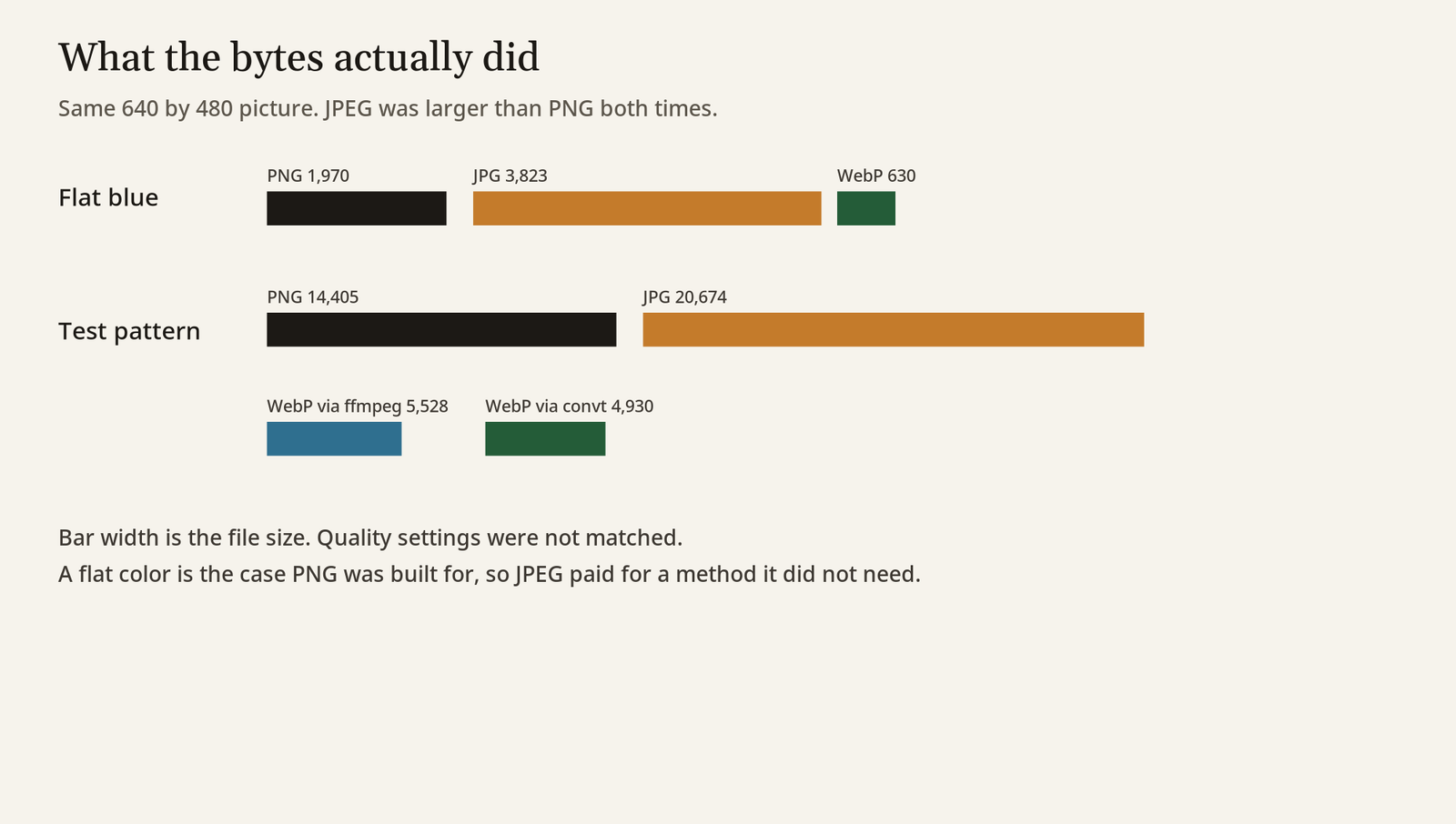
The flat blue JPEG is larger than the PNG. A PNG stores a big area of one color as a short repeat. A JPEG assumes a photograph, so a plain rectangle pays for a method it does not need. I used -q:v 3 for the JPEG, which keeps a lot of detail, so that file is not a small JPEG. If you ask for a tiny JPEG, it will get small and look worse. The WebP at quality 80 was the small one both times: 630 bytes and 5,528 bytes.
So “convert it to make it smaller” is not a law. Ask what is in the picture. A screenshot of a window, with flat colors and sharp text, often wants PNG or a high-quality WebP. A photo from a camera often wants JPEG or WebP, and PNG will balloon. Open the new file before you delete the old one.
convt vs ffmpeg
convt is the right-click version of this job, and on the copy I ran it still used ffmpeg for video and audio. I unpacked the Linux build and ran:
convt pattern.png --to webpIt wrote pattern (1).webp next to the original, 4,930 bytes, a bit smaller than my ffmpeg WebP at 5,528 bytes. I did not match their quality setting to mine, so that gap is a hint, not a contest. The command finished with no browser and no upload.
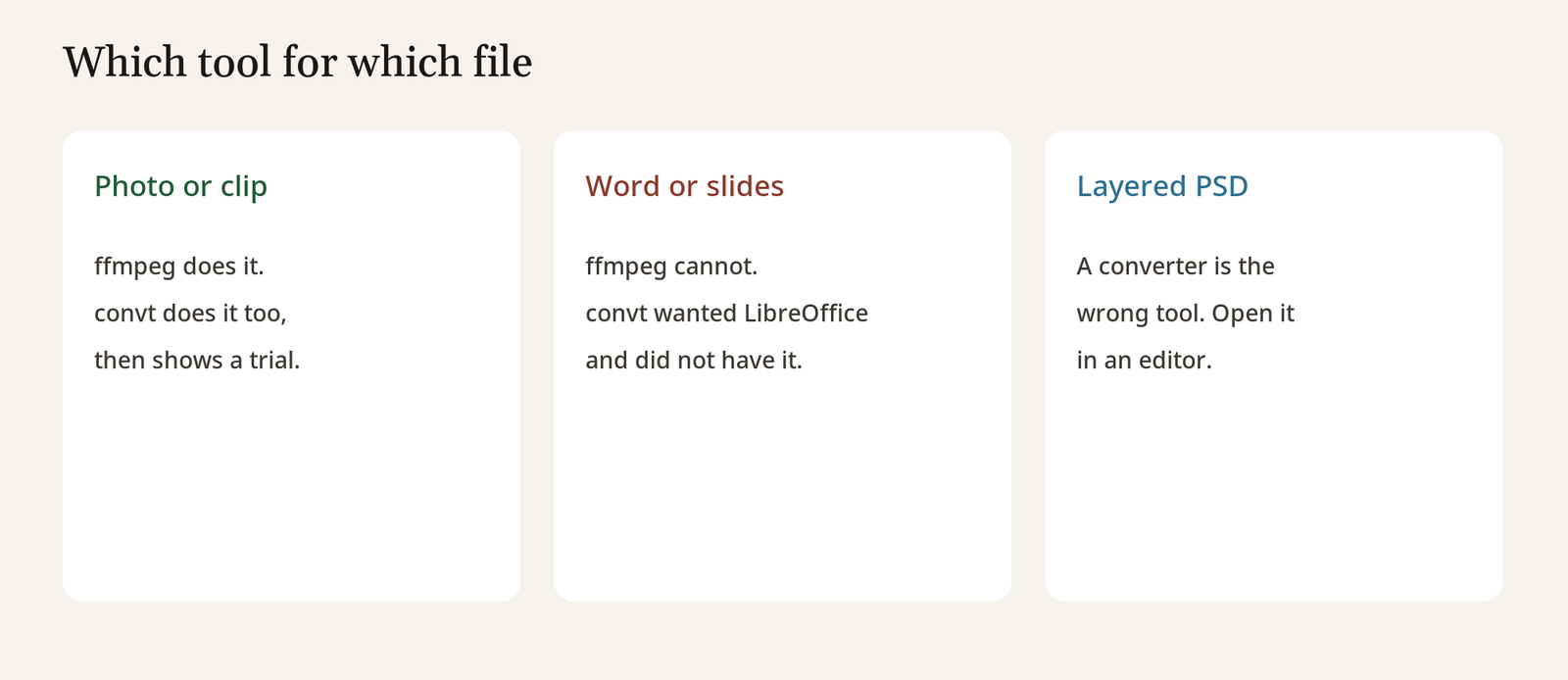
convt engines listed image, svg, libheif, ffmpeg, and pdfium. libheif is what reads HEIC (the photo file an iPhone writes). pdfium is what turns a PDF page into a picture. LibreOffice was marked unavailable, and this build said it had no document pack to download. A Word or PowerPoint file would have stopped there until LibreOffice is installed and sitting on the PATH, which is the list of folders the terminal searches for programs.
convt targets pattern.png offered avif, bmp, gif, heic, ico, jpeg, exr, ppm, qoi, tga, tiff, and webp. Not pdf, and not mp4. A photo does not become a video by wishing. The target list is the honest menu.
ffmpeg is the tool I would script, put in a folder action, or call from another program. It is free, and the line you typed is the whole product. The manual is at ffmpeg.org. convt is the tool I would hand to someone who will not open a terminal. The project lives at github.com/opencoredev/convt. It also prints a skill file for a coding agent with convt skill, a short instruction sheet the agent can load. If you are deciding whether that sheet should be a plugin or a one-off file, the same choice shows up in Claude Code mods vs plugins.
Is convt worth it?
It is worth it only if you want the menu and you accept the trial. After the conversion, convt license printed Free trial: 7 days left. The conversion itself was not blocked. The program still knew it was on a timer. The code is open source under a license that lets you build it yourself, and that asks you to share your changes if you offer the program as a public service. The packaged desktop builds are a paid license after the trial. When I looked at the product page, the desktop license was a one-time $29, and a separate cloud plan was $12 a month. Cloud conversion uploads the file. That is the thing this page is trying to avoid. Skip the cloud plan if the reason you came here was privacy. Prices move, so read convt.app before you pay.
Building from source is the path that stays inside the license and off the trial, and it is also the slower afternoon. I used the packaged binary instead of a rebuild, got one WebP, and saw the trial line. If a coding agent offers to remove the paywall as a weekend project, stop it. A license check is not a bug, and an unasked rewrite is how a small tool turns into a pile of extra files. The check I use for that is in how to stop Claude Code from overengineering.
When the file is a document, not a photo
A document is not a photo, so ffmpeg will not save you. ffmpeg moves pictures, sound, and video. It does not understand a Word paragraph. convt’s own engine list says those files go through LibreOffice, which was missing here. Install LibreOffice, confirm convt engines no longer says unavailable, then convert. Until that line changes, do not trust a long format list for a .docx.
A PDF page can become a PNG through pdfium, which was present. That gives you a picture of the page, not editable text. If you needed the words, a picture is the wrong result. And if you needed to change layers inside a Photoshop file, you do not want a converter at all. You want an editor that opens the layers, which is a different job: a free Photoshop alternative that opens PSD files.
How do I try this on my own file?
Pick a copy of a file you can throw away. Photos first.
- Install ffmpeg from your system packages, or use a build you already trust.
- In the folder with the file, run
ffmpeg -i your-photo.png -quality 80 your-photo.webp. - Compare the two sizes. Open both. If the WebP looks soft, raise the quality number or keep the original.
- If you would rather click than type, install convt, run one conversion, then run
convt licenseso you see the trial before the week ends. - For Word, Excel, or PowerPoint, install LibreOffice first. If
convt enginesstill marks it unavailable, stop. Do not upload the document to finish the job.
Turn the network off and run step 2 again if you want the proof in your hands. The new file should still appear. A website cannot do that.
I will keep ffmpeg for anything I can type, and I would install convt only for a person who wants the right-click menu and has read the trial line. The file stays here either way.
Common questions about converting a file without uploading it
Can I convert HEIC to JPG without uploading it?
Yes. HEIC is the photo file an iPhone writes, and JPG is the older photo file almost everything else opens. On convt, the engine list included libheif, and convt targets on a PNG included heic, so the packaged build I used is wired for that pair. I did not have an iPhone photo in the folder, so there is no HEIC timing here. The command shape is the same: convt photo.heic --to jpeg. With ffmpeg, you need a build that includes that decoder. If ffmpeg -i photo.heic errors on the format, the build is missing it, and installing a build that has it is the fix. Uploading the photo is not the fix.
Does a smaller file mean a worse picture?
Often yes, and not always. A conversion that only changes the box, like some MOV to MP4 jobs when you copy the streams instead of recompressing, can keep every frame. A conversion that picks a new codec throws information away to get the size down. My flat blue square got smaller as WebP and looked the same because there was almost nothing in it. A face, a screenshot of small text, or a chart will show the damage first. Open the result at full zoom before you send it.
Is it safe to use a free online file converter?
No, not for a file you would not email to a stranger. The conversion may be fine and the copy may sit on their disk anyway. Use a local program for anything private. The safe test is the one above: network off, new file still appears.
Why is my JPEG bigger than my PNG?
Because the picture was simple and the JPEG settings kept a lot of detail. My flat blue JPEG was 3,823 bytes and the PNG was 1,970. PNG is built for flat color. Try WebP, or ask JPEG for less quality, and look at the picture before you decide the converter failed.
Do I need convt if I already have ffmpeg?
No. ffmpeg did the photo and will do the video. convt is the menu, the HEIC wiring, and the PDF-page pictures, with a trial on the packaged build. Use ffmpeg if you are fine typing one line.
Can convt convert Word to PDF offline?
Not on the build I ran. LibreOffice was missing, and the program said this build had no document pack to download. Install LibreOffice and check convt engines again. Until it is available, the answer is no. Do not fall back to a website for a contract or a spreadsheet.
6 comments