I had a project whose notes still told the coding agent to run a script that was not in the project, and to open a file that was not on disk. A coding agent is a program that edits the project by using tools, not a chat box that only talks. Before it edits, it reads a notes file. Claude Code reads a file named CLAUDE.md. The short version of how do i use tidyagents to find stale paths is one command in that folder. tidyagents scored my sample 41 out of 100. The safe cleanup moved it to 56. The names of the missing files were still there, and that is the part you still fix by hand.
The picture is the scene, not the proof. The proof is the score, and the lines the checker refused to delete.

What Is Tidyagents?

tidyagents is a local checker for the notes a coding agent reads before it works.
You need three ideas before the name is useful. The notes are a plain text file in the project. A path is the location of a file, written like src/app.js. A stale path is a path whose file was renamed or deleted, while the note still points at the old place. tidyagents reads those notes and checks them against the files that are actually in the folder. It does not call a model, and it did not ask me to log in.
Two note names matter. CLAUDE.md is the file Claude Code reads when a session starts. AGENTS.md is the same kind of file for many other agents. If both sit in one folder, they are not the same note. I will come back to that, because my run warned about it.
A score here starts at 100 for each file. An error takes 10 points. A warning takes 4. A small nit takes 1. The number you should watch is the lowest file, not an average. One bad file holds the whole folder down.

How Do I Find Stale Paths in CLAUDE.md?
Run npx -y tidyagents in the project folder. It prints one score and one line per problem, including every stale path it can see.
I built a small folder so I would know the answers before the tool did. package.json is the file that lists the project’s npm scripts, the short commands you run with npm run. Mine listed only test. CLAUDE.md told the agent to run npm run check. The real app file was src/app.js. The notes also named src/old.js, which I never created. They linked to docs/guide.md, which was not there. They pulled in @docs/missing.md, which was not there either. An @ import is a line that tells Claude Code to load another file into the notes. If that file is missing, nothing is loaded, and the agent never says so.
The first run said this:
AGENTS.md  96/100
  warning  Claude Code reads CLAUDE.md instead of this file

CLAUDE.md  41/100
  error    runs script "check", which is not in package.json
  error    references `src/old.js`, which does not exist
  error    links to `docs/guide.md`, which does not exist
  error    imports `@docs/missing.md`, which does not exist
  error    always-comment line contradicts the never-comment line
  warning  "write clean code" is too vague
  warning  "Prefer small diffs." is repeated
  nit      2 blank lines in a row

Score: 41/100src/app.js was a real file, and it was not in that list. That is the check I cared about. A tool that flags every path is noise. This one flagged the path that was gone and left the path that was real.
A markdown link is a path written so a person can click it, like [guide](docs/guide.md). The checker treats that as a path too. I had written the missing guide that way, and it caught it. Paths written as ordinary words with no backticks and no link were not tested. This page does not claim the checker catches those.

What Tidyagents Will Not Delete
The safe cleanup deletes a dead script line, a repeated line, and extra blank lines. It does not delete a missing file name, a pair of opposite rules, or a vague line.
I then ran npx -y tidyagents fix --yes on that same sample. The score moved from 41 to 56. CLAUDE.md lost three things: the npm run check line, the second copy of “Prefer small diffs.”, and the extra blank lines. It still contained src/old.js, the link to docs/guide.md, the import of @docs/missing.md, both comment rules, and “Write clean code.” The tool said six issues still needed a person.
This is in contrast to what the word “tidy” suggests. I expected the cleanup to rewrite the note so it matched the disk. What happened was smaller. It removed lines it could prove were useless. A missing path might mean “this file is gone” or “please create this file.” The tool will not guess. Opposite rules are the same kind of problem. My file said to always add comments, and also to never add comments. A contradiction is two orders that cannot both be true. Someone who knows the project has to keep one. “Write clean code” is vague: it does not name a command, a file, or a limit. The checker will not invent the better sentence.
So the 56 is not a clean file. It is a file whose easy junk is gone, and whose real decisions are now the only lines left.

How Do I Use Tidyagents?
From the project folder, run the check, fix the paths yourself, then run the check again.
A terminal is the text window where you type commands. Open it in the project, not in your home folder, or it will score the wrong notes.
- Run
npx -y tidyagentsand read the lowest score. - For each missing path, either point the note at the file that exists now, or delete the line if the note is dead.
- For two opposite lines, keep one.
- Replace a vague line with a concrete one, or delete it. The tool will not write it for you.
- Run
npx -y tidyagentsagain. Stop when the remaining warnings are choices you accept.
If you want a hard stop, npx -y tidyagents --min-score 80 ends with a failure code when the score is under 80. I ran the check and the fix. That min-score line was not put on a build server for this page. The flag is the same program with one extra option, so the local run is the part that stands.
One caveat. fix can take --yes and then it writes without asking. I used that on a sample I was willing to lose. On a real project, run fix without --yes first and read the diff. The diff is the list of lines it wants to delete. If a line is a path you still mean, do not accept that deletion. In my run it did not try to delete the missing paths, which is the behavior I want.
The program itself is the tidyagents repository. The page you are reading is the run, not a second copy of that page.

Tidyagents vs Checking the File by Hand
Hand checking is enough when the notes are a dozen lines and you wrote them this week. tidyagents is worth it when the notes name files and scripts you no longer remember, or when a second notes file is being skipped.
On this sample I could see “always comment” against “never comment” with my eyes. The file was short on purpose. I would not have noticed the AGENTS.md warning as fast. Both files were in the folder. Both looked active. The checker said Claude Code reads CLAUDE.md and skips AGENTS.md unless CLAUDE.md pulls it in. That warning is the one I would have shipped without.
| What I put in the notes | What I saw by reading | What tidyagents did |
|---|---|---|
npm run check, and package.json had only test | I had to open package.json and compare | Error, then fix deleted the line |
src/old.js, file not created | Easy on a short file, easy to miss on a long one | Error, line kept |
src/app.js, file was real | I knew it was real | Not flagged |
Link to docs/guide.md, file missing | I had to click it or look in the folder | Error, line kept |
@docs/missing.md | I would not have known an @ line loads a file | Error, and nothing is loaded |
| Always comment, and never comment | Visible because the lines were neighbors | Error, neither line deleted |
AGENTS.md next to CLAUDE.md | Looked like both were in use | Warning: Claude Code reads CLAUDE.md only |
A rules file that only gives style advice has the same hole. The four-rule CLAUDE.md writeup can still name a path that moved. Those rules do not check the disk. Ponytail versus a short rules file measures what the words do to the code diff. tidyagents does not touch that diff. It only looks at the notes.

How Do I Stop Claude Code From Reading Deleted Files?
Take the deleted path out of CLAUDE.md, or point it at the file that exists, then run the checker again until that error is gone.
Claude Code does not know the path is stale. It trusts the note, looks for the file, fails, and spends the turn searching. Removing the line is the whole fix for a path you no longer mean. If the file was renamed, change the backticks to the new name and run the checker once more. My src/app.js line is what a good line looks like: the checker stayed quiet.
There is a second way the agent reads the wrong notes. When CLAUDE.md and AGENTS.md are in the same folder, Claude Code reads CLAUDE.md and does not read AGENTS.md. The fix the warning gave me is one line inside CLAUDE.md: @AGENTS.md. That line means “also load the other file.” The sample left that line unadded, and the warning stayed at 96 for AGENTS.md, which is right. The tool tells you. It does not edit that line in for you.
If you run Claude Code and another agent in one project, they may not even share a notes file. OpenRig versus git worktrees is about that split. tidyagents is the check you run after you decide which file is the real one.
A long note has a cousin problem. A good rule gets buried, and the agent never acts on it. How to stop Claude Code from overengineering is about the writing. This page is only about notes that point at the wrong place. The sample was not grown large enough to see a size warning, so no size limit is quoted here.

When Is Tidyagents Not Worth It?
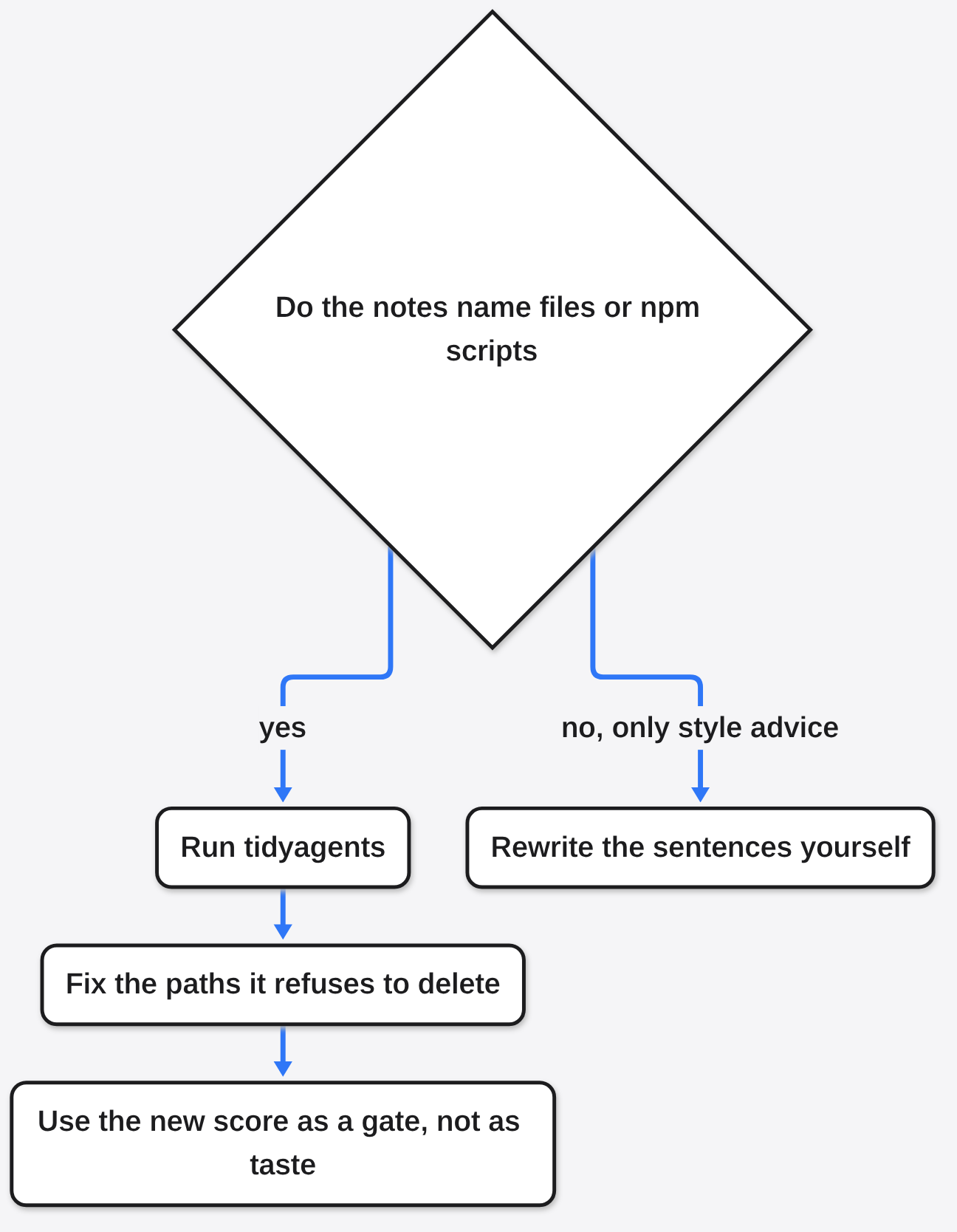
Skip it when the notes do not name files, links, or npm scripts, and the only problem is that the sentences are soft.
On a file like that, the useful output is a pile of “too vague” warnings. You still have to rewrite each line. A checker cannot tell you the real test command if you never wrote it down. It also cannot stop the agent from ignoring a rule that is true. Words in CLAUDE.md are not a lock. If a rule must hold even when the model forgets, you want a permission or a test, not a linter.
I would still run it once on any project whose notes were copied forward for months. Fifteen minutes told me which lines were lies about the disk. I would not run it hoping for better prose. The score going from 41 to 56 is the honest result: easier junk left, and the decisions stayed on the page where I could see them.
Common questions about tidyagents
Does Tidyagents Edit My Notes by Itself?
No. npx -y tidyagents only prints. npx -y tidyagents fix shows deletions and waits. fix --yes writes immediately. I used --yes on a sample folder, and the only edits were the dead script, the repeated line, and the blank lines.
Is Tidyagents Worth It?
Yes, if the notes name files or scripts. My sample went from 41 to 56, and the lines that remained were choices a person should make. No, if the file is a short style list with no paths. Then there is nothing on disk for it to compare.
Why Is AGENTS.md Ignored When CLAUDE.md Is in the Same Folder?
Claude Code reads CLAUDE.md and skips the AGENTS.md beside it. tidyagents warns, and it tells you to add @AGENTS.md inside CLAUDE.md if you still want those rules. That warning appeared. The line was left unadded, and the warning stayed.
What Is a Stale Path in CLAUDE.md?
A stale path is a file location in the notes whose file is not on disk. In my run, src/old.js was stale and got an error. src/app.js was real and got nothing. The cleanup did not remove the stale line. You remove it, or you point it at the file you meant.
I would run the check before the next long session on any repo where the notes have been copied forward. I would not ask it to become the writer. It only makes the notes honest about what is still on disk. After that, the opposite rules are yours to pick.