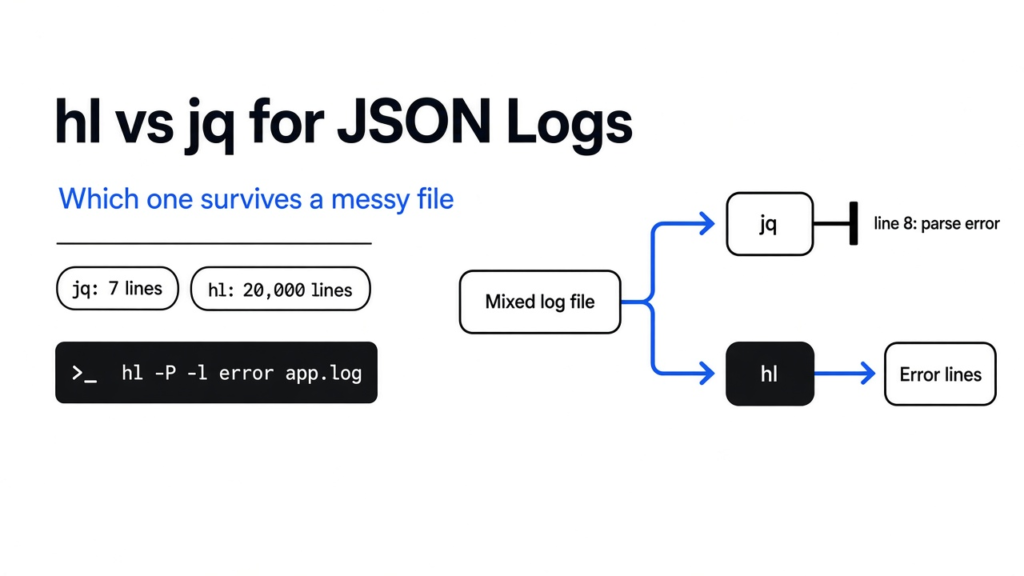
Short answer: in the hl vs jq for JSON logs question, hl wins for reading a messy log, because it keeps going past lines that are not JSON, and jq wins when you need to reshape or add up the data.
I had a log from a small API. Twenty thousand lines, about 3 MB. Almost every line was one JSON object: a time, a level, a service, a message, a user id, how long the call took, and the HTTP status. Fifty lines were plain text a worker had printed. I wanted the errors, in a line I could scan, without the braces. jq reads JSON and can filter it. hl turns JSON logs, and the key=value lines some programs print, into one short line per event. I ran both on that file. jq printed 7 lines and stopped. hl printed all 20,000.
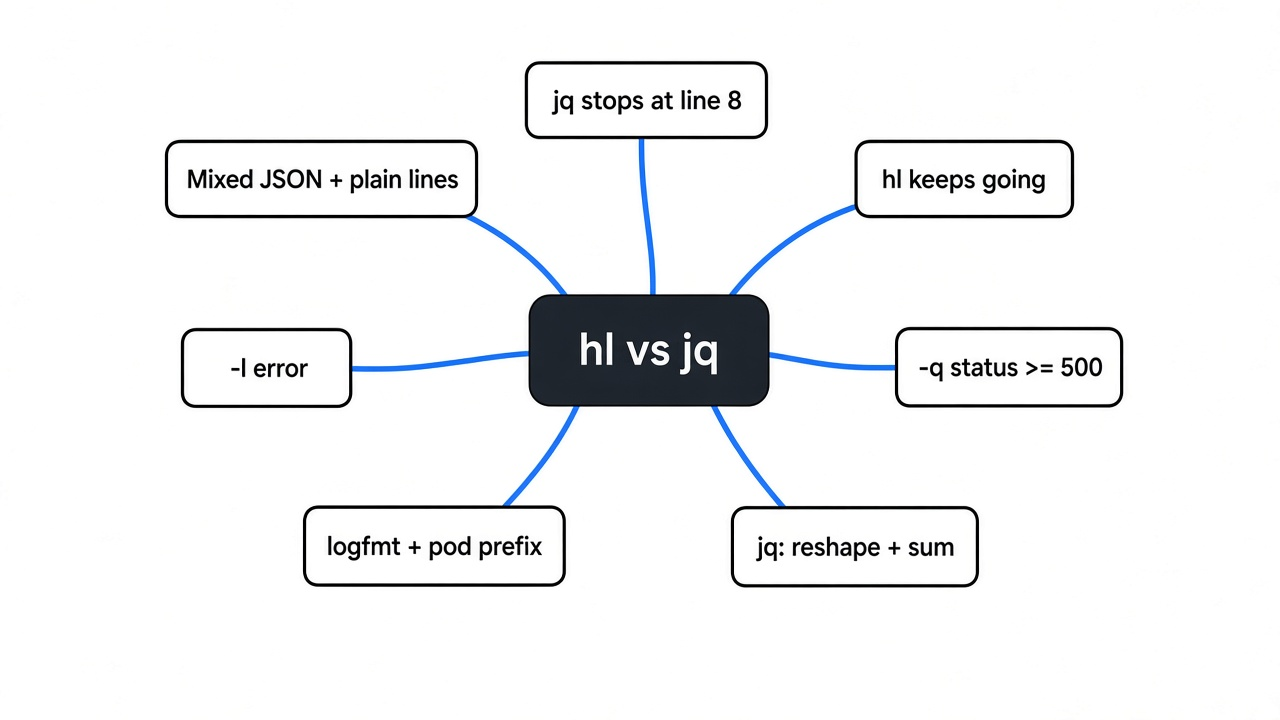
jq stops at the first line that is not JSON, and hl keeps going and can keep only the error lines.
Retested on 31 October 2026 with hl 0.36.5 (released 21 October 2026) and jq 1.7 on Linux, on a fresh 20,000-line file with 50 plain lines: same result, jq stopped at line 8 and hl printed every line.

The picture is the whole test. One bad line is enough to end jq. hl steps past it.
How to read JSON logs in the terminal
Pipe the file through hl with paging turned off, and read the short line it prints. A JSON log is hard to scan because every field sits inside braces, and a long line wraps before you see the message. hl lifts the time, the level, and the message out, then puts the rest of the fields after a mark. The first event in my file came out like this:
2026-06-19 10:00:00.000 [DBG] db timeout while loading user › service=api user-id=1000 duration-ms=0 status=500The raw line was 160 characters of JSON. I can live with the short one. If the line was never JSON, hl printed it unchanged, including note: worker 7 printed a plain line, not json. That is the useful part. You are not learning a new file format. You are looking at the same events, with the message where your eye already goes.

I passed -P and --color never. -P means do not open a pager. The default is auto, and in a pipe that can sit there waiting for a keypress. Leave color on when you are the one reading. Turn it off when you are timing a run or sending the text somewhere else.
hl vs jq for JSON logs on a mixed file
On the mixed file, jq is the wrong first pipe, and hl is the right one. I ran jq -c . so jq would reprint each object on one line. It got through 7 objects, then stopped with parse error: Invalid literal at line 8, column 5 and a non-zero exit code (4 in the first run; jq 1.7 in the retest said Invalid numeric literal and exited 5). Line 8 was the first plain note. The same death happened when I asked jq for errors with select(.level=="error"). One bad line ends the filter, so you never see the errors that come after it. hl, with -P and --color never, exited 0. It wrote 20,000 lines and 2,070,143 bytes. Wall time on this machine was about 0.034 seconds. The high-water memory for that pass was about 10 MB.
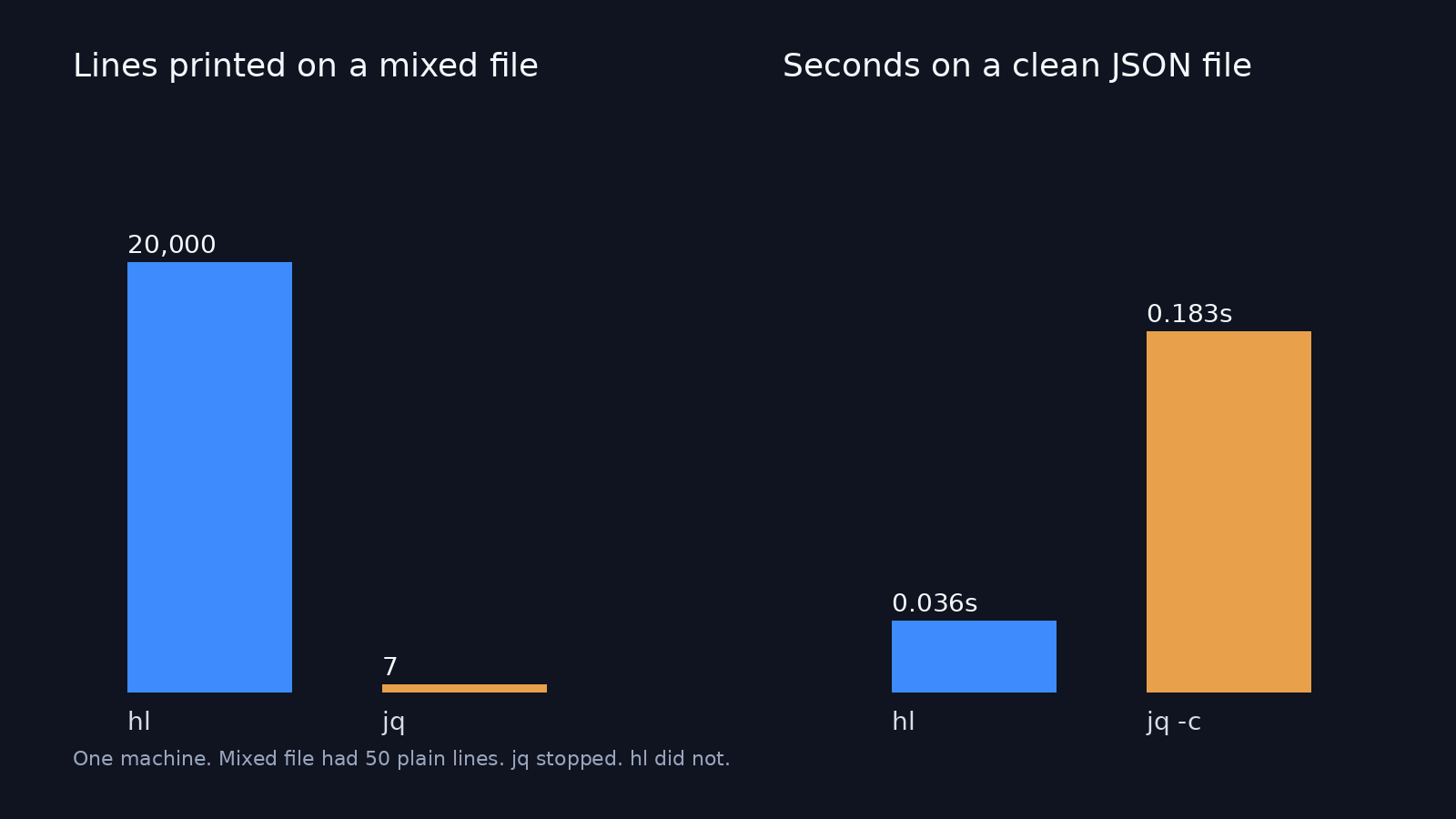
Mixed file: 20,000 lines in, 50 of them not JSON. Clean file: 19,950 JSON lines. One machine, one run.
I expected jq to win once the file was clean, because this job looks small. I stripped the 50 plain lines and left 19,950 JSON lines. hl finished in about 0.036 seconds. jq -c . finished in about 0.183 seconds, exit 0, same line count. This is one machine and one file. That does not make hl always faster, and giant files were not part of the test. The result to stand on is the mixed file: jq stopped, hl did not.
What hl will not do is the thing jq is for. jq can reshape a document, pick a field, build a new object, and add numbers up. hl prints and filters log lines. If I need a sum of duration_ms, I stay on jq. The jq manual is the language for that. On a mixed file I clean it first. This read each line as raw text, tried to parse it, and kept the errors:
jq -c -R 'fromjson? | select(type=="object" and .level=="error")' app.logThat printed 3,316 lines and exited 0, the same error count as the source. In the retest file the jq raw-line filter and hl -l error both returned 5,034 lines, matching a plain grep count. So jq can survive a dirty file if you ask it to. It will not do that on its own, and the output is still JSON, not the short line.
| Job | hl | jq |
|---|---|---|
| Read a mixed file without stopping | Plain lines pass through | Stops at the first bad line, unless you skip them yourself |
| Keep error lines | -l error | select, after every line parses or you skip bad ones |
| Filter on status and level | -q 'status >= 500 and level = error' | select, same catch |
| Reshape JSON, map, add numbers | No | Yes |
| Key=value lines | Yes | Not unless you write the parser |
| A pod name glued in front of the JSON | --allow-prefix | Strip the prefix first |
| Follow a growing file | --follow | No follow of its own |
How to install hl
The Linux build I used is the musl tarball from the releases page. In an empty folder:
curl -sSfL https://github.com/pamburus/hl/releases/latest/download/hl-linux-x86_64-musl.tar.gz | tar xztar warned that it could not change ownership, and the hl binary was still there and ran. On a Mac the matching file is hl-macos.tar.gz. Arm Linux is hl-linux-arm64-musl.tar.gz. If you already live in one of these, the project also documents cargo install --locked --git https://github.com/pamburus/hl.git, brew install hl, pacman -S hl, and nix run github:pamburus/hl. Put the binary on your PATH, then run hl -V. You should see a version line. The project is pamburus/hl, MIT licensed; the current release when this was checked was 0.36.5.
How to keep only error lines with hl
-l error keeps every line whose level is error or worse. On this file that was 3,316 lines, which matches a separate count of "level":"error" in the JSON. Nothing in the file was above error, so the set was exactly the errors. It took about 0.018 seconds and exited 0. A jq select on the same mixed file died on line 8, so it never reached that count.
A level flag is not the only filter. -q 'status >= 500' kept 1,814 lines, and every one of them showed status=500. -q 'status >= 500 and level = error' kept 301 lines. The help text shows the same idea as status>=400 or duration>=15. I hid fields I didn’t need with -h user_id -h service. Those keys dropped out, and hl left an ellipsis where they had been. An empty file exited 0 and printed nothing, which is what I want in a script.
The command I would paste the next time a pod log is half noise:
hl -P -l error app.logIf I also care that the call failed, I add the query instead of trusting the level word. A line can be an error with status 200. My file had those. Level and status are not the same fact.
Reading logfmt and pod-prefixed lines
hl also reads logfmt. That is keys and values on one line, instead of a JSON object. I fed it level=info msg="user logged in" user_id=42 duration_ms=120 with a time field in front. It printed a short line: the time, [INF], user logged in, then user-id=42 and duration-ms=120. A second line had a level and a message and no time. hl still printed it, with the clock shown as ####-##-## ##:##:##.###, and the message disk full. A missing time does not drop the line. It leaves a blank clock.

kubectl and stern often glue a pod name in front of the JSON. I had one line that started pod-a { and then the object. Without a flag, hl printed that line raw, because the brace is not at the start. With --allow-prefix, it printed pod-a and then the short info line. If your logs come from a multi-pod dump, that flag is the difference between a readable stream and a wall of raw JSON.
hl vs lnav
hl is a filter in a pipe. lnav is a full-screen log navigator you sit inside. lnav was not part of this test, so there is no timing or setup step for it here. Use lnav when you want to open one big file, search, and jump around for a while. Use hl when the next thing is your eyes on a short line, or another command in the pipe. If the question is “show me the errors,” hl is enough. If the question becomes “what happened around this one line,” open the navigator.
When to still use jq
Stay on jq when the next program needs JSON, not a line for a person. hl’s short line is for you. A script that sums durations, or pulls one field into a new object, still wants jq. On a clean file I would reach for jq for that work even though hl printed the clean file faster here. Speed at printing is not the same as having a query language.
If the JSON is one object you need a field from, not a stream of events, stay on jq the way the prompt-behind-every-commit walkthrough already does. The same goes for small scripts that read one JSON payload, like the one behind context usage in the Claude Code status line, or the NDJSON report you get when you check for a malicious npm package. If the file is a table of rows rather than events, the closer pair is xan vs csvkit.
Common questions about hl and jq
Why did jq stop on my log file?
jq stopped because one line was not a JSON value, and jq’s default is to parse until a value fails. In my file that was line 8, and the error text was Invalid literal (Invalid numeric literal in jq 1.7). The lines after that never ran. hl does not use that rule. A plain line is copied, and the next JSON line is formatted again. If you want to stay on jq, the raw-line filter above is the fix. If you want the short line, switch to hl and pass -P.
Can hl follow a live file?
Yes, if you pass --follow. The help also has --tail for how many old lines to show first. No live append was timed here, so this is the documented flag, not a measured tail. For a one-off look at errors that are already on disk, you do not need follow. -l error on the file is enough.
Does jq pretty-print JSON logs?
Yes, if every line is valid JSON. jq . pretty-prints. jq -c . keeps one object per line. On my clean file the compact form finished and printed all 19,950 lines. On the mixed file it died at the first plain line. Pretty output does not help if the command never reaches the error you came for.
Is hl worth it?
Worth it when you read JSON logs or key=value logs in a terminal and the file is not guaranteed clean. Not worth it when you need jq’s language, or a full-screen navigator. I would install hl next to jq, not instead of it.
I kept both. The pipe I will actually type, the next time a pod log is half JSON and half noise, is hl -P -l error. If the line that comes out is not enough and I need a new JSON object, I will switch back to jq on a file I already know is clean.