
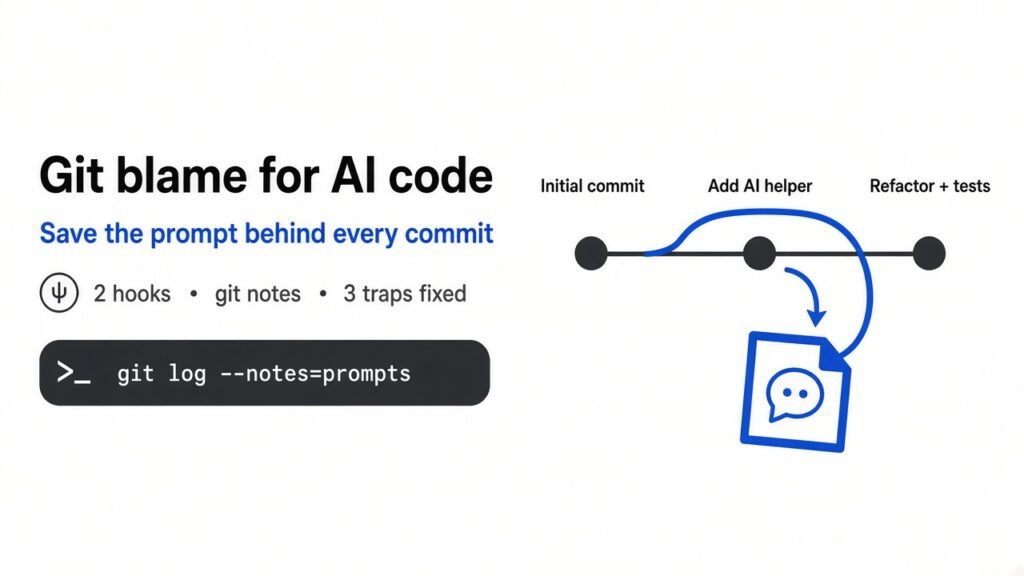
Short answer: Git saves what changed in your code, but not the prompt that made an AI agent change it. You can fix that with two small files: a Claude Code hook that saves each prompt, and a Git hook that pins those prompts to the next commit as a git note. Turn on one Git setting, push notes on purpose, and the “why” stays with the code. If you want more (line-by-line blame, rewind, many agents), use Git AI, AgentDiff, Entire or Atlas.
You open a file, find a strange block of code, and run git blame to see who wrote it. The answer is “you”. Except you did not write it. Claude Code did, from a prompt you no longer remember.
That gap costs real time. You cannot tell if the code was a quick hack, a fix for a real bug, or a misunderstanding. So you either leave it alone out of fear, or you break something by removing it.
This post shows you how to keep the prompt next to every commit, using only Git and one Claude Code feature. I built it, broke it three ways, and fixed each break. The results are below, so you can copy the setup in about ten minutes. The official docs for Claude Code hooks and git notes are the references I followed.
What does Git remember, and what does it forget?
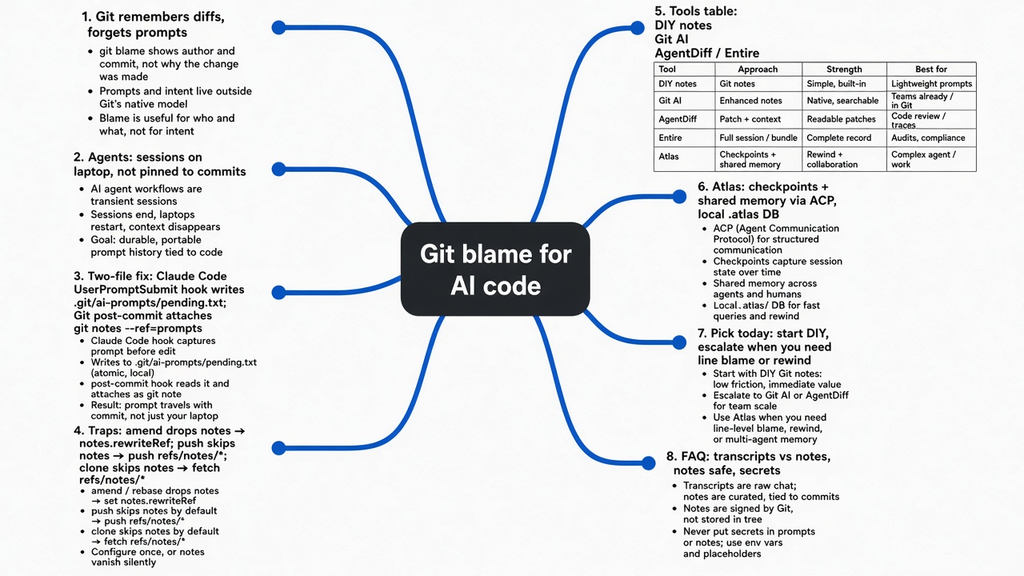
Git keeps a perfect record of changes, but the reason behind them lives only in the commit message.
Start from the base. Git (a tool that saves snapshots of your project over time) stores each snapshot as a commit (one saved snapshot, plus a short message and an author name). The difference between two snapshots is called a diff (the list of lines added or removed).
When you want to know who touched a line, you run git blame (a command that shows, for every line in a file, the last commit that changed it). That gives you the commit, the author and the message.
Now build on it. For code a human writes, the author can explain the reason, and the message often does. For code an AI agent writes, the real reason is the prompt (the instruction you typed to the AI). The prompt is never saved in Git. So the one piece of information that explains the code is the piece Git throws away.
Here is the flow in plain words:
- You type a prompt.
- Claude Code edits files.
- You commit.
- Git saves the diff, the message, and the author.
- The prompt, the reasoning, and the session are lost unless you pin them yourself.
Think of it like a receipt that lists what you bought but never says why you went to the shop. Fine for groceries. Painful for a production bug.
Why does the missing “why” hurt more with AI agents?
Agents write more code, faster, and nobody remembers the conversation a week later.
A coding agent (an AI that reads your files, runs commands and edits code for you, like Claude Code) works in a session (one continuous conversation, from start until you close it). During a session you might send twenty prompts. Each one can touch many files.
Claude Code does save every session as a transcript (a log file of the whole conversation). But that file lives in a hidden folder on your laptop, not in the repo. Your teammates never see it. And it is not linked to any commit, so you cannot jump from a line of code to the prompt that made it.
That is the real problem. Not “no record exists”, but the record and the code are stored in two places that never meet. The fix is to pin the record onto the commit. If you already track how Claude Code shrinks long chats, the compaction write-up is the sibling problem: both are about losing the instruction that explained the change.
What is the simplest way to save the prompt with each commit?
Use a git note: extra text stuck onto a commit without changing the commit itself.
You need two ideas first.
A git note (a piece of text attached to a commit, stored in its own hidden list) is like a sticky note on a page in a book. The page stays the same. The note sits on top. Because notes do not change the commit, adding one never rewrites your history.
A hook (a small script that runs by itself when a certain event happens) is how we make this automatic. Claude Code has hooks, and Git has hooks. We will use one of each.
Here is the plan, as a loop:
- You send a prompt. A Claude Code hook called
UserPromptSubmit(it fires every time you press enter on a prompt) saves the text into a small file inside.git. - You commit. A Git hook called
post-commit(it fires right after every commit) reads that file, attaches it as a note, then clears it. - Later,
git log --notes=promptsshows each commit with the exact prompts behind it.
Step by step:
- You → Claude Code: send a prompt.
- Claude Code →
.git/ai-prompts/pending.txt: the UserPromptSubmit hook appends the prompt. - You → Git:
git commit. - Git → pending file: the post-commit hook reads the prompts.
- Git → Git: attach them as a note on
refs/notes/prompts. - Git → pending file: clear the file.
File 1: save each prompt
Save this as .claude/save-prompt.sh in your project and run chmod +x on it. It needs jq (a small tool that reads JSON, the text format Claude Code sends to hooks).
#!/usr/bin/env bash
# Runs on every prompt you send Claude Code (UserPromptSubmit hook).
# Saves the prompt text so the next commit can carry it.
input=$(cat)
prompt=$(printf '%s' "$input" | jq -r '.prompt')
session=$(printf '%s' "$input" | jq -r '.session_id')
dir="$(git rev-parse --git-dir)/ai-prompts"
mkdir -p "$dir"
printf -- '- [%s] %s\n' "$session" "$prompt" >> "$dir/pending.txt"Then tell Claude Code to run it. Add this to .claude/settings.json (the project settings file, which you can commit so your team gets it too):
{
  "hooks": {
    "UserPromptSubmit": [
      {
        "hooks": [
          { "type": "command", "command": ".claude/save-prompt.sh" }
        ]
      }
    ]
  }
}File 2: pin the prompts to the commit
Save this as .git/hooks/post-commit and make it executable.
#!/usr/bin/env bash
# After each commit, attach the saved prompts as a git note, then clear them.
f="$(git rev-parse --git-dir)/ai-prompts/pending.txt"
[ -s "$f" ] || exit 0
git notes --ref=prompts add -F "$f" HEAD && rm "$f"What it looks like when it works
I ran this in a fresh repo, sent two prompts through the hook script, and committed. This is the real output of git log --notes=prompts -1:
commit 3e9b1fb5630593421223a05f6a9a65385fbbf4ee
Author: tester <t@t>

    Add retry to fetch

Notes (prompts):
    - [a1b2c3] Add retry with backoff to the fetch call
- [a1b2c3] Cap retries at 3, the API rate-limits usNow the odd “max 3 retries” line has a reason sitting right next to it: the API rate-limits you. That one sentence saves the next person from “cleaning it up”.
What breaks this setup, and how do you fix it?
Notes are fragile in three places: amending, pushing and cloning. Each has a one-line fix.
This is the part most guides skip. I tested each case in the same repo.
Trap 1: amending wipes the note. When you run git commit --amend (replace the last commit with an edited copy), Git makes a brand new commit. The note stays stuck to the old one, which is now gone from your branch. In my test the amended commit showed an empty note.
The fix is one setting that tells Git to carry notes over when it rewrites commits:
git config notes.rewriteRef refs/notes/promptsWith that on, I amended again and the note moved with the commit. I then squashed two commits with git rebase -i (combine several commits into one) and the note came along too.
Trap 2: a normal push leaves notes behind. git push sends your branch, not your notes. Notes live in their own ref (a named pointer Git keeps, like a branch but for other things). After a plain push, a fresh clone of my test remote showed no notes at all.
git push origin 'refs/notes/*'Trap 3: teammates must fetch notes on purpose. Even after you push notes, git clone and git pull skip them. Each person runs this once per clone:
git fetch origin 'refs/notes/*:refs/notes/*'After pushing and fetching notes, the fresh clone showed the prompt under the commit, exactly as on my machine.
| What you do | Note survives by default? | Fix |
|---|---|---|
git commit --amend | No | notes.rewriteRef refs/notes/prompts |
git rebase -i squash | No | Same setting |
git push | No | git push origin 'refs/notes/*' |
git clone / git pull | No | git fetch origin 'refs/notes/*:refs/notes/*' |
One more limit: if your team uses GitHub’s “Squash and merge” button, the merged commit is made on the server, so your notes will not follow it. Keep the notes on the feature branch, or use one of the tools below.
Which tool should you use instead of building it yourself?
The DIY setup is enough for one person. Pick a tool when you want line-level blame, rewind, or more than one agent.
All the tools below solve the same problem you just solved by hand. They differ in how deep they go and where they store the record.
| Tool | What it saves | Where it stores it | Best for |
|---|---|---|---|
| DIY (this post) | Every prompt per commit | Git notes | Solo devs who want zero installs |
| Git AI | Which lines an AI wrote, plus agent and model | Git notes under refs/notes/ai | Teams that want AI line blame |
| AgentDiff | Prompt and reasoning per line | .agentdiff/ folder plus git notes | Claude Code users who want blame with the prompt |
| Entire | Full session: prompts, tool calls, transcript | Hidden branch, with an ID in the commit message | Rewinding when the agent goes wrong |
| Atlas | Session checkpoints plus memory shared across agents | Local database in .atlas/ | Running Claude Code and Codex on one repo |
Git AI (a Git add-on that marks AI-written lines) hooks into your agent after every edit, then writes the result as a note when you commit. You read it with git log --show-notes=ai. It also rewrites its notes during rebases and cherry-picks, so it handles Trap 1 for you.
AgentDiff (a “git blame for coding agents”) hooks into Claude Code and saves every file change with its prompt and reasoning. Its blame command shows the prompt next to each line, which is the closest thing to what you wanted when you first ran git blame.
Entire (a session logger for Git) is set up with entire enable. It keeps the full session on a separate hidden branch, so your main branch stays clean, and adds a short checkpoint ID to each commit. Its best trick is entire rewind, which puts your code back to an earlier save point when the agent makes a mess. It works with Claude Code and Gemini CLI.
What does Atlas do that the others do not?
Atlas treats the agent session as the main record and shares it between different agents.
The other tools answer “why was this line written?”. Atlas also answers “what does the next agent need to know?”. That matters once you use more than one agent on the same code.
Start with its base idea, the checkpoint (a saved record that links a commit to the session that made it: the prompt, the tool calls, the file changes and the reasoning). Every agent run makes one. So Atlas is Git plus a searchable history of why.
Build on that. Because every checkpoint is stored in one place, Atlas can share memory (notes, plans, past failures) between agents. A decision Claude Code made can show up in Codex’s next prompt. It runs each agent through ACP (Agent Client Protocol, a standard way for an app to talk to different coding agents), so they all go through the same path.
How the pieces connect:
- Claude Code, Codex, and the Atlas agent each talk through ACP (one path for every agent).
- ACP writes a checkpoint: prompt + tool calls + diff + reasoning.
- Checkpoints land in
.atlas/sessions.db(local). - Shared memory feeds the next agent the context it needs.
It is local-first (everything stays on your computer, no account needed). It also folds your CLAUDE.md and AGENTS.md files (instruction files that agents read at the start) into the same search index.
The honest limits: it is a full desktop app, not a small CLI. macOS is the only tested platform. And the checkpoint data sits in a local database that Git ignores, so it does not travel with the repo the way notes do.
So which one should you set up today?
Start with the two-file setup. Move to a tool only when you feel its limit.
- Working alone with Claude Code: use the DIY notes. Add
notes.rewriteRefon day one. - Want to see the prompt beside each line: try AgentDiff or Git AI.
- Agents often go off the rails and you want an undo button: try Entire.
- Running two or more agents on one repo, on a Mac: try Atlas.
The rule underneath all of them is the same. If an AI wrote the code, the prompt is part of the code. Store it where the code lives.
If you already keep project rules in a CLAUDE.md file, this is the natural next step: that file tells the agent what to do, and these notes remember what you actually asked it.
Common questions about git blame for AI code
Does Claude Code save my prompts anywhere already?
Yes, it keeps a transcript of each session on your computer. It is not linked to commits and does not go into the repo, so teammates cannot see it.
Do git notes change my commit history?
No. Notes are stored separately and never change the commit ID, so adding or removing them is safe.
Why can’t my teammate see the notes I pushed?
Git does not fetch notes by default. They need to run git fetch origin 'refs/notes/*:refs/notes/*' once.
Is it safe to store prompts in the repo?
Only if your prompts never contain secrets like API keys or passwords. Anyone with repo access can read the notes, so treat them like commit messages.

1 comment