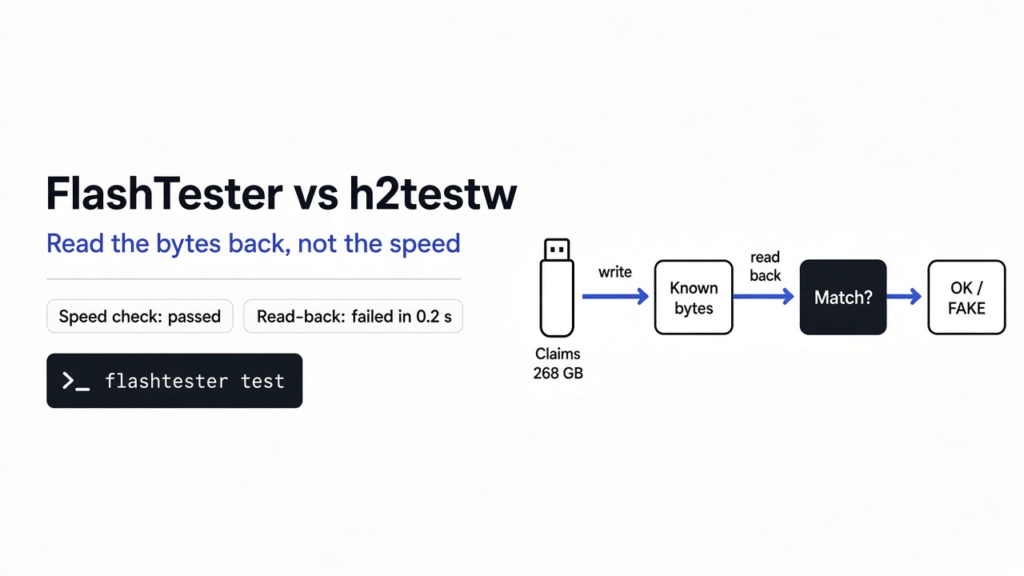
A new stick can show a huge size, accept a file, and still have nowhere to keep it. I pointed FlashTester at a disk that claimed 268.44 GB and then threw every write away. A speed check called that disk fine, at 40,154.1 MB/s. The write-and-read check stopped in 0.2 seconds and said the bytes never landed. h2testw is the older Windows program that made this kind of check famous. The useful flashtester vs h2testw choice is not which name is newer. It is whether the program reads the bytes back. A speed number is not proof.
Tested with the FlashTester Linux x86_64 build; commands, verdicts and exit codes checked against the FlashTester 0.4.0 README in November 2026.
The label is a promise your computer cannot see. Open a stick, or a flat SD card from a camera, and you find chips on a small board. One chip stores the bits after the power is gone. Another chip talks to the computer. Your computer asks how big the drive is, and it believes the answer. It does not count the memory.
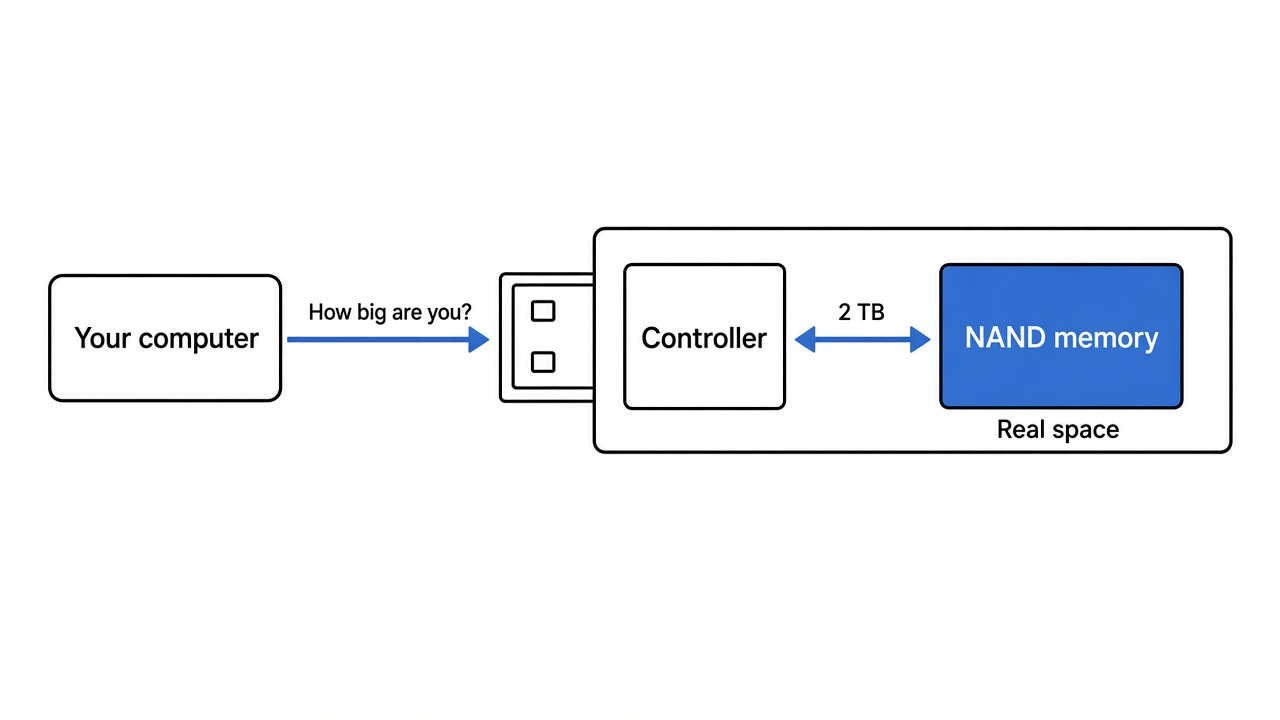
The storage chip is NAND. The chip that answers “how big am I” is the controller. The controller can say 2 TB when the NAND only has a small real region. Copying one photo still works, because that photo fits in the real region. The failure shows up later, when a newer file lands on top of an older one.

What is a fake USB stick?
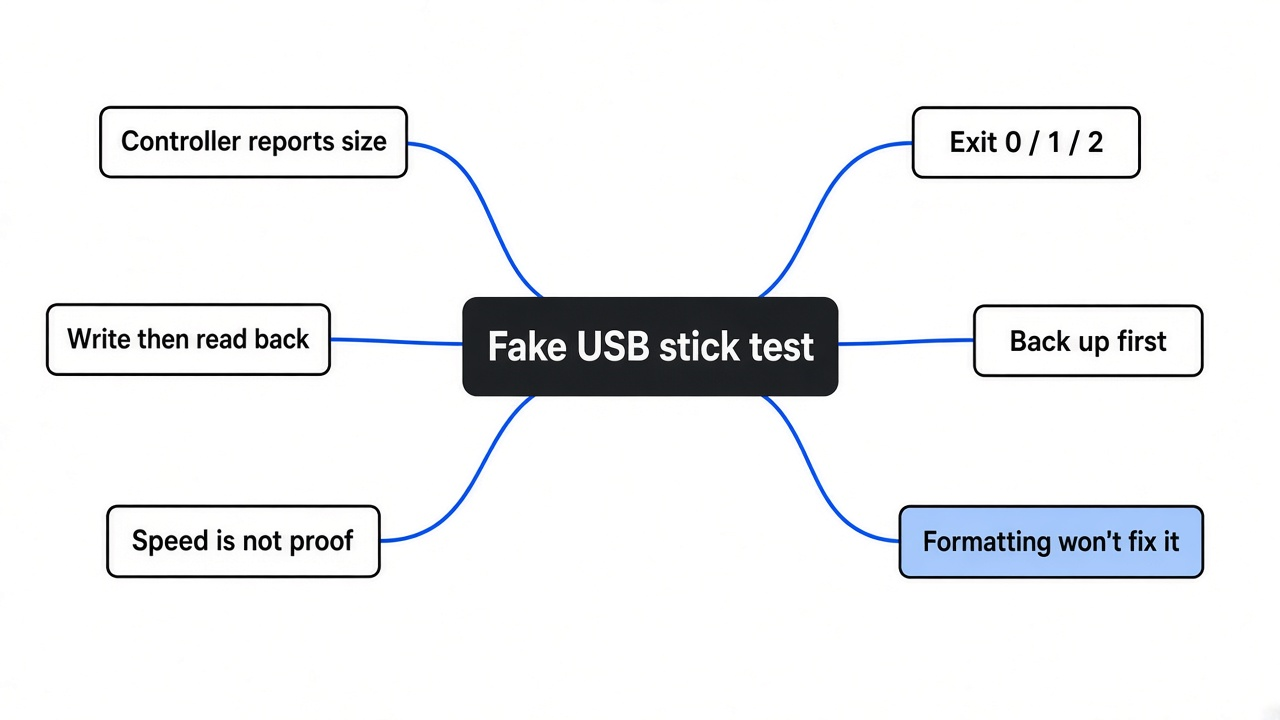
A fake USB stick is a drive whose reported size is larger than the memory it can keep. The computer is not counting chips. It is trusting the controller.
Think of the drive as a row of slots. Each slot holds 512 bytes. That slot is a sector. A real 32 GB stick has a real last slot. A fake one keeps answering as if the row went on. A write past the real end does not grow the chip. The controller folds that address back onto an earlier slot, and the new bytes replace old bytes. The folder still lists both files. One of them is already gone.

That folded read has a name in the report. When the bytes that come back are a copy of some other position, FlashTester calls them aliased. My test did not print that word. My disk did something simpler: it took the write and gave back zeros. The next sections are that run, and the commands you use on a stick you actually bought.
FlashTester vs h2testw: same job, different stopping rule
FlashTester vs h2testw is the same job with a different stopping rule. Both write known bytes and read them back. h2testw is a Windows window that fills the free space with test files, then checks those files. FlashTester does that fill on Windows, Linux, and FreeBSD. It also re-reads earlier bytes while it is still writing, so it can stop as soon as earlier data dies.
h2testw was not run here: it is a Windows program, and the test machine runs Linux. FlashTester was. So the table compares the job each one does, not a timed race between them.
| h2testw | FlashTester | |
|---|---|---|
| Where it runs | Windows | Windows, Linux, FreeBSD |
| What it checks | Free space, by writing test files and reading them back | Free space, or the whole disk |
| When it can stop | After the fill, when the check starts | During the write, if earlier bytes are already wrong |
| Speed-only mode | The check is the test | bench measures speed and says capacity was not checked |
| A short sample | A limit means a clean result covers only that much | --size does the same, and a short pass can miss a late lie |
| What I ran | Not on this machine | A lying disk failed in 0.2 seconds. A speed check of that same disk passed |
Linux already had another pair of commands for this job: f3write, then f3read. They fill free space and read it back, the way h2testw does. Those were not timed here either; FlashTester is the one that ran. It adds the early stop, a whole-disk mode, and a one-page report. The commands and the downloads live with the program at github.com/Dissimilis/FlashTester.
Is a fast copy proof the drive is real?
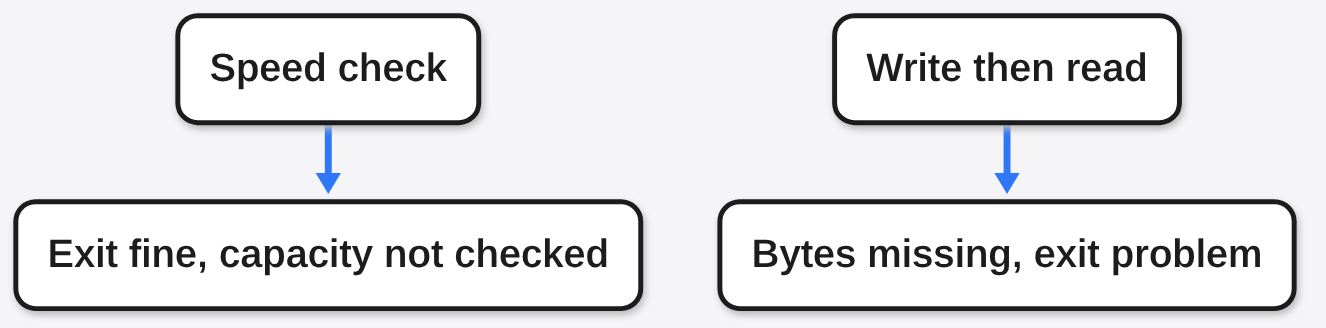
No. A fast copy only proves the stick accepted bytes for a moment. On the same lying disk, FlashTester’s speed check exited clean. The line was “Sequential read 40154.1 MB/s (speed only, capacity not checked).” MB/s is millions of bytes per second. It read about 16 MB in a few thousandths of a second and did not ask whether any of it had been stored.
The real check was test on that disk, limited to 16 MB so it would not try to walk the claimed 268.44 GB. It stopped itself after 8.4 MB. Elapsed time was 0.2 seconds. The exit code was 1. An exit code is the small number a program leaves for the terminal: 0 means the check passed, 1 means it found a problem, 2 means it refused to start. The report said the drive ignores writes, 8.4 MB of 8.4 MB checked was lost, and 16,384 sectors were corrupted. The first wrong read was a zero where the test data should have been. The write speed it printed was about 55,300 MB/s. That number is not a USB stick. It is what a disk looks like when it throws data away and answers immediately.
So the absurd speed was a clue, and it was not the verdict. The verdict was the read-back. If I had stopped at the speed check, I would have called a broken disk fine. The disk was disposable, built to drop writes. It was not a stick from a shop. That is enough to see which check tells the truth. It is not a survey of sticks for sale.
How do I check if my USB stick is fake?
Copy anything you care about off the stick first, then fill the free space and read it back. No second drive handy? Copy the files to another computer over WiFi without installing an app. On Linux, download the FlashTester Linux build, make it executable, and check that the file matches the published checksum. The downloaded file matched. Then run:
flashtester list
flashtester test /media/you/STICK --report result.json --evidence evidence.htmlUse the folder where the stick is mounted. Do not use the disk that holds your system. I pointed a file-mode test at a folder on that disk. FlashTester refused it and exited 2. list marks that disk as protected. The refusal is the right behavior.
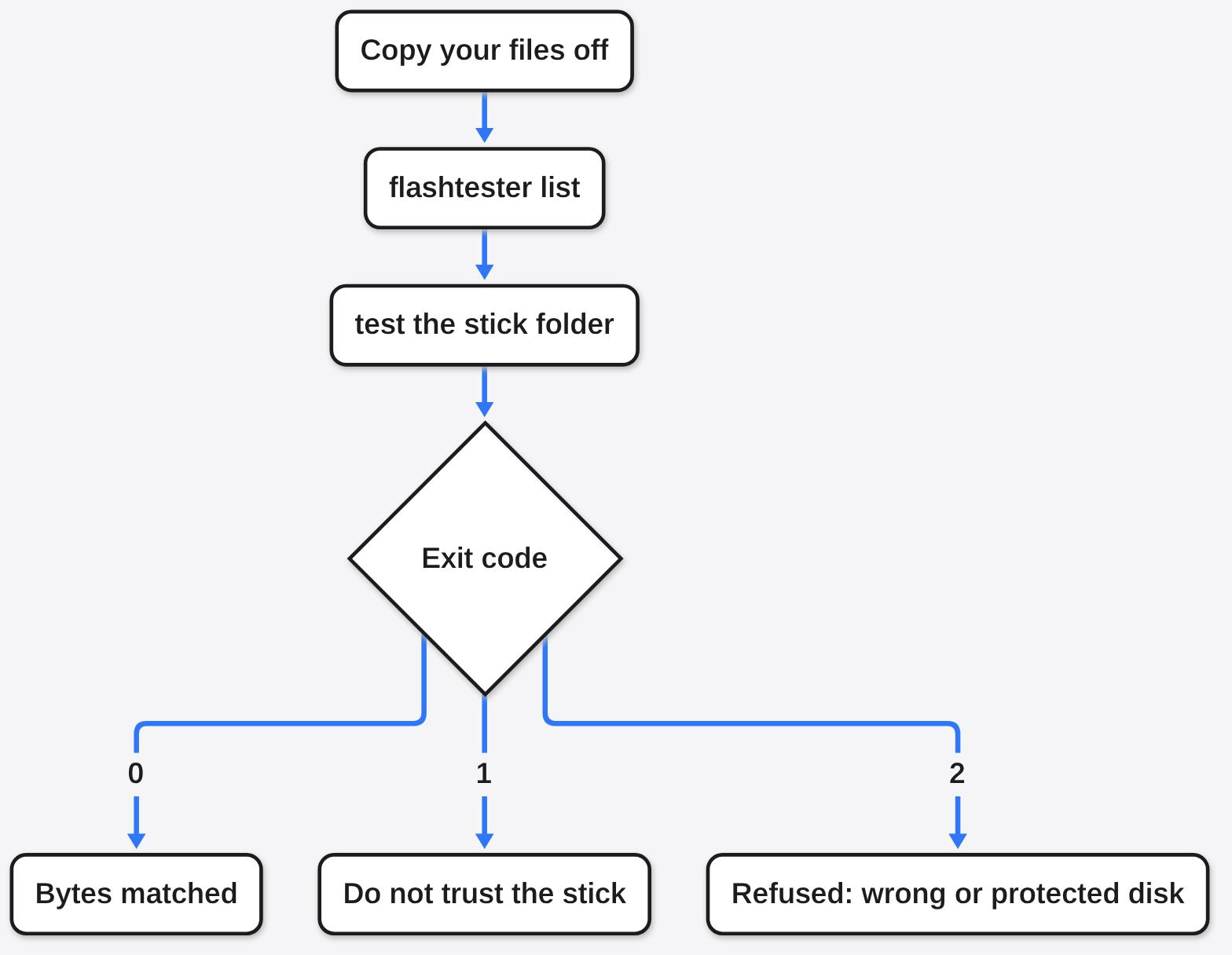
A learning pass with --size 1G is fine while you learn the command. It is not the answer. A fake often has some real memory at the start, so the first gigabyte can come back perfect. The test that matters uses the free space, which is the default when you leave --size off. It takes as long as writing that space once and reading it once. Do not sleep the computer in the middle.
When it finishes, read the status, not the speed. Exit 0 is OK. Exit 1 is a problem: fake, damaged, or ignoring writes. Exit 2 means it refused, often because you aimed it at the wrong disk. --evidence writes a one-page sheet you can keep with the return request.
What do OK, FAKE and READ-ONLY mean?
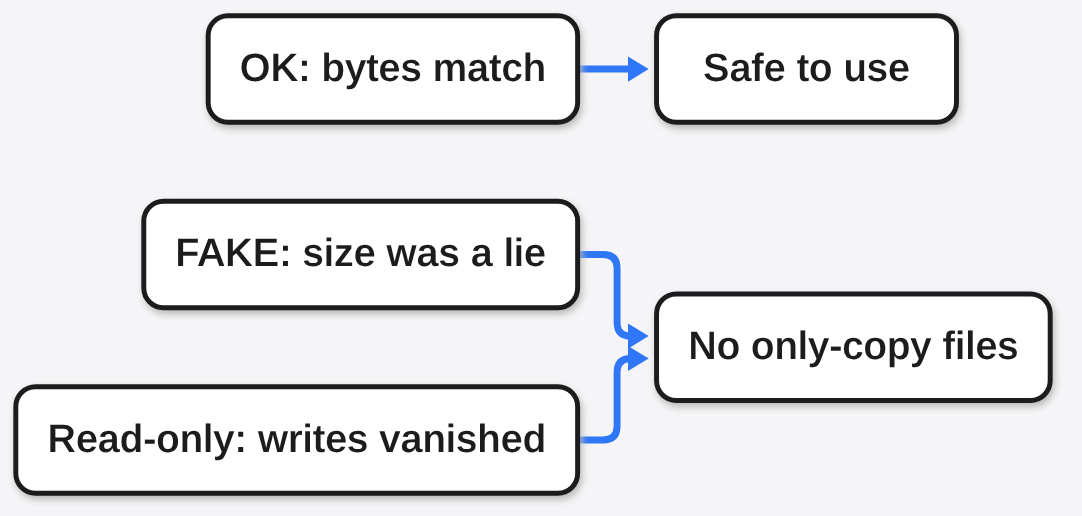
OK means every byte it wrote came back the same. FAKE means the stick kept less than it claimed, and data past the real end was lost or folded onto earlier data. Read-only, in the words of the report I got, means the drive ignores writes and the data read back is old or never changed.
| Status | What came back | What you should do |
|---|---|---|
| OK | The bytes match | You can use the stick. Keep the report. |
| FAKE | Less real space, or aliased data | Do not store the only copy of anything. Ask for a refund with the report. |
| READ-ONLY | Writes did not land. My run came back as zeros | Same as a fail. The stick did not keep the test. |
| DEFECTIVE | Data lost or corrupted inside the real capacity | The media is bad, not just a slow cable. |
| UNRELIABLE | Data verified, but with disconnects or read errors | Try another port, cable or card reader, then test again. |
| Refused (exit 2) | It would not start. My run was the system disk | Pick the stick from list, not the disk that holds your system. |
Inside the report, each lost sector also gets a label. Aliased is the fold, a read that came from a different place than the one you wrote. Corrupted is “wrong, and wrong the same way every re-read,” which is what I saw, except the wrong value was zero. A loose cable tends to change when you read again. The tool re-reads a bad stretch for that reason. Nothing was unplugged during this run, so that cable case was not tested.
When FlashTester will not save you
A clean short test does not clear the rest of the stick. bench does not check capacity, and its own line says so. File mode only writes into free space, so files already sitting on the stick are not part of the test. On a fake, those writes can still land on top of the files you kept, which is why the backup comes first.
Whole-disk mode erases the disk. It needs --destroy, and you confirm the name from list before you type it. That mode ran here only on a disposable disk that already dropped writes. Do not point it at a stick that still holds the only copy of a trip.
One more limit sits under every tool in this family, including h2testw. If the controller repairs a weak cell before the computer is allowed to see it, the read-back looks clean. ECC (the controller’s hidden repair) is that step. A passing test means the bytes you wrote came back. It does not mean the stick will last for years.
No counterfeit stick from a shop was part of this test, so the wrap itself was not observed. The disk in this test advertised 268.44 GB and returned zeros. That is the read-only result, not the aliased result. Both mean do not trust it. They are not the same line in the report.
If the report is not OK, the stick is not a place for the only copy of a photo. That is the whole decision.
Common questions about FlashTester and h2testw
Can I test the stick without deleting my files?
You can, if you only use file mode on free space, and you accept that a fake stick may overwrite files anyway. Back up first. flashtester test /media/you/STICK does not ask to erase the whole disk. Whole-disk probe --disk and fix do: they erase the disk and need --destroy. Neither was run for this article, so there is no timed claim for them.
If the stick is empty, the full free-space test is the one to leave running. If the stick was only going to install Linux, and you would rather not trust a random one, there is a path that never needs it: install Linux without a USB drive.
After a stick passes, encryption is a separate job. A folder tool such as gocryptfs scrambles files. It cannot invent memory the controller does not have.
Does formatting fix a fake USB stick?
No. Formatting asks the controller to draw a new empty map. It does not add memory chips. If the map was a lie, the new map is a lie too. Run the write-and-read test after a format if you want a real answer, not instead of one.
Is h2testw enough on Linux?
Not on Linux, because h2testw is the Windows program. Use FlashTester there, or f3write and f3read if you already know those two commands. I would pick FlashTester when you want the early stop and a report file. I would not pick either tool’s speed number as the yes.