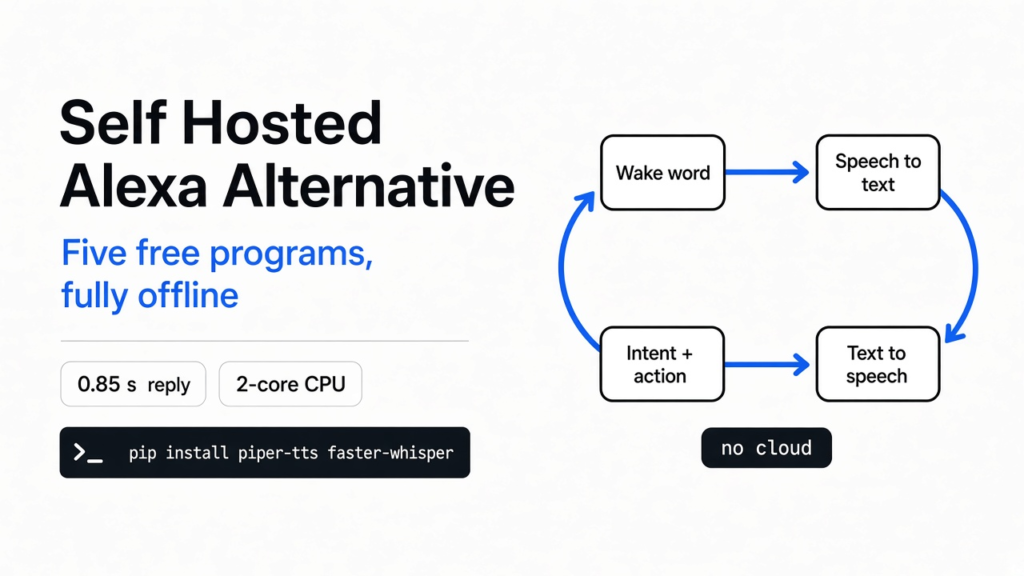
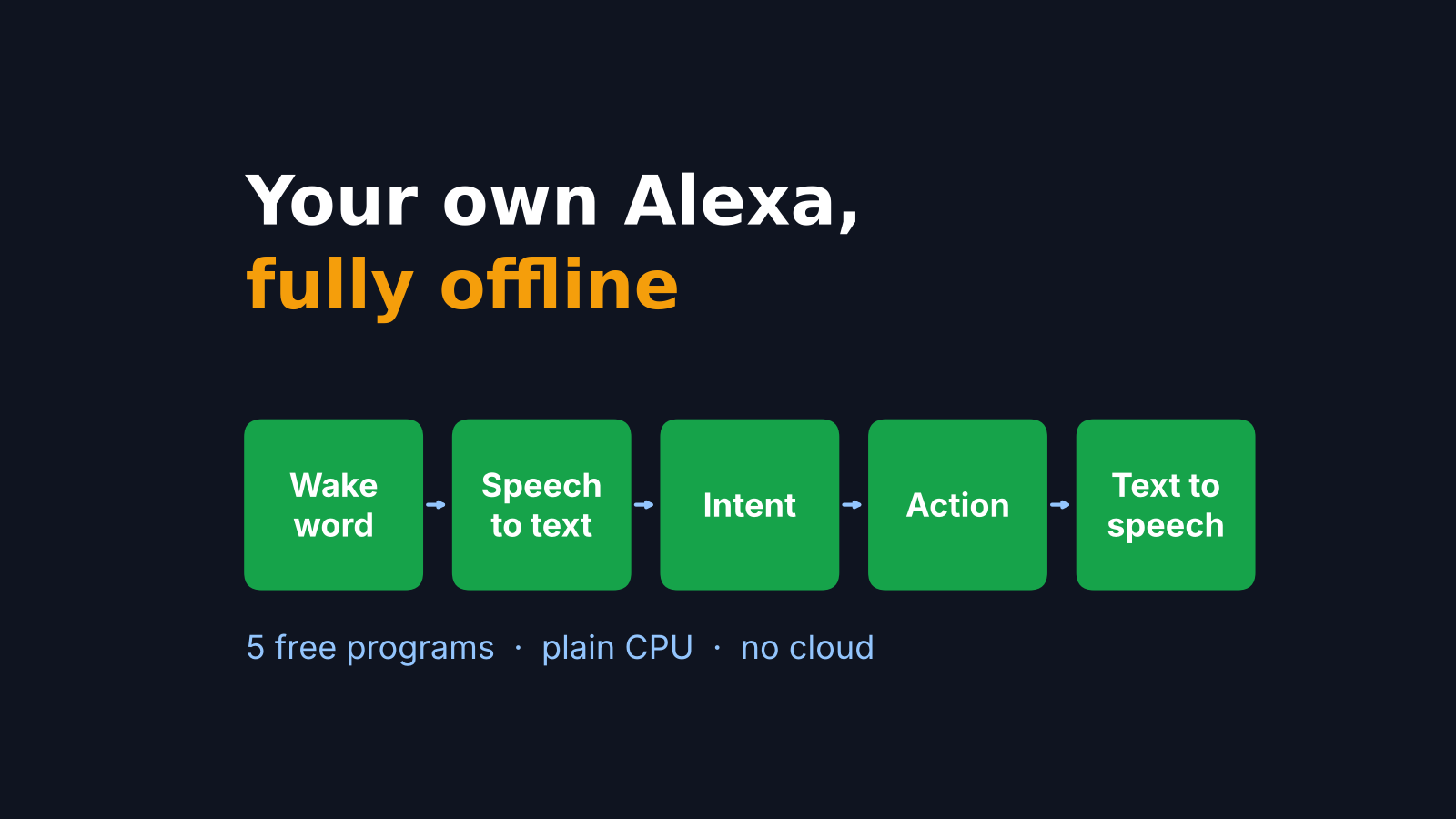
Short answer: yes. A self hosted Alexa alternative is five small programs in a row: a wake word listener, speech to text, an intent matcher, the action, and text to speech. All five run on an ordinary computer with no internet. I built the whole chain on a 2-core CPU, and a spoken command became text in under a second.
You say “Alexa, turn on the kitchen light.” The light comes on. It feels like the little speaker on your shelf understood you.
It didn’t. Your voice took a trip first. On a typical smart speaker, only the first word is heard at home, and the rest of the sentence travels to a company’s servers to be understood.
That trip is the whole story of this post. A voice assistant is five simple parts in a row. You decide which of them leave your house. Once you see the five parts, building your own is a weekend job, not a research project.
What actually happens when you talk to Alexa?
Your speaker hears one word locally. Everything after it goes to the cloud.
Start with sound. A microphone turns your voice into numbers, thousands of tiny loudness readings every second. A computer cannot “understand” those numbers directly. It has to turn them into words, then into a meaning, then into an action.
So every voice assistant, from Alexa to the one you can build, runs the same five steps:
- Wake word: a tiny program listens for one phrase, like “Alexa” or “Hey Jarvis”, and ignores everything else.
- Speech to text: a bigger AI model turns the sound after the wake word into written words.
- Intent: the words become one clear action, like “light on, kitchen”.
- Action: something actually happens. A light, a timer, a song.
- Text to speech: the reply is turned back into a voice.
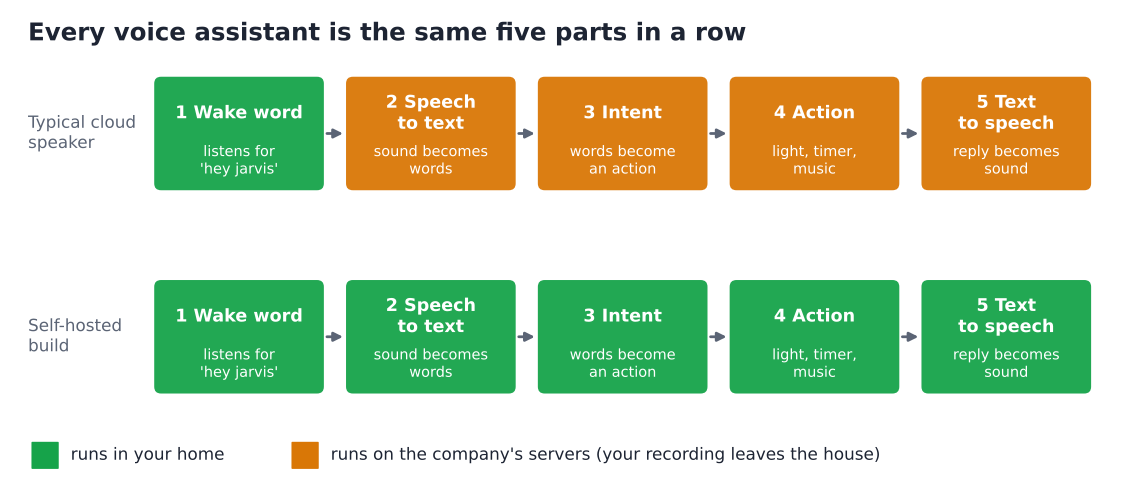
On an Echo, step 1 runs on the device. The heavy steps, understanding you and answering, run on Amazon’s servers. Amazon even removed a setting that let some Echo models (the 4th gen Echo Dot, Echo Show 10 and Echo Show 15) keep voice recordings on the device. Its reason: its generative AI features need the cloud.
That is the honest trade. The cloud gives a smarter assistant. It also gets a copy of what you said in your kitchen.
Can every part run on my own computer?
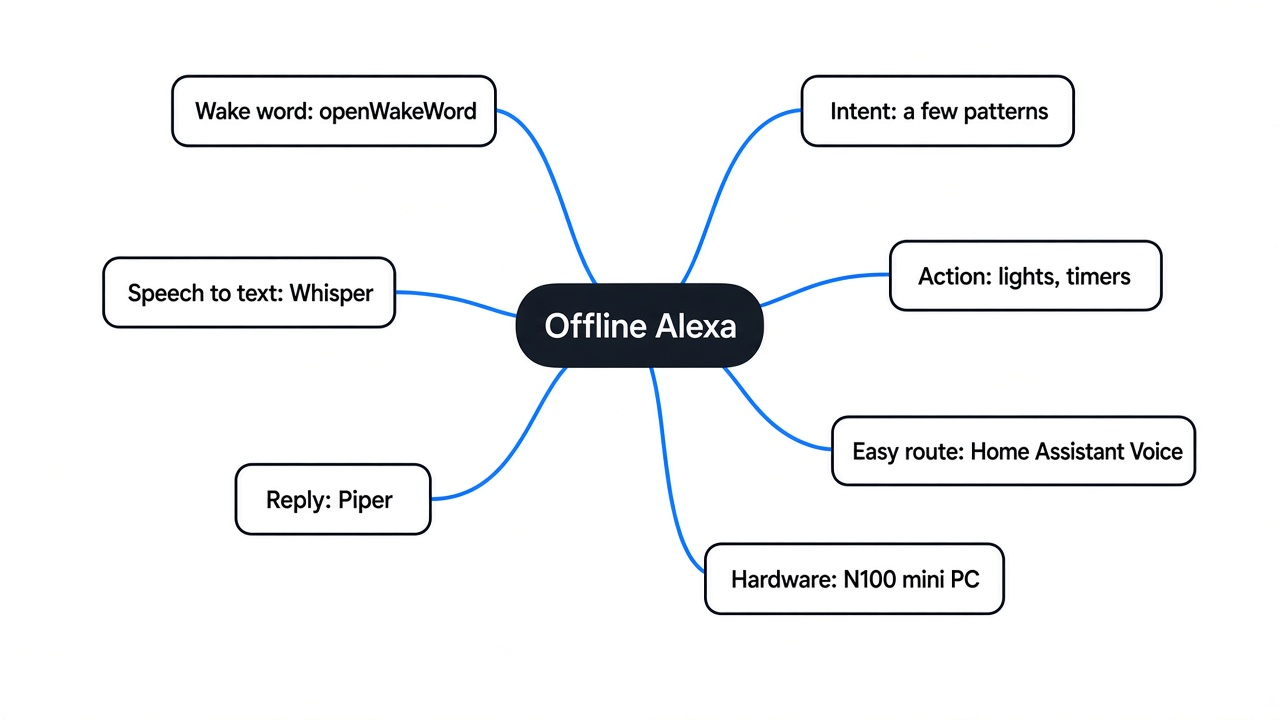
Yes. Each of the five parts has a free, open source program that runs offline.
Here are the pieces I used. Each one is a small, well-known project:
- openWakeWord for step 1. It checks the sound in 80 ms slices (less than a tenth of a second) and gives each slice a score from 0 to 1.
- faster-whisper for step 2. It runs OpenAI’s Whisper speech model (a free AI model trained to turn speech into text) and is up to 4 times faster than the original for the same accuracy.
- A few lines of Python for steps 3 and 4.
- Piper for step 5. It is a fast, local neural text to speech engine (an AI model that reads text out loud in a natural voice). Want the reply in your own voice? You can clone your voice locally too.
So the whole stack is free. The only cost is the computer it runs on, and that is where most people get it wrong, as you will see in a moment.
Does a local voice assistant feel fast enough?
On a plain 2-core CPU, the full chain answered in about a second. That is fast enough for daily use.
I wanted real numbers, not a feature list. So I built all five steps on a small 2-core cloud computer with no graphics card and 7 GB of memory.
The test was simple. Piper spoke “Turn on the kitchen light” into a sound file, which stood in for a microphone. Then the chain had to hear it, understand it and answer. I ran it three times.
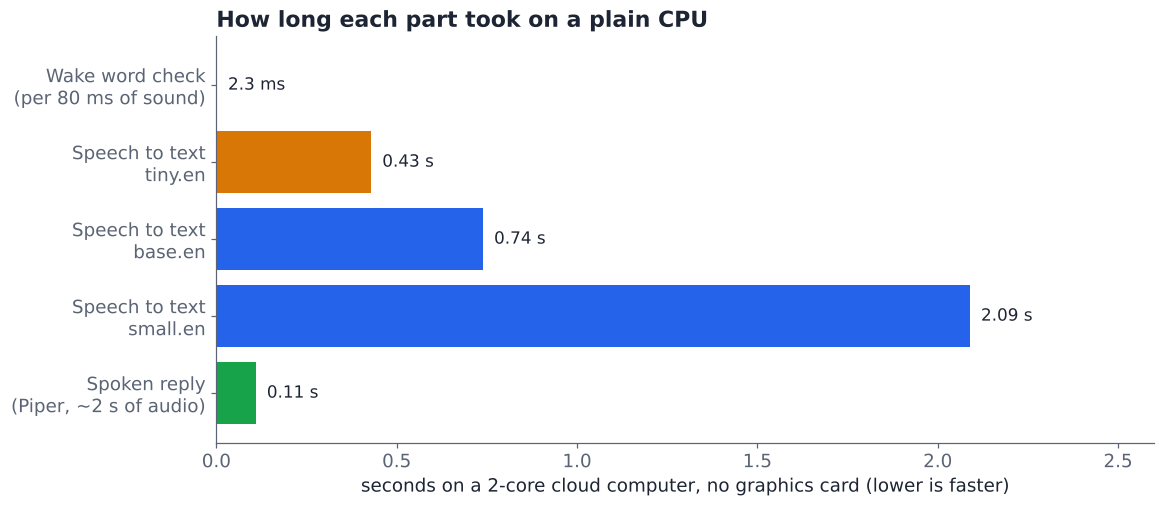
Here is what each step took:
- Wake word: about 2.3 ms to check each 80 ms slice of sound. That is about 35 times faster than the sound arrives.
- Speech to text: 0.43 s with the tiny model, 0.74 s with base, 2.1 s with small. All three wrote the sentence perfectly.
- Intent: 0.2 ms. Matching a pattern is almost free.
- Spoken reply: Piper made two seconds of speech in about 0.1 s.
Add it up with the base model, and the gap between you finishing the sentence and the reply starting is roughly 0.85 seconds. Why does that number matter most? Because it is the silence you actually sit through.
One catch, stated plainly. This was a clean, computer-made voice in a quiet file. A real room is messier, which is exactly what the next test checks.
How does the wake word know it’s you talking to it?
It does not understand words at all. It recognises one sound pattern and nothing else.
Think of a dog that knows its name. It does not follow your conversation. It just perks up at one specific sound. A wake word model works the same way: it is trained on many recordings of one phrase, and it scores how closely each 80 ms slice matches.
That is why it can run all day on almost no power. It is not listening to your sentences. It is waiting for one shape.
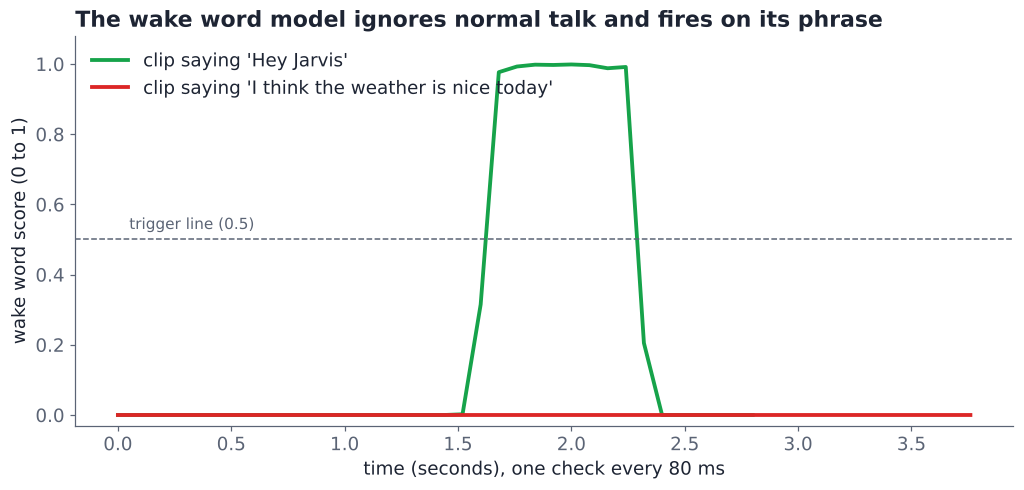
I tested this with two clips. The “Hey Jarvis” clip jumped to a score of 0.998. A normal sentence about the weather stayed at 0.00002 the whole time, far under 0.5, the default trigger line the models were trained for.
Every wake word model balances two mistakes. A false accept (it wakes up when nobody called it) is annoying. A false reject (you call it and it ignores you) is worse. openWakeWord’s ready-made models aim for under 5% missed calls and fewer than one false wake every two hours, once you tune the trigger line.
Which speech to text model should I pick?
Use base for a quiet room, small for a noisy one. Tiny is fast but trips on noise.
Speech models come in sizes. A bigger model has seen more examples and copes better with messy sound, but it needs more time. So I made the test harder. I added random hiss to the same sentence at three levels.
The levels are measured in dB (decibels, a scale for how much louder one sound is than another). At 10 dB, your voice is clearly louder than the noise. At 0 dB, the noise is as loud as your voice, like talking right next to a running blender.
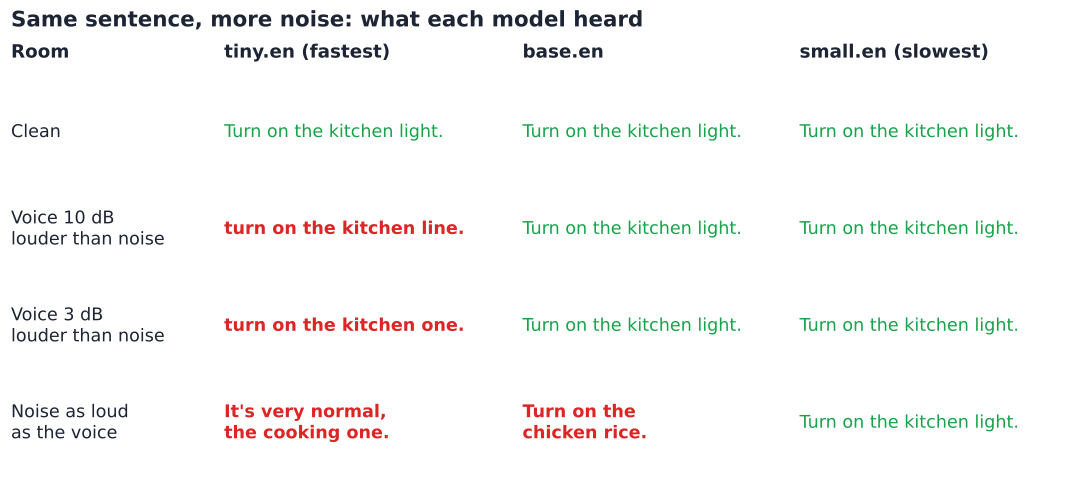
This is where it got funny. At 0 dB, the base model heard “Turn on the chicken rice.” The tiny model heard “It’s very normal, the cooking one.” Only the small model still got “Turn on the kitchen light.”
So which one belongs in your kitchen? It is a trade between speed and ears. If your speaker sits in a quiet room, base is plenty. If it sits in a busy kitchen, pay the extra second for small, or put a better microphone closer to where people talk.
Only need text from recordings, not live commands? Then a bigger model is fine, and here is how to transcribe audio on your own computer.
How do I turn words into actions?
Match the text against a few patterns. For home control, that is all you need.
Once you have text, the hard part is over. “Turn on the kitchen light” is just a string. A pattern (a regular expression, a short rule that describes the shape of a sentence) can pull out the two bits that matter: on or off, and which room.
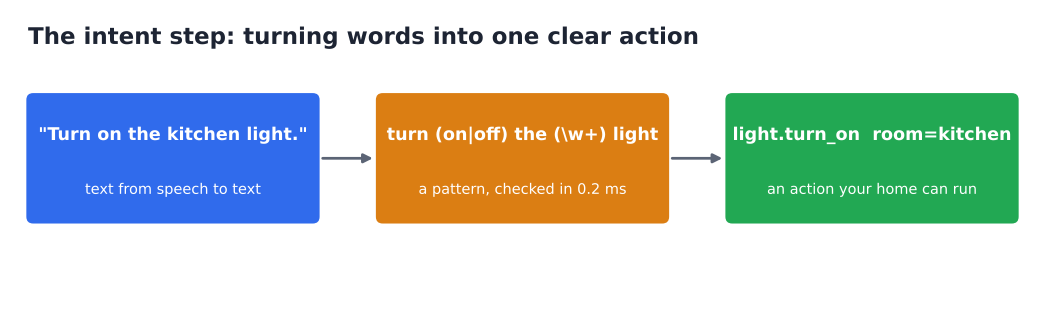
Here is the core of my test, trimmed down. Install the parts and download a voice:
pip install piper-tts faster-whisper scipy
python3 -m piper.download_voices en_US-lessac-mediumThen this runs as written:
import re, wave
import numpy as np
from scipy.signal import resample_poly
from piper import PiperVoice
from faster_whisper import WhisperModel

voice = PiperVoice.load("en_US-lessac-medium.onnx")
stt = WhisperModel("base.en", device="cpu", compute_type="int8")

def say(text, path="reply.wav"):
    with wave.open(path, "wb") as w:
        voice.synthesize_wav(text, w)

def hear(path):  # Whisper wants 16 kHz audio as numbers between -1 and 1
    with wave.open(path) as w:
        rate, pcm = w.getframerate(), np.frombuffer(w.readframes(w.getnframes()), np.int16)
    return resample_poly(pcm / 32768.0, 16000, rate).astype(np.float32)

def understand(text):
    m = re.search(r"turn (on|off) the (\w+) light", text.lower())
    return {"action": f"light.turn_{m.group(1)}", "room": m.group(2)} if m else None

say("Turn on the kitchen light.", "cmd.wav")      # stands in for your microphone
segments, _ = stt.transcribe(hear("cmd.wav"), language="en")
text = " ".join(s.text for s in segments).strip()
intent = understand(text)                          # {'action': 'light.turn_on', 'room': 'kitchen'}
say(f"Okay, the {intent['room']} light is on.")Running it understands the sentence perfectly and writes the spoken reply to reply.wav. For real use, swap the fake microphone for a live one. Then send intent to whatever runs your lights, such as a Home Assistant webhook (a web address that triggers an action when something calls it).
Simple patterns break when people phrase things differently. “Kitchen light on, please” would miss my rule. The fix is a longer list of patterns, or handing the text to a small local AI model to work out the meaning. Tools like Strata or Ollama run one on the same box.
What is the easiest self hosted Alexa alternative to set up?
For most homes, Home Assistant Voice. For tinkerers, Willow. For learning, the script above.
You do not have to wire everything yourself. Two projects package the five parts for you.
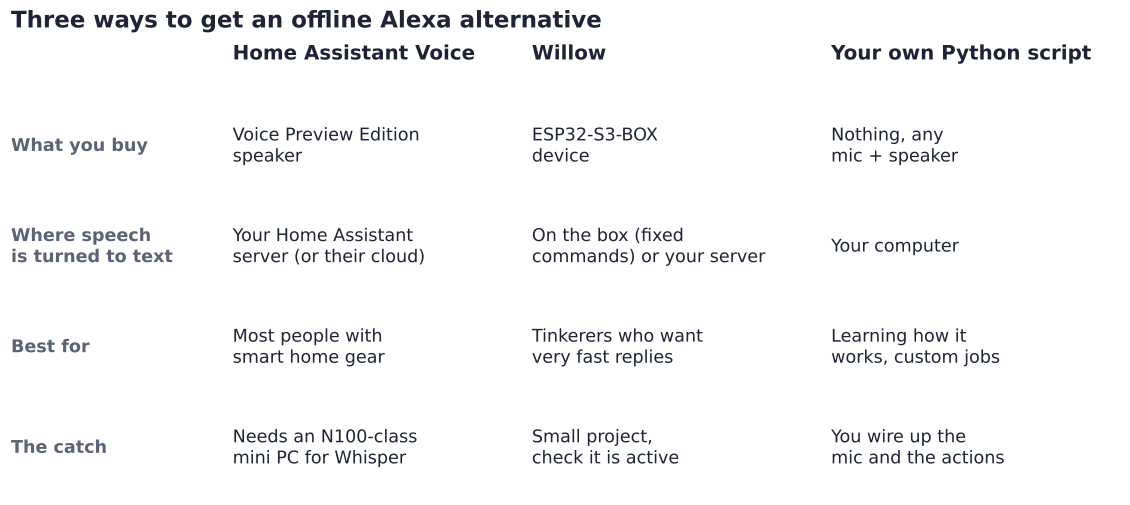
Home Assistant Voice is the route most people should take. Home Assistant is free software that controls smart home devices from one place, on a box you own. Its voice feature is called Assist.
Assist plugs in local speech to text (Whisper), local text to speech (Piper) and wake word engines. They connect through Wyoming, a small protocol (a standard way for voice programs to talk to Home Assistant). Its own speaker, the Voice Preview Edition, sells for about $59 and can run with no internet.
Willow is an open source project built for very fast replies. It runs on the ESP32-S3-BOX, a small device with a screen and microphones that costs around $50. It can recognise up to 400 fixed commands on the device itself, or send speech to a server you host for anything else.
Willow talks to Home Assistant, openHAB or any web address. It is a smaller project, so check that it is still active before you buy the hardware.
Your own script is the path above. It is the best way to understand how the parts fit, and the most flexible if you want the assistant to do jobs no smart home app covers.
What computer do I need to run it?
Skip the Raspberry Pi 4 for Whisper. Use a small x86 mini PC, like an Intel N100 box.
This is the mistake that makes people give up. A Raspberry Pi 4 takes about 8 seconds to turn one command into text with Whisper. Eight seconds of silence feels broken. The same job takes under a second on an Intel NUC-class mini PC, and Home Assistant recommends an Intel N100 or better for fully local voice.
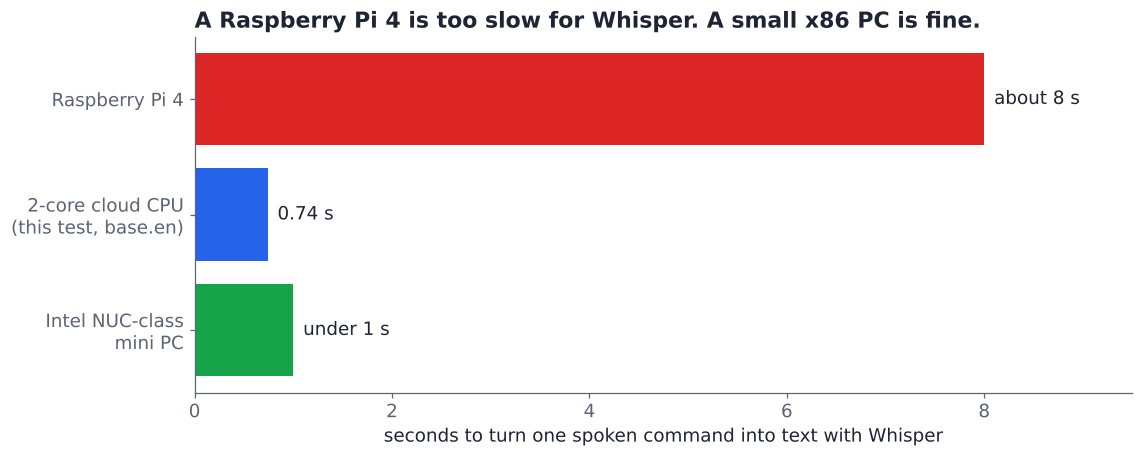
If you are stuck with a Pi, there is a fair middle ground. Home Assistant’s Speech-to-Phrase engine runs in under a second even on a Pi 4, because it only listens for a fixed set of commands instead of any sentence. Piper is also light enough for a Pi.
Is a homemade assistant as good as Alexa?
For your home, often yes. For general knowledge, no, unless you add a local AI model.
To be fair to Alexa, it does things a local box will not do out of the box. It answers trivia, orders shopping, plays music by name and keeps improving without you lifting a finger. If you want a chatty assistant that knows the world, the cloud still wins.
But most of what people say to a smart speaker is short and boring: lights, timers, music, the weather. A local chain handles those in under a second, works when the internet is down, and never sends a recording anywhere. For many homes, that is the better deal.
There are two small catches. openWakeWord’s ready-made wake word models are licensed for non-commercial use only, so check the licence if you build a product. And Piper’s code is GPL licensed, which matters only if you ship it inside your own software.
So run the script once. Hear your own computer answer you. Then decide how much of your voice you want to leave the house.
Common questions about self hosted Alexa alternatives
Can I use “Alexa” as the wake word on my own assistant?
Yes. openWakeWord ships a ready-made “alexa” model, along with “hey jarvis” and “hey mycroft”. You can also train your own phrase.
Does a local voice assistant work without internet?
Yes. Once the models are downloaded, every step in this guide runs offline. Only actions that need the web, like a weather lookup, need a connection.
Do I need a graphics card for local speech to text?
No. Every number in this post came from a 2-core CPU with no graphics card. A graphics card only helps if you want the larger, more accurate Whisper models to run fast.
Is Home Assistant Voice better than Willow?
For most people, yes, because it plugs straight into Home Assistant and has its own speaker. Willow suits tinkerers who want on-device commands and very fast replies, and do not mind a smaller project.