
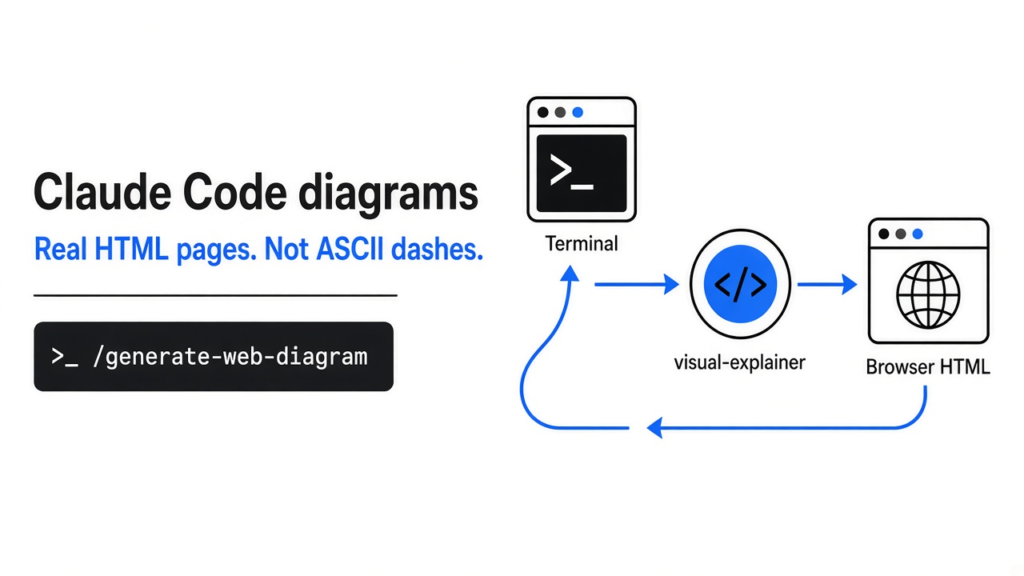
Ask for a picture, get a picture. Not a box made of dashes.
Install the visual-explainer plugin, then type /generate-web-diagram plus what you want drawn. Claude Code writes one HTML page with a real diagram, saves it in ~/.agent/diagrams/, and opens it in your browser. Add --quick when you want a cheaper page that also opens with no internet.

Why does Claude Code draw diagrams with dashes?
Claude Code lives in a terminal, and a terminal can only show text.
You ask Claude Code (the terminal app where Claude edits your project for you) to explain how a login flow works. It answers with boxes built from +, - and | characters. One arrow lands on the wrong line, a label wraps, and the picture you needed is now a puzzle.
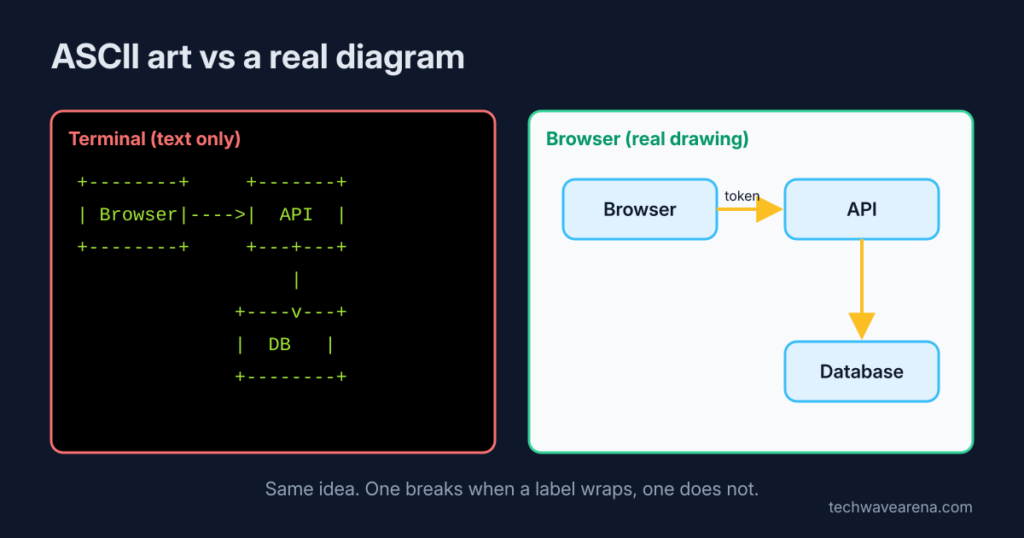
That is not Claude being lazy. A terminal is a grid of letters, so the only “drawing” it can do is ASCII art (pictures made only from keyboard characters). Big pictures break fast, because every box has to line up by hand, one character at a time.
So the fix is not a better prompt. The fix is to send the picture somewhere that can draw: your browser. That one move is the whole idea of this post.
What is visual-explainer?
It is a free skill that makes Claude Code answer with a web page instead of text art.
First, one building block. A skill (a folder of written instructions Claude loads only when the task needs it) teaches Claude a new habit without retraining anything. Claude reads a short description of every skill up front. The full instructions load only when that description matches what you asked.
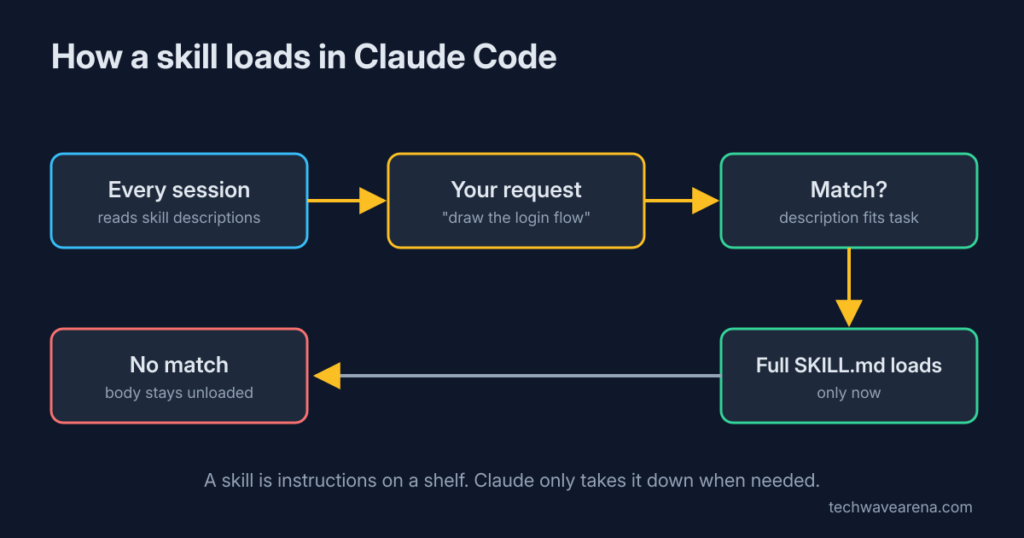
visual-explainer is a skill like that, packed as a plugin (an add-on you install from inside Claude Code). Its main instruction is simple: when the answer is a picture, write an HTML page instead of ASCII. It also says that any table with 4 or more rows, or 3 or more columns, goes to a page, and the chat only gets a short summary.
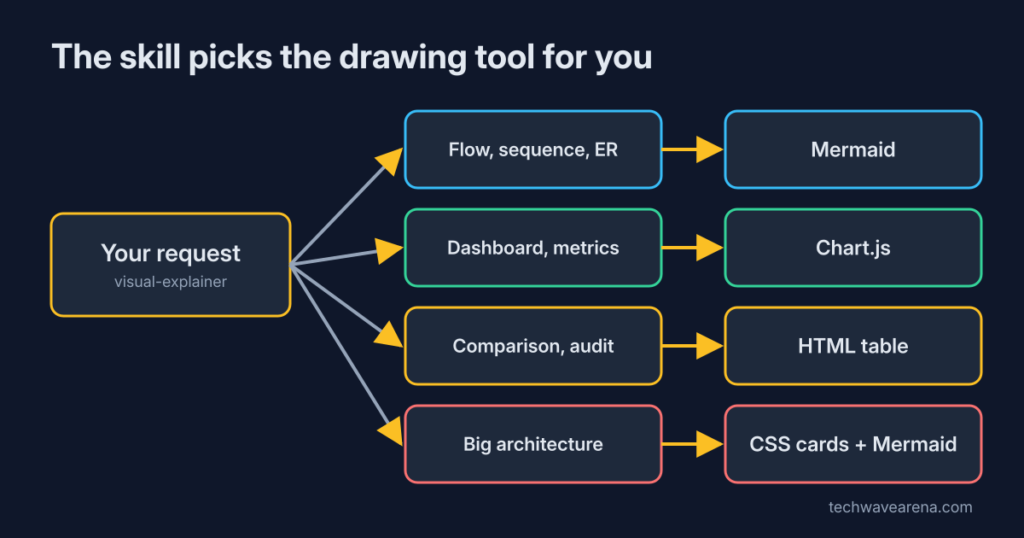
Inside that page, it picks the right drawing tool for the job. Flows and sequences get Mermaid (a tool that turns a few lines of text into a drawn diagram). Dashboards get Chart.js (a small library that draws charts in a web page). Plain comparisons get a normal HTML table. You do not choose; the skill routes it.
How do I install it in Claude Code?
Two commands inside Claude Code, then reload.
Type these in the Claude Code input box, not in your normal shell:
/plugin marketplace add nicobailon/visual-explainer
/plugin install visual-explainer@visual-explainer-marketplaceThen run /reload-plugins or restart Claude Code. The first line tells Claude Code where the plugin lives. The second installs it. If you are unsure what a plugin actually loads, start with what changes when you flip mods vs plugins.
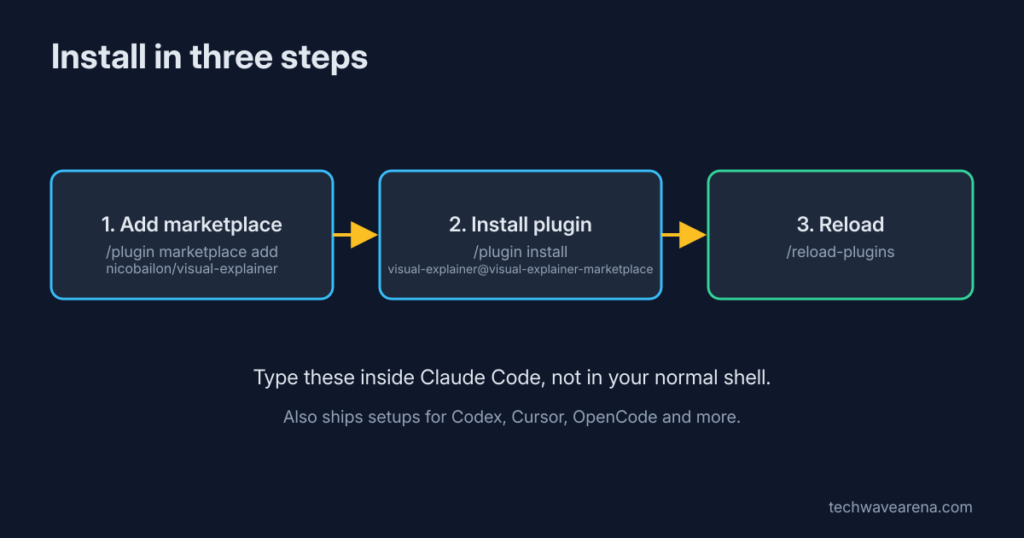
It is not tied to Claude. The same skill ships setups for Codex, Cursor, OpenCode and a few other coding agents (AI helpers that read and change your code). Switching tools later does not mean losing your diagrams.
Which commands should I use first?
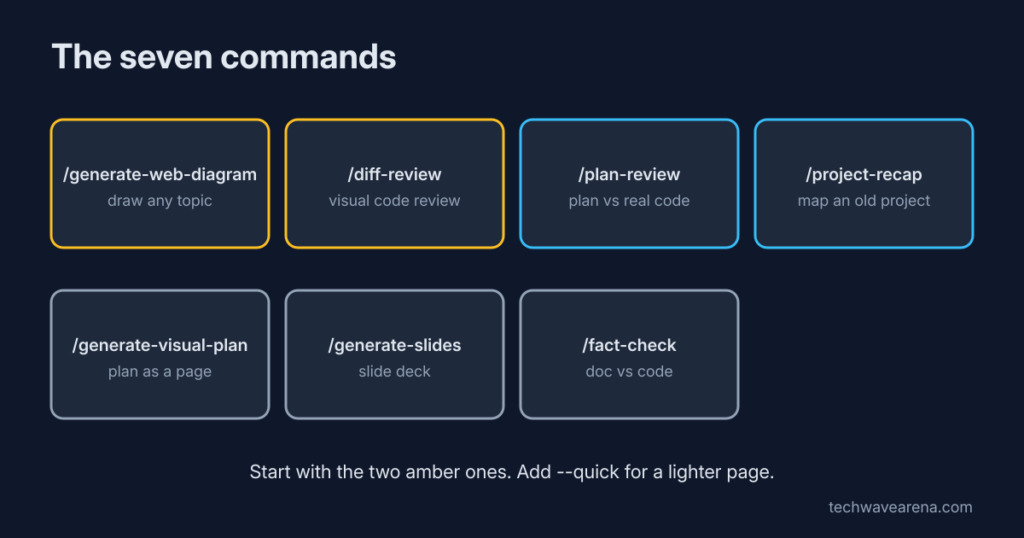
Start with `/generate-web-diagram` and `/diff-review`. They cover most days.
There are seven commands. Each one is a ready-made request, so you do not have to explain the layout every time:
/generate-web-diagramdraws any topic you name./diff-reviewturns your code changes into a visual review./plan-reviewchecks a plan against your real code and flags risks./project-recapgives you a one-page map when you come back to an old project./generate-visual-planand/generate-slidesmake plans and slide decks./fact-checkchecks a document’s claims against the actual code.
A diff (the list of lines you added and removed) is where this pays off most. In the terminal, a big diff is a long scroll of red and green. /diff-review reads the changed files in full first, then lays out what changed, which parts depend on each other, and which tests are touched. The command tells Claude to cite file paths and not invent reasons.
Try it on your own project. Run /project-recap in a repo you have not opened in a month. If the page helps you remember the shape of it in two minutes, keep the plugin.
What did I find when I read the plugin’s files?
Two things worth knowing before you install: what it costs, and what it needs to open.
I went through the plugin’s files and measured them. Here is what matters for you.
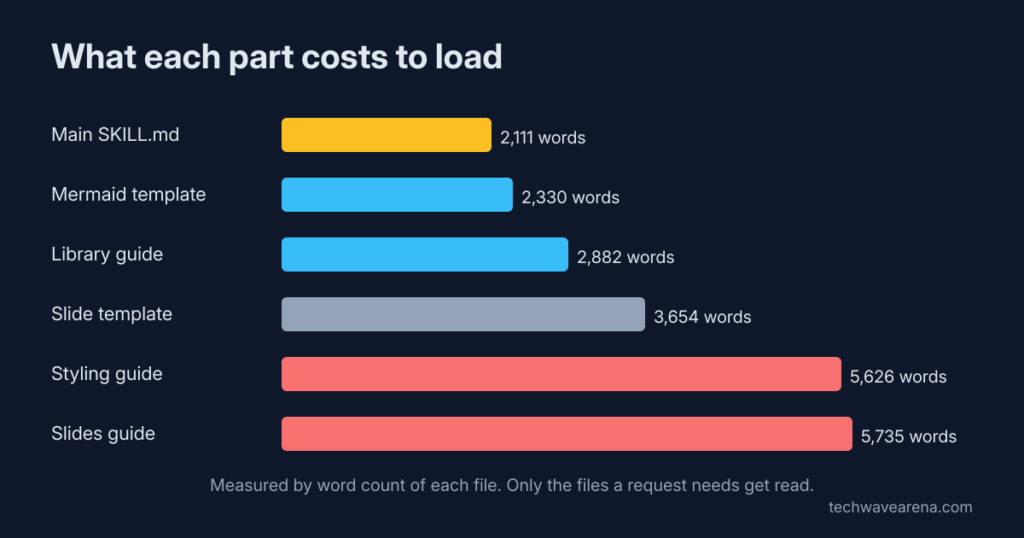
Cost. Tokens (the small chunks of text an AI model reads and is billed by) are the price of every instruction Claude loads. The main skill file is about 2,100 words. That only loads when a visual is needed, so normal coding sessions do not pay it.
Then the skill reads only the guide it needs. The two biggest guides, for slides and for page styling, are about 5,600 words each. So a slide deck costs noticeably more context (the text Claude can hold in mind at once) than a quick table. The same logic applies to every add-on: which MCP server is wasting tokens shows how to check.
Internet. The full pages describe themselves as self-contained, meaning one file. But the templates they copy from pull Mermaid and Chart.js from a public CDN (a server network that hosts shared code), and fonts from Google Fonts. On a plane, or on a work laptop that blocks outside sites, the diagram can show up blank.
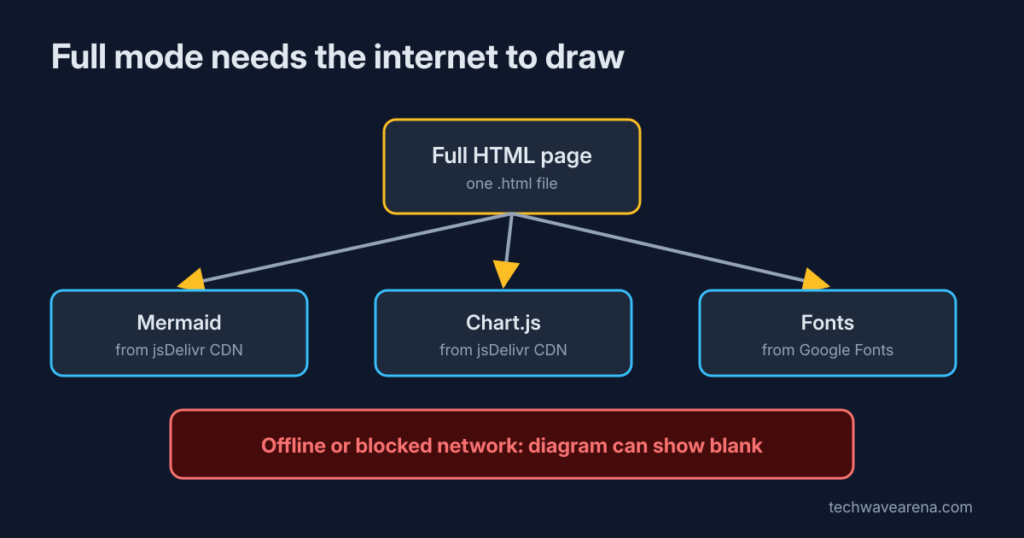
The quick fix for both. Add --quick to /generate-web-diagram, /diff-review, /plan-review or /project-recap. Claude then writes a small data file in JSON (a plain text format for structured data) instead of a whole page.
That file is short, so Claude writes fewer tokens. A local script, which needs Node.js on your machine, turns it into the finished HTML.
I searched that script and its style sheet for outside links and found none, so a quick page opens offline. It also escapes Claude’s text, so stray HTML in a label cannot break the page.
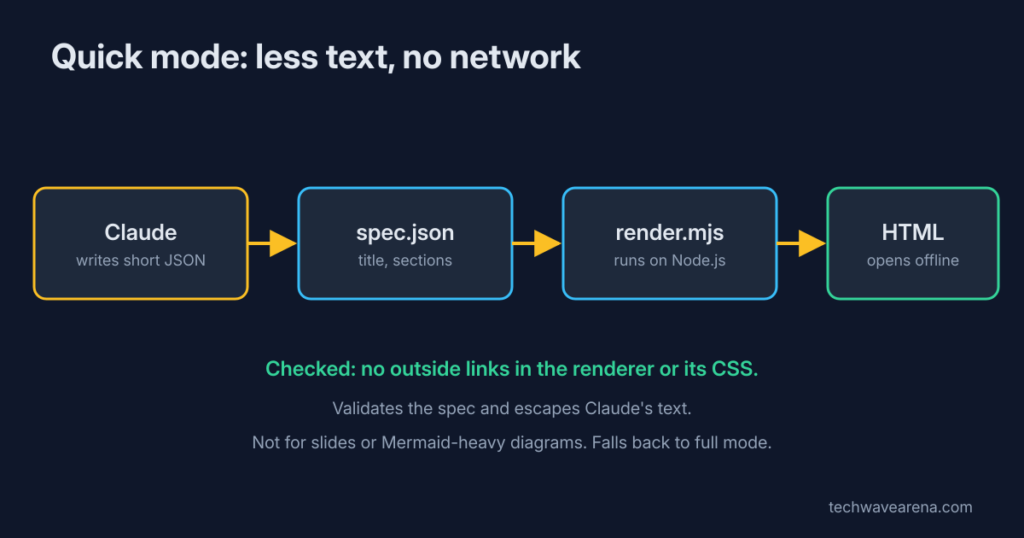
Quick mode has limits. It does cards, tables, steps, risk lists, file lists and simple flow charts. It does not do slides or Mermaid-heavy pictures. When the request does not fit, the skill falls back to the full page on its own.
Can I get diagrams without installing anything?
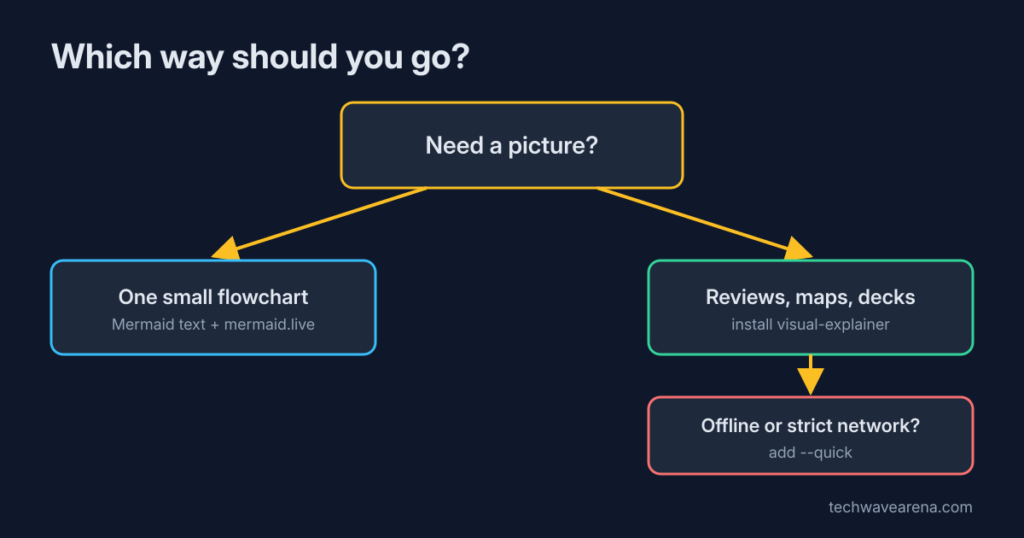
Yes: ask for Mermaid text, then paste it where Mermaid renders.
Tell Claude Code: “Draw this as a Mermaid diagram in a code block.” You get a few lines of text that describe boxes and arrows. Paste them into the free editor at mermaid.live and you see the drawing.
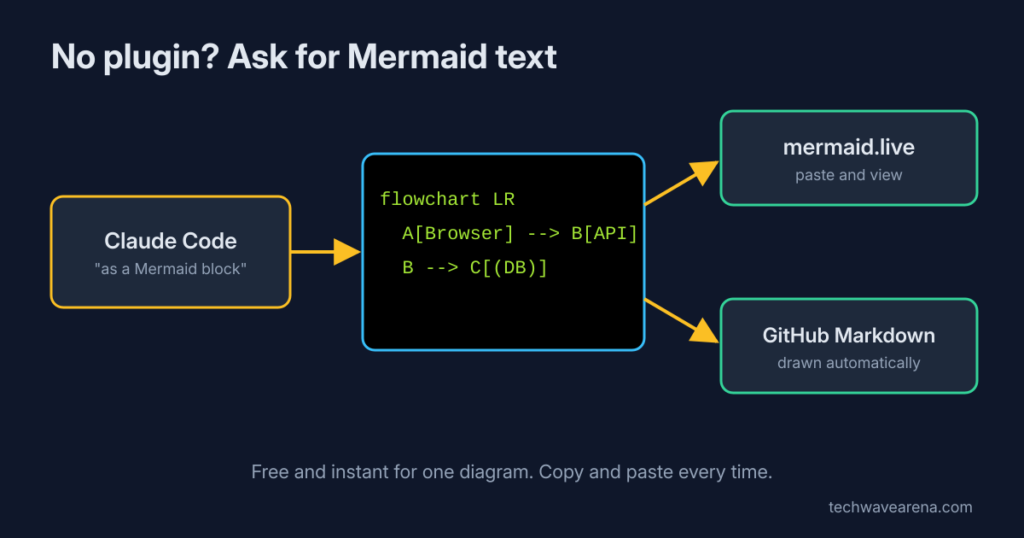
Even better, put that block into a Markdown file in your repo. GitHub draws Mermaid automatically in Markdown files, issues, pull requests, discussions and wikis. That diagram then lives with your code and updates in normal commits.
The catch is effort. You copy, paste and switch windows every time, and you get one diagram, not a laid-out page with tables and notes. For a single flowchart, this is enough. For a full review or a project map, the plugin saves real time.
Is it safe to let a plugin write files on my machine?
It writes HTML into one folder you can see. The only outside calls are the libraries a full page loads.
Pages land in ~/.agent/diagrams/ by default. There is also an optional MCP server (a small helper program that lets an AI app use an extra tool). It only talks to the app that started it, has no web listener, handles no logins or keys, and writes only inside that diagrams folder. It refuses file names that try to escape the folder.
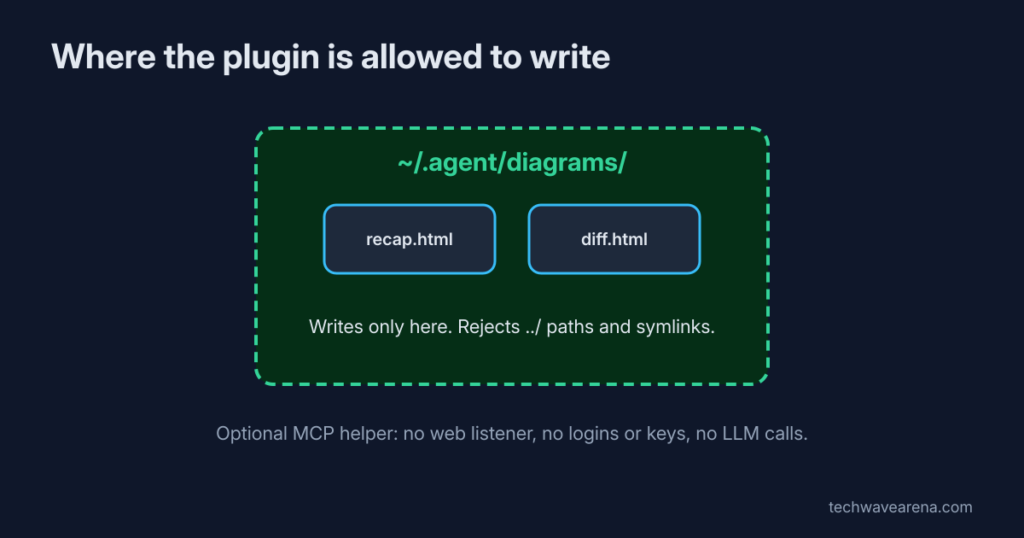
The real thing to watch is the open-in-browser step. A full page loads code from the CDN when you open it, like most web pages do. If your company forbids that, use --quick, which needs no outside code.
Should you use it?
Yes, if you often ask Claude to explain structure. No, if you only want one quick flowchart.
Fair point first: ASCII is instant and costs nothing extra, and for a three-box sketch it is fine. But the moment a picture has more than a handful of parts, the dashes start lying to you. That is when a page wins.
My setup: install it, use /diff-review --quick before every merge, and save the full mode for slides or diagrams you will show to people. Get the plugin at nicobailon/visual-explainer. Ask for a picture. Get a picture.
Common questions about Claude Code diagrams
Does visual-explainer work without internet?
Quick mode does: its renderer and styles have no outside links. Full pages load Mermaid, Chart.js and fonts from the web, so they can show blank offline.
Where does visual-explainer save the diagrams?
In ~/.agent/diagrams/ by default, as one HTML file per request, and it opens the file in your browser.
Can Claude Code show Mermaid diagrams inside the terminal?
No. The terminal only shows text, so Claude prints the Mermaid code itself. Render it with a plugin like this, mermaid.live, or a Markdown file on GitHub.
Does it work with Codex or Cursor?
Yes. The project includes setup files for Codex, Cursor, OpenCode and other agents, not only Claude Code.
Ask for a picture, get a picture. Not a box made of dashes.


1 comment