Your workout log is a diary of your body. It should live somewhere you control.
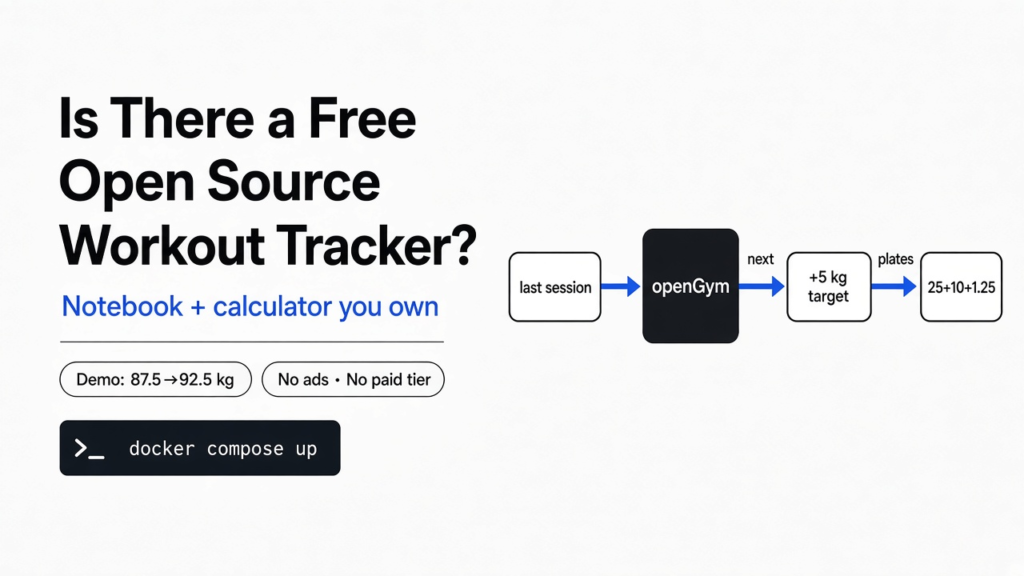
Short answer: Yes. openGym is a free, open source workout tracker with no subscription, no ads and no paid tier. You can use it on your phone with no account, or run it on your own computer with Docker so your phone and laptop stay in sync. It also imports your history from Strong, Hevy and FitNotes.
You open your gym app between sets, and a pop-up asks you to upgrade. Or worse, the app shows only your last three months of lifts unless you pay. Your own training history, behind a paywall.
That history matters more than it looks. It is the only honest record of whether you are getting stronger. This post shows you a free tracker that keeps it yours, what it does well, where it falls short, and how to try it in two minutes.
Demo screens and the progression rule checked against opengym.ch/demo and the openGym README on GitHub in November 2026.
The thread for the whole post is one simple idea: a workout tracker is just a notebook plus a calculator. Once you see that, it is easy to judge any app, paid or free.
Why Does a Workout Tracker Even Matter?
A tracker turns “I think I’m stronger” into a number you can check.
Start with the base fact. Muscles grow when you ask them to do slightly more than last time. Coaches call this progressive overload (adding a little weight, reps or sets over time so the body keeps adapting).
Now build on it. To add “a little more”, you must remember exactly what you did last time. Was it 60 kg for 8 reps, or 62.5 kg for 6? Memory is bad at this. A notebook is better. An app is better still, because it also does the maths.
So the app has two jobs. Notebook: store every set. Calculator: tell you what to lift next. Everything else is decoration.

What Is openGym?
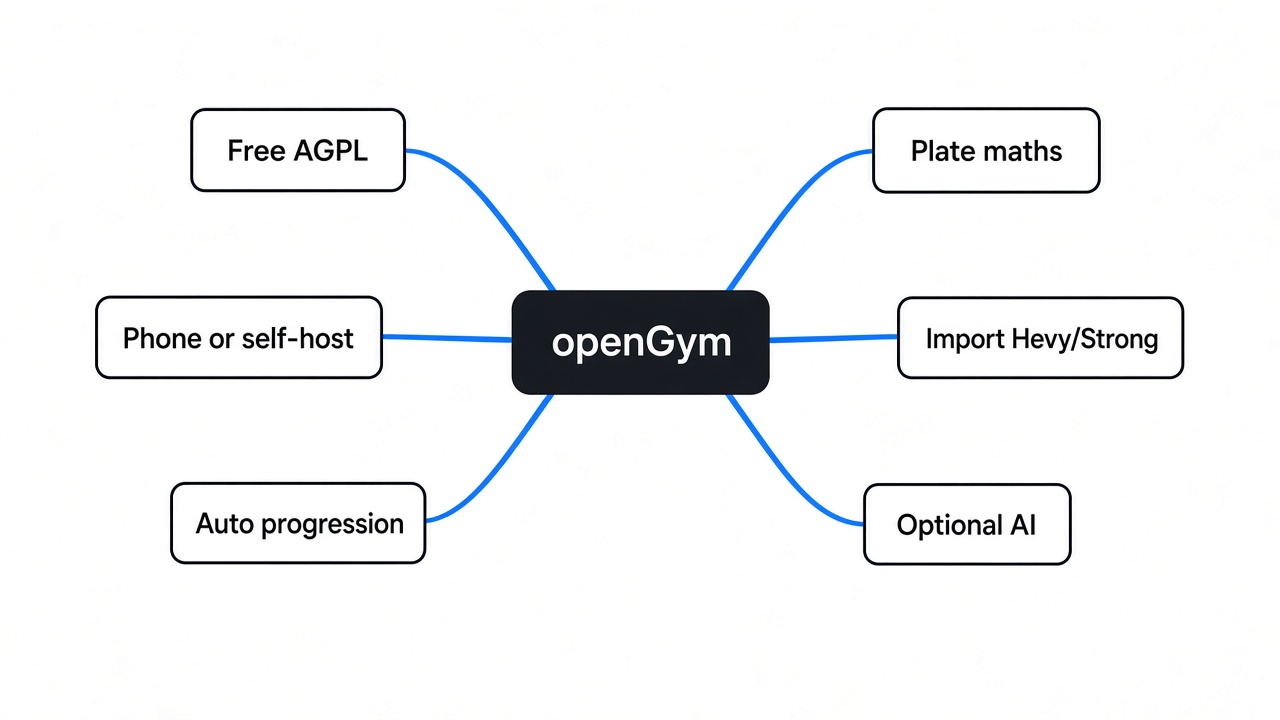
openGym is a free gym and body-weight tracker that you can run yourself, with nothing sent to a company.
Two words need unpacking first. Open source means the full code is public, so anyone can read it, check it and fix it — the same ownership idea as picking an open source Obsidian alternative for notes you keep locally. Self-hosted means the app runs on a machine you own (a laptop, a mini PC, a home server) instead of on a company’s computers, much like running a self-hosted Discord alternative for chat you control.
openGym is both. Its licence is the AGPL (a licence that keeps the code open forever, even when someone else hosts it). There is no paid tier and no ads. Your data sits in a plain folder of JSON files (simple text files that store data in labelled fields) that you can copy as a backup.
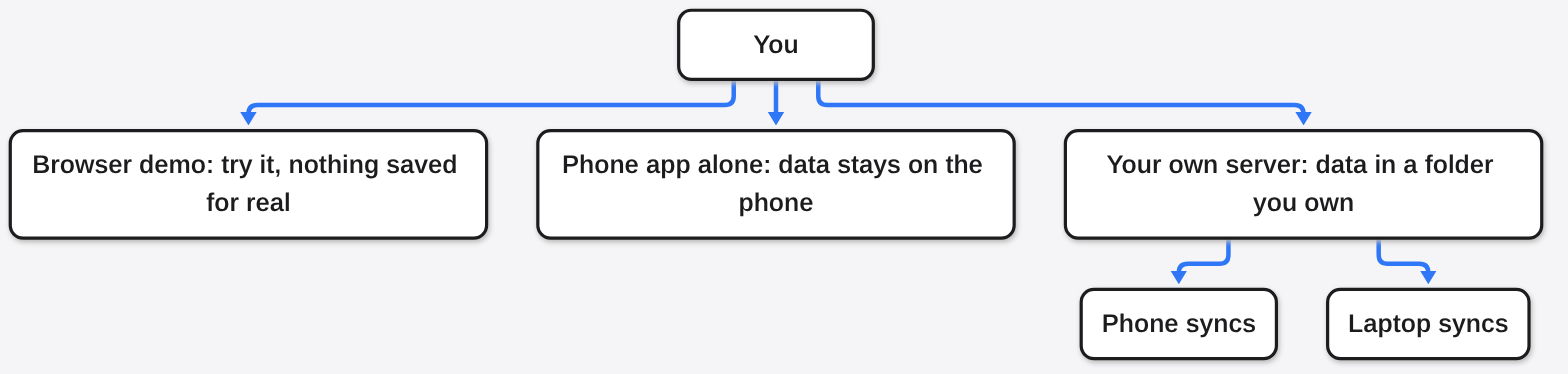
You get it three ways:
- Try it: an in-browser demo with example data, no install.
- Phone only: the iPhone app or the Android APK (the install file for an Android app), with no server and no account.
- Your own server: run it with Docker and sync your phone and laptop.
How Does It Decide What I Should Lift Next?
It reads your last session and applies a simple, visible rule. I watched it do this in the demo.
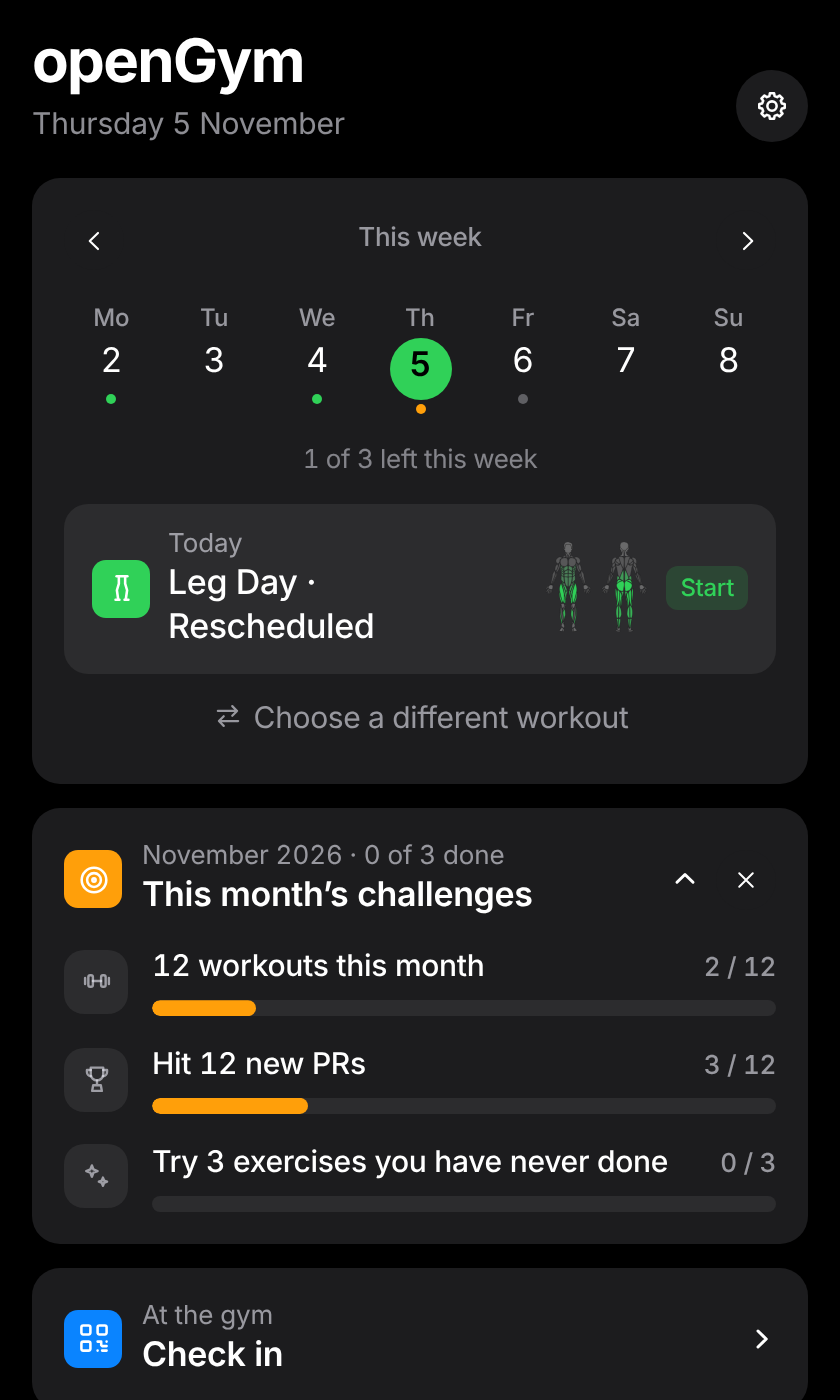
Here is the test I ran. I opened the live demo and started its leg day. Last session’s squat was 87.5 kg for 4 sets of 8, every rep done. The app pre-filled today’s sets at 92.5 kg and printed its reason right under the exercise: “Linear progression. Every rep last time. 5 kg more.”
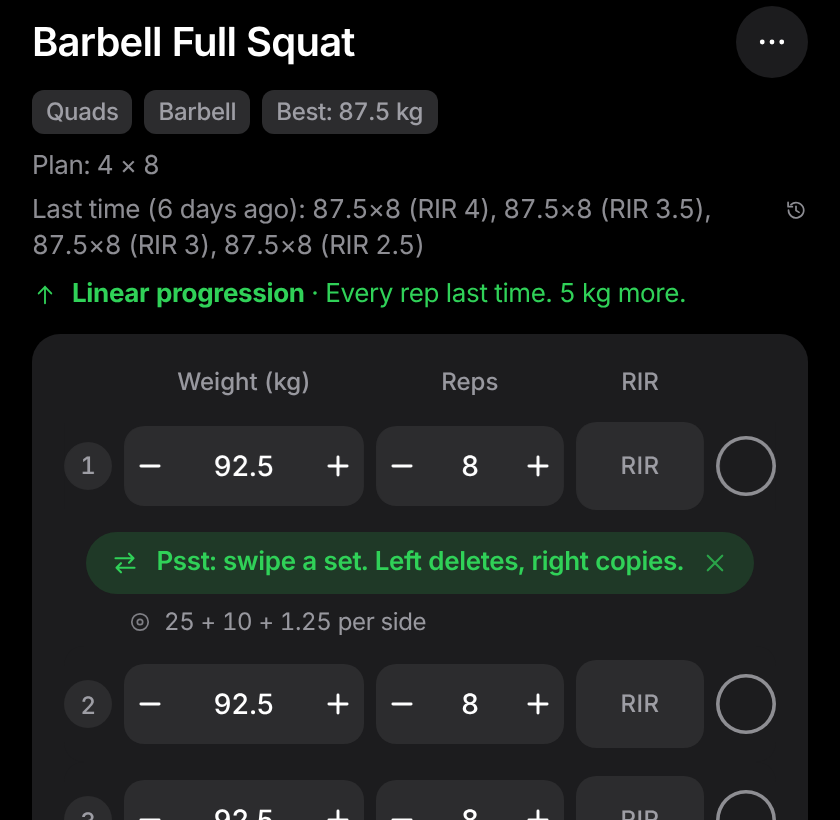
That one line is the calculator half of the app. Linear progression (add a fixed amount of weight each time you hit every rep) is the simplest rule there is. openGym also offers double progression (climb up a rep range first, then add weight), triple progression (reps, then sets, then weight) and Greyskull LP (a beginner plan where the last set goes to failure).
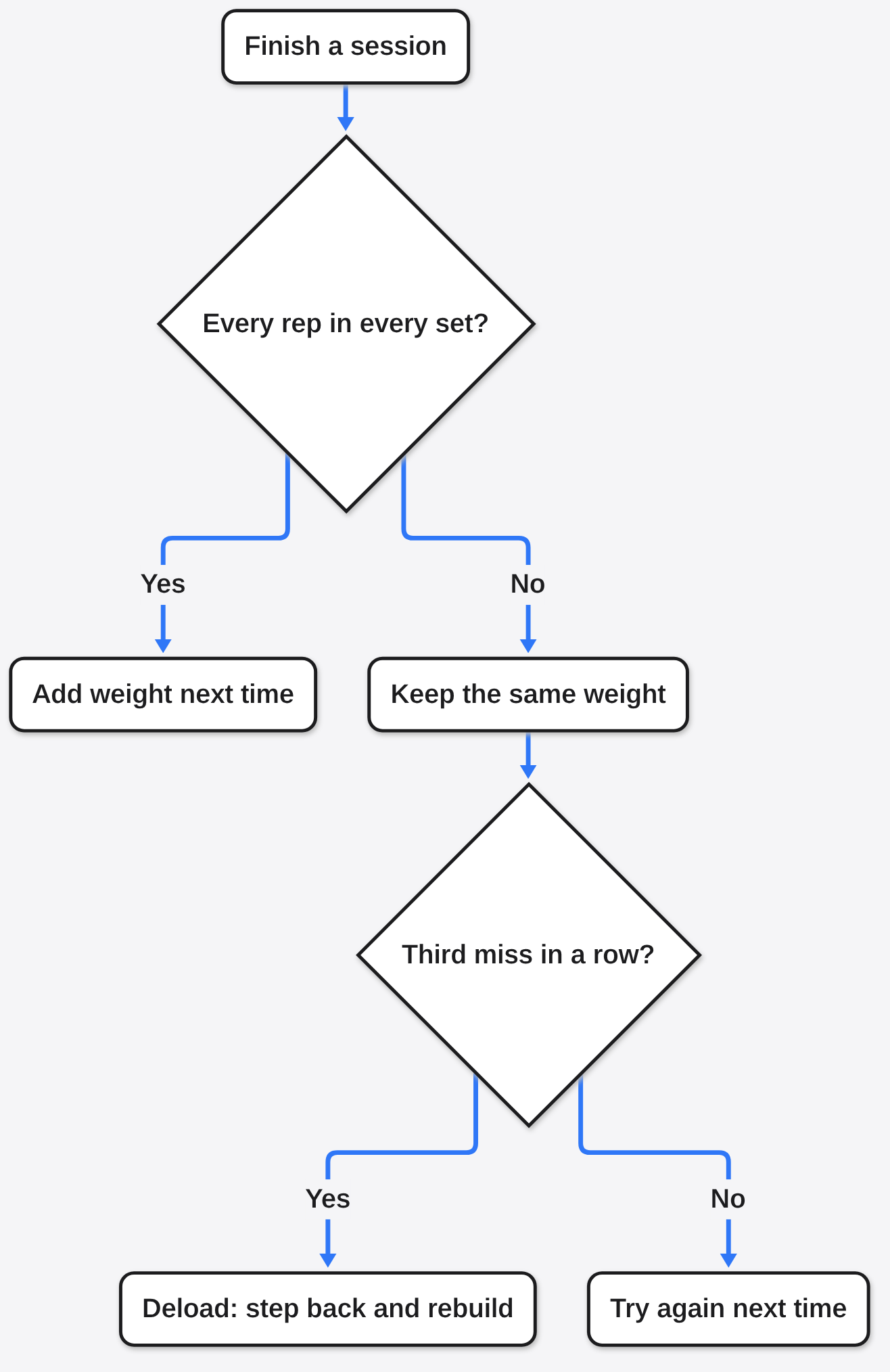
What happens when you miss? The code reads a missed rep, or a set you never ticked, as a miss. A miss never adds weight. On linear progression, three missed sessions in a row trigger a deload (a planned step back in weight so you can build up again). Simply put: the app will not pretend a bad day was a good one.
What Does the Small Grey Line Under the Weight Mean?
It is plate maths: which plates to load on each side of the bar, worked out for you.
The demo showed “25 + 10 + 1.25 per side” under the 92.5 kg target. Check it yourself. A standard barbell weighs 20 kg. That leaves 72.5 kg of plates, or 36.25 kg per side. And 25 + 10 + 1.25 is exactly 36.25.
Small thing. But it saves you doing sums with sweaty hands, and you can tell it which plates your gym actually owns. If you train in two places, each gym keeps its own list.

How Does It Estimate My One-Rep Max?
It guesses the heaviest single rep you could lift from a normal set, and it refuses to guess when the guess would be bad.
First the base idea. Your one-rep max, or 1RM, is the most weight you can lift once. Testing it for real is tiring and risky. So lifters estimate it from a lighter set done for several reps.
The default formula is Epley: weight × (1 + reps ÷ 30). Take the demo squat. 87.5 kg for 8 reps gives 87.5 × (1 + 8 ÷ 30), which is about 110.8 kg. That is the app’s guess at your best single squat.
Here is the honest part. All these formulas agree at low reps and drift apart at high reps. So openGym simply stops estimating above 12 reps on a single formula. A comment in its code puts it plainly: refusing to guess beats printing a fantasy. You can also pick a blended mode that mixes seven formulas.
Can It Replace Hevy or Strong for Free?
For logging, planning and progress charts, yes. For a big social feed and a polished app store listing everywhere, not yet.
Why compare at all? Because most people searching for a free tracker already use one of these, and the free tier is where it hurts. Hevy’s free plan, for example, caps you at 4 routines, 7 custom exercises and 3 months of history. Pro removes those limits.
| What you need | openGym | Hevy (free plan) | wger |
|---|---|---|---|
| Price | Free, no paid tier | Free with limits, Pro is paid | Free |
| Routines | Unlimited | Up to 4 | Unlimited |
| Workout history | All of it | Last 3 months | All of it |
| Where your data lives | Your phone or your server | Hevy’s cloud | Your server or wger’s hosted site |
| Open source | Yes (AGPL) | No | Yes (AGPL) |
| Nutrition tracking | No | No | Yes |
Moving over is the part people dread, and it is the easy part here. openGym reads export files from Strong, Hevy, FitNotes, Fitbod, JEFIT, StrongLifts and more. It matches exercise names to its own library of over 5,600 exercises. Anything it does not recognise becomes your own custom exercise, so nothing gets dropped. Importing the same file twice does not create duplicates.
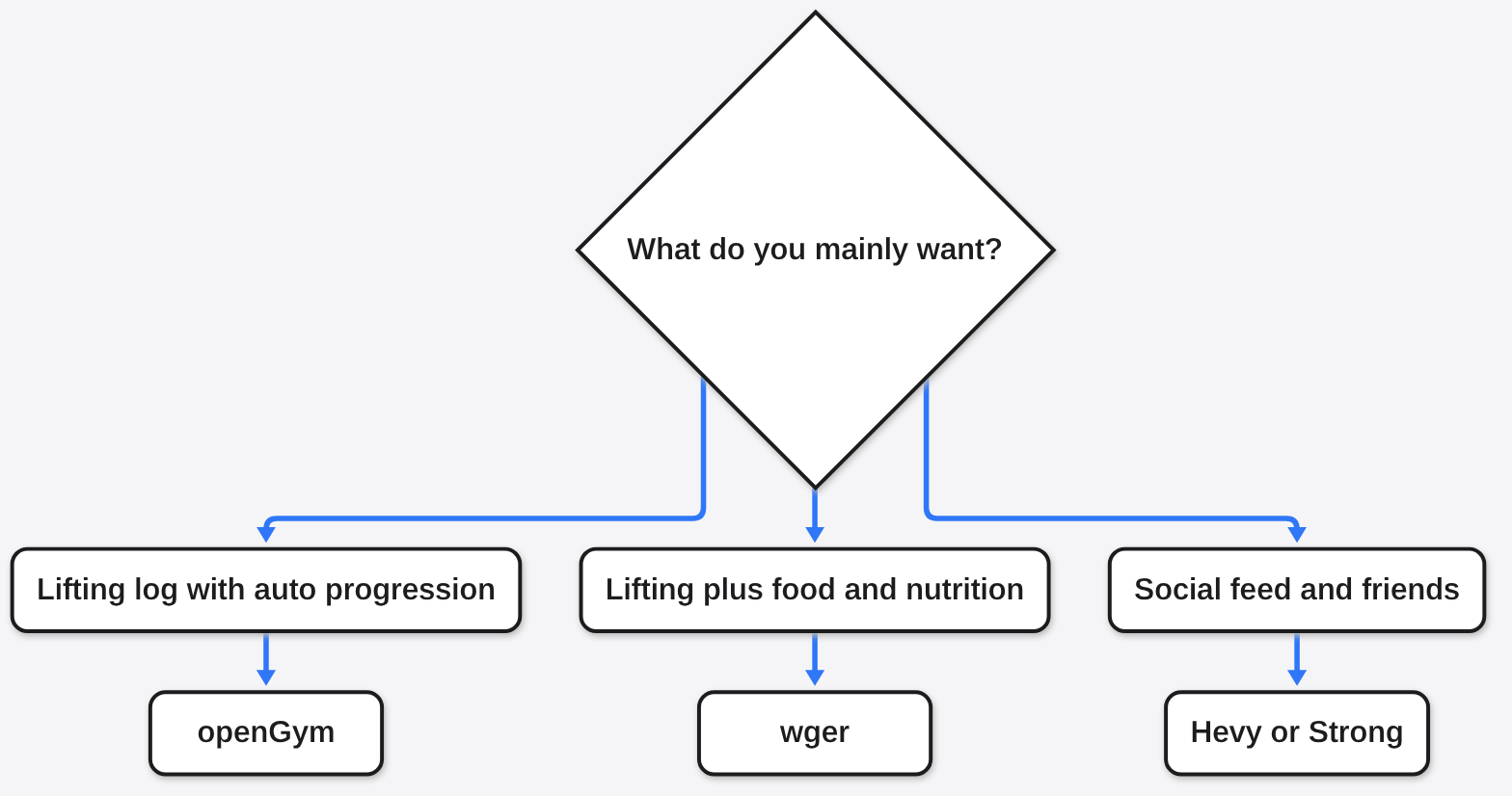
And wger? It is the older, well-known open source option, and it also tracks diet and nutrition. If you want food logging in the same place, wger is the better fit. If you mainly lift and want smart progression and plate maths, openGym is the sharper tool.
How Do I Try It Without Installing Anything?
Open the browser demo first. It is the real app with fake data, and it takes about a minute.
Go to the openGym website and open the demo. Tap Start on today’s workout, skip the weigh-in, and look at the first exercise. You will see last session’s sets, the new target, the reason for it and the plate maths. That screen tells you in seconds whether this app thinks the way you train.
Then pick your real path:
- Phone only: install the iPhone app from the App Store, or the Android APK from the project’s releases page.
- Import: export your history from your old app, then use Settings, Data and backup, Import from another app.
- Own server (optional): install Docker, then run the commands below.
git clone https://github.com/DuarteSantos8/openGym
cd openGym
cp .env.example .env
docker compose pull
docker compose up -dDocker (a tool that runs an app inside a sealed box with everything it needs) starts two small pieces: one that serves the app, and one that stores your data. Open http://localhost:8080 on the same computer, create a profile, and you are in.
What Is the Catch?
Three real ones: phone access needs HTTPS, the Android file is big, and the exercise images are not open source.
First, sign-in. openGym uses passkeys (login with your fingerprint or face instead of a password). Browsers only allow passkeys over HTTPS (the padlock version of a website address), except on your own computer’s local address.
So to reach your own server from your phone, you need a domain name and HTTPS. The project’s self-hosting guide walks through Cloudflare Tunnel, Caddy and Tailscale, but it is a real extra step. A password login can be switched on if you prefer. If you only need to move an export file onto the phone first, you can also share files over the local network with no cloud and no app on the receiver.
Second, size. The exercise animations ship inside the app, so the standard Android APK is about 315 MB. Google Play is not open to everyone yet, so on Android you install the APK by hand for now.
Third, licence. The code is AGPL, but the exercise pictures and animations are licensed from a separate company. You can use them in the app. You cannot reuse them in your own project.
Is that a deal-breaker? For most people, no. If you only use the phone app on its own, the first catch disappears entirely.
Does It Use AI, and Should I Care?
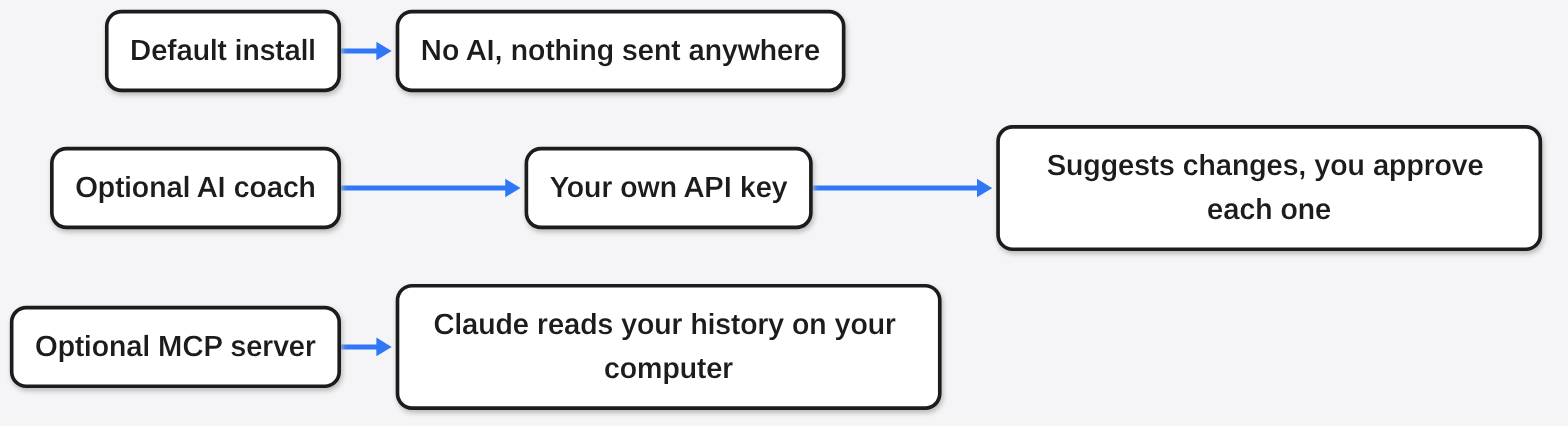
Only if you switch it on. The default install calls no AI service at all.
There is an optional AI coach. It can draft a week of routines and suggest changes from what you logged, and you approve every change. It runs with your own key from Anthropic, OpenAI, Gemini or a local model through Ollama (a free tool that runs AI models on your own computer) — the same local-first habit as building your own Alexa offline.
There is also an optional MCP server (a small connector that lets an AI assistant like Claude read your training history). With it, you can ask “how has my squat moved?” in everyday language, or describe a workout and have it logged. Both stay off unless you turn them on.
So Which Tracker Should You Use?
If you lift and want your history to stay yours, start with openGym’s demo, then the phone app.
There are good reasons to stay on Hevy or Strong. If your friends are there and the social feed keeps you going, that matters more than any feature table. And if you want food tracking too, wger does more.
For everyone else, remember the thread. A workout tracker is a notebook plus a calculator. openGym gives you a notebook you own and a calculator that shows its working.
Open the demo. Start leg day. Read the grey line.
Common questions about openGym
Is openGym completely free?
Yes. It is open source under the AGPL with no subscription, no paid tier and no ads.
Do I need a server to use openGym?
No. The iPhone app and the Android APK work on their own with no account. A server only adds sync between devices and profiles for family or friends.
Can I import my workouts from Hevy or Strong?
Yes. Export your data from Hevy or Strong, then import the file in openGym under Settings, Data and backup. Unknown exercises become custom exercises, so nothing is lost.
Is there a free open source alternative to Hevy?
Yes. openGym and wger are both free and open source. openGym focuses on lifting with automatic progression; wger also tracks nutrition.